
August 2025 Product Release
Applies to: All Maxio products
Last updated on Aug 27, 2026
Maxio released the following updates and new features during August 2025.
Billing
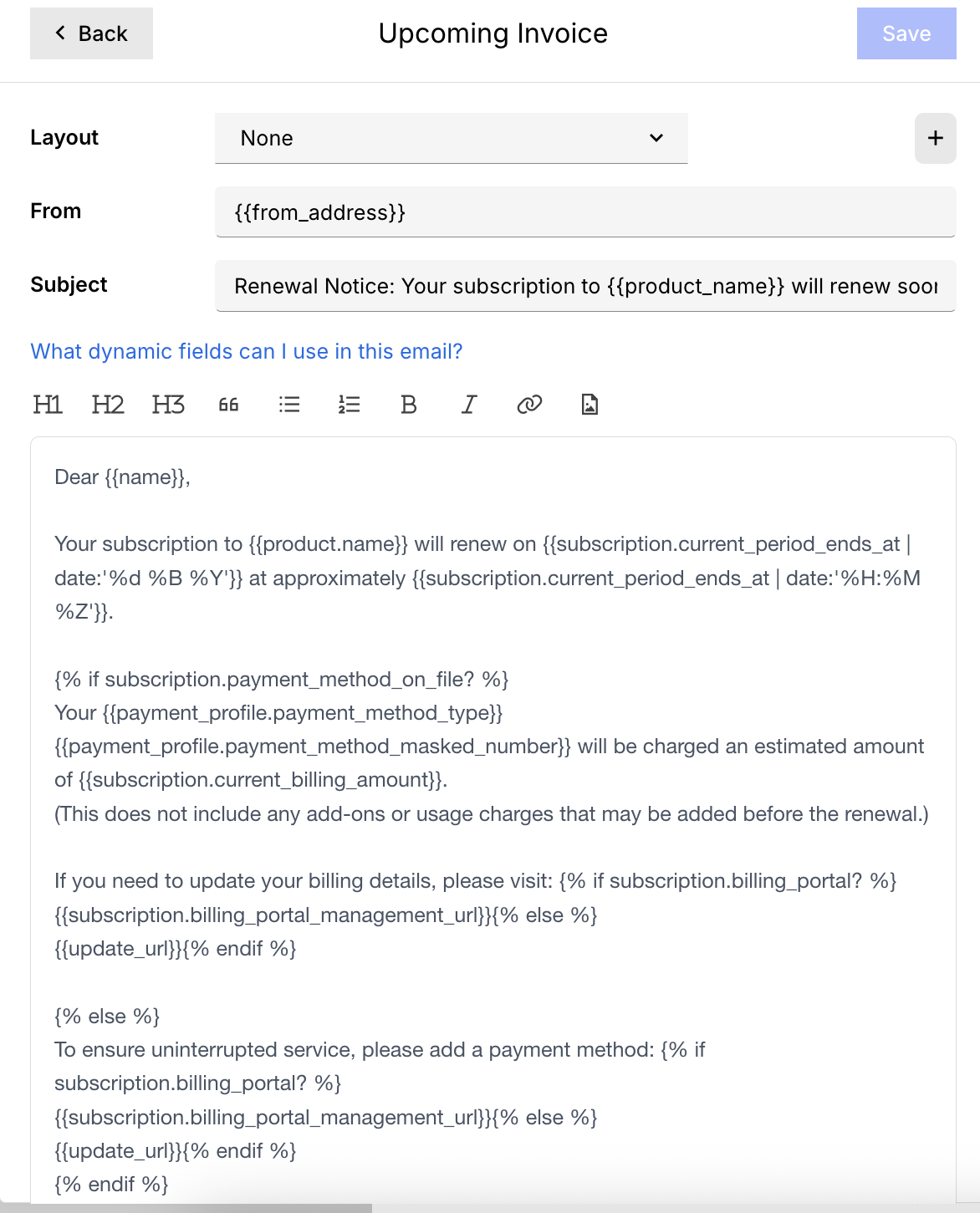
"Upcoming Renewal" Email Template Updated BETA
For customers using Term Subscriptions, the "Upcoming Renewal" email template has been updated to send only when an invoice is expected. This update changes both the name and the behavior of the template to reduce confusion for merchants and end users. (Released: 6 August 2025)
Learn more
- Behavior changes:
-
-
Expiration logic removed
The previous template included a conditional message stating that a subscription was expiring. This logic block has been removed to avoid misleading communications at the end of a term.
-
New send conditions
- When auto-renewal or a scheduled renewal is configured (an invoice is issued at term end or renewal start).
- When a final arrears-billed usage invoice is generated (e.g., for metered or EBB components).
-
- Why it matters:
- Previously, subscribers could receive renewal emails even when no invoice was forthcoming, particularly at the end of a non-renewing subscription. This led to unnecessary confusion. Now, subscribers only receive reminders when billing occurs, ensuring accuracy and transparency for both merchants and customers.
- Where to find it:
- Go to your email templates and look for the newly renamed Upcoming Invoice template. It triggers only when auto-renewals, scheduled renewals, or end-of-term invoices (including arrears-billed components) are present.
Improve DSO with Credit Card Collection Window BETA
You can now limit the number of days after invoice issuance during which credit card payments are accepted. By restricting credit card usage to an “early pay” window, you can encourage faster payments, reduce Days Sales Outstanding (DSO), and improve cash flow. This feature also gives finance teams greater control over when credit card payments are allowed, helping align collections strategies with business goals. (Released 25 August 2025)
Learn more
- Why it matters:
- Gives your team a new lever to speed up collections, improve cash flow, and reduce DSO, all while keeping tighter control over credit card payments.
- Where to find it:
- Go to Invoicing Settings, then configure Credit Card Window. For details, refer to the Set a Credit Card Window article.
Reduce Processing Fees with Credit Card Collection Threshold BETA
You can now set a maximum amount for a remittance invoice that can be paid by credit card, helping reduce processing costs and minimize chargeback risk. (Released 25 August 2025)
Learn more
- Why it matters:
- This feature gives your finance team better control over large transactions while encouraging customers to use lower-cost payment methods.
- Where to find it:
- Go to Invoicing Settings and configure Credit Card Thresholds per currency. For details, refer to the Set a Credit Card Threshold article.
Accounting
New menu option in Maxio Core and Advanced Billing to view all organizations General Access
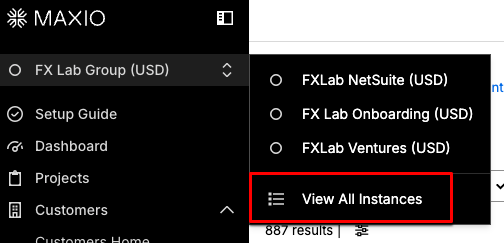
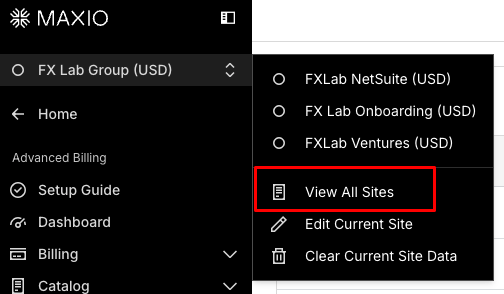
Users can now easily return to the organization picker screen from within Maxio Core or Advanced Billing. A new submenu item has been added to the instance switcher, allowing seamless navigation between organizations/sites. (Released: August 2025)
Learn more
- Why it matters:
- This update makes it easier for users to switch between organizations without logging out or navigating away, improving workflow efficiency for those managing multiple organizations.
- Where to find it:
- In Maxio Core, open the instance switcher submenu and select View All Instances.
 In Advanced Billing, open the site switcher submenu and selece View All Sites.
Insights
Choose Custom Fields for Subscription Momentum Reporting General Access
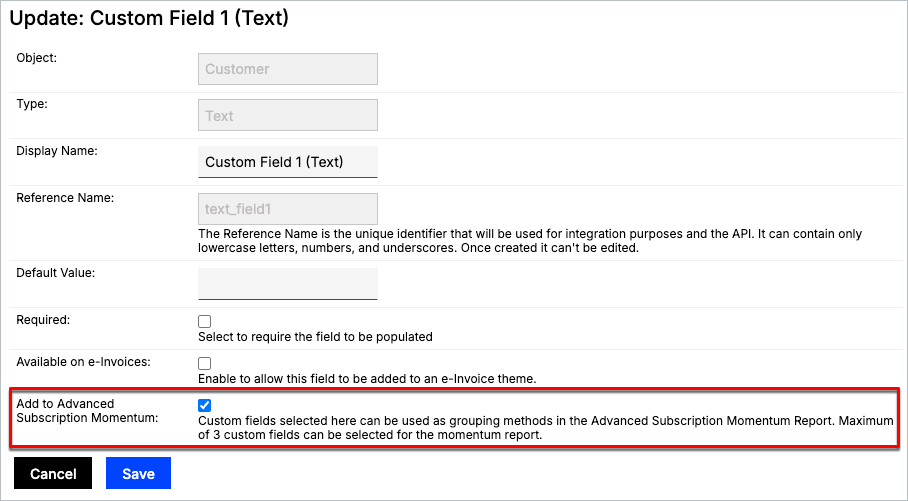
You can now flag up to three custom fields for inclusion in the Advanced Subscription Momentum Report using a new checkbox on the custom field create and edit pages. These flagged fields are available as grouping methods in the report. (Released: 6 August 2025)
Learn more
- Why it matters:
- This update gives users more control over how subscription momentum is analyzed by allowing them to include relevant custom fields in report calculations. It enhances flexibility and ensures reporting reflects key business-specific data points.
- Where to find it:
- Go to Admin > Custom Fields and create or edit a custom field. Check the Add to Advanced Subscription Momentum box.
Dynamic Field Selection in Subscription Momentum Report General Access
The Subscription Momentum Report now features a dynamic drop-down for selecting your calculation field, replacing the previous three checkbox options. This drop-down includes both standard fields and any custom fields you've flagged as "Available on the Subscription Momentum report." (Released: 5 August 2025)
Learn more
- Why it matters:
- This update gives you more flexibility when grouping or segmenting the Subscription Momentum Report by allowing you to use custom fields relevant to your reporting needs.It gives reporting users more variety as it expands the grouping calculation to go beyond just the Customer, Contract, and Subscription ID. You must first select the custom fields before you can use them in this dynamic selection.
- Where to find it:
- Navigate to the Subscription Momentum Report and look for the new Calculation Field drop-down at the top of the report builder. Your pre-defined and flagged custom fields appear automatically.
Group Advanced Subscription Momentum Report by Custom Field General Access
The Advanced Subscription Momentum Report now supports grouping by custom fields flagged as "Available on Subscription Momentum." You can select from standard and applicable custom fields to calculate and display report results. This enhancement is only available in the Advanced report version. (Released: 12 August 2025)
Learn more
- Why it matters:
- This provides greater flexibility to align reporting with your internal business structures by enabling grouping based on custom-defined values.
- Where to find it:
- Navigate to the Advanced Subscription Momentum Report and use the Group By drop-down to select your desired field.
Still need help?
Reach out and our support team will take it from here.