
February 2026 Product Release
Applies to: All Maxio products
Last updated on Aug 27, 2026
Maxio released the following updates and new features during February 2026.
Selling
Clear reCAPTCHA signup messages General Access
The error message shown when reCAPTCHA validation fails during signup is now much clearer and more helpful. Users see a specific explanation and actionable steps to resolve the issue, making it easier to complete signup without contacting support. (Released: 11 February 2026)
Learn more
- Why it matters:
- This update reduces confusion and frustration for prospective Customers by providing clear guidance when reCAPTCHA fails, helping more users complete signup independently and reducing unnecessary support requests.
- Where to find it:
- On the Public Signup Page and other relevant signup entry points, when reCAPTCHA validation fails during the signup process.
Billing
Settings and schedule improvements in Retries and Dunning General Access
This update introduces several enhancements to the Retries & Dunning settings page.
Learn more
- Why it matters:
- This enhancement gives you a clear, centralized view of all dunning schedules, making it easier to manage payment retries and dunning processes across all payment methods. It saves time, reduces complexity, and improves operational efficiency for your billing team.
- Where to find it:
- From Advanced Billing, go to Config > Retries & Dunning. Click Create Shedule to start the configuration wizard. Related articles:
- Product Enhancements:
-
-
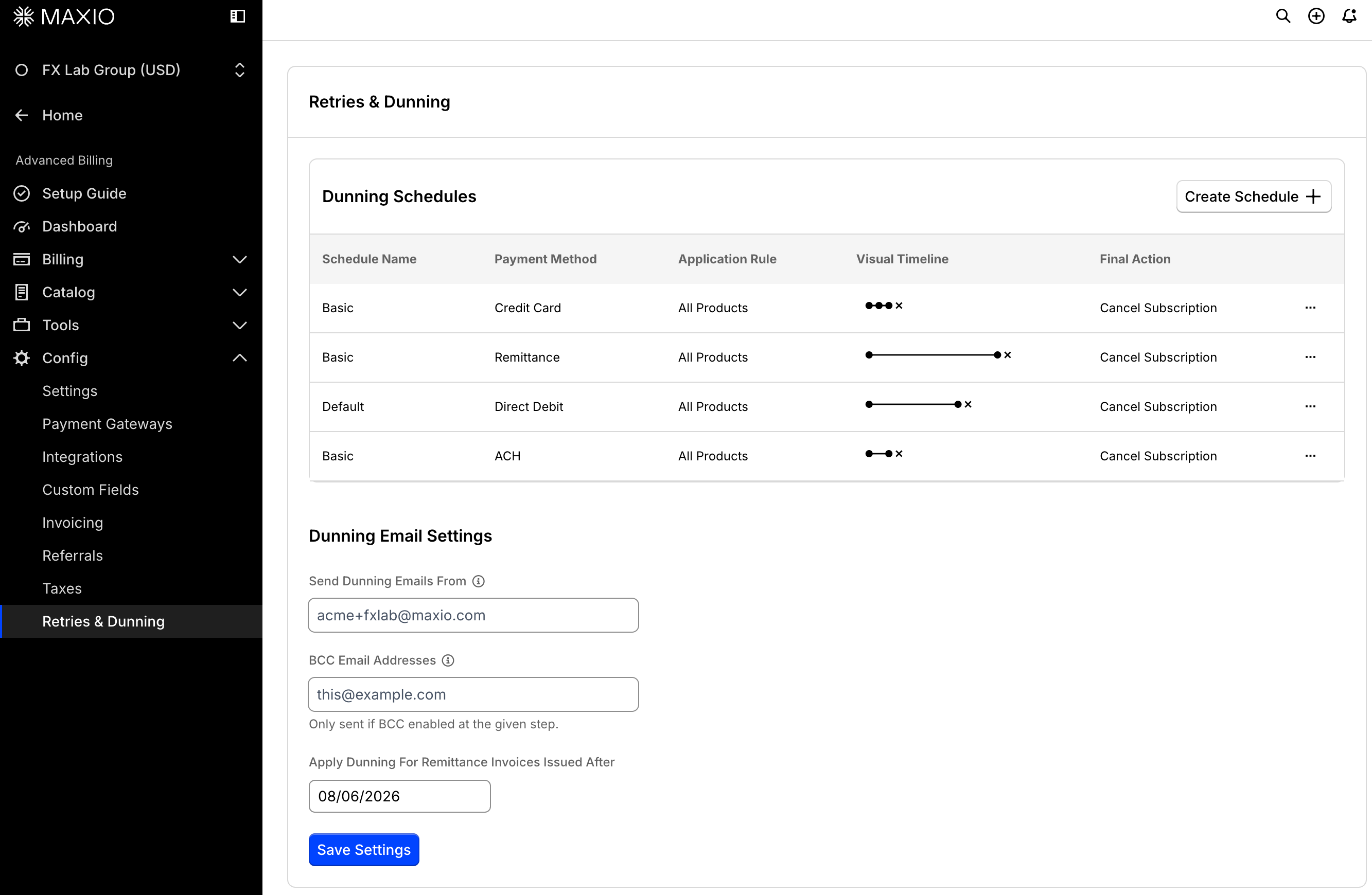
General dunning settings now visible on Retries & Dunning configuration page
You can now see all dunning schedules for every payment method in one consolidated table on the Retries & Dunning settings page. This update removes the old tab bar and previous table, replacing them with a streamlined, easy-to-read table. To add a dunning schedule, click Create Schedule. (Released: 3 February 2026)
-
Clone existing schedules to configure a new Application Rule
- Assign a schedule to an entire Product Family
- Use a wizard to configure dunning schedules
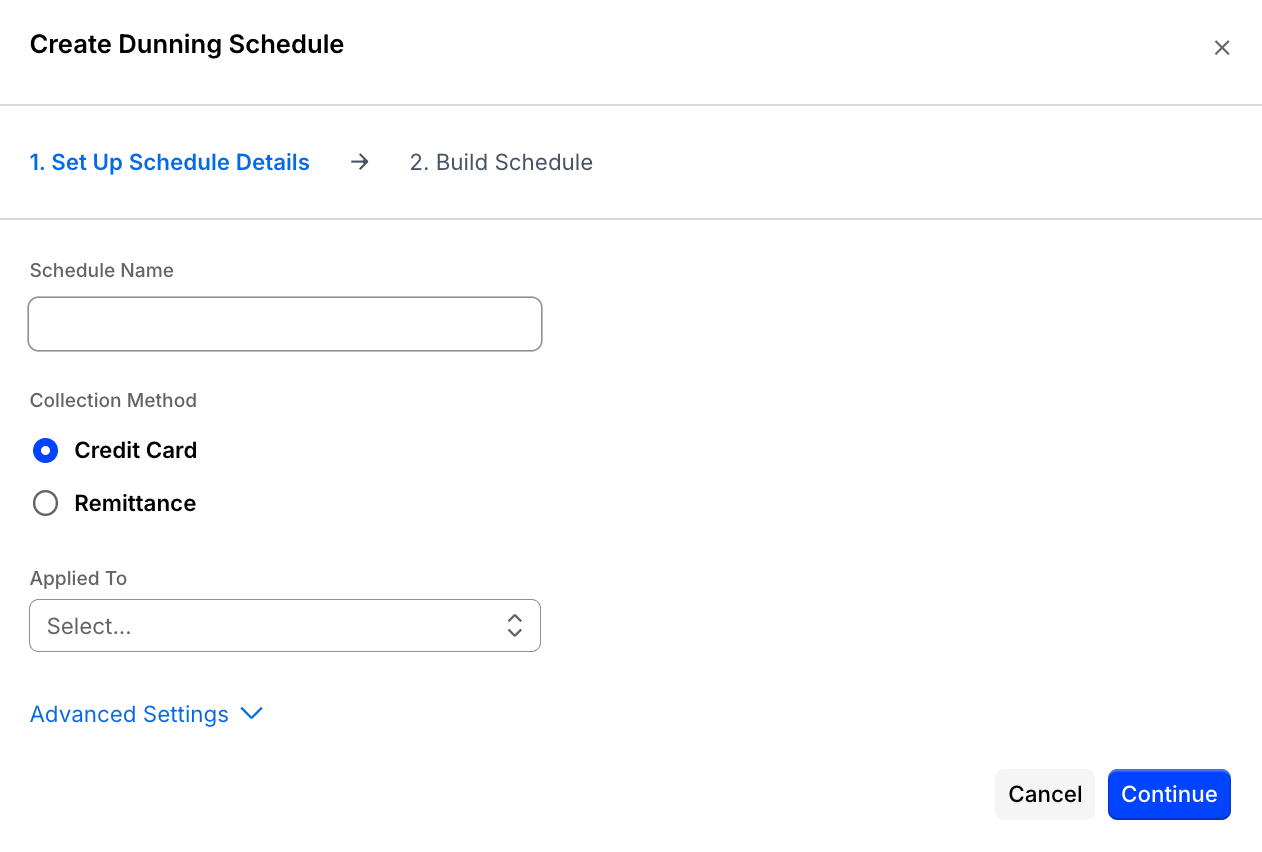 Step 1 - Set Up Schedule Details
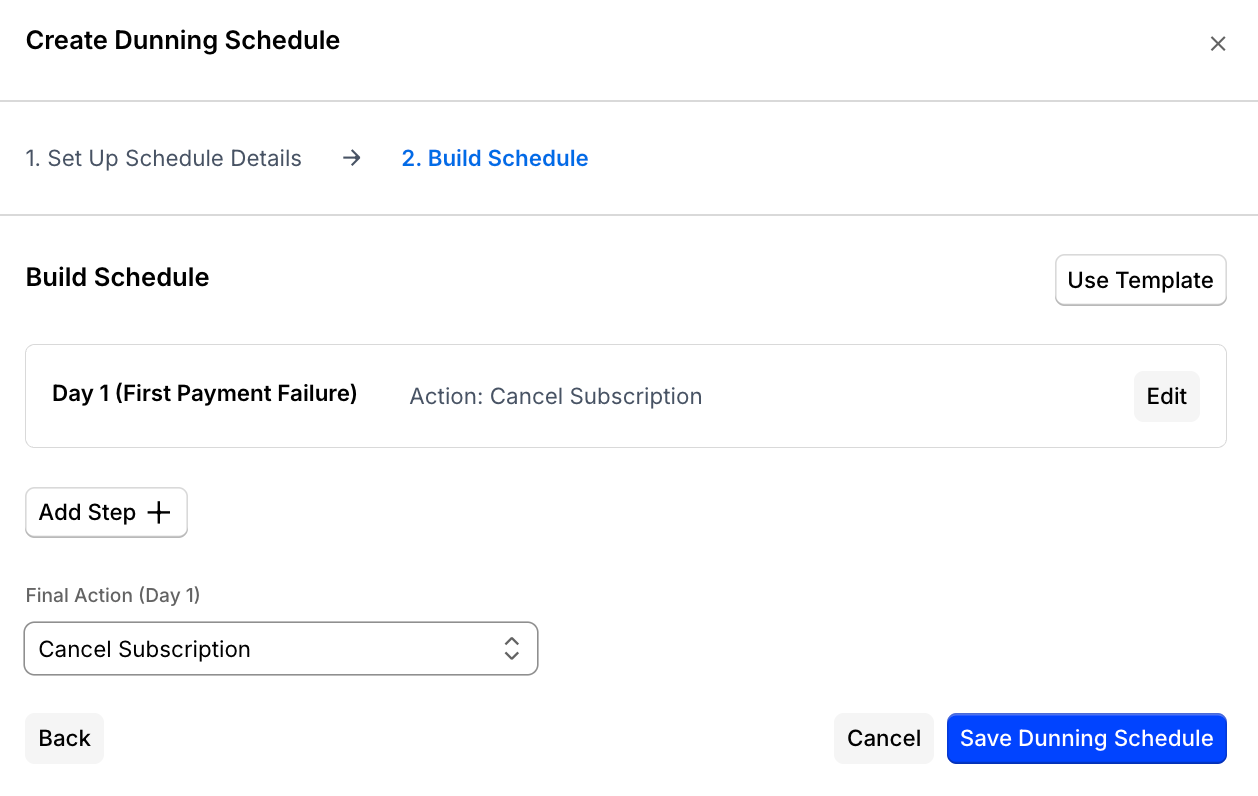 Step 2 - Build Schedule
-
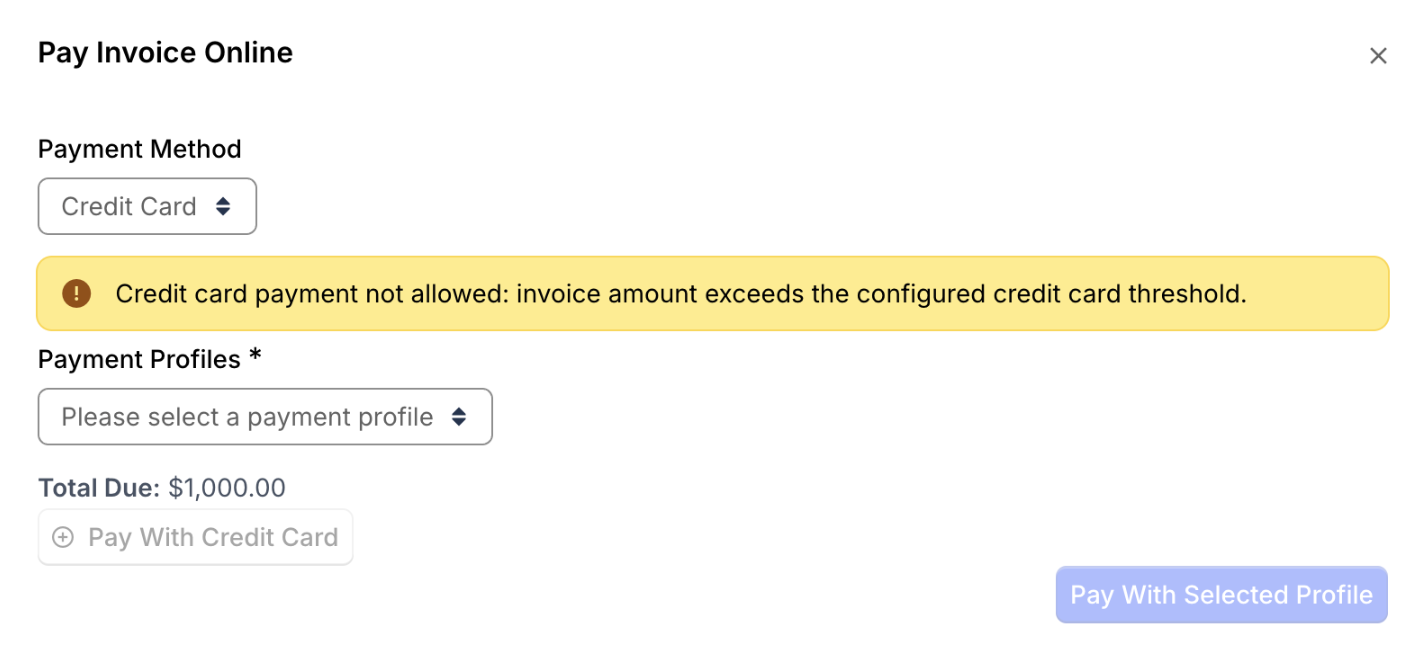
See credit card payment restrictions before paying General Access
Users now see an immediate warning and are prevented from attempting credit card payments if the invoice amount exceeds the credit card threshold or is outside the allowed payment window. The payment option is disabled before a payment attempt, making it clear why credit card payment is unavailable. (Released: 3 February 2026)
Learn more
- Why it matters:
- This update prevents confusion and wasted effort by letting users know right away when credit card payment is not allowed, improving the overall payment experience and reducing failed payment attempts.
- Where to find it:
- Go to Invoices, select an Invoice, and click Record Payment. When you choose Credit Card as the payment method, the warning and disabled state appears if limits are exceeded.
Control visibility of zero-dollar invoice line items General Access
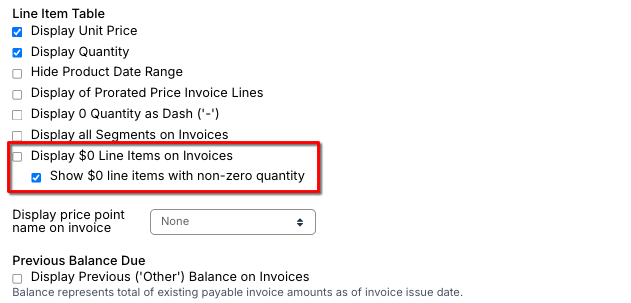
You can now choose how zero-dollar line items appear on invoices, including the option to show non-zero usage even when the charge is $0. This update helps you accurately display usage details for free tiers, included usage, and allowance-based billing models. (Released: 16 February 2026)
Learn more
- Why it matters:
- This feature restores support for free-tier and allowance-based billing models, improves invoice transparency, and reduces confusion for your customers. It ensures that usage is clearly represented on invoices, even when there is no charge.
- Where to find it:
- From Advanced Billing, go to Config > Settings > Invoices and scroll down to the Line Item Table options.
Clone Component Price Points General Access
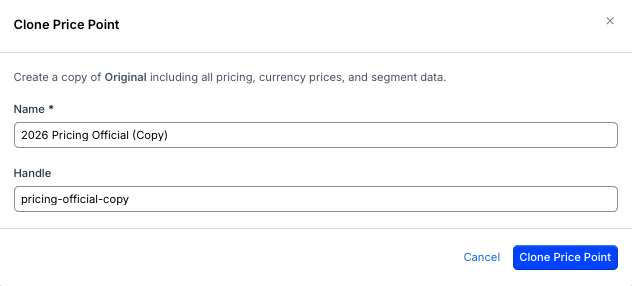
You can now duplicate a Component Price Point configuration with a single click, making it easier to create similar price points without manual re-entry. This feature copies all relevant fields, including rates, pricing structures, metadata, and interval flags, streamlining setup and reducing errors. (Released: 16 February 2026)
Learn more
- Why it matters:
- This enhancement saves time and reduces mistakes by eliminating repetitive manual setup when creating similar price points, especially in complex billing scenarios with multiple currencies or rate tables.
- Where to find it:
- From Advanced Billing, go to Catalog > Product and select the Component. Under Component Pricing and next to the price point you want to duplicate, click More (...) and select Clone Price Point.
Filter and issue pending Invoices in bulk General Access
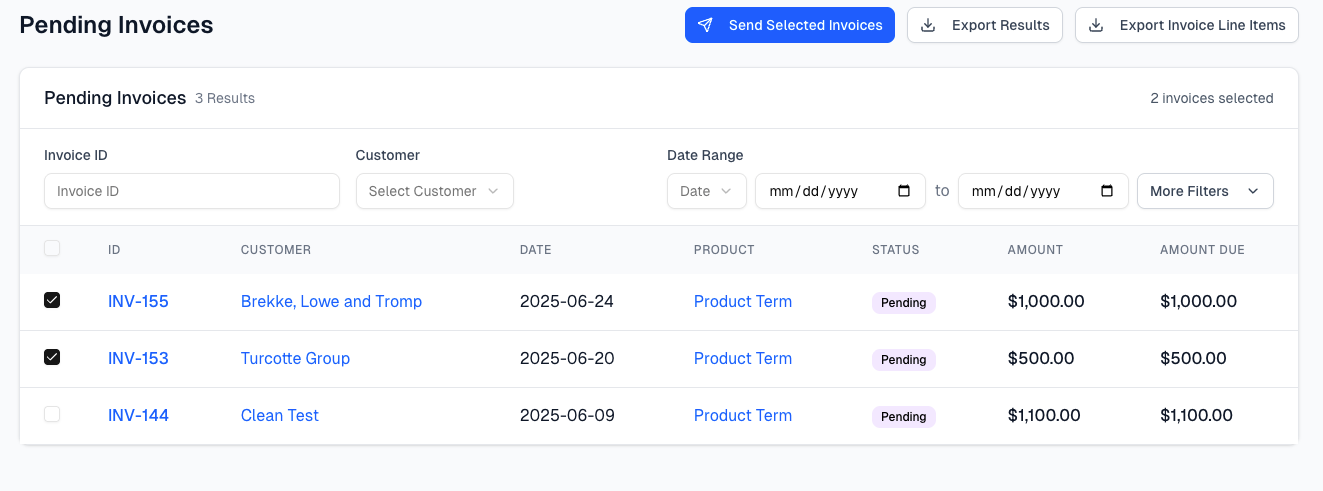
Finance teams can now filter for pending invoices and issue them individually or in bulk from the Invoices screen. This update streamlines the billing process and reduces manual effort for finance users. (Released: 23 February 2026)
Learn more
- Why it matters:
- This feature helps finance teams quickly identify pending invoices and send them out efficiently, improving billing accuracy and saving time.
- Where to find it:
- From Advanced Billing, go to Billing > Invoices. For More Filters, set the Invoice Status to Pending. Select the Invoice(s) and click Send Selected Invoice.
View VAT breakdown per Invoice Line Item General Access
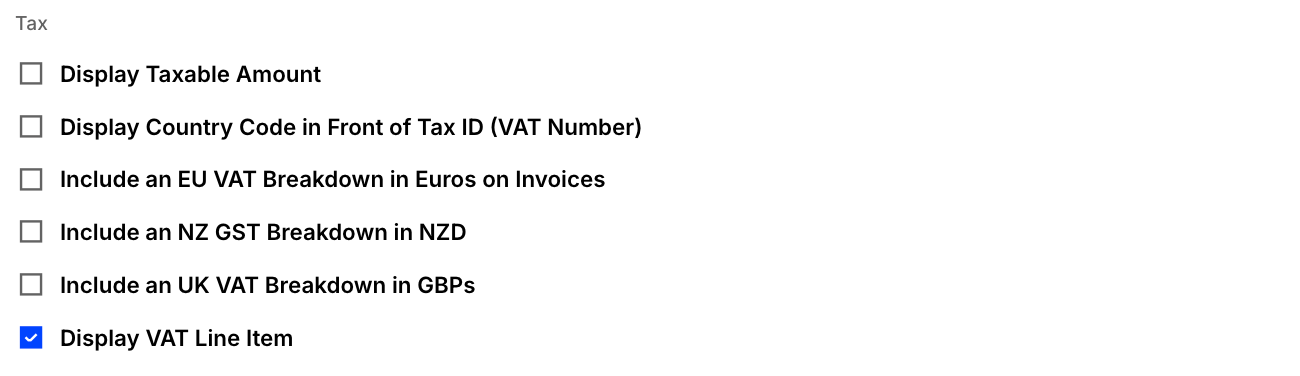
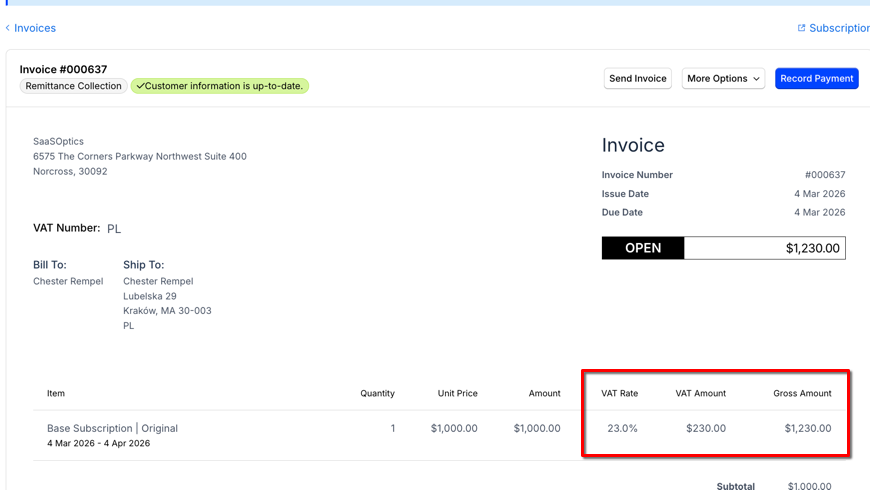
For UK Invoices, you can now see the VAT amount, VAT rate, and gross amount for each Invoice Line Item. This update helps Customers and accounting users easily understand how VAT is applied, making reconciliation and VAT-compliant reporting simpler. (Released: 10 February 2026)
Learn more
- Why it matters:
- This feature provides greater transparency for VAT-regulated regions, allowing Customers to clearly see VAT details per Invoice Line Item. It streamlines reconciliation and supports compliance with VAT reporting requirements.
- Where to find it:
- From Advanced Billing, go to Config > Settings > Invoices. Scroll down to Invoice Sections > Tax and check the Display VAT Line Item box. Ensure UK VAT tax is configured correctly within your tax service. Invoices then show VAT Rate, VAT Amount, and Gross Amount for all applicable EU VAT line items.
Payments
Improved chargeback handling for subscription group payments General Access
Maxio Payments customers now benefit from automatic invoice status updates for subscription group chargebacks in Advanced Billing. Enhanced synchronization with Maxio Core ensures chargeback information is always accurate and up to date across all platforms. (Released: 9 February 2026)
Learn more
- Product Enhancements:
-
- Automatic invoice status updates to reflect the latest chargeback state.
- Improved synchronization between the Advanced Billing UI and Maxio Core for accurate chargeback information.
- Better handling of chargebacks for grouped subscriptions and consolidated invoicing.
- Why it matters:
- These improvements reduce reconciliation mismatches and help merchants maintain accurate, reliable financial records for subscription groups.
- Where to find it:
- Go to Advanced Billing > Invoices and review the Invoice status and chargeback details for your Subscription Groups. No action is required from users as these improvements are applied automatically. However, Maxio recommends reviewing the status of chargebacks and invoices post-update to confirm the accuracy of the displayed information.
Saved views now available for Deposit Details list General Access
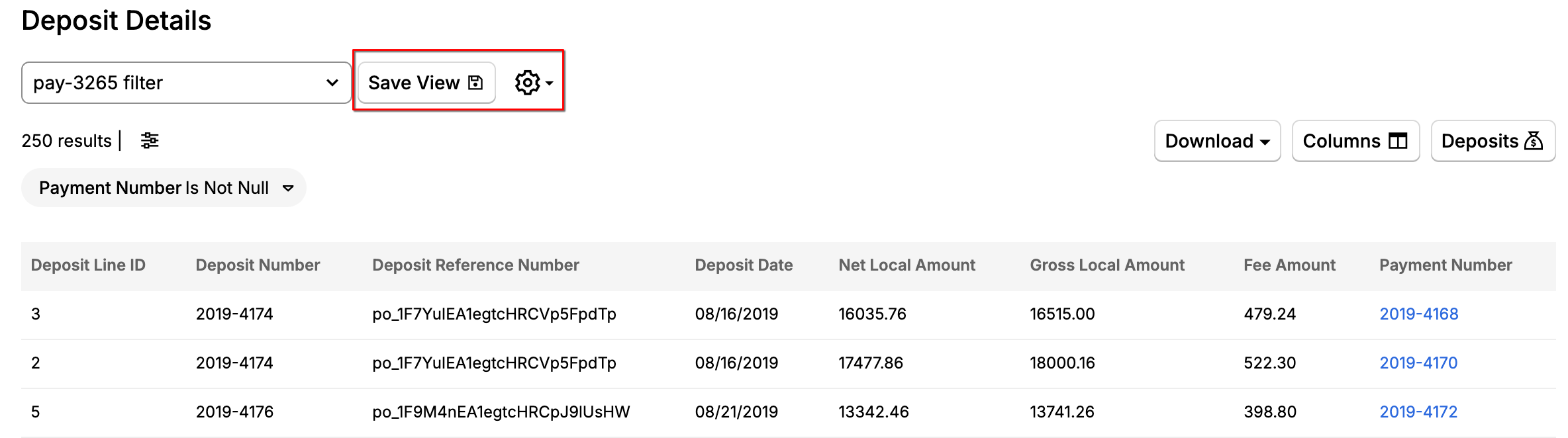
You can now create, save, and manage multiple custom views for the Deposit Details list. This update lets you quickly access your preferred filters, sorting, and columns, making it easier to work efficiently. All saved views are persistent and can be accessed any time. (Released: 9 February 2026)
Learn more
- Why it matters:
- This enhancement gives you more control and flexibility over how you view and organize your deposit data, saving time and improving your workflow.
- Where to find it:
- Go to Payments > Deposit Details. Use the Save View options at the top of the list to create or select your custom views.
Stripe gateway now supports address fields General Access
Buyers can now enter their full billing address when making credit card payments through the Stripe gateway. This update helps ensure customers receive the best possible transaction and interchange fee pricing by submitting complete address information. (Released: 25 February 2026)
Learn more
- Why it matters:
- Allowing buyers to provide their full billing address can reduce transaction costs for merchants by qualifying for lower interchange fees. It also improves the payment experience and ensures compliance with payment processing standards.
- Where to find it:
- Buyers now see additional fields for entering their billing address information on the Stripe payment form. These fields must be completed to process the payment effectively and secure the best possible rates.
Accounting
Transaction Order Dates Now Reflect Subscription Cancellation Date General Access
Negation Transactions generated by a subscription cancellation in Advanced Billing now use the date the cancellation action occurred as the Order Date. Previously, the Order Date could reflect the affected billing period rather than the date the action was taken. This update aligns the Order Date with the actual subscription event. (Released: 11 February 2026)
Learn more
- Why it matters:
- This change improves the accuracy of audit and operational reporting by ensuring that negation Transactions follow the true sequence of customer actions. Reports that rely on Order Date now more accurately reflects when cancellations occur.
- Where to find it:
- Navigate to Transactions to view negation Transactions and their associated Order Dates.
Enable reclassification journal entries for Advanced Revenue Summary in NetSuite integration General Access
Customers using the NetSuite integration now have reclassification journal entry support in the Advanced Revenue Summary (ARS) report. This enhancement improves financial reporting accuracy and reduces the need for manual adjustments in NetSuite. (Released: 25 February 2026)
Learn more
- Why it matters:
- This update helps finance teams maintain consistent and accurate financial records between Advanced Revenue Summary and NetSuite, saving time and reducing the risk of errors or compliance issues.
- Where to find it:
- This feature is automatically enabled for NetSuite customers. You see reclassification journal entries in the Advanced Revenue Summary when mapping inconsistencies require reclassification.
Create a method to credit only taxes on an Invoice General Access
Finance and Admin users can now create tax-correction credit memos and manage credit memo reasons with a new, dedicated workflow. These features are available immediately and help ensure accurate handling of tax corrections and classification of credit memos. (Released: 12 February 2026)
Learn more
- Why it matters:
- This update improves accuracy and control in tax correction processes, reduces the risk of errors, and prepares the system for future accounting enhancements without disrupting current workflows.
- Where to find it:
- Go to Invoices, select an Invoice, and look for the Create Tax-Correction Credit Memo option. Admins can manage credit memo reasons in the Admin section under Credit Memo Reasons.
Still need help?
Reach out and our support team will take it from here.