
April 2026 Product Release
Applies to: All Maxio products
Last updated on Aug 27, 2026
Maxio released the following updates and new features during April 2026.
Billing
Enhanced Activity Log for scheduled Product changes
Advanced Billing now records an entry in the Activity Log at the moment a Product change is scheduled. This ensures full traceability for future updates before they take effect, closing visibility gaps for long billing cycles. (Released: 2 April 2026)
Learn more
- Why it matters:
- It provides complete audit traceability and improves troubleshooting for support teams. By capturing the timestamp of the scheduling action immediately, users can verify when a change was requested, even if the change itself hasn't been applied yet.
- Where to find it:
- From Advanced Billing, navigate to a Customer record, select a Subscription and click the Activity tab.
Add Subscription Group Activity Events to Filter Drop-down
Users can now filter the subscription activity list by subscription group events directly from the UI. Previously, while these events were recorded in the activity stream, they were missing from the Event filter dropdown menu, requiring a manual URL workaround to filter by them. (Released: 15 April 2026)
Learn more
- Why it matters:
- This update improves discoverability and ease of use for tracking subscription group changes. You no longer need to manually edit browser URLs to see when subscriptions were added to or removed from a group; these options are now standard selections in your activity filters.
- Where to find it:
- Navigate to the Subscription Activity page for any subscription and open the Event filter dropdown menu.
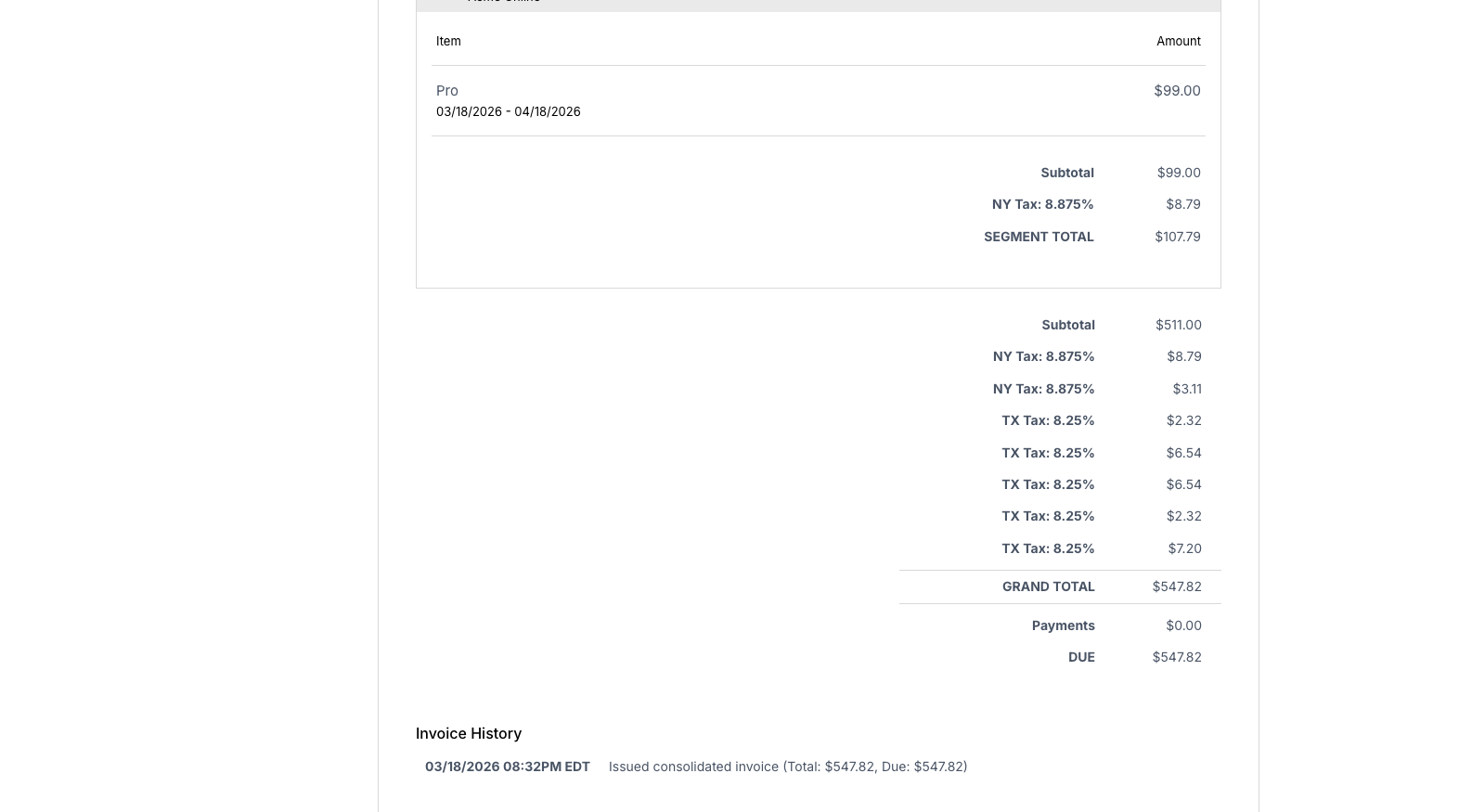
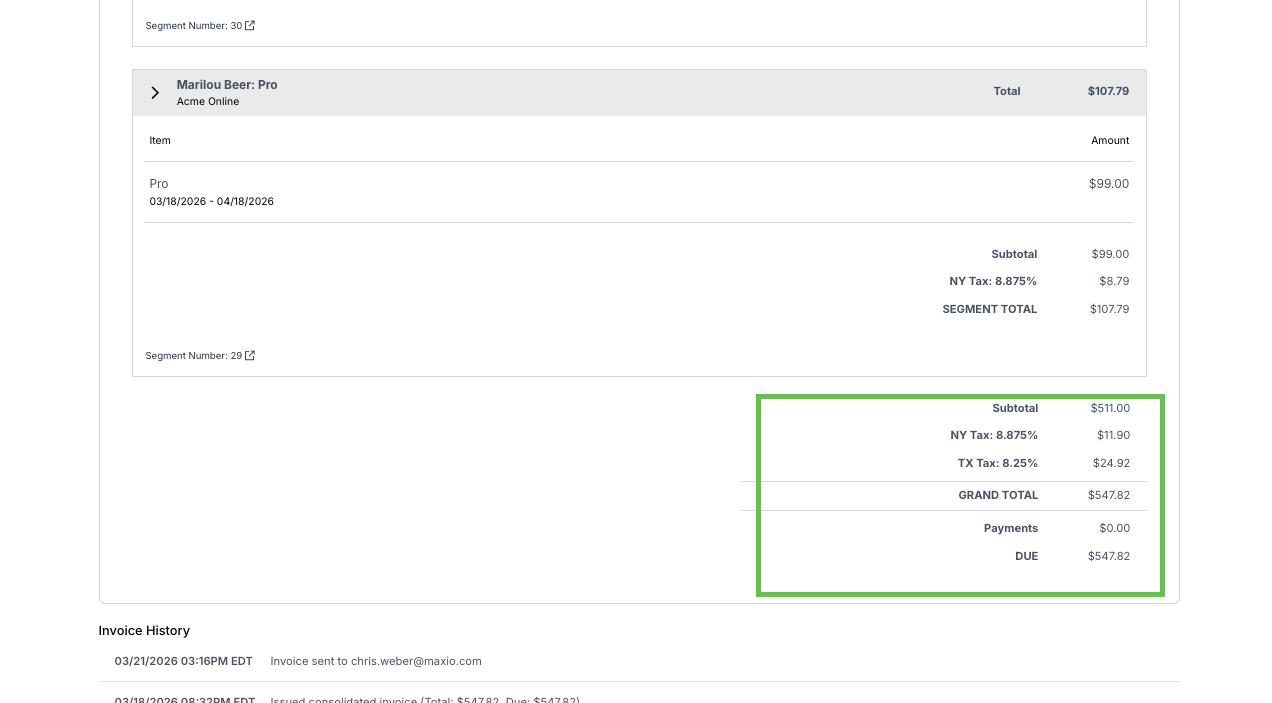
Consolidated tax display for Subscription Group Invoices using AvaTax
When using AvaTax, taxes are now consolidated by tax type on grouped Subscription Invoices rather than showing fragmented lines for each individual segment. This update ensures that customers see a unified summary of tax obligations, such as state and city taxes, on a single line. (Released: 20 April 2026)
Learn more
- Why it matters:
- This improves Invoice readability and simplifies reconciliation for finance teams by removing the need to manually aggregate tax details across multiple segments. It provides a cleaner billing experience for Customers with complex tax scenarios without altering underlying tax calculation logic.
- Where to find it:
- From Maxio, go to Admin > Integrations, select AvaTax to manage tax settings for your Subscription groups.
Before:
 After:
Enhanced Invoice and Subscription Group Management for Mid-Period Allocations
This update improves how Invoice relationships are defined and how Subscription Groups are managed during mid-period component allocations. By assigning parent and child identifiers at the time of accrual, the system ensures consistent and predictable Invoice numbering.
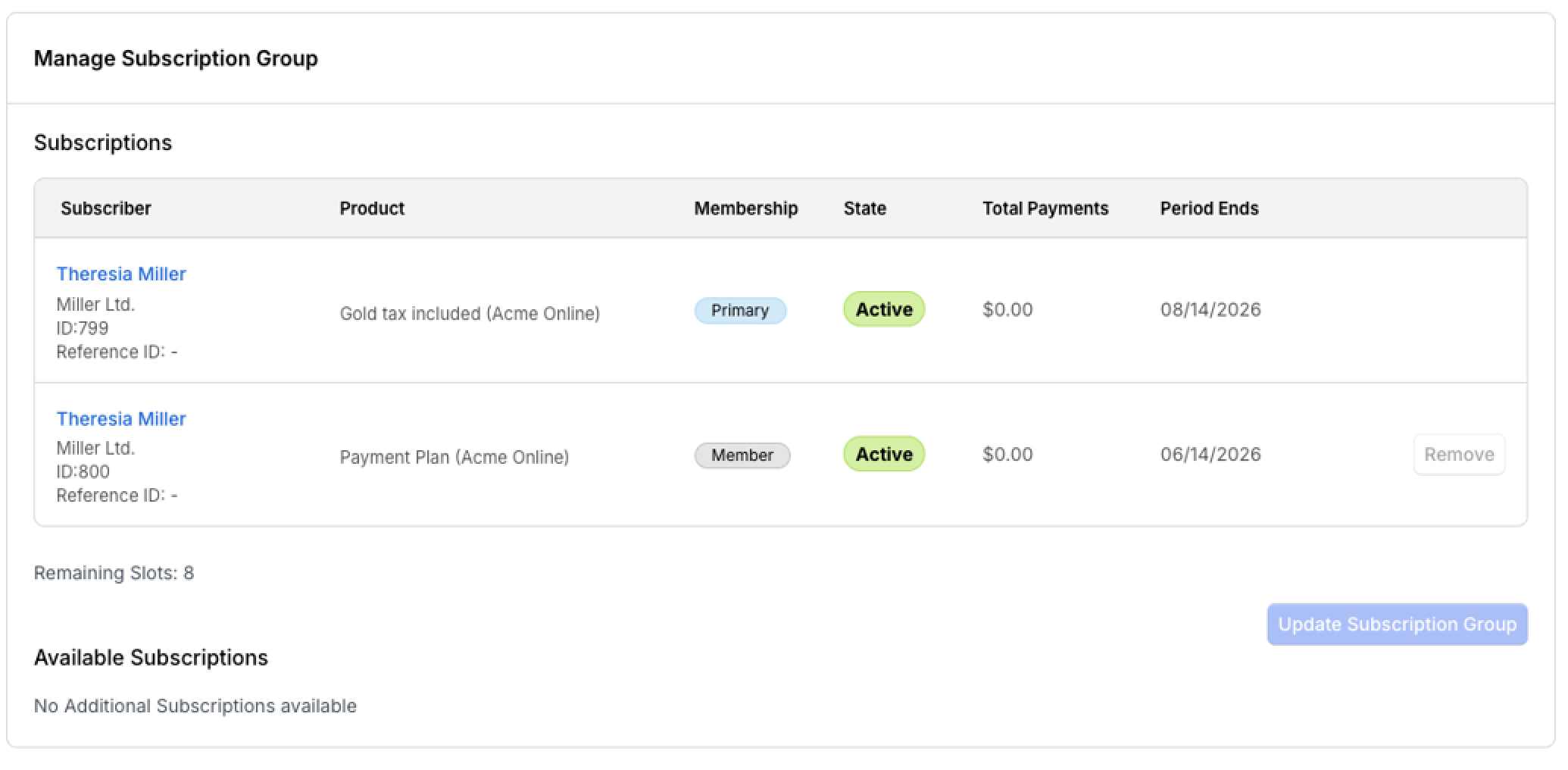
Additionally, the system now prevents the removal of a subscription from a subscription group if there is a pending accrued mid-period component allocation that has not yet been invoiced. Previously, such removals were allowed and could lead to inconsistencies in invoice grouping, incorrect invoice enumeration, and orphaned accrued charges.
With this enhancement, accrued charges remain properly associated with their subscription group, ensuring they are included in the next consolidated billing cycle and eliminating ambiguity in invoice generation.
(Released: 20 April 2026)
Learn more
- Why it matters:
- This change removes ambiguity in how accrued charges are grouped within consolidated Invoices and enforces billing integrity at the subscription group level. By establishing invoice hierarchy early and preventing premature subscription removal, Customers and billing teams benefit from deterministic dash-suffixed Invoice numbering, improved financial transparency, and reduced risk of discrepancies.
- Where to find it:
- Navigate to Subscriptions, select a Subscription within a group, and perform a mid-period Component allocation with the Accrue to next billing period option selected. The Manage Subscription Group form now restricts removal of subscriptions with pending accrued allocations awaiting invoicing.
 Impact:
This change affects all users managing Subscription Groups, particularly when mid-period component allocations are configured to accrue to the next billing period. It ensures a more robust and error-free billing process by safeguarding invoice accuracy and completeness.
Action required:
Users managing Subscription Groups should familiarize themselves with the new restriction and adjust their subscription management workflows accordingly to align with the updated process.
Impact:
This change affects all users managing Subscription Groups, particularly when mid-period component allocations are configured to accrue to the next billing period. It ensures a more robust and error-free billing process by safeguarding invoice accuracy and completeness.
Action required:
Users managing Subscription Groups should familiarize themselves with the new restriction and adjust their subscription management workflows accordingly to align with the updated process.
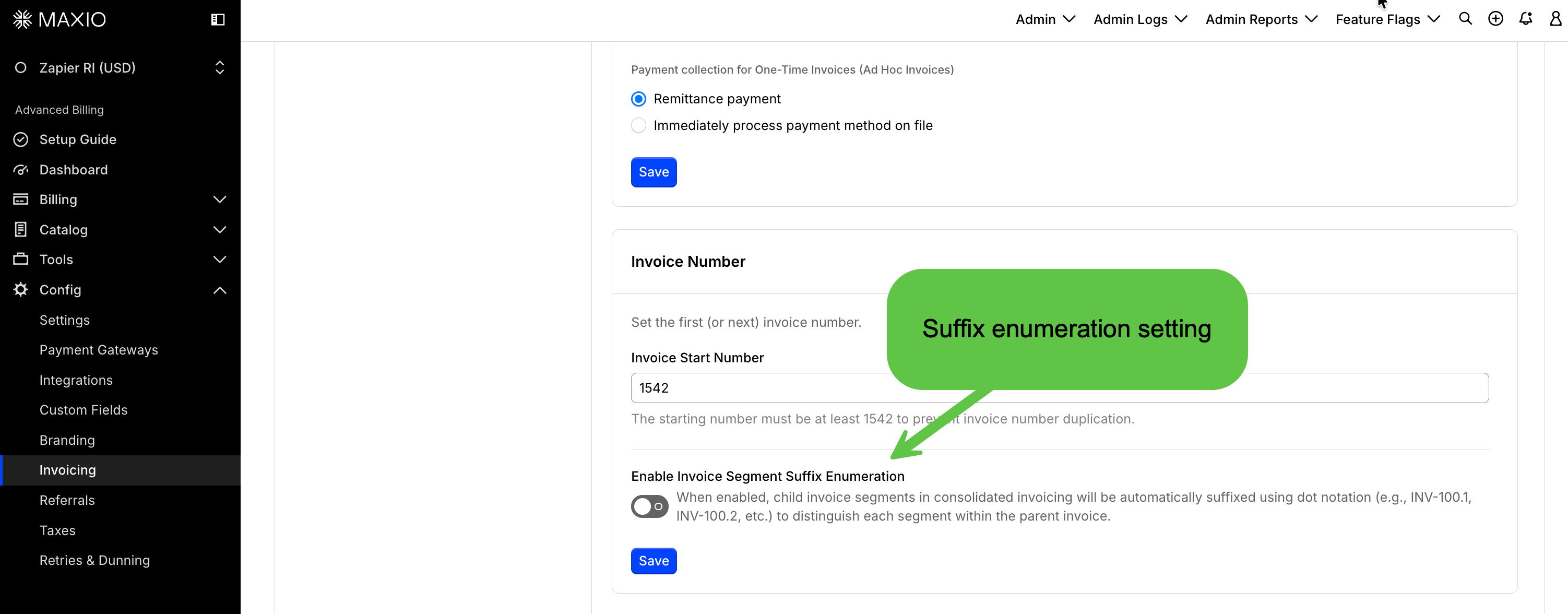
Enable dash-based enumeration for child Invoice segments
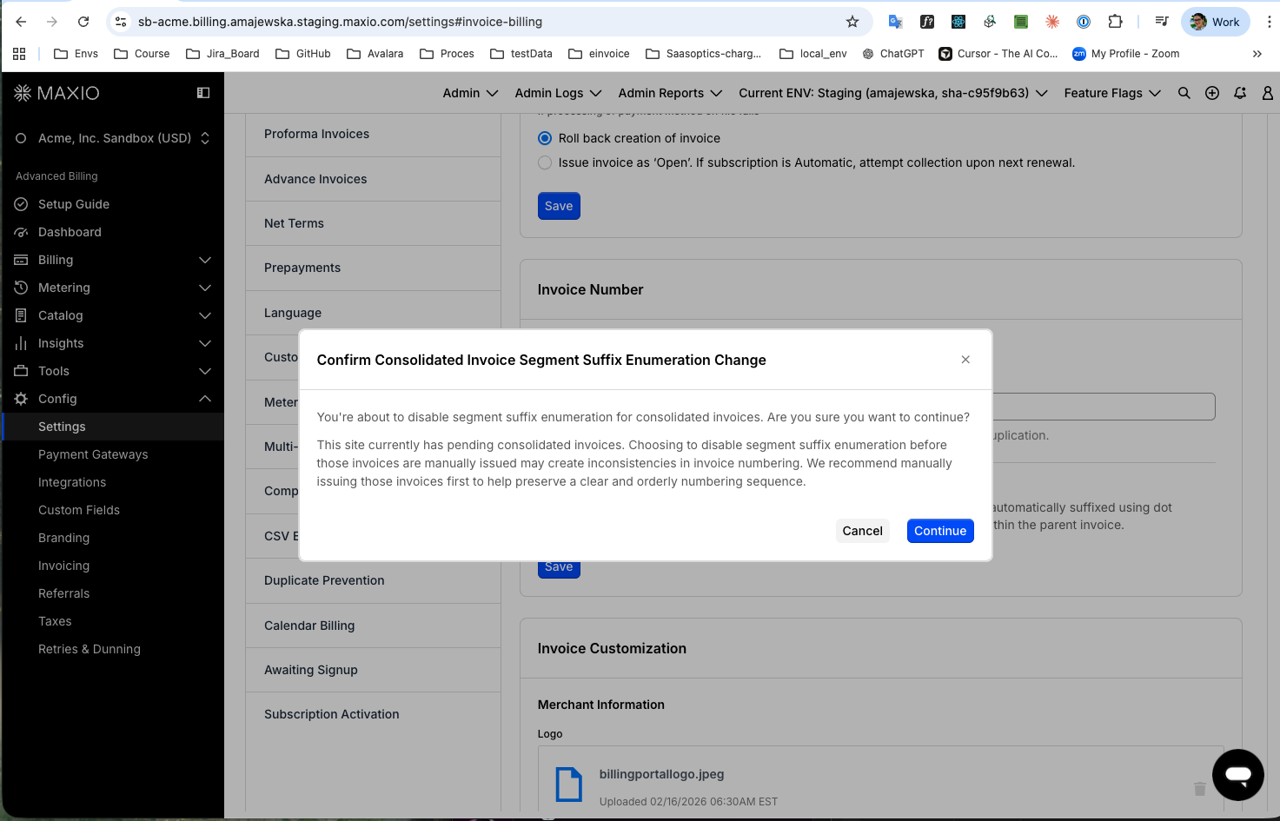
You can now enable a setting to automatically append a dash-based enumeration suffix to child segments within a consolidated Invoice. This allows for clearer identification and differentiation between parent and child segments in complex account structures. (Released: 20 April 2026)
Learn more
- Why it matters:
- Providing distinct numbering for child segments improves clarity for billing teams and customers when referencing individual segments within a master consolidated Invoice. It also ensures better data accuracy when parsing Invoice details in downstream systems.
- Where to find it:
- From Maxio, navigate to Config Settings Invoicing and look for the Enable Invoice Segment Suffix Enumeration toggle under the Invoice Start Number section. Note that this setting only appears if Consolidated Invoicing is enabled.
Control the visibility of the Product Family Field in the Billing Portal
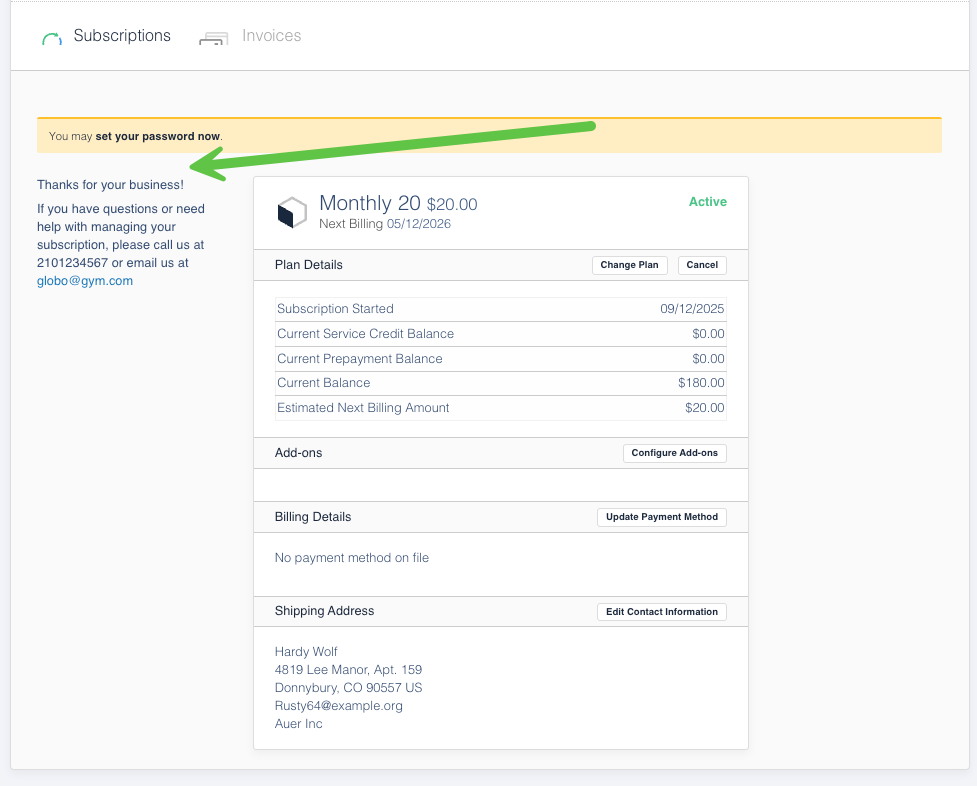
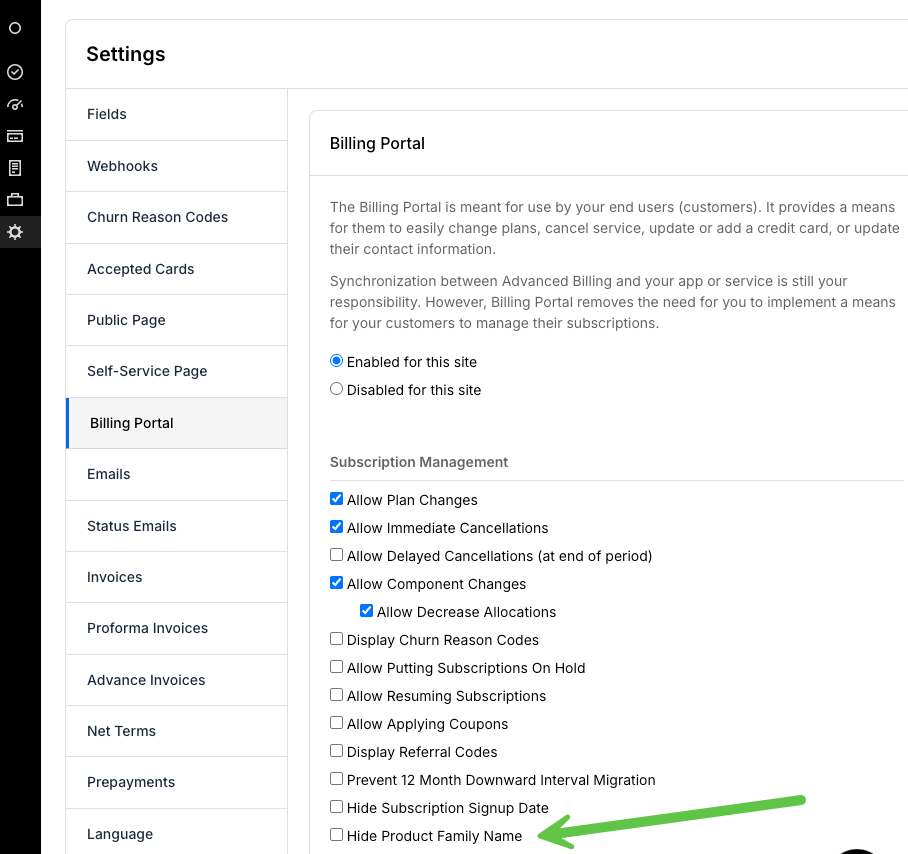
You can now toggle the visibility of the Product Family Name within your Billing Portal settings to create a cleaner interface. This update allows you to hide the field if you offer a single product line or prefer a minimalist design for your Customers. (Released: 17 April 2026)
Learn more
- Why it matters:
- This provides greater control over your brand experience and reduces the need for custom CSS or developer resources to simplify the Billing Portal UI.
- Where to find it:
- Navigate to Config > Billing Portal > Settings and look for the UI customization options to toggle the Product Family visibility.
Conditional display of Billing Portal Actions Drop-down in Customer View
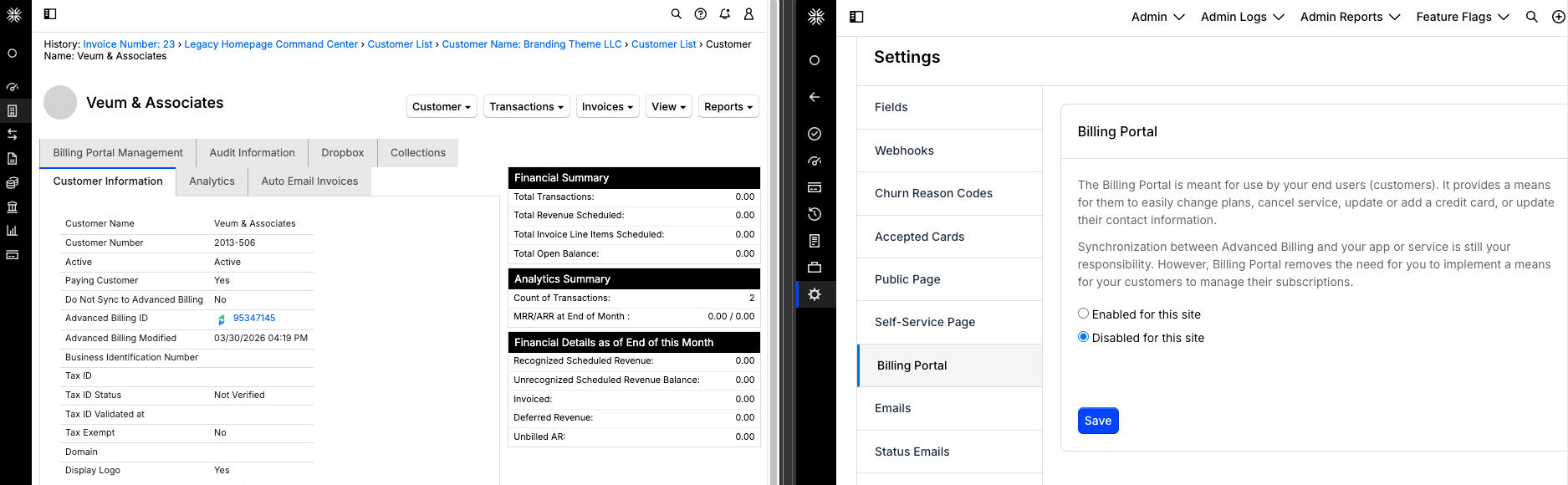
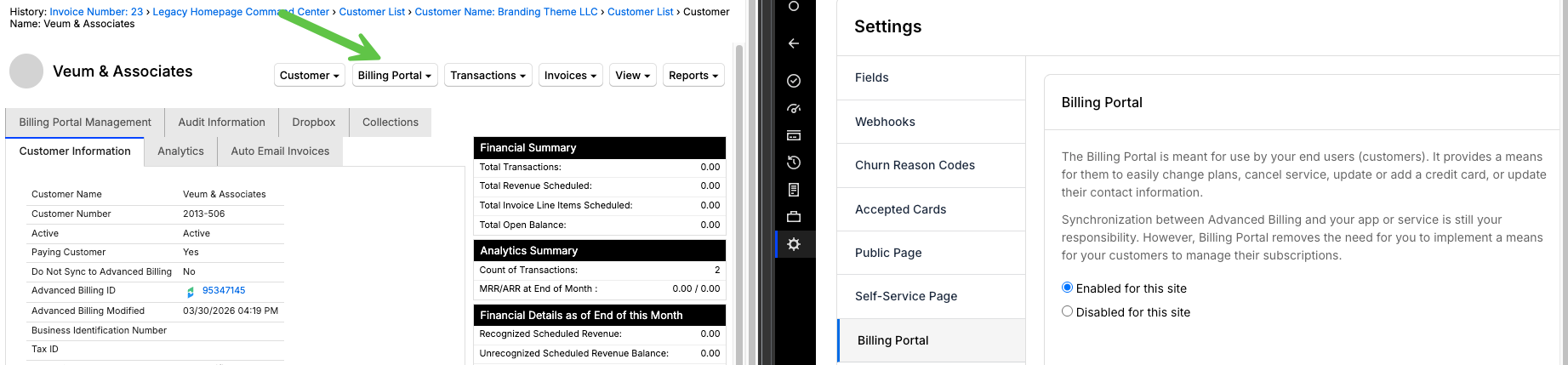
Maxio Core now dynamically updates the visibility of Billing Portal options based on your settings in Advanced Billing. When the Billing Portal is disabled, related actions and menus are automatically hidden to streamline the user interface. (Released: 20 April 2026)
Learn more
- Why it matters:
- This update ensures a cleaner and more accurate user experience by hiding inactive features. By syncing the portal status automatically, it prevents confusion and ensures that only applicable actions are available for your Customer and Subscription records.
- Where to find it:
- Navigate to the Customer view to see updated action menus, or check the Billing Portal Management tab under Settings.
Enhanced Tax ID country selection with flag Icons
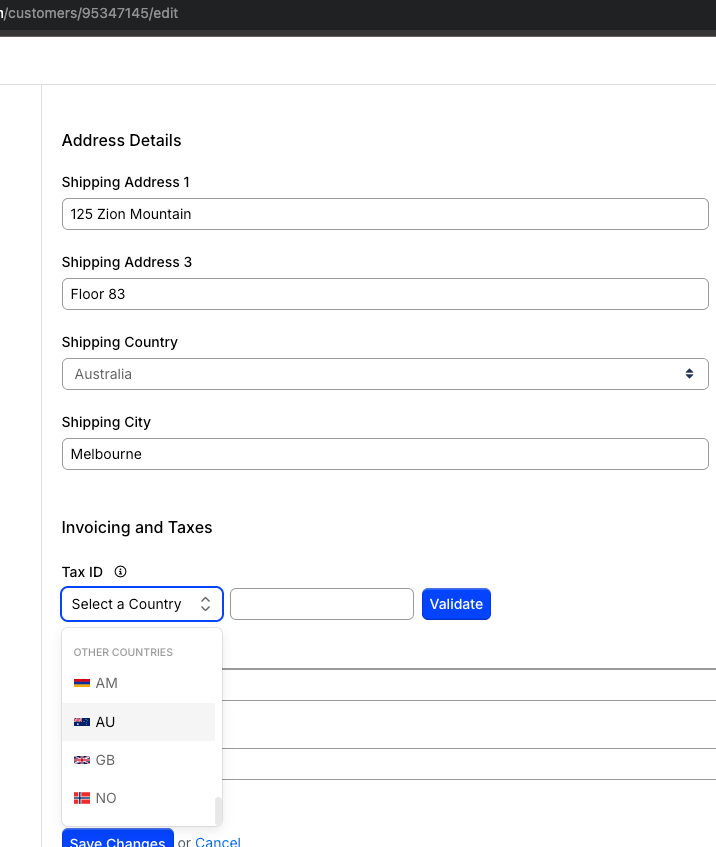
You can now select from an expanded list of taxable countries, including non-EU regions like Armenia, Australia and Norway. Each option now features a country flag icon and ISO code to help you quickly identify and confirm the correct location for tax purposes. (Released: 16 April 2026)
Learn more
- Why it matters:
- This update simplifies global taxation workflows by providing more comprehensive country coverage and visual aids. These improvements reduce selection errors and ensure you can accurately assign taxable countries for your Customers worldwide.
- Where to find it:
- Navigate to a Customer record and locate the Tax ID: Country drop-down within the Customer Invoicing and Taxes configuration settings.
Enhanced tax exemption synchronization for Advanced Billing
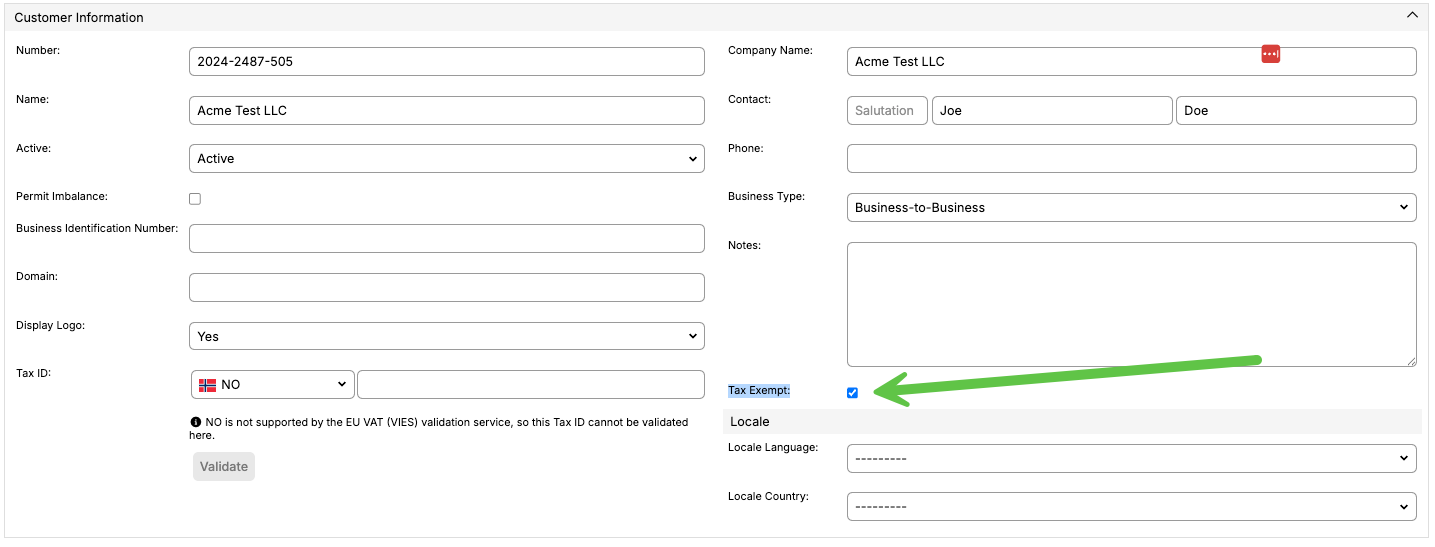
Maxio improved how tax exemption field syncs between Maxio Core and Advanced Billing. This update ensures that Customer records accurately reflect explicit tax changes while preventing unintended overrides when data is omitted. (Released: 20 April 2026)
Learn more
- Why it matters:
- This ensures data integrity across your platforms by distinguishing between an intentional Tax exempt checkbox, preventing missed exemptions during synchronization.
- Where to find it:
- In the Customer forms and read views Tax Exempt checkbox.
Payments
Unified navigation update for Maxio and Maxio Payments
Maxio updated the navigation structure in the Maxio Payments application to align with the core Maxio interface. This update introduces a consistent left-side navigation pane across both applications, providing a more seamless and intuitive user experience. (Released: 22 April 2026)
Learn more
- Why it matters:
- Standardizing the navigation across platforms reduces the learning curve and increases efficiency for users who manage multiple parts of the Maxio ecosystem. The use of design system components also ensures a more cohesive and visually appealing interface.
- Where to find it:
- Open the Maxio Payments application to view the new navigation pane on the left side of the screen.
Self-Service Apple Pay URL Registration
Maxio introduced a new user interface in the Maxio Payments dashboard that allows you to easily register and manage the URLs required for Apple Pay. This enhancement simplifies the setup process, ensuring Apple Pay functions correctly on your payment forms with minimal manual effort. (Released: 14 April 2026)
Learn more
- Why it matters:
- Setting up Apple Pay previously required manual coordination or developer support to register specific service URLs. With this update, you can now manage these registrations yourself. By automating the retrieval of these URLs from your existing settings, Maxio made it faster and easier to offer Apple Pay to your customers.
- Where to find it:
- These settings are available within the Maxio Payments dashboard under the Apple Pay configuration section. Related article: Enable Apple Pay
Maxio Payments adds Plaid and micro-deposit verification to the Billing Portal
Buyers using ACH direct debit on the Maxio Payments gateway can now verify their bank accounts via Plaid or micro-deposits directly within the Billing Portal. This ensures secure account validation and helps Merchants maintain compliance with NACHA requirements. (Released: 20 April 2026)
Learn more
- Why it matters:
- This update automates bank account verification for ACH transactions, reducing fraud risk and ensuring your business stays compliant with NACHA regulations without manual intervention.
- Where to find it:
- Buyers encounter these verification flows when updating or adding an ACH Direct Debit payment method within the Billing Portal.
Billing Portal update payment method user interface enhancement
Maxio updated the Billing Portal Update Payment Method interface to a modern, two-column layout that aligns with the rest of the Maxio experience. This enhancement streamlines the selection process for various payment options like Credit Card, Direct Debit, and Apple Pay. (Released: 23 April 2026)
Learn more
- Why it matters:
- The intuitive layout and improved navigation provide a smoother experience for Customers when updating their payment information, while ensuring the design can easily accommodate new payment methods in the future.
- Where to find it:
- In the Billing Portal, navigate to the Update Payment Method page.
Accounting
QuickBooks Online integration: Continue-on-Error setting
QuickBooks Online users can now enable a new setting that allows synchronization to continue even if individual record-level errors occur. This update ensures that one bad record does not halt the entire sync process, keeping your data flow consistent. (Released: 20 April 2026)
Learn more
- Why it matters:
- Previously, a single record-level error would stop the entire sync, leading to operational delays and backlogs. This feature reduces manual intervention by skipping isolated errors while still halting for critical system-level failures.
- Where to find it:
- Navigate to Settings, select Integrations, and click on QuickBooks Online. The Continue on Error toggle is located at the bottom of the Settings section.
Intacct integration: Continue-on-Error setting
Maxio introduced a new Continue-on-Error setting for Intacct sync operations. This enhancement allows the sync to continue processing unaffected records even if specific items encounter recoverable failures, rather than stopping the process entirely. (Released: 30 April 2026)
Learn more
- Why it matters:
- This change reduces operational friction and prevents minor, recoverable errors from delaying your entire sync. By allowing unaffected records to process, you can address isolated failures at your convenience without blocking the rest of the data flow.
- Where to find it:
- Navigate to your Intacct settings and locate the Continue on Error toggle under the Safeguards section.
Still need help?
Reach out and our support team will take it from here.