
Reconcile Refunds in Rillet
Applies to: Advanced Billing · Maxio Core
Last updated on Aug 24, 2026
Refunds issued in Maxio require a short reconciliation step in Rillet once the funds clear in your bank feed.
Reconcile a refund
Reconcile each refund with these steps:
-
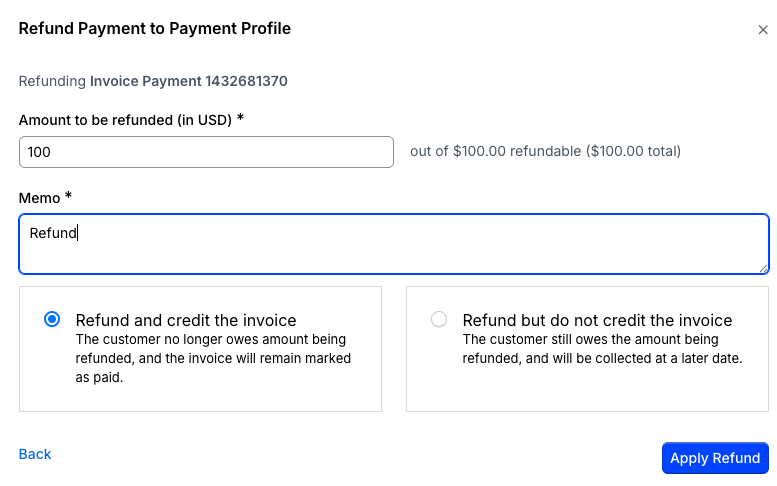
Issue the refund in Maxio Core or Advanced Billing. Enter the refund amount and a memo, choose whether to credit the original invoice, then click Apply Refund.
-
Maxio creates a credit memo for the refund and sends it to Rillet.
-
After the refunded transaction appears in Rillet's bank feed (usually within a few days), go to Cash Reconciliation in Rillet.
-
Find the transaction in the Bank Transactions column and the matching credit memo in the Rillet Transactions column, select both, and click Match.
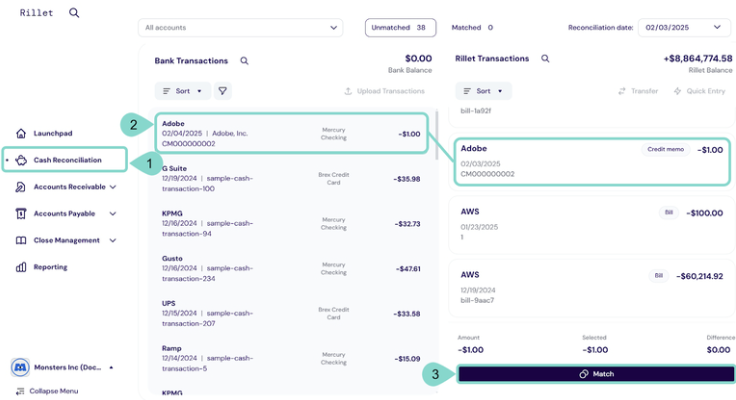
This updates the credit memo's status to Refunded in Rillet.
Related information
To decide which system should originate your refunds and credit memos, see Choose Your Rillet Workflow Model.
Still need help?
Reach out and our support team will take it from here.