
November 2025 Product Release
Applies to: All Maxio products
Last updated on Aug 27, 2026
Maxio released the following updates and new features during November 2025.
Billing
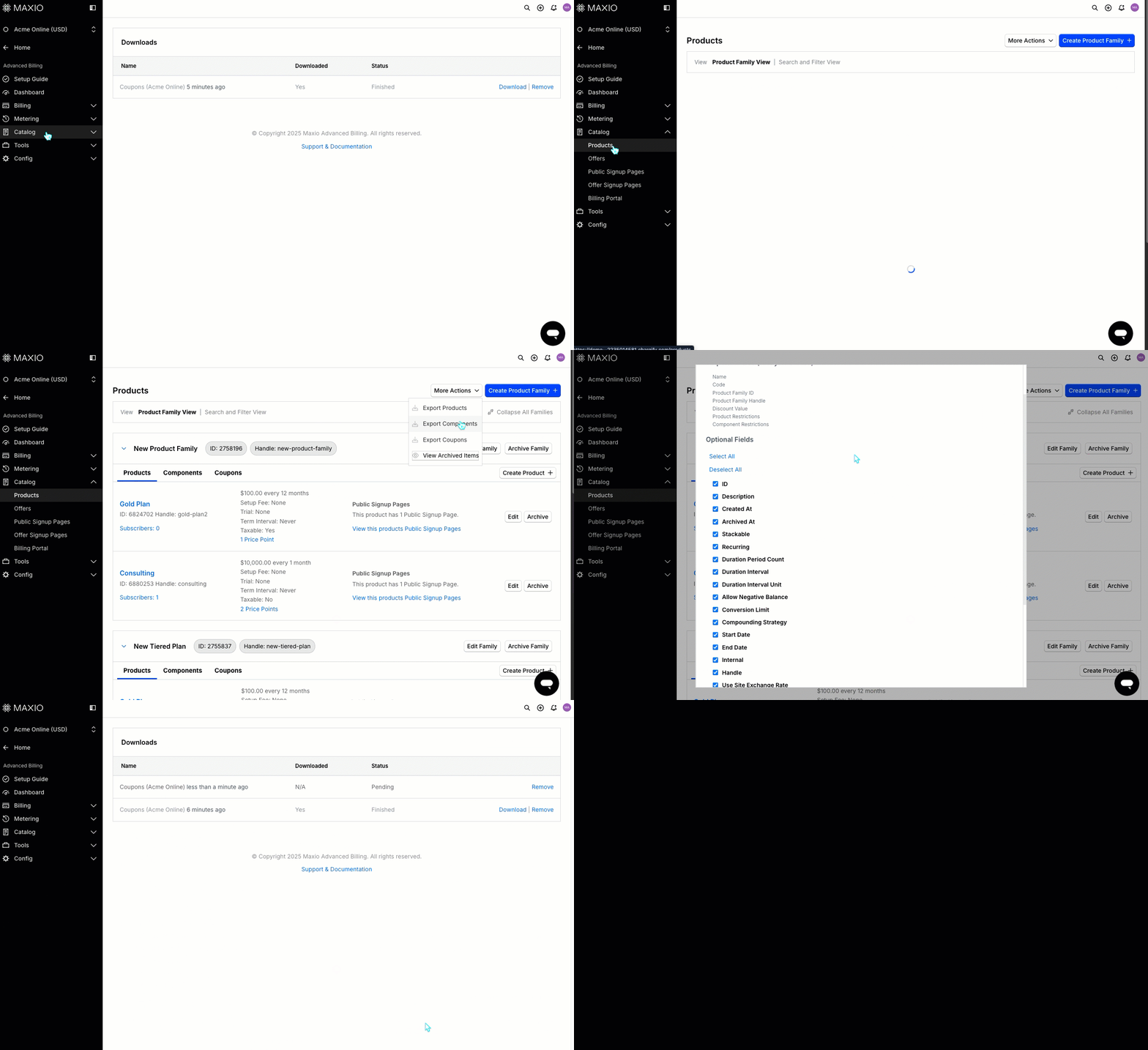
Export coupon usage metrics in Advanced Billing General Access
Merchants can now export coupon usage metrics, including times used, total amount saved, and revenue generated, directly from the Advanced Billing Coupon Export. This update makes it easier to analyze coupon performance without relying on the UI or API. (Released: 6 November 2025)
Learn more
- Why it matters:
- This enhancement helps merchants and analysts quickly understand the impact of their discount campaigns, saving time and reducing the need for manual data extraction or developer support.
- Where to find it:
- From Advanced Billing, go to Catalog > Products. From the More Actions drop-down, select Export Coupons. Check the fields you want to track and then click Export option. Download the Coupon report.
Customer export now includes active Subscriptions column General Access
The Advanced Billing Customer Export now includes a new column showing the number of active Subscriptions for each Customer. This update allows you to analyze Customer Subscription data directly from the export, without needing to combine multiple reports. (Released: 24 November 2025)
Learn more
- Why it matters:
- This enhancement saves time for finance and operations teams by making it easier to identify Customers with no active Subscriptions, segment Customer lists, and analyze churn, all from a single export file.
- Where to find it:
- From Advanced Billing, go to Billing > Customers, then click the Export Customers action to download the CSV file. The new Active Subscriptions column (
live\_subscription\_count) appears in the export CSV.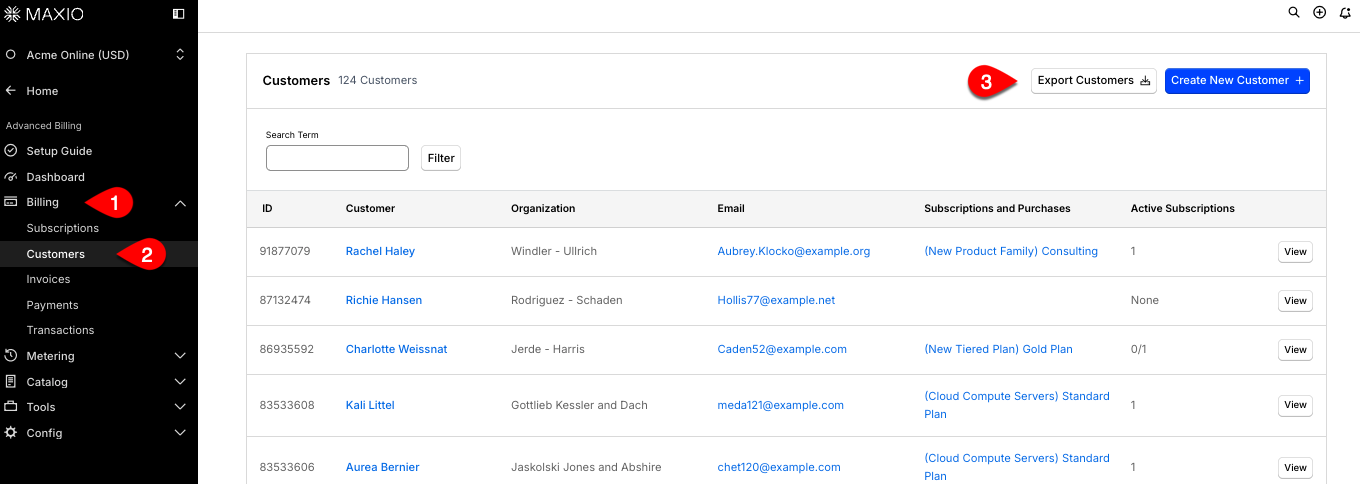
Customize the “Metered Usage (Not Billed)” label on your Invoices General Access
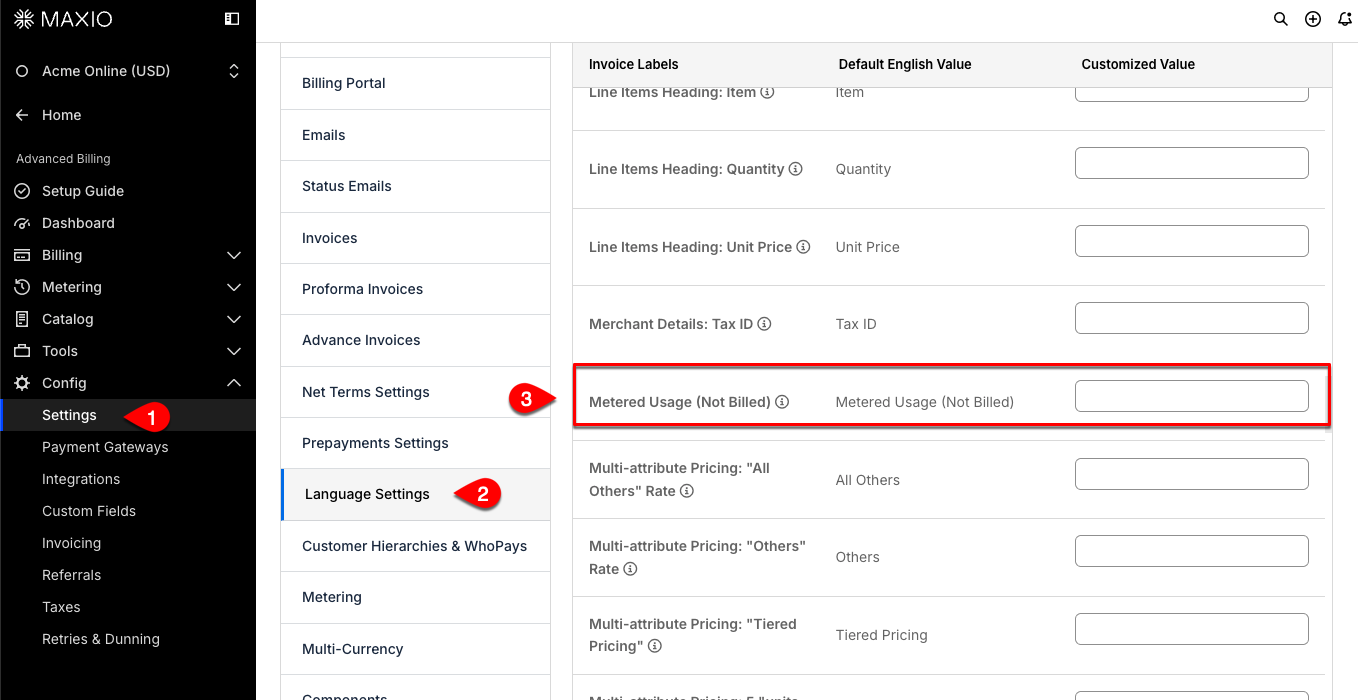
This update allows you to change how this label appears on both Proforma and final Invoices, helping you match your business’s terminology and branding. The default value remains Metered Usage (Not Billed) unless you choose to update it. (Released: 6 November 2025)
Learn more
- Why it matters:
- This enhancement helps businesses improve clarity and maintain consistent branding by allowing them to localize or rephrase invoice labels to better suit their needs.
- Where to find it:
-
- From Advanced Billing, go to Config > Settings.
- Select Language Settings and, from the Actions drop-down, select Customize Language.
- Scroll down to Metered Usage (Not Billed) label and enter a value.
Improved coupon recurring input for more flexible renewal periods General Access
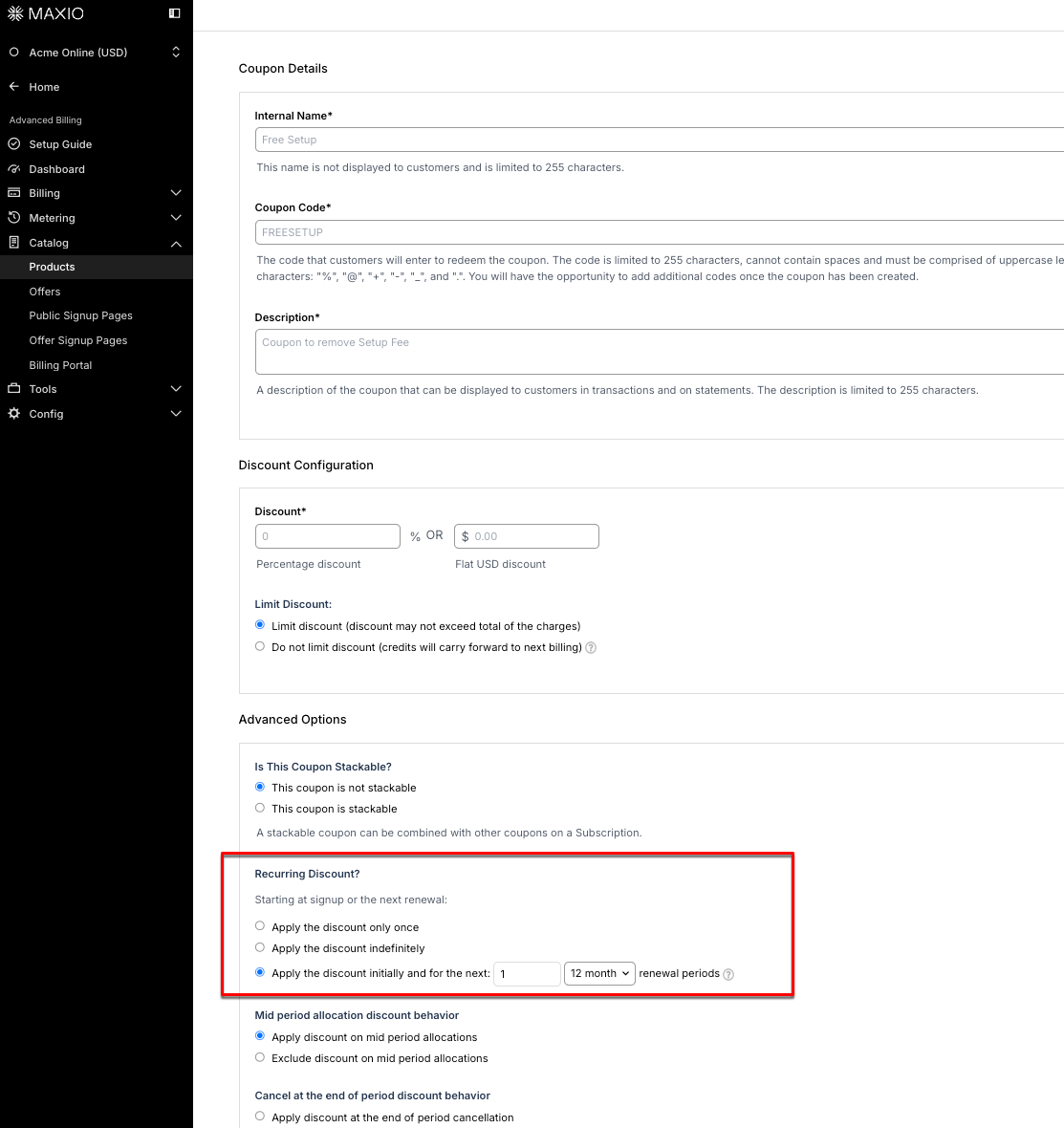
From Advanced Billing, you can now set any positive integer for the recurring discount period when creating or editing a coupon, instead of being limited to 30 periods. The drop-down has been replaced with a numeric input, allowing greater flexibility for your discount programs. (Released: 21 November 2025)
Learn more
- Why it matters:
- This update removes unnecessary restrictions, letting you offer longer recurring discounts to Customers and better align with your business needs.
- Where to find it:
- From Advanced Billing, go to Catalog > Products and click the Coupon tab. Use Create Coupon or Edit Coupon to set the recurring discount period.
Access Credit Notes from the Subscription View General Access
Users can now access Credit Notes directly from the View Subscription sidebar, making it easier to view and manage credit notes for each Subscription. This update improves navigation and eliminates the need to manually enter the credit notes URL. (Released: 28 November 2025)
Learn more
- Why it matters:
- This change makes it much easier for users to find and use the Credit Notes feature, saving time and reducing confusion. Customers no longer need to remember or bookmark a specific URL, improving overall usability and satisfaction.
- Where to find it:
- Go to any View Subscription page and look for the Credit Notes link in the left sidebar, located between Proforma Invoices and Service Credits. This tab directs the user to the Subscription’s Credit Notes which were previously only available by adding
/credit_notesin the URL.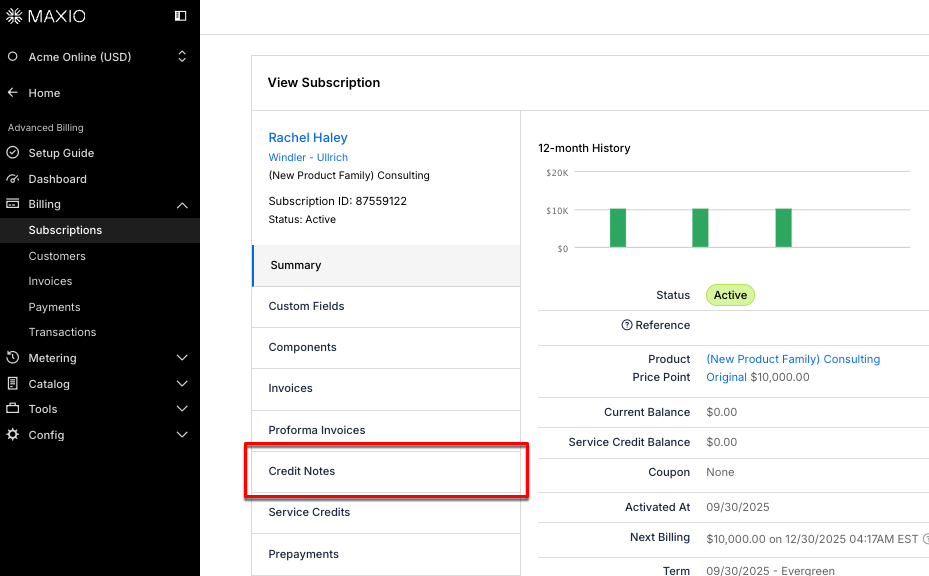
Accounting
Easily copy Customer Shipping address as the Billing address General Access
You can now quickly copy the shipping address into the billing address fields with a single click when creating or editing a Customer in Maxio Core. This new button streamlines data entry and helps prevent errors by making it easy to match billing and shipping details. (Released: 19 November 2025)
Learn more
- Why it matters:
- This feature saves time and reduces manual entry errors, especially for users who enter shipping information first. It ensures consistency and improves the overall experience when managing Customer addresses.
- Where to find it:
- From Maxio, go to Customers Home. Either click the plus sign (+) to add a new Customer or edit an existing Customer. Once you enter the Shipping address, click the Copy Shipping Address button to populate the corresponding Billing address fields.

Insights
Set renewals identification for Advanced Subscription Momentum Report General Access
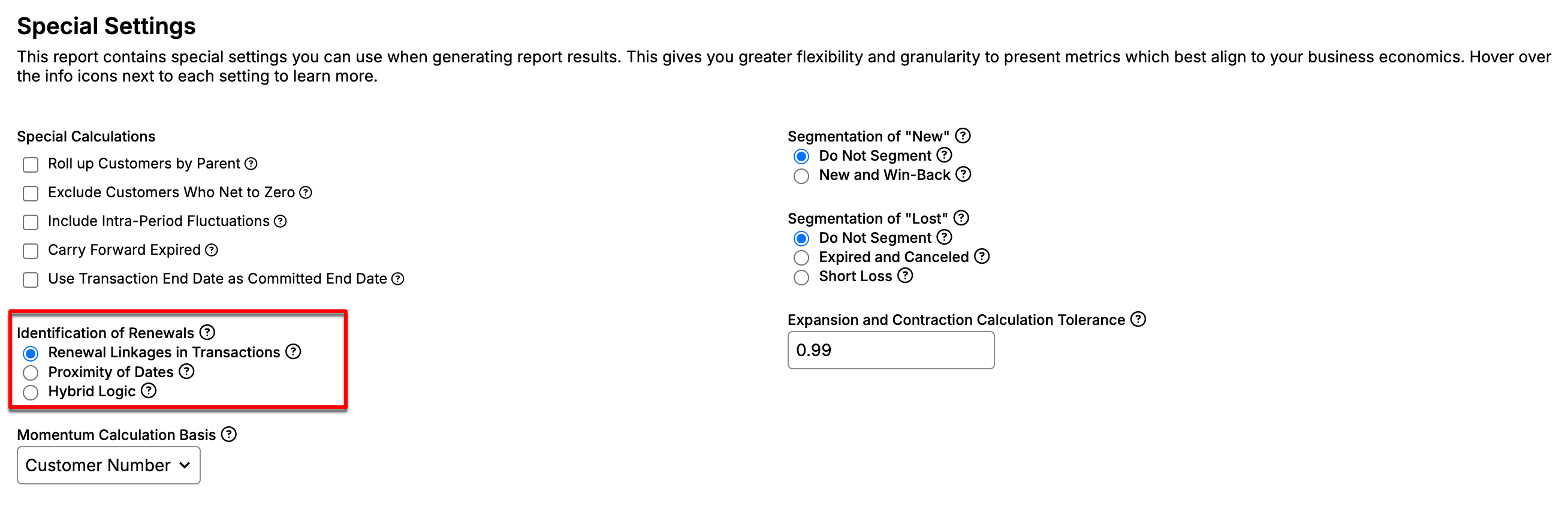
You can now choose how renewals are identified in the Advanced Subscription Momentum report. Three identification methods are available: Renewal Linkages in Transactions (now the default), Proximity of Dates, and Hybrid Logic. This update makes renewal logic options generally available to all users. (Released: 20 November 2025)
Learn more
- Why it matters:
- This update gives you more control and flexibility in analyzing renewal activity, helping you get more accurate insights from your Subscription data. It addresses a long-standing request and improves reporting consistency.
- Where to find it:
- From Maxio, go to Reports and either create or edit an existing Advanced Subscription Momentum Report. From the Special Settings section, select your preferred renewal identification method.
- Key Points:
- Users can now select from three methods for identifying renewals.
- Renewal Linkages in Transactions (Now the Default)
- Uses explicit renewal linkages to determine renewal activity.
- This is now the default method for all newly generated reports.
- Includes an optional setting to treat Transaction End Date as Committed End Date.
- Proximity of Dates
- Identifies renewals when a new Transaction’s start date falls in the same period as a prior Transaction’s end date.
- Useful when renewal linkages are incomplete or inconsistently applied.
- Hybrid Logic
- A blend of proximity logic with selective reliance on linkages.
- This was the previous default, and all existing reports have been migrated to this option to ensure consistent regeneration.
Payments
New Maxio Payments home page General Access
The new home page of Maxio Payments provides a streamlined dashboard experience for customer users. After logging in, users are now directed to the dashboard instead of the Transaction list, and the Maxio logo in the navigation bar clearly indicates its function as a home button. (Released: 24 November 2025)
Learn more
- Why it matters:
- This update improves navigation and usability for customers, making it easier to access key dashboard information and return to the home page quickly.
- Where to find it:
- After logging in, customer users are automatically taken to the Dashboard. The Maxio logo in the top navigation bar now acts as a home button.
Differentiate credit cards from debit cards in Maxio Payments General Access
You can now easily distinguish between credit cards, debit cards, and direct debit (bank payments) in the UI, payment profiles, and API. This helps Merchants identify card types for surcharging and reporting purposes. (Released: 10 November 2025)
Learn more
- Why it matters:
- This feature enables customers to accurately identify card types, making it easier to apply surcharges only to credit cards and comply with payment regulations.
- Where to find it:
- View card type details in the Payments panel, on the payment profile in Advanced Billing, and through the API endpoints that return payment profiles.
Non-tokenized payments for India-based buyers General Access
Maxio now supports non-tokenized, one-time payments for all credit cards issued in India, in compliance with the latest RBI mandate. Card details are not stored, except for the last four digits and buyer name, and users must enter their card information for each invoice. (Released: 7 November 2025)
Learn more
- Why it matters:
- This update ensures compliance with RBI regulations and provides a seamless payment experience for customers using India-issued credit cards, reducing failed transactions and supporting secure, one-time payments.
- Where to find it:
- Contact your Maxio Support to become an early adopter. Applies automatically when Customers with India-based billing address use India-issued credit cards for Subscription purchases through the Maxio Payments gateway.
Still need help?
Reach out and our support team will take it from here.