---
title: Enable and Configure 3D Secure for Your Gateway
url: https://docs.maxio.com/payments/additional-gateways/compliance-3d-secure/supporting-3d-secure-topics/step-1-gateway-configuration-advanced-billing-test-site-test-credentials-and-car
applies_to: Advanced Billing
updated: 2026-08-26
---
# Enable and Configure 3D Secure for Your Gateway
Most gateways require you to take some action on their side to enable 3D Secure. This is the first step in testing and implementing 3D Secure: enable 3DS at your gateway, configure your Advanced Billing test site with test credentials, and use each gateway's test cards to simulate 3DS flows.
Please be aware that this article is related to testing and implementing 3D Secure. We currently support 3DS on the following gateways: **Stripe**, **Braintree**, **CyberSource**, **Windcave** (**Payment Express**), **Adyen.**
## Enabling 3DS at your gateway
| Gateway | What to Do |
| :--- | :--- |
| Stripe | 3DS is already enabled in Stripe by default. |
| Braintree | Contact Braintree to ensure 3DS is enabled on your account. See Braintree's 3D Secure documentation for more information. |
| CyberSource | Contact CyberSource to enable 3D Secure on your account and retrieve Cardinal Commerce credentials. |
| Windcave (formerly Payment Express) | Contact Windcave support and request a set of REST API credentials (REST API Username and REST API Key) linked to your existing PxPost credentials under the same "Group Account." This linkage under the same Group Account is important for correct functionality with Advanced Billing. Also have Windcave enable **AJAX_POST** and **FORM_POST** for your account.
Windcave credential types differ depending on whether the Advanced Billing site is used for testing or production: test sites use UAT credentials, and live sites use SEC credentials. Windcave itself also has separate usernames and passwords for its test and live environments. |
| Adyen | 3DS is already enabled in Adyen by default. |
| BlueSnap | Visit **BlueSnap Account > Settings > Fraud Settings** and enable 3D Secure.
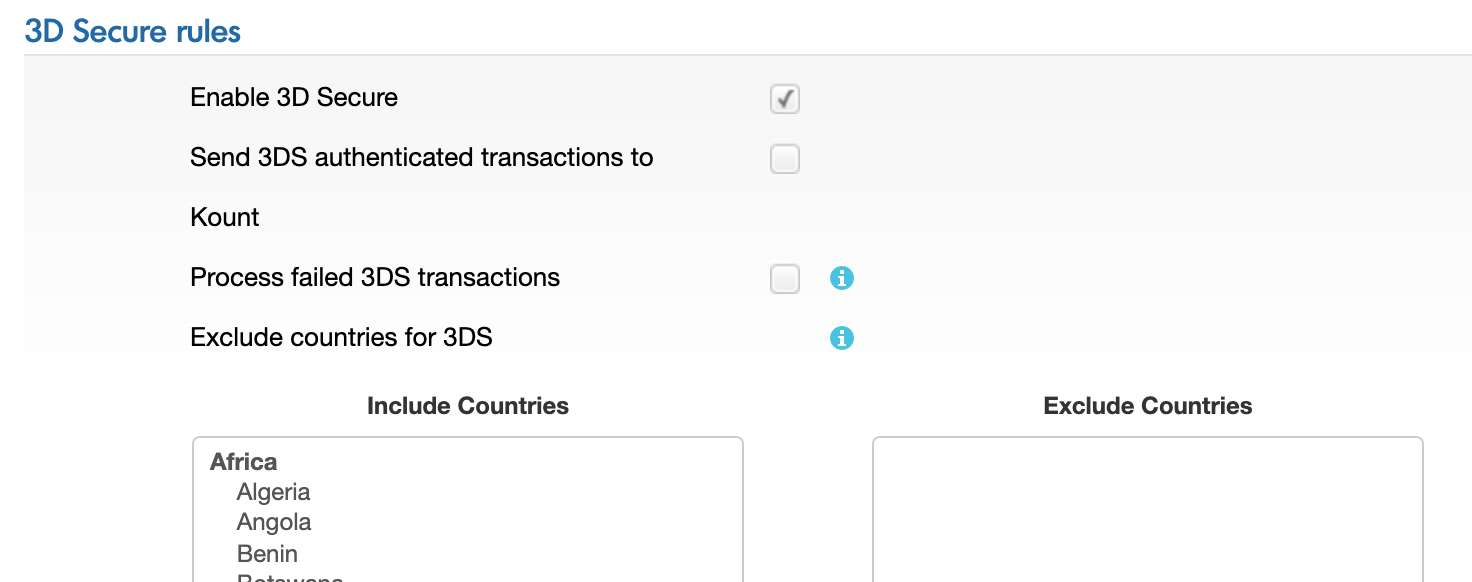
*3D Secure rules for BlueSnap account* |
### Configuring an Advanced Billing test site with test gateway credentials
If you haven't created an Advanced Billing test site yet, it is recommended to create one in order to test the 3DS flow; see Test Site Basics. When configuring your gateway on the test site, you may have to provide additional information to enable 3DS support.
| Gateway | What to Do |
| :--- | :--- |
| Stripe | No additional steps are needed for Stripe. |
| Braintree | Visit **Config > Payment Gateways** and edit your Braintree credentials. At the bottom of the popup is a checkbox labeled **Strong Customer Authentication (SCA) Enabled**.
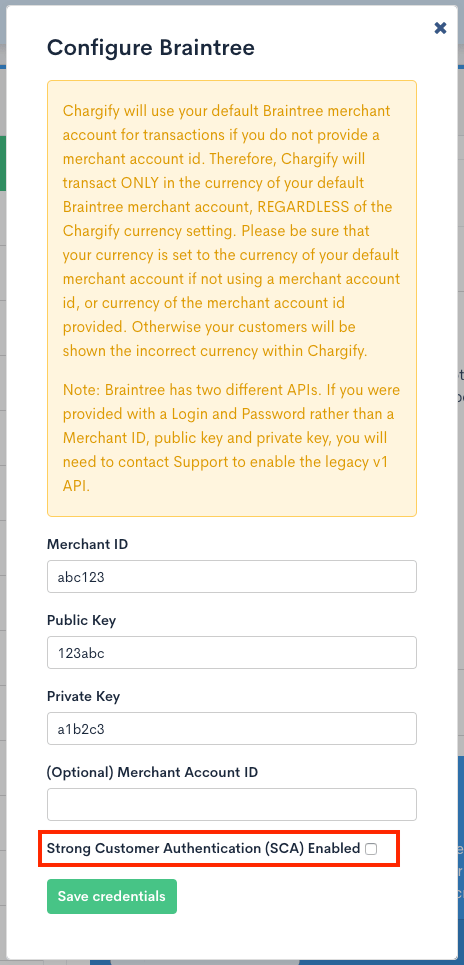
*Enable SCA requests for Braintree in Advanced Billing* |
| CyberSource | CyberSource requires two additional steps, both completed on the same page in Advanced Billing. From **Config > Payment Gateways**, edit your existing credentials and perform the following:
- Add your Cardinal Cruise API Identifier, Cardinal Cruise API Key, and Cardinal Cruise Org Unit ID
- Select the checkbox for Strong Customer Authentication (SCA) Enabled
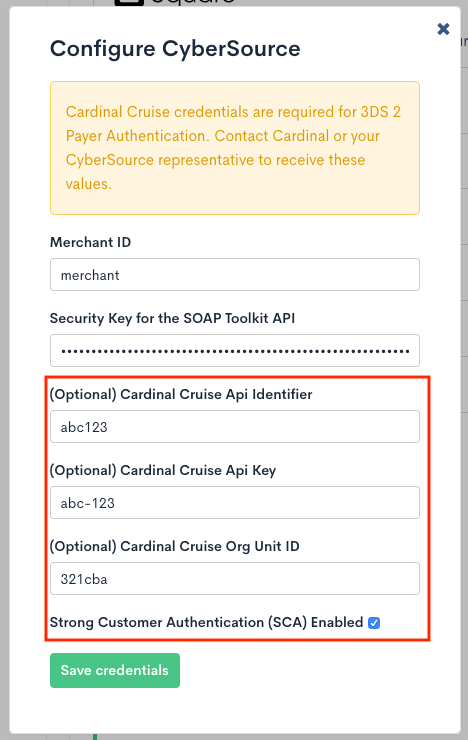
*Enable SCA requests for CyberSource in Advanced Billing* |
| Windcave (formerly Payment Express) | Windcave requires two additional steps, both completed on the same page in Advanced Billing. From **Config > Payment Gateways**, edit your existing credentials and perform the following:
- Fill in your Windcave REST API Username and REST API Key
- Select the checkbox for Strong Customer Authentication (SCA) Enabled
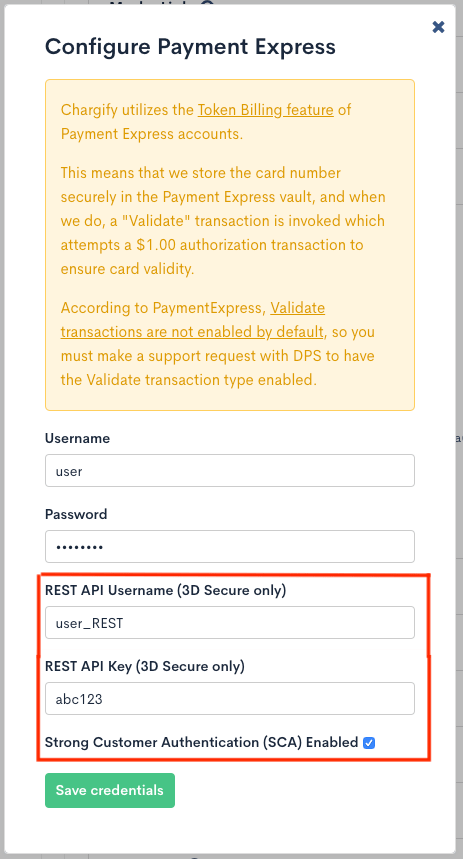
*Enable SCA requests for Windcave in Advanced Billing* |
| Adyen | Visit **Config > Payment Gateways** and edit your Adyen credentials. At the bottom of the popup is a checkbox labeled **Strong Customer Authentication (SCA) Enabled**, and an **SCA Live Environment** dropdown where you can select the environment closest to your location:
|
| BlueSnap | Visit **Config > Payment Gateways** and edit your BlueSnap credentials. At the bottom of the popup is a checkbox labeled **Strong Customer Authentication (SCA) Enabled**. |
### Gateway test cards
Most gateways provide unique test card numbers you can use to simulate successful and unsuccessful 3DS flows.
| Gateway | Test Cards |
| :--- | :--- |
| Stripe | `4000000000003063`
See Stripe's documentation for more information. |
| Braintree | See Braintree's documentation for test cards. |
| CyberSource | Successful cards:
4000000000001091 (Visa)5200000000001096 (Mastercard)340000000001098 (American Express)
Unsuccessful cards:
4000000000001109 (Visa)5200000000001104 (Mastercard)340000000001106 (American Express)
See CyberSource's documentation for more information. |
| Windcave (formerly Payment Express) | See Windcave's documentation for details. Use any future card expiration date and any 3-digit CSC/CVC value for successful and unsuccessful payments.
Successful cards:
5588880000077770 (Mastercard)
Unsuccessful cards:
5431111111111228 (Mastercard)4999999999999996 (Visa)
|
| Adyen | 4917610000000000, expiry date 03/2030, CVV 737 (Visa)371449635398431, expiry date 03/2030, CVV 7373 (American Express)
See Test and Implement 3D Secure for more test credit cards with 3D Secure. |
| BlueSnap | Successful without challenge:
4000000000000101 (Visa)5200000000000908 (Mastercard)
Successful with challenge:
4000000000000002 (Visa)5200000000000007 (Mastercard)
Failed with challenge:
4000000000000028 (Visa)5200000000000023 (Mastercard)
Unavailable:
4000000000000069 (Visa)5200000000000064 (Mastercard)
Expiration date: the expiration month is always January, and the expiration year is the current year plus 3 years.
Security code (CVV): any 3-digit code.
Challenge: the username `test1` is prefilled, and the password is `1234`.
See BlueSnap's documentation for more information. |