
Loading article…
Loading article…
Last updated on Aug 24, 2026
Chargify.js is now Maxio.js
The Chargify.js library has been renamed to Maxio.js. This change is fully backwards compatible, so existing integrations continue to work without code changes. Our developer documentation is being updated incrementally, so you will continue to see Chargify.js referenced in code examples and screenshots.
Maxio.js is a powerful tool that can streamline your existing API-based workflows in Advanced Billing. Use Maxio.js to easily construct signup and payment profile update forms directly on your existing sites.
Advanced Billing provides transparent iframes that allow you to customize a Customer's payment form. This approach ensures that you meet the latest PCI Compliance requirements.
When a Customer submits your payment form, Maxio.js sends the payment information to your payment gateway for secure storage. In return, a one-time token is generated for you to use when completing the Subscription process through our API. This one-time token references the securely stored payment information.
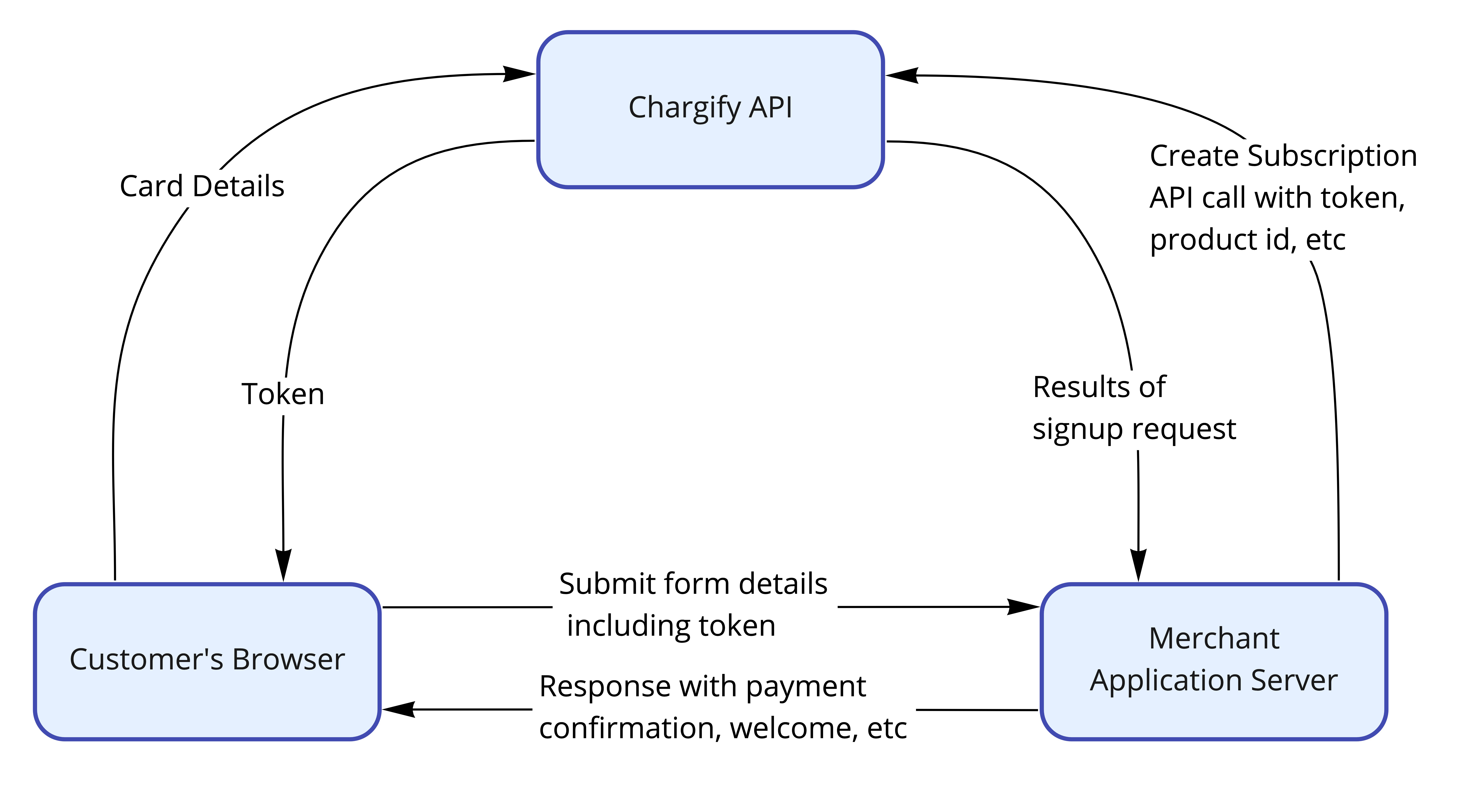
With this token, you can create a Subscription or Payment Profile assigned to the Customer. Your PCI scope is significantly reduced because no sensitive payment information passes through your systems. An example API call to the /subscriptions endpoint might look like this:
type: 'card'{
"subscription": {
"product_handle": "pro-plan",
"customer_attributes": {
"first_name": "Joe",
"last_name": "Smith",
"email": "j.smith@example.com"
},
"credit_card_attributes": {
"chargify_token": "tok_cwhvpfcnbtgkd8nfkzf9dnjn"
}
}
}type: 'direct_debit'{
"subscription": {
"product_handle": "pro-plan",
"customer_attributes": {
"first_name": "Joe",
"last_name": "Smith",
"email": "j.smith@example.com"
},
"bank_account_attributes": {
"chargify_token": "tok_cwhvpfcnbtgkd8nfkzf9dnjn"
}
}
}type: 'gocardless' (deprecated in favor of 'direct_debit'){
"subscription": {
"product_handle": "pro-plan",
"customer_attributes": {
"first_name": "Joe",
"last_name": "Smith",
"email": "j.smith@example.com"
},
"bank_account_attributes": {
"chargify_token": "tok_cwhvpfcnbtgkd8nfkzf9dnjn"
}
}
}type: 'apple_pay'{
"subscription": {
"product_handle": "pro-plan",
"customer_attributes": {
"first_name": "Joe",
"last_name": "Smith",
"email": "j.smith@example.com"
},
"apple_pay_attributes": {
"chargify_token": "tok_cwhvpfcnbtgkd8nfkzf9dnjn"
}
}
}type: 'pay_pal'{
"subscription": {
"product_handle": "pro-plan",
"customer_attributes": {
"first_name": "Joe",
"last_name": "Smith",
"email": "j.smith@example.com"
},
"paypal_account_attributes": {
"chargify_token": "tok_cwhvpfcnbtgkd8nfkzf9dnjn"
}
}
}Maxio.js accepts these values for type: card, bank, direct_debit, gocardless, apple_pay, pay_pal, paypal_complete, and google_pay. The examples above cover the most common ones.
Use Maxio.js to allow new subscribers to enter their payment information on your site. Instead of sending a credit_card_attribute with your POST to the /subscriptions endpoint, your workflow should follow this outline:
/subscriptions API request.Important: Maxio.js cannot update an existing credit card in Advanced Billing. You can only add new cards to existing Subscriptions, or create new Subscriptions with tokenized cards.
In addition to creating new Subscriptions, you can use Maxio.js to add new payment methods. This workflow allows existing subscribers to securely enter new card information on your site. Use the token in a POST request to the /payment_profiles endpoint to create a new payment method.
Still need help?
Reach out and our support team will take it from here.