
Loading article…
Loading article…
Last updated on Aug 26, 2026
Chargify.js is now Maxio.js
The Chargify.js library has been renamed to Maxio.js. This change is fully backwards compatible, so existing integrations continue to work without code changes. Our developer documentation is being updated incrementally, so you will continue to see Chargify.js referenced in code examples and screenshots.
Maxio.js is configured through a single options object passed to chargify.load. The sections below cover basic setup, using separate fields as iframes, the options for each payment method type, and a full reference of every field and callback.
Call chargify.load anywhere on your page.
chargify.load({
  selector: "#chargify-form",
  publicKey: "chjs_your-public-api-key",
  type: "card",
  serverHost: "https://acme.chargify.com",
});
You can find your public API key in the Config → Integrations section on your site's page in Advanced Billing.
The chargify.load method also accepts optional parameters. Here is a more complete example:
chargify.load({
    // selector, where the iframe will be included on your page
    // optional, if you have a `selector` for every field ('fields' option)
    selector: '#chargify-form',

    // (i.e. '1a2cdsdn3lkn54lnlkn')
    publicKey: 'chjs_your-public-api-key',

    // form type
    type: 'card',

    // points to your Advanced Billing site
    serverHost: 'https://acme.chargify.com',

    // flag to show/hide the credit card image
    // true: hides the credit card image
    hideCardImage: false,

    // optional label/translation (i.e. '(optional field)') for optional fields
    // Especially useful if you use 'fields'
    optionalLabel: '(optional field)',

    // required label/translation (i.e. '*') for required fields
    // Especially useful if you use 'fields'
    requiredLabel: '*',

    // Use auto-populated dropdowns instead of plain text fields
    addressDropdowns: true,
    creditCardExpirationDateDropdowns: true,

    // optional unless your site uses multi-currency with BlueSnap gateway
    currency: 'USD,

    // optional global styles that include iframe styles,
    // styles for fields, inputs, labels and messages
    style: {
        // to style an iframe, use the iframe's container selector
        '#chargify-form': { border: '1px dashed #ffc0cb57' },

        // `field` is the container for each field
        field: {
            backgroundColor: 'orange',
            paddingTop: '10px',
            paddingBottom: '10px',
            borderRadius: '5px'
        },

        // `input` is the input HTML element
        input: {
            backgroundColor: '#e6e6e6',
            paddingTop: '2px',
            paddingBottom: '1px',
            placeholder: { color: '#eee' }
        },

        // `label` is the label container
        label: {
            backgroundColor: 'lightblue',
            paddingTop: '2px',
            paddingBottom: '1px'
        },

        // `message` is the invalid message container
        message: {
            backgroundColor: 'red',
            color: 'white',
            paddingTop: '2px',
            paddingBottom: '1px'
        }
    },

    // use this option if you want to include each field
    // in a separate iframe
    fields: {}
});In Maxio.js, selectors determine where secure payment form iframes appear on your webpage. Whether embedding a single payment profile iframe or using multiple field-level iframes, you can customize the layout and styling using the chargify.load function and selector options.
<!doctype html>
<html>
  <head>
    <script src="https://js.chargify.com/latest/chargify.js"></script>
  </head>

  <body>
    <form id="chargify-form">
      <div id="chargify1"></div>

      <!-- While testing, you can remove the "hidden" type to expose the token for easy viewing. -->
      <input id="chargify-token" type="hidden" />

      <button type="submit">Submit Form</button>
    </form>
  </body>

  <script>
    var chargify = new Chargify();

    chargify.load({
      // selector, where the iframe will be included on your page
      // optional, if you have a `selector` for every field ('fields' option)
      selector: "#chargify1",

      // (i.e. '1a2cdsdn3lkn54lnlkn')
      publicKey: "chjs_your-public-api-key",

      // payment profile type you will accept
      type: "card",

      // points to your Advanced Billing site
      serverHost: "https://acme.chargify.com",
    });
  </script>
</html>
In the example above, a single iframe appears on the Maxio.js form with the ID chargify1. The selector can use any valid ID.
The following section outlines an alternative way to display iframes.
To display each field in a separate iframe, or to group related attributes into individual iframes, define a fields option and include its corresponding selector ID on your frontend form. When using this method, you must specify all required fields in the fields option. Otherwise, Payment Profile creation fails.
// ...

  fields: {
      // ...

      firstName: {
          // selector where the iframe with this field will be included on your page
          selector: '#chargify4',

          // overrides default label
          label: 'FIRST NAME',

          // overrides default placeholder
          placeholder: 'John',

          // if a given field is optional by default, you can make it required
          required: true,

          // overrides default error message
          message: 'First name is not valid. Please update it.',

          // overrides or defines max length
          maxlength: '30',

          // it overrides global styles for this field only
          style: {
              field: {
                  backgroundColor: '#f0dfdf',
                  padding: '3px',
                  borderRadius: '5px'
              },
              input: {
                  backgroundColor: '#f0fde1',
                  paddingTop: '2px',
                  paddingBottom: '1px',
                  placeholder: { color: '#eee' }
              },
              label: { paddingTop: '2px', paddingBottom: '1px', fontSize: '11px' },
              message: { paddingTop: '2px', paddingBottom: '1px' }
          }
      }
}If your business is subject to PSD2 requirements in Europe and you're using Maxio.js in your signup flow, form updates may be necessary. Post-authentication gateways (e.g., Stripe) require no changes on the Maxio.js form.
For all other supported gateways (Cybersource, Windcave, Braintree, Adyen), add the field threeDSecure: true to your load function. See the Testing 3D Secure documentation for details on gateway-specific workflows.
You can pass a callback function to the load function to handle errors when Maxio.js attempts to load a 3DS configuration.
chargify.load(configObject, {
    onThreeDsConfigError: function(error) {
        console.error(error);
    },
}
If Maxio.js cannot retrieve a 3D Secure configuration, or if Strong Customer Authentication is not enabled in your site's gateway settings, the system falls back to the default credit card flow.
When using GoCardless as the gateway:
chargify.load({
  // selector, where the iframe will be included on your page
  // optional if you have a `selector` on each and every field
  selector: "#chargify-form",

  // (i.e. '1a2cdsdn3lkn54lnlkn')
  publicKey: "chjs_your-public-api-key",

  // form type
  type: "direct_debit",

  // selector for GoCardless header
  // that should make the page identifiable to customers
  selectorForGoCardlessHeader: "#gocardless-header",

  // selector for GoCardless footer that should make customers aware
  // that payments are powered by GoCardless
  selectorForGoCardlessFooter: "#gocardless-footer",

  // selector for adding link to switch between IBAN and local bank details
  // (this link will be automatically added after account number
  // if selector is not present)
  //selectorForToggleIbanOrLocalDetails: '#gocardless-toggle-iban',

  // if you want to add your custom styles for GoCardless modal,
  // set this to true to skip automatic injection of CSS styles
  //customGoCardlessModalStyles: true,

  // points to your Advanced Billing site
  serverHost: "https://acme.chargify.com",
});
When using Stripe as the gateway:
chargify.load({
  // selector, where the iframe will be included on your page
  // optional if you have a `selector` on each and every field
  selector: "#chargify-form",

  // (i.e. '1a2cdsdn3lkn54lnlkn')
  publicKey: "chjs_your-public-api-key",

  // form type
  type: "direct_debit",

  // points to your Advanced Billing site
  serverHost: "https://acme.chargify.com",
});This configuration has been deprecated in favor of Direct Debit Configuration.
chargify.load({
  // selector, where the iframe will be included on your page
  // optional if you have a `selector` on each and every field
  selector: "#chargify-form",

  // (i.e. '1a2cdsdn3lkn54lnlkn')
  publicKey: "chjs_your-public-api-key",

  // form type
  type: "direct_debit",

  // selector for GoCardless header
  // that should make the page identifiable to customers
  selectorForGoCardlessHeader: "#gocardless-header",

  // selector for GoCardless footer that should make customers aware
  // that payments are powered by GoCardless
  selectorForGoCardlessFooter: "#gocardless-footer",

  // selector for adding link to switch between IBAN and local bank details
  // (this link will be automatically added after account number
  // if selector is not present)
  //selectorForToggleIbanOrLocalDetails: '#gocardless-toggle-iban',

  // if you want to add your custom styles for GoCardless modal,
  // set this to true to skip automatic injection of CSS styles
  //customGoCardlessModalStyles: true,

  // points to your Advanced Billing site
  serverHost: "https://acme.chargify.com",
});To use Braintree Advanced Fraud Protection, first enable it in Advanced Billing. See the Advanced Billing help article for details. Once enabled, include the deviceData option in Maxio.js:
chargify.load({
  // selector, where the iframe will be included on your page
  // optional if you have a `selector` on each and every field
  selector: "#chargify-form",

  // (i.e. '1a2cdsdn3lkn54lnlkn')
  publicKey: "chjs_your-public-api-key",

  // form type
  type: "card",

  // points to your Advanced Billing site
  serverHost: "https://acme.chargify.com",

  deviceData: true,
});
Advanced Fraud Protection supports the following payment methods:
To configure Apple Pay for use with Maxio.js and Braintree, ensure the following requirements are met:
chargify.load({
  // selector, where the iframe will be included on your page
  // optional if you have a `selector` on each and every field
  selector: "#chargify-form",

  // (i.e. '1a2cdsdn3lkn54lnlkn')
  publicKey: "chjs_your-public-api-key",

  // form type
  type: "apple_pay",

  // This will be presented in the Apple Pay modal window
  applePayLabel: "Example product",
  applePayAmount: "10", // the amount should be formatted with period, for example "10.5"

  // selector for Apple Pay button (Apple Pay button will be shown inside of it)
  selectorForApplePayButton: "#apple-pay",

  // points to your Advanced Billing site
  serverHost: "https://acme.chargify.com",
});
You can pass a second object with callbacks to the load function for Apple Pay.
chargify.load(configObject, {
    onApplePayAuthorized: function() {
        // this function is called after Apple Pay authorization passes (user has authorized payment via fingerprint)
    },
    onApplePayNotSupported: function() {
        // this function is called when Apple Pay is not supported by the user's device
    },
    onApplePayError: function(err) {
        // this function is called on internal error related to Apple Pay
    }
}To configure Apple Pay for use with Maxio.js and MAXP, ensure the following requirements are met:
'chargify.load({
  // selector, where the iframe will be included on your page
  // optional if you have a `selector` on each and every field
  selector: "#chargify-form",

  // (i.e. '1a2cdsdn3lkn54lnlkn')
  publicKey: "chjs_your-public-api-key",

  // form type
  type: 'maxp_apple_pay',

  applePayCountryCode: 'US',

  // This will be presented in the Apple Pay modal window
  applePayLabel: "Example product",
  applePayAmount: "10", // the amount should be formatted with a period, for example "10.5"
  applePayCurrency: 'USD',

  // Apple Pay button appearance configuration
  // https://developer.apple.com/documentation/applepayontheweb///applepaybutton#Configuring-appearance
  applePayButtonStyle: 'black', // defaults to 'black'
  applePayButtonType: 'pay', // defaults to 'pay'
  applePayButtonLocale: 'en-US', // defaults to 'en-US'

  // selector for Apple Pay button (Apple Pay button will be shown inside it)
  selectorForApplePayButton: "#apple-pay",

  // points to your Advanced Billing site
  serverHost: "https://acme.chargify.com",
});'There is an additional callback available for Apple Pay with MAXP.
'onApplePayBillingInfoReceived: function(data) {
  // this function is called after Apple Pay authorization passes
  // it returns a customer's billing information associated with their payment method
  // the customer is asked to provide billing information when this function is defined (it may be an empty function)
}'To configure PayPal for use with Maxio.js, use the following setup:
chargify.load({
  // selector, where the iframe will be included on your page
  // optional if you have a `selector` on each and every field
  selector: "#chargify-form",

  // (i.e. '1a2cdsdn3lkn54lnlkn')
  publicKey: "chjs_your-public-api-key",

  // form type
  type: "pay_pal",

  // selector for PayPal button (PayPal button will be shown inside of it)
  selectorForPayPalButton: "#pay-pal",

  // points to your Advanced Billing site
  serverHost: "https://acme.chargify.com",
});
You can pass a second object with callbacks to the load function for PayPal.
chargify.load(configObject, {
    onPayPalAuthorized: function() {
        // this function is called after PayPal authorization passes (user has completed PayPal flow)
    },
    onPayPalError: function(err) {
        // this function is called on internal error related to PayPal
    }
}Use the following configurations to simulate Customer bank account capture and mandate authorization for CAD EFT and PAD Direct Debit flows. These examples assume that you have already installed Maxio.js and that your Advanced Billing site is configured to accept Direct Debit payment methods.
For testing, use sandbox credentials from your Maxio Payments or GoCardless gateway configurations, and avoid using live Customer bank details. For the CAD EFT you can use these values for testing purposes (in sandbox):
Use this configuration to test CAD EFT mandates with the Maxio Payments gateway.
security_token from the gateway configuration.type: 'direct_debit' and currency: 'CAD' so the SDK requests the correct EFT rails from Maxio Payments. Use the Maxio Payments service host, pass your security token, and include the required bank account fields as shown in the example below.const chargify = new Chargify();
chargify.load(
{
selector: '#chargify-form',
publicKey: 'YOUR_MAXP_EFT_PUBLIC_KEY',
type: 'direct_debit',
currency: 'CAD',
serverHost: 'https://payments-svr.maxio.com',
securityToken: 'your_security_token',
addressDropdowns: true,
fields: {
firstName: { selector: '#chargify-form', required: true },
lastName: { selector: '#chargify-form', required: true },
address: { selector: '#chargify-form', required: true },
address2: { selector: '#chargify-form' },
country: { selector: '#chargify-form' },
city: { selector: '#chargify-form', required: true },
state: { selector: '#chargify-form', required: true },
zip: { selector: '#chargify-form', required: true },
bankName: { selector: '#chargify-form', required: true },
routingNumber: { selector: '#chargify-form', required: true }, // Transit number
accountNumber: { selector: '#chargify-form', required: true },
branchCode: { selector: '#chargify-form', required: true }, // Institution number
accountType: { selector: '#chargify-form', required: true },
accountHolderType: { selector: '#chargify-form', required: true },
},
},
{
onDirectDebitReceiveConfigurationError(error) {
console.log('onDirectDebitReceiveConfigurationError: ', error);
},
onReceivedDirectDebitConfiguration() {
console.log('onReceivedDirectDebitConfiguration');
},
},
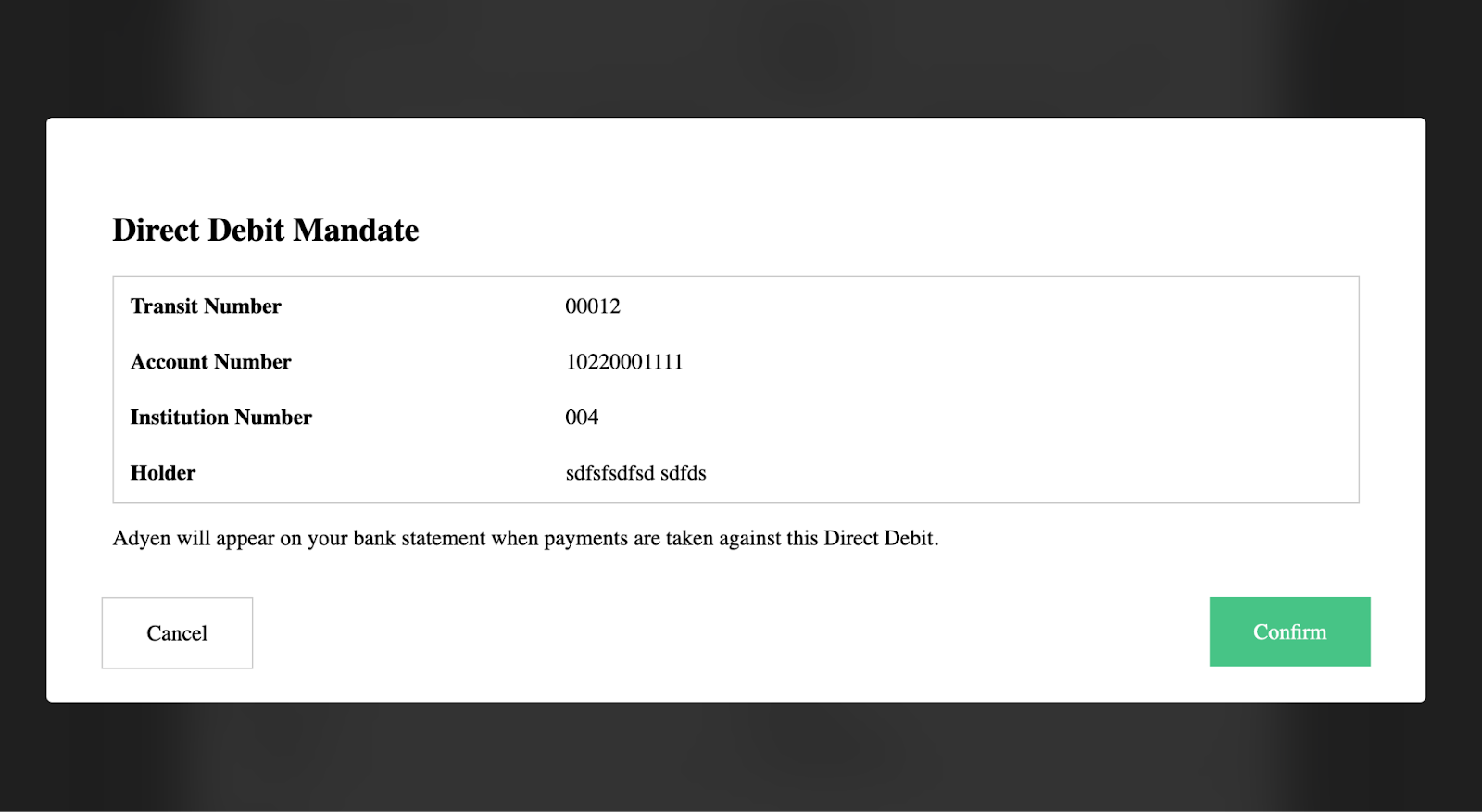
);When the host form calls chargify.token, Maxio.js opens the Maxio Payments mandate modal (see following image). The modal displays the Customer's transit, institution, and account numbers that you supplied in the configuration.
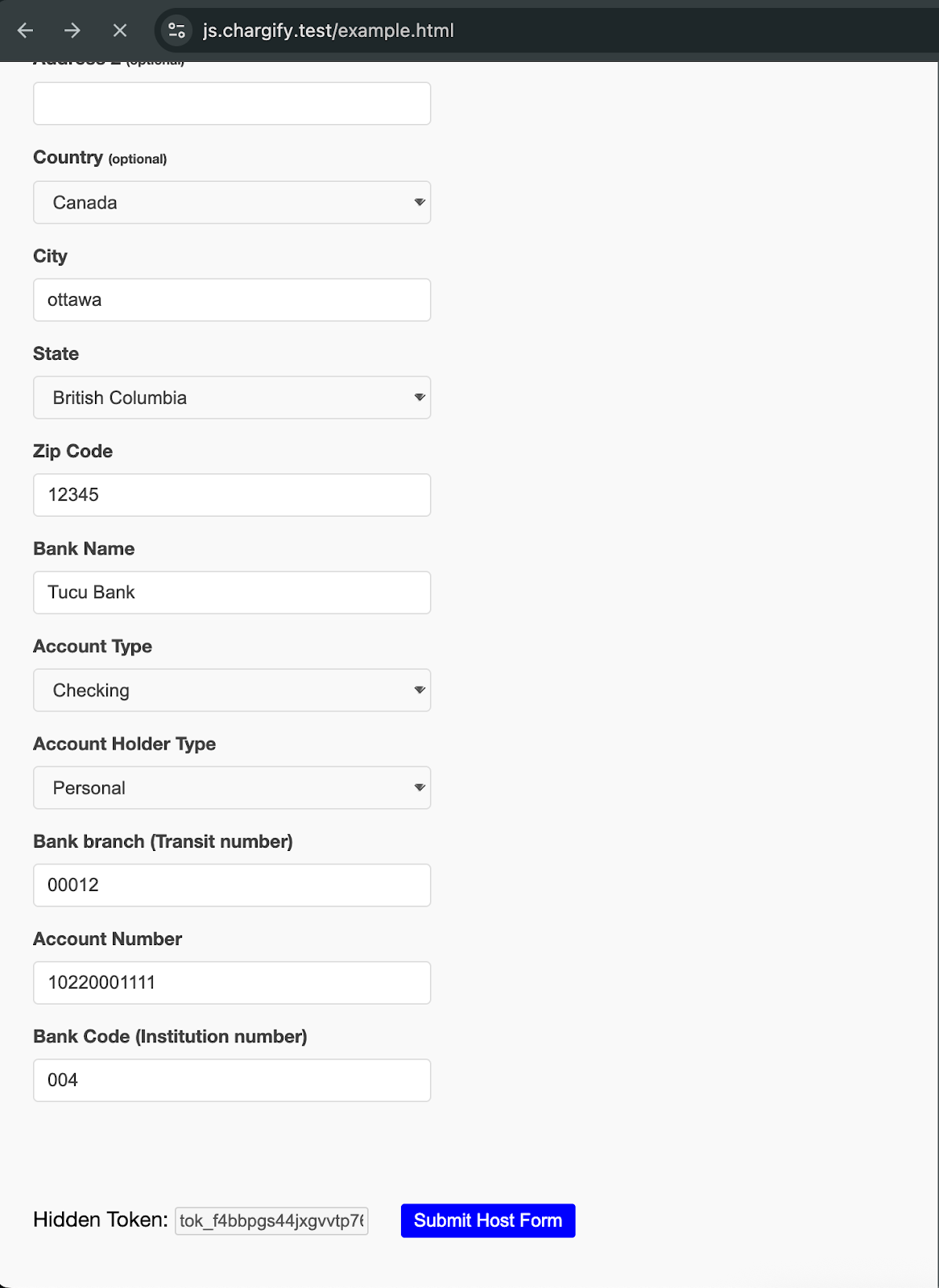
After the Customer confirms the mandate, Maxio Payments returns a tokenized EFT mandate (see following image)) that you can attach to the Subscription payment profile in Advanced Billing.
Use this configuration to test Canadian PAD Direct Debit mandates with the GoCardless gateway.
type: 'direct_debit' so the SDK fetches the GoCardless PAD configuration. Optionally, include selectors for the GoCardless header and footer regions if you want to mirror the hosted mandate copy on your page.const chargify = new Chargify();
chargify.load({
publicKey: 'YOUR_PAD_PUBLIC_KEY',
type: 'direct_debit',
selector: '#chargify-form',
selectorForGoCardlessHeader: '#gocardless-header',
selectorForGoCardlessFooter: '#gocardless-footer',
serverHost: 'https://acme.chargify.test',
fields: {
firstName: { selector: '#chargify-form', required: true },
lastName: { selector: '#chargify-form', required: true },
address: { selector: '#chargify-form', required: true },
address2: { selector: '#chargify-form' },
country: { selector: '#chargify-form' },
city: { selector: '#chargify-form', required: true },
state: { selector: '#chargify-form', required: true },
zip: { selector: '#chargify-form', required: true },
},
});
document
.querySelector('.host-form')
.addEventListener('submit', (event) => {
event.preventDefault();
chargify.token(event.target, (token) => {
document.querySelector('#host-token').value = token;
// Submit the host form to your backend with the returned token
// so you can attach it to the Customer's Subscription in Advanced Billing.
});
});Submitting the host form triggers the GoCardless PAD modal, where the payer reviews and confirms the mandate details. After the mandate is confirmed, Maxio.js returns a token to your page. Store this token and use it to attach the Direct Debit mandate to the Customer's Subscription in Advanced Billing.
To integrate chargify.js with Plaid, specific arguments are required:
chargify.js displays a link for connecting a bank account via Plaid.Additionally, the following callbacks are available:
null.The following code example shows this in context:
chargify.load(
  {
    selector: "#chargify-form",
    publicKey: "chjs_your-public-api-key",
    type: "direct_debit",
    selectorForPlaidLink: "#plaid-link",
    plaidLinkName: "Use Plaid to connect my bank account",
    plaidLinkStyle: {
      backgroundColor: "#000",
      color: "#fff",
      padding: "15px 25px",
      textDecoration: "none",
      margin: "20px",
    },
    serverHost: "https://acme.maxio.com",
  },
  {
    onPlaidLinkTokenError: function (error) {
      console.log(error);
    },
    onPlaidComplete: function () {
      console.log("onPlaidComplete");
    },
    onPlaidExit: function (error) {
      console.log("onPlaidExit: " + error);
    },
  },
);
For more details on how the Plaid authentication module works, check the Plaid documentation.
Maxio.js calls onCardTypeDetected when it recognizes the card brand a Customer is entering.
chargify.load(configObject, {
    onCardTypeDetected: function(type) {
        // this function is called when a card type provided by a customer is detected
    }
}
Returned card types: american-express, diners, diners-club, discover, jcb, maestro, mastercard, visa.
Every callback Maxio.js accepts is listed below. Those with a dedicated section above are marked, and the rest are available on any integration.
| Callback | When it fires |
|---|---|
onLoaded | The hosted field iframes have finished loading. |
onCardTypeDetected | Maxio.js detects the card brand being entered. |
onCardDetailsChange | The card details change. Provides brands and funding_source. |
onAddressChange | An address field changes. Provides the current address fields. |
onTreeDsModal | The 3D Secure modal opens (true) or closes (false). |
onThreeDsConfigError | 3D Secure configuration could not be loaded. |
onApplePayAuthorized | The Customer authorizes an Apple Pay payment. |
onApplePayBillingInfoReceived | Apple Pay returns billing information. |
onApplePayNotSupported | The browser or device does not support Apple Pay. |
onApplePayError | An Apple Pay error occurs. |
onGooglePayAuthorized | The Customer authorizes a Google Pay payment. |
onGooglePayBillingInfoReceived | Google Pay returns billing information. |
onGooglePayError | A Google Pay error occurs. |
onPayPalAuthorized | The Customer authorizes a PayPal payment. |
onPayPalError | A PayPal error occurs. |
onReceivedGoCardlessConfiguration | GoCardless configuration has been received. |
onGoCardlessReceiveConfigurationError | GoCardless configuration could not be received. |
onCancelGoCardlessModal | The Customer closes the GoCardless modal. |
onReceivedDirectDebitConfiguration | Direct Debit configuration has been received. |
onDirectDebitReceiveConfigurationError | Direct Debit configuration could not be received. |
onCancelDirectDebitModal | The Customer closes the Direct Debit modal. |
onPlaidComplete | The Customer completes the Plaid Link flow. |
onPlaidExit | The Customer exits Plaid Link before completing it. |
onPlaidLinkTokenError | A Plaid link token could not be created. |
onPlaidAccountVerificationPending | The linked account requires microdeposit verification. Provides the token. |
onPlaidAccountVerificationSuccess | Microdeposit verification succeeds. |
onPlaidAccountVerificationError | Microdeposit verification fails. |
| Field name | Example | Required | Description |
|---|---|---|---|
| selector | #chargify-form | Optional | Pulls in an iframe to the page. Can be defined on the overall form or within each field. |
| publicKey | chjs_g3ifjs... | Required | Authenticates your Maxio.js form to a specific Advanced Billing site. |
| type | card | Required | The type of payment profile the form accepts. Can be card, bank, direct_debit, gocardless, apple_pay, pay_pal, paypal_complete, or google_pay. |
| serverHost | https://acme.chargify.com | Required | The full URL of your Advanced Billing site. |
| gatewayHandle | stripe | Optional | If Multi-Gateway is enabled, specifies the particular gateway to send payment profiles to. |
| hideCardImage | true | Optional | Choose whether to display the image of a credit card. |
| optionalLabel | (optional) | Optional | A label that appears to denote optional fields. Useful for translations. |
| requiredLabel | * | Optional | A label that denotes required fields. |
| selectorForGoCardlessHeader | #gocardless-header | Required for GoCardless | Adds a GoCardless header to the page. |
| selectorForGoCardlessFooter | gocardless-footer | Required for GoCardless | Adds a footer indicating that payments are powered by GoCardless. |
| selectorForToggleIbanOrLocalDetails | #gocardless-toggle-iban | Optional for GoCardless | Adds a link to switch between IBAN and local bank details. If not present, the link is added automatically after the account number field. |
| customGoCardlessModalStyles | true | Optional for GoCardless | When true, allows custom styling for the GoCardless modal. Otherwise, GoCardless's default CSS is applied. |
| applePayLabel | Gold Product | Required for Apple Pay | Changes the label of the purchase within the Apple Pay modal. |
| applePayAmount | 10.5 | Required for Apple Pay | Specifies the amount for the purchase. |
| selectorForApplePayButton | #apple-pay | Required for Apple Pay | The selector for the Apple Pay button. |
| selectorForPayPalButton | #pay-pal | Required for PayPal | The selector for the PayPal button. |
| deviceData | true | Required to use Braintree Advanced Fraud Protection feature | Enables collection of Device Data for the Braintree Advanced Fraud Protection feature. |
| addressDropdowns | true | Optional, not supported for GoCardless | Renders country and state fields as dropdowns instead of plain text fields. |
| googlePayCountryCode | US | Required for Google Pay | The country code for the Google Pay purchase. |
| googlePayCurrency | USD | Required for Google Pay | The currency for the Google Pay purchase. |
| addRequiredSignToTranslatedLabels | true | Optional for GoCardless | Appends the required-field marker to translated labels. |
| blankPhoneAllowedForGoCardlessBecsNz | true | Optional for GoCardless | Allows a blank phone number for the BECS NZ scheme. |
| showRecaptchaTerms | true | Optional | Displays the Google reCAPTCHA attribution text below the card number, bank account number, and IBAN fields. |
| creditCardExpirationDateDropdowns | true | Optional, not supported for GoCardless | Renders credit card expiration month and year as dropdowns instead of plain text fields. |
| currency | USD | Optional | Specifies which currency to use. Set this when your site uses multi-currency with BlueSnap as the gateway or with Stripe for Direct Debit. |
The fields below are more suited for styling specific fields, but CSS can be specified globally for them:
| Field name | Example | Required | Description |
|---|---|---|---|
| label | First Name | Optional | The label displayed above the iframe. |
| placeHolder | Jane | Optional | The default text that appears in the input field. |
| required | true | Optional | Indicates whether the field is required for form submission. |
| message | This field is not valid. Please update it | Optional | The error text displayed for an invalid submission. |
| maxLength | 30 | Optional | The maximum number of characters allowed in the field. |
As of the 2022-02-23 version, some fields support additional error messages. To customize these messages, set the message as an object with predefined keys. Available keys for each field:
numbermessage: {
empty: 'This will be returned when the field is blank',
too_short: 'This will be returned when the credit card number is too short (< 13 digits)',
invalid: 'This will be returned when the credit card number is proper length but it is not a valid credit card number'
},monthmessage: {
empty: 'This will be returned when the field is blank',
in_past: 'This will be returned when the month is in the past',
invalid: 'This will be returned when the month is invalid',
},yearmessage: {
empty: 'This will be returned when the field is blank',
in_past: 'This will be returned when the year is in the past',
invalid: 'This will be returned when the year is invalid',
},cvvmessage: {
empty: 'This will be returned when the field is blank',
invalid: 'This will be returned when CVV code is invalid.',
},If you provide a string instead of an object for these fields, Maxio.js uses that string as the message for all validation errors.
As of the 2022-03-10 version, the number, month, and year fields support a next_focus option.
Setting this option triggers the focus event on the specified field after the current field is completed.
Example:
number: {
  selector: '#chargify-form',
  label: 'Number',
  placeholder: 'xxxx xxxx xxxx xxxx',
  next_focus: 'month',
}
In the example above, once the user enters the full credit card number (e.g., 4242 4242 4242 4242), focus automatically shifts to the month field.
As of the 2022-09-15 version, the country and state fields support an optional value key to set a default value. When addressDropdowns is enabled globally, the value must be in two-letter format to pre-select a dropdown value.
Example:
country: {
  selector: '#chargify-form',
  label: 'Country',
  value: 'US'
},
state: {
  selector: '#chargify-form',
  label: 'State',
  value: 'TX'
}Note that styles can be set globally across the whole form, or individually on particular fields. All styles are optional.
Objects that can be styled:
| Field Name | Description |
|---|---|
| field | This applies to the container of the field. |
| input | The text that appears in the iframe. |
| label | The label for the iframe. |
| message | The text that appears on an invalid submission. |
Available styles:
| Field Name | Example | Description |
|---|---|---|
| backgroundColor | orange | Changes the background color. |
| paddingTop | 10px | Adds space to the top. |
| paddingBottom | 10px | Adds space to the bottom. |
| borderRadius | 5px | Defines the radius of the element's corners. |
| color | blue | Changes the text color in the input. |
| border | 1px dashed #ffc0cb57 | Creates a border around the iframe. |
| fontSize | 11px | Sets the font size in the input. |
To style a pseudo-element, place its name in quotes, e.g.:
style: {
  input: {
    '::placeholder': { color: '#ff0000', fontStyle: 'italic' }
  }
}
This changes the placeholder text color to red and sets the font style to italic.
To style a pseudo-class, use the same approach, e.g.:
style: {
  input: {
    ':focus': { border: 'solid 3px #ff0000', color: '#ff0000' }
  }
}
This adds a 3px red border when you place your cursor in the input field. (This field receives the focus event.)
| Field Name | Example | Required | Description |
|---|---|---|---|
| firstName | Joe | Optional | Cardholder's first name |
| lastName | Doe | Optional | Cardholder's last name |
| number | 4242 4242 4242 4242 | Required | Credit card number |
| month | 08 | Required | Card expiration month |
| year | 2022 | Required | Card expiration year |
| cvv | 123 | Optional (may be required by your gateway settings) | The 3- or 4-digit Card Verification Value. This value is passed through to the payment gateway. |
| address | 123 Main St. | Optional (may be required by your gateway settings) | The credit card or bank account billing street address. This value is passed through to the payment gateway. |
| address2 | i.e. Apt. 100 | Optional | Second line of the Customer’s billing address |
| city | Boston | Optional (may be required by your gateway settings) | The credit card billing address city. This value is passed through to the payment gateway. |
| state | MA | Optional (may be required by your gateway settings) | The credit card billing address state (preferably in 2-letter format). This value is passed through to the payment gateway. |
| zip | 12345 | Optional (may be required by your gateway settings) | The credit card billing address ZIP code. This value is passed through to the payment gateway. |
| country | US | Optional (may be required by your gateway settings) | The credit card billing address country (preferably in ISO 3166-1 alpha-2 format). This value is passed through to the payment gateway. Some gateways require country codes in a specific format. Check your gateway’s documentation. |
| Field Name | Example | Required | Description |
|---|---|---|---|
| firstName | Joe | Optional | First name on the bank account |
| lastName | Doe | Optional | Last name on the card or bank account |
| bankName | Test Bank | Required | Name of the bank where the Customer’s account resides |
| routingNumber | 110000000 | Required | Bank's routing number |
| accountNumber | 000123456789 | Required | Customer’s bank account number |
| accountType | checking | N/A | This defaults to checking and cannot be changed |
| accountHolderType | personal | Required | May be personal (default) or business |
| address | 123 Main St. | Optional (may be required by your product configuration or gateway settings) | The bank account billing street address. This value is passed through to the payment gateway. |
| address2 | Apt. 100 | Optional | Second line of the Customer’s billing address |
| city | Boston | Optional (may be required by your product configuration or gateway settings) | The bank account billing address city. This value is passed through to the payment gateway. |
| state | MA | Optional (may be required by your gateway settings) | The bank account billing address state (preferably in 2-letter format). This value is passed through to the payment gateway. |
| zip | 12345 | Optional (may be required by your gateway settings) | The bank account billing address ZIP code. This value is passed through to the payment gateway. |
| country | US | Optional (may be required by your gateway settings) | The bank account billing address country (preferably in ISO 3166-1 alpha-2 format). This value is passed through to the payment gateway. Some gateways require country codes in a specific format. Check your gateway’s documentation. |
| Field Name | Example | Required | Description |
|---|---|---|---|
| firstName | Joe | Required | First name on the bank account. |
| lastName | Doe | Required | Last name on the bank account. |
joe@chargify.test | Required for BECS NZ scheme only | The Customer’s email address. | |
| phone | +640800000000 | Required for BECS NZ scheme only | The Customer’s phone number. |
| bankName | Test Bank | Required | The name of the bank where the Customer’s account resides. |
| bankIban | FR1420041010050500013M02606 | Required | The Customer’s International Bank Account Number (IBAN). Required if local bank details are empty. |
| routingNumber | 19043 | Required | Bank code. Alternatively, you can provide an IBAN. |
| branchCode | 200000 | Required | Branch code. Alternatively, you can provide an IBAN. |
| accountNumber | 55779911 | Required | The Customer’s bank account number. Alternatively, you can provide an IBAN. |
| accountHolderType | personal | Required | May be personal (default) or business. |
| address | 123 Main St. | Required | The bank account billing street address. This value is passed through to the payment gateway. |
| address2 | Apt. 100 | Optional | Second line of the Customer’s billing address. |
| city | London | Required | The bank account billing address city. |
| state | LND | Required | The bank account billing address state, in 2- or 3-letter format. |
| zip | E1W 3SS | Required | The bank account billing address zip code. |
| country | GB | Required | The bank account billing address country in ISO 3166-1 alpha-2 format. |
| swedishIdentityNumber | 198112289874 | Required for Autogiro scheme only | The Swedish civic/identity number. |
| danishIdentityNumber | 0101701234 | Required for Betalingsservice scheme only | The Danish civic/identity number. |
| Field Name | Example | Required | Description |
|---|---|---|---|
| firstName | Joe | Required | First name on bank account. |
| lastName | Doe | Required | Last name on bank account. |
joe@chargify.test | Required for BECS NZ scheme only | The Customer's email address. | |
| bankName | Test Bank | Required | The name of the bank where the Customer's account resides. |
| bankIban | FR1420041010050500013M02606 | Required | The Customer's International Bank Account Number (IBAN). |
| accountHolderType | personal | Required | May be personal (default) or business. |
| address | 123 Main St. | Required | The bank account billing street address. This value is passed through to the payment gateway. |
| address2 | Apt. 100 | Optional | Second line of the Customer's billing address. |
| city | Berlin | Required | The city of the bank account billing address. |
| state | BE | Required | The state of the bank account billing address, in 2- or 3-letter format. |
| zip | 12345 | Required | The zip code of the bank account billing address. |
| country | DE | Required | The country of the bank account billing address, in ISO 3166-1 alpha-2 format. |
| Field Name | Example | Required | Description |
|---|---|---|---|
| firstName | Joe | Required | First name on bank account. |
| lastName | Doe | Required | Last name on bank account. |
joe@chargify.test | Required for BECS NZ scheme only | The Customer's email address. | |
| bankName | Test Bank | Required | The name of the bank where the Customer's account resides. |
| branchCode | 000000 | Required | BSB code of the bank branch. |
| accountNumber | 000123456 | Required | The Customer's bank account number. |
| accountHolderType | personal | Required | May be personal (default) or business. |
| address | 123 Main St. | Required | The bank account billing street address. This value is passed through to the payment gateway. |
| address2 | Apt. 100 | Optional | Second line of the Customer's billing address. |
| city | Stony Rise | Required | The city of the bank account billing address. |
| state | TAS | Required | The state of the bank account billing address, in 2- or 3-letter format. |
| zip | 12345 | Required | The zip code of the bank account billing address. |
| country | AU | Required | The country of the bank account billing address, in ISO 3166-1 alpha-2 format. |
| Field name | Example | Required | Description |
|---|---|---|---|
| firstName | Joe | Required | First name on bank account |
| lastName | Doe | Required | Last name on bank account |
joe@chargify.test | Required for BECS NZ scheme only | The customer's email | |
| bankName | Test Bank | Required | The name of the bank where the customer’s account resides |
| branchCode | 108800 | Required | Sort Code |
| accountNumber | 00012345 | Required | Account Number |
| accountHolderType | personal | Required | may be personal (default) or business |
| address | 123 Main St. | Required | The bank account billing street address (i.e. 123 Main St.). This value is merely passed through to the payment gateway |
| address2 | Apt. 100 | Optional | Second line of the customer’s billing address |
| city | London | Required | The bank account billing address city. |
| state | LND | Required | The bank account billing address state, in 2 or 3-letter format. |
| zip | E1W 3SS | Required | The bank account billing address zip code. |
| country | GB | Required | The bank account billing address country, in ISO 3166-1 alpha-2 format. |
| Field Name | Example | Required | Description |
|---|---|---|---|
| firstName | Joe | Optional | Cardholder's first name |
| lastName | Doe | Optional | Cardholder's last name |
| address | 123 Main St. | Optional (may be required by your gateway settings) | The billing street address for the credit card or bank account. This value is passed through to the payment gateway. |
| address2 | i.e. Apt. 100 | Optional | Second line of the Customer's billing address. |
| city | Boston | Optional (may be required by your gateway settings) | The billing city for the credit card. This value is passed through to the payment gateway. |
| state | MA | Optional (may be required by your gateway settings) | The billing state for the credit card, preferably in two-letter format. This value is passed through to the payment gateway. |
| zip | 12345 | Optional (may be required by your gateway settings) | The billing ZIP code for the credit card. This value is passed through to the payment gateway. |
| country | US | Optional (may be required by your gateway settings) | The billing country for the credit card, preferably in ISO 3166-1 alpha-2 format. This value is passed through to the payment gateway. Some gateways require country codes in a specific format; refer to your gateway’s documentation. |
| Field Name | Example | Required | Description |
|---|---|---|---|
| firstName | Joe | Optional | Cardholder's first name |
| lastName | Doe | Optional | Cardholder's last name |
| address | 123 Main St. | Optional (may be required by your gateway settings) | The billing street address for the credit card or bank account. This value is passed through to the payment gateway. |
| address2 | i.e. Apt. 100 | Optional | Second line of the Customer's billing address. |
| city | Boston | Optional (may be required by your gateway settings) | The billing city for the credit card. This value is passed through to the payment gateway. |
| state | MA | Optional (may be required by your gateway settings) | The billing state for the credit card, preferably in two-letter format. This value is passed through to the payment gateway. |
| zip | 12345 | Optional (may be required by your gateway settings) | The billing ZIP code for the credit card. This value is passed through to the payment gateway. |
| country | US | Optional (may be required by your gateway settings) | The billing country for the credit card, preferably in ISO 3166-1 alpha-2 format. This value is passed through to the payment gateway. Some gateways require country codes in a specific format; refer to your gateway’s documentation. |
Still need help?
Reach out and our support team will take it from here.