
Getting Started as a Developer
Applies to: Advanced Billing · Maxio Core
Last updated on Aug 26, 2026
Use the Advanced Billing and Maxio Core APIs to build a billing integration that fits how you monetize your products and services, including upfront and usage-based pricing models. Each product has its own API documentation and its own credentials, so start with the section for the product you are integrating with.
Advanced Billing API documentation
The Maxio Developer Portal holds the reference documentation for the Advanced Billing API. Start there when you set up an Advanced Billing integration.
To create the API credentials your integration authenticates with, see the Manage Advanced Billing API Keys help article.
Maxio Core API documentation
Maxio Core hosts its full API documentation inside the application.
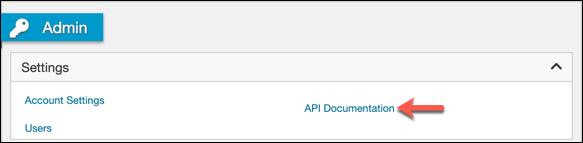
Important: The Admin page is only available to users with the Admin role. Without it, the side navigation shows Options in place of Admin.
Go to Admin > Settings > API Documentation. The documentation opens in a new browser tab.
For API access requirements and how to create an API token, see the Get Started with the Maxio Core API help article.
Setup Guide
Maxio's in-app Setup Guide covers the account setup that runs alongside your integration work, tracking your onboarding progress task by task. Find it at the top of the left navigation. It is not turned on for every account, so it may not appear on yours.
Key links and resources
The Developer One Sheet gathers the API endpoints, integration guides, and Maxio.js references you reach for most often into a single page.
Related information
If you are new to Advanced Billing, see the System Overview help article for a brief tour of the system and its functions.
For additional context on implementing Advanced Billing, see the Intro to Quick Start Guides help article.
Still need help?
Reach out and our support team will take it from here.