
Understand Transaction Rejection Reasons
Applies to: Maxio Payments
Last updated on Aug 26, 2026
Use Maxio Payments rejection reasons to understand why a card payment or tokenization attempt failed. Review plain-language decline explanations, recommended buyer messaging, and next actions for resolving failed transactions.
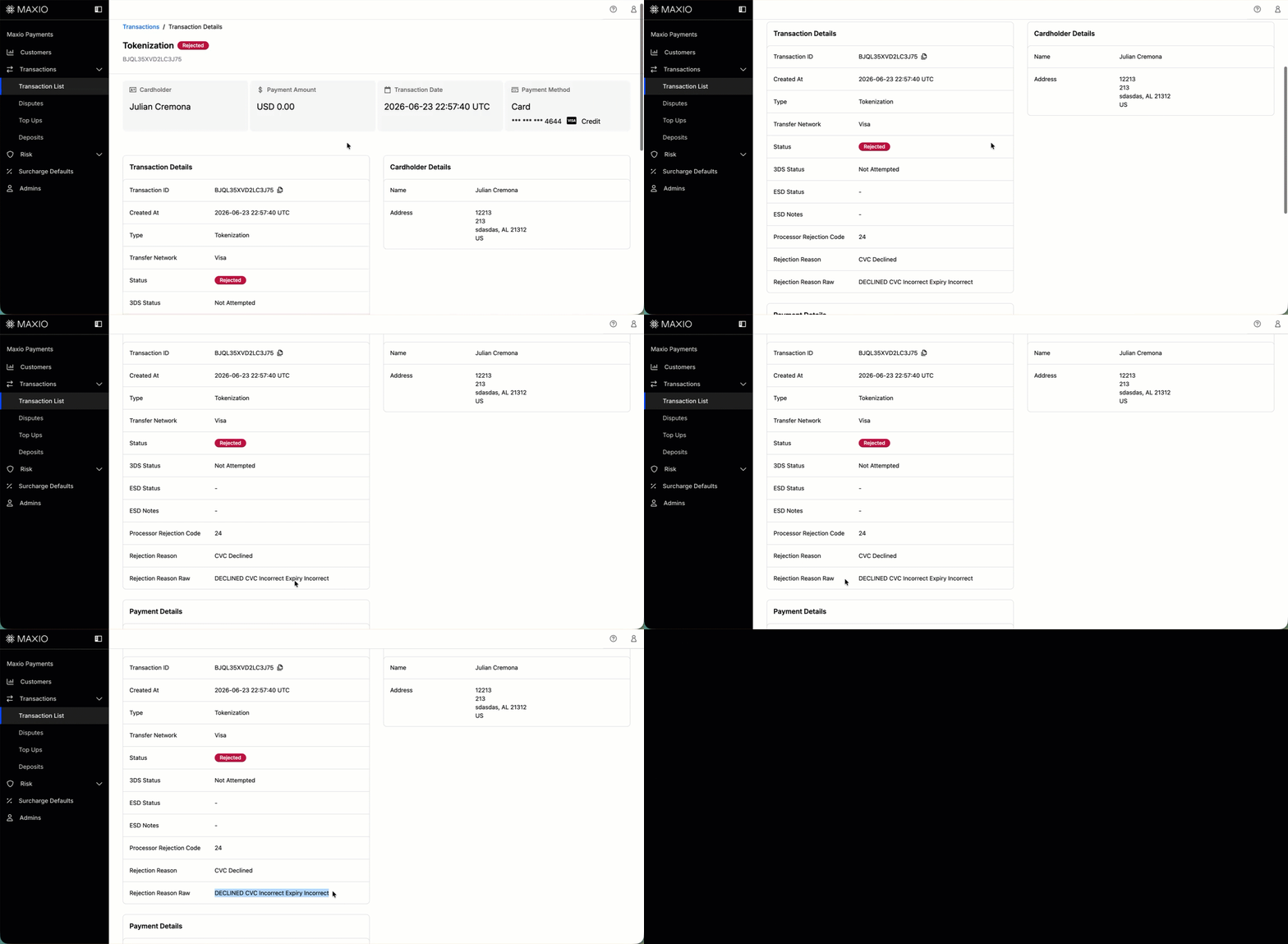
When a payment or tokenization fails in Maxio Payments, you can view the Rejection Reason Raw field on the transaction detail page. This field contains the raw response sent by the card network or issuing bank explaining why the transaction was declined.
These codes are technical by nature. They're written for payment processors, not customers. This article helps you translate what each rejection reason means and gives you language you can use when reaching out to your buyer to help them resolve the issue.
WARNING: Do not share the raw rejection reason text directly with your buyer. Exposing these details could educate bad actors and compromise the integrity of fraud prevention systems. Use the plain-language explanations and suggested talking points in this article instead.
Find the rejection reason
Every failed transaction records its rejection reason on that transaction's own detail page.
To find the rejection reason for a failed transaction
- Navigate to Transactions in your Maxio Payments dashboard.
- Open the failed transaction you want to review.
- On the transaction detail page, locate the Rejection Reason Raw field under the transaction status section.
Rejection reason reference
Rejection reasons fall into four categories based on the appropriate next action:
- Correct payment information - The buyer entered something incorrectly and can retry with accurate details.
- Use a different payment method - The card itself has an issue that cannot be fixed by re-entering data.
- Add funds - The payment method doesn't have sufficient balance or credit.
- Contact issuing bank - The bank has placed a restriction that only they can resolve.
| Rejection Reason Raw | What It Means | What to Tell Your Buyer | Action |
|---|---|---|---|
| 01 / 02: Refer to Card Issuer | The bank has declined the transaction without a specific reason and is asking the cardholder to call them directly. | "Your bank has declined this transaction and is asking you to contact them directly. Please call the number on the back of your card to find out what's happening, then try your purchase again." | Contact issuing bank |
| 04: Pickup Card / 07: Pickup Card Special Conditions | The card issuer has flagged this card as suspected counterfeit, stolen, or fraudulent and has requested it be retained. | "Your bank has declined this card and it cannot be processed. Please use a different payment method to complete your purchase." | Use a different payment method, do not retry |
| 05: Do Not Honor | A generic catch-all decline that can have many causes, including fraud suspicion, account status issues, or internal bank policies. This is the most common decline code. | "Your bank has declined this transaction. This can happen for a variety of reasons. Please call the number on the back of your card to find out why and to authorize the payment, then try again." | Contact issuing bank |
| 12: Invalid Transaction | The card issuer doesn't permit this type of transaction on this card or account. Common with corporate, fleet, or limited-use cards that have merchant category restrictions. | "Your card doesn't support this type of transaction. This can happen with some corporate or specialty cards. Please try a different card." | Use a different payment method |
| 14: No Such Card / Invalid Card Number | The card number submitted isn't valid or doesn't correspond to a recognized account. Common causes: missing digit, transposed numbers, or stale autofill. | "We weren't able to process your card number. Please double-check that all digits are entered correctly, then try again. If the issue continues, please try a different card." | Correct payment information |
| 41: Lost Card / 43: Stolen Card | The card has been reported as lost or stolen by the cardholder. | "This card cannot be processed. Please use a different payment method to complete your purchase." | Use a different payment method, do not retry |
| 51: Insufficient Funds / Over Credit Limit | The card doesn't have enough available balance or credit to cover the transaction amount. | "Your payment was declined because the available balance on your card isn't sufficient to cover this charge. Please add funds to your account and try again, or use a different payment method." | Add funds |
| 54: Expired Card / Declined Expiry Incorrect | The expiration date submitted doesn't match the issuer's records, or the card has passed its expiration date. Common causes: typo, autofill with an old saved card, or a recently reissued card with a new date. | "The expiration date we received doesn't match what your bank has on file. Please double-check the date printed on the front of your card and try again. If your card was recently renewed, make sure you're using the new one." | Correct payment information |
| 57: Transaction Not Permitted to Cardholder / 58: Not Permitted to Terminal | The card type or account is restricted from this transaction type. Often prepaid, fleet, or restricted-use cards. | "Your bank doesn't allow this card to be used for this type of transaction. Please try a different card." | Use a different payment method |
| 61: Exceeds Withdrawal Amount Limit | The transaction amount exceeds the daily or per-transaction spending limit set by the cardholder's bank. | "This charge exceeds the spending limit your bank has set on this card. You can contact your bank to temporarily increase your limit, or try a different card." | Contact issuing bank or use different card |
| 62: Restricted Card | The card has been blocked by the issuer, often due to account restrictions or sanctions. | "Your bank has placed a restriction on this card. Please contact your bank for more information, or use a different payment method." | Use a different payment method |
| 65: Exceeds Withdrawal Frequency Limit | The cardholder has made too many transactions within a given period and their bank has blocked additional charges. | "Your bank has temporarily limited new transactions on this card due to recent activity. Please contact your bank or try again with a different card." | Contact issuing bank or use different card |
| 78: Blocked First Use / No Account | The card has never been activated, or the account associated with it doesn't exist in the issuer's system. | "It looks like this card may not have been activated yet. Please contact your bank to activate the card, then try again." | Contact issuing bank |
| 91: Issuer Inoperative / 96: System Malfunction | The card issuer's systems are temporarily unavailable and couldn't respond to the authorization request. This is a technical issue on the bank's side, not with the card or account. | "Your bank's systems are temporarily unavailable. This isn't an issue with your card. Please wait a few minutes and try again, or use a different payment method in the meantime." | Retry later |
| 93: Transaction Cannot Be Completed | The card issuer has declined due to a compliance or regulatory reason, such as sanctions screening. | "Your bank has declined this transaction. Please contact your bank directly to resolve this." | Contact issuing bank, do not retry |
| Declined CVC Incorrect / Invalid CVC | The CVV/CVC security code entered doesn't match the issuer's records. Common causes: typo, worn card, or using the wrong card's CVV. | "The security code (CVV) we received didn't match your card. Please check the 3-digit code on the back of your card (or the 4-digit code on the front for American Express) and try again." | Correct payment information |
Tips for handling failed payments
Use these guidelines when communicating with buyers about failed payments:
- Keep the conversation neutral. Most declines are simple data entry issues. Avoid implying fraud or account problems unless the code clearly indicates it.
- Never share the raw rejection reason with your buyer. This information is intended for merchant use only. Sharing it could reveal details about fraud detection systems and create security risks.
- Do not retry cards flagged 04, 07, 41, 43, or 93. These indicate serious card-level issues. Retrying can result in additional network fees or flag your merchant account.
- Offer alternatives proactively. If a buyer cannot resolve a bank-side issue quickly, offer them the option to pay with a different card. Having a backup payment method available reduces drop-off.
- Use rejection reasons for subscription billing follow-up. If a recurring charge fails, Maxio Payments surfaces the rejection reason on the transaction record. Use the rejection reason to determine whether to prompt the subscriber to update their payment method or take another action.
Still need help?
Reach out and our support team will take it from here.