
View and Export Disputes
Applies to: Maxio Payments
Last updated on Aug 28, 2026
A dispute, or chargeback, happens when a cardholder challenges a charge with their card issuer instead of resolving it directly with you. Track each case through the chargeback lifecycle, and respond before the deadline passes. For what the lifecycle involves and which evidence tends to win a case, see Understand Credit Card Chargebacks. A sudden run of disputes is often automated card testing rather than real customers — see Manage Card Testing Exposure.
In Maxio Payments, expand Transactions in the left navigation menu and select Disputes to see all active and historical disputed credit card transaction cases across your account(s).
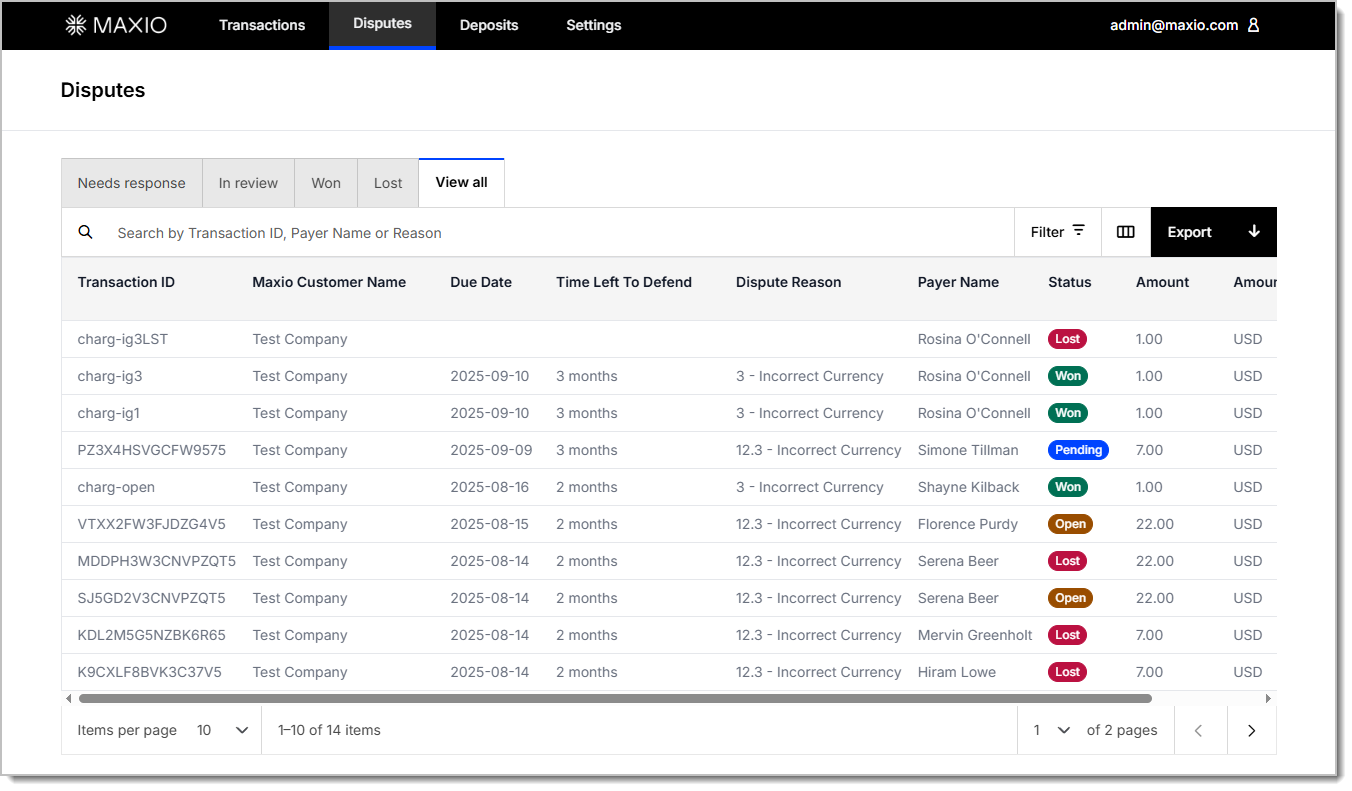
Dispute views
From the Disputes page, select one of the following views to filter the list by status. Each view reflects where the case stands in the chargeback lifecycle:
- Needs response - Disputes that require action. This corresponds to the Open status.
- In review - Disputes where evidence has been submitted and the issuing bank is reviewing. This corresponds to the Pending status.
- Won - The dispute was decided in the merchant's favor. No further edits or uploads are allowed at this stage.
- Lost - The dispute was not overturned and remains a debit.
- View all - View all disputes, regardless of their current stage.
Second chargebacks
A second chargeback occurs when a related dispute is filed again on the same transaction following an earlier chargeback. In Maxio Payments, second chargebacks appear in the Lost tab and can't be defended further.
Filter the dispute report by Dispute Type to identify disputes marked Second Chargeback. Open the dispute record to review the full dispute timeline, including the original dispute activity and the date and time the second chargeback was filed.
Dispute report
Filter, search, and customize this report to review your dispute activity, then export it to a .csv file with your selections in place. Each row represents a dispute that has occurred within Maxio Payments. Search by Transaction ID, Payer Name, or Reason to find a specific dispute.
Dispute report columns
| Column | Description |
|---|---|
| Transaction ID | A unique identifier assigned by Maxio Payments to each transaction. |
| Payer Name | The name of the customer or entity that initiated the payment. |
| Payer Billing Street | The street address from the payer's billing information. |
| Payer House Number | The house or building number from the payer's billing information. |
| Payer City | The city from the payer's billing information. |
| Payer State | The state or region from the payer's billing information. |
| Payer Zip | The postal code from the payer's billing information. |
| Payer Country | The country from the payer's billing information. |
| Transfer Network | The financial network used to process the transaction, e.g. Visa, ACH, etc. |
| Status | The current state of the dispute, such as Won, Pending, Open, or Lost. |
| Dispute Type | The classification of the disputed transaction: Chargeback or Second Chargeback. |
| Amount | The original amount submitted for processing, excluding fees. |
| Amount Currency | The currency of the transaction amount (e.g., CAD, USD). |
| Settlement Currency | The currency in which the disputed transaction is settled. |
| Total Payment Fees | Combined fees associated with processing the original transaction, including card network and Maxio service fees. |
| Created | The timestamp of when the transaction was initiated. |
| Dispute Reason | The reason code provided by the card issuer (e.g., fraud, product not received) explains why the transaction is being contested. |
| Time Left To Defend | Countdown indicating the time remaining before the dispute response deadline. |
| Due Date | The final date by which a response and documentation must be submitted to contest the dispute. |
| Payment Amount | The total amount charged initially in the disputed transaction. |
| Transaction Date | The date the original, disputed transaction was processed. |
| Card | Masked details of the card used in the original payment (e.g., a card ending in 1234). |
Click into a dispute to open the transaction details of the dispute.
Related information
For an overview of the Maxio Payments portal and its other views, see Using Maxio Payments.
Still need help?
Reach out and our support team will take it from here.