
Stripe 1Way Data Mapping
Applies to: Maxio Core
Last updated on Sep 20, 2026
Stripe 1Way syncs Plans, Customers, Invoices, Payments, Refunds, and Deposits from your connected Stripe account into Maxio Platform, and each Stripe field maps to a specific Maxio Platform field once it syncs.
Credit Card and Bank ACH information is never sent to or stored in Maxio Platform.
This mapping logic is specific to the Stripe 1Way Integration. If you use Stripe to let Customers pay Invoices generated directly in Maxio Platform instead, see Set Up Stripe for Payments, since the sync logic and information flow are different there.
How Stripe Plans map to Maxio Platform Items
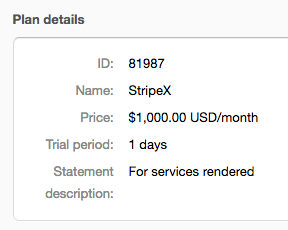
How Stripe Plan fields map to Maxio Platform Item fields
| Stripe field | Maxio Platform field |
|---|---|
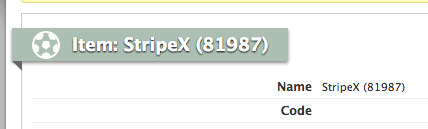
| Plan Name and Plan ID | Item Name, set to the Plan Name plus the Plan ID in parentheses |
| Interval | Item Default Duration |
| Description | Item Note |
Example:
How Stripe Customers map to Maxio Platform Customers
The Maxio Platform Customer Name is set to the Stripe Description, and the Customer Email address is set to the Stripe Email address.
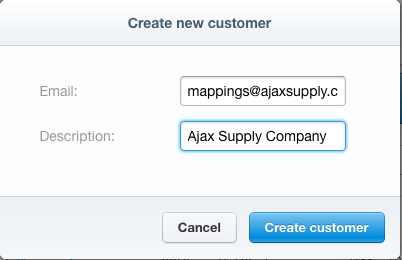
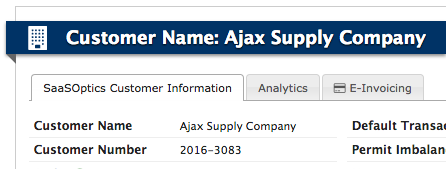
The unique Stripe ID for the Customer is stored in a special Stripe ID field in the Maxio Platform Customer.
How Stripe Subscription changes sync to Maxio Platform
Data from the Stripe Subscription object does not sync. Invoices produced for a Subscription, as well as changes to a Subscription, sync to Maxio Platform, and Transaction information is created from information about the Subscription contained within the Invoice.
In Stripe, you have the ability to edit a Subscription and change properties of the Subscription, including the quantity (which changes the fee) or the Plan itself. Such changes produce Invoices with prorations, and those Invoices sync to Maxio Platform, resulting in proper Revenue recording.
How Stripe Invoices map to Maxio Platform Invoices
The Maxio Platform Invoice Number is set to the Stripe Invoice's own Invoice Number. If Stripe didn't assign one, such as for Invoices created before February 2017, the Maxio Platform Invoice Number falls back to the Stripe Invoice ID instead.
The Maxio Platform Invoice Date is set to the Stripe Invoice's created date.
Tax amounts and tax percentages added to a Stripe Invoice sync to Maxio Platform's Sales Tax and Sales Tax Percentage fields on the Invoice.
In Stripe, you can create an Invoice Line Item and add it to an Invoice, then charge it to a card or ACH on file. Such Invoice Line Items sync and use the Non-Plan Item set in the Stripe 1Way Integration Settings.
How coupons and discounts sync
When a Stripe coupon applies to an Invoice, how the discount is recorded in Maxio Platform depends on the Discount Treatment setting in your Stripe 1Way Integration Settings.
- Use Net Invoice Line Amounts (the default) bakes the coupon's discount directly into the amount of each discountable Invoice Line Item. Maxio Platform keeps no separate record of the Invoice Line's original, pre-discount amount or of which coupon applied.
- Create Discount Lines syncs each discountable Invoice Line Item at its full, pre-discount (gross) amount, and adds a second, negative-amount Invoice Line Item for the discount. This discount line is linked to the first discountable Invoice Line Item on the Invoice, and its description references the originating Stripe coupon's name or ID. Every discount line an Invoice creates uses the single Fallback Discount Item set on the integration.
Stripe applies a coupon at the Invoice level rather than to individual lines. If more than one Invoice Line is discountable, the full discount is still recorded as one discount line, linked to the Invoice's first discountable line.
Regardless of which setting is selected, the Invoice's own subtotal, total, and amount due always come directly from the Stripe Invoice, so switching Discount Treatment never changes what a Customer is charged — only how the discount is represented across Invoice Line Items in Maxio Platform. Changing this setting doesn't retroactively rewrite Invoices you've already synced; it only takes effect the next time an Invoice syncs.
If a Stripe Invoice's coupon is later removed and the Invoice is re-synced, Maxio Platform removes the discount line it previously created, as long as that line hasn't already been exported to your GL or otherwise locked.
Payment without an Invoice
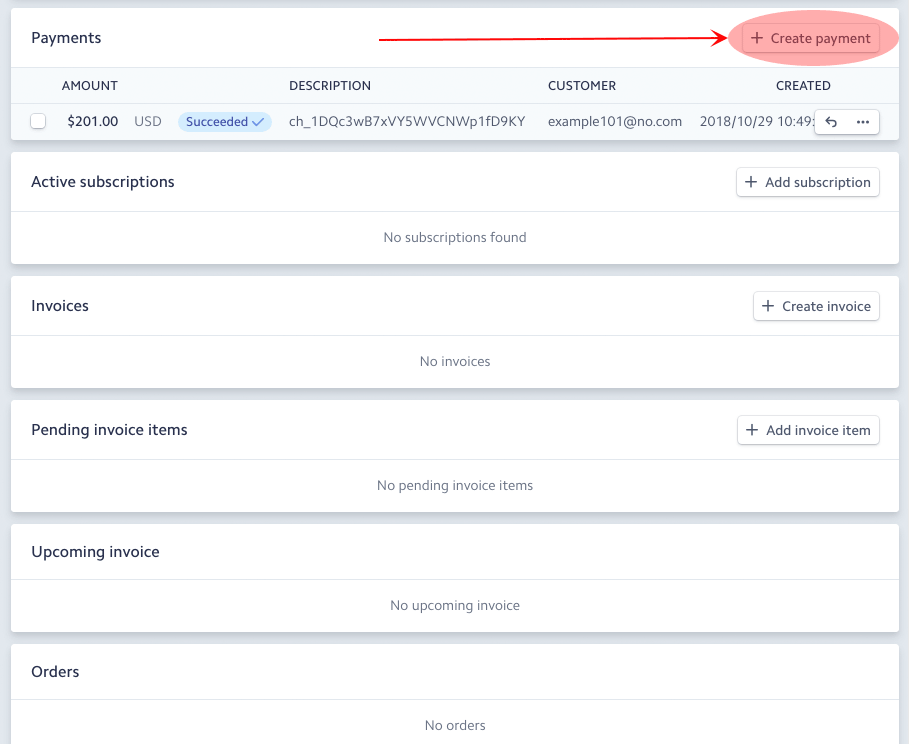
A Stripe payment that is not made against an Invoice never syncs to Maxio Platform. In the example below, the Create Payment function is used to create a Payment with no Invoice. This payment will not sync to Maxio Platform:
Invoice without a Subscription
If you create Invoices directly without using Subscriptions, the Invoice data syncs to Maxio Platform, and Payments made against those Invoices sync to Maxio Platform too.
However, since Stripe does not associate a Plan with such Invoice Line Items, Maxio Platform does not receive Item information or date ranges. In this scenario, Maxio Platform uses the designated Non-Plan Item and its Maxio Platform Item properties to create Transactions and Revenue.
Since there is only one designated Non-Plan Item, and since an Item only has one set of properties, all Invoice Line Items sync to like Transactions in Maxio Platform. The Transaction start date is that of the Stripe Invoice, and the Transaction end date is calculated using the Item's default duration. The Transaction revenue is generated based on the Maxio Platform Item's default Revenue Recognition method. The Create Invoice option in Stripe here:

Was used to create this invoice in Stripe. Note there is no selection of a Plan Item in Stripe:
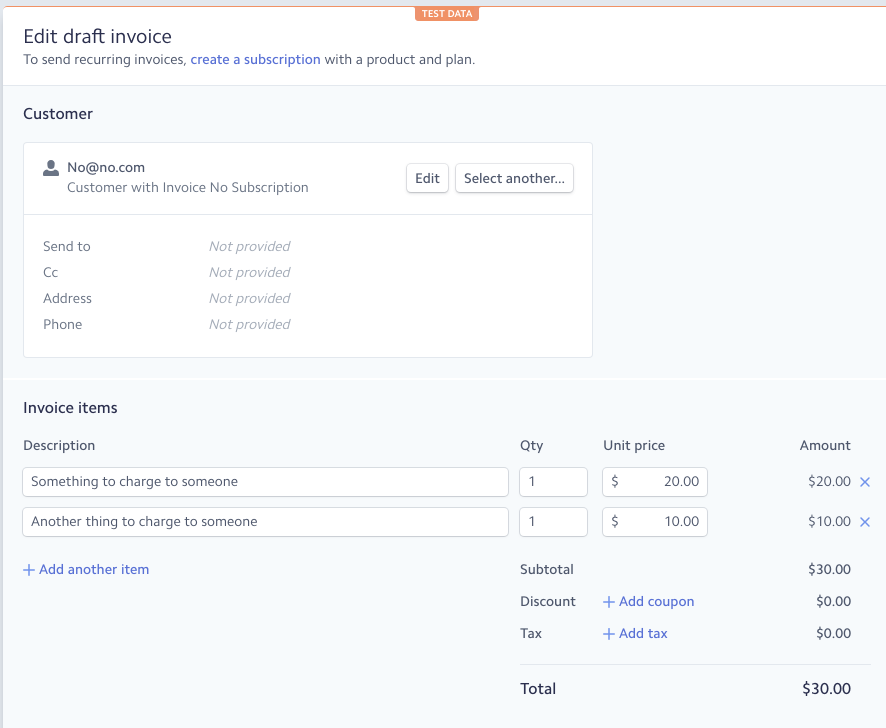
When synced to Maxio Platform, the Invoice goes to Maxio Platform, but since there is no Stripe Plan selected in the Invoice, each Line Item in Maxio Platform is assigned the Non-Plan Item in the Stripe 1Way settings.
In this example, we created an Item named Non-Plan Holder and selected it as the Non-Plan Item for Invoices in our integration settings in Maxio Platform.
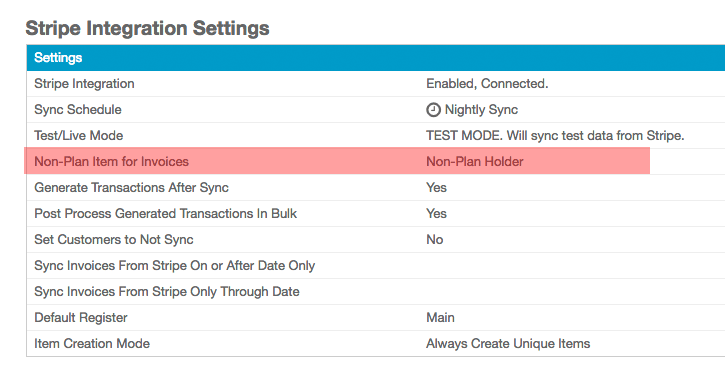
The Invoice in Maxio Platform now has two Line Items, each with Non-Plan Holder as the Item.
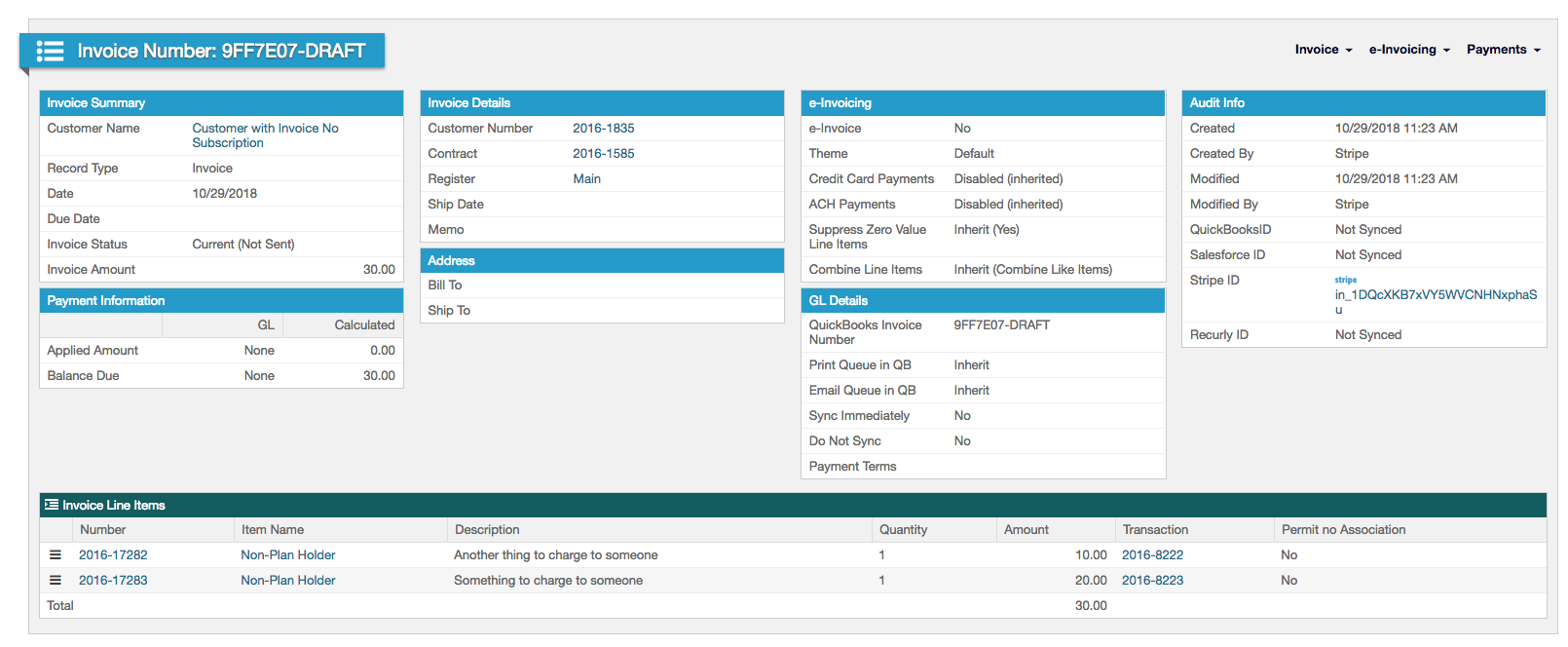
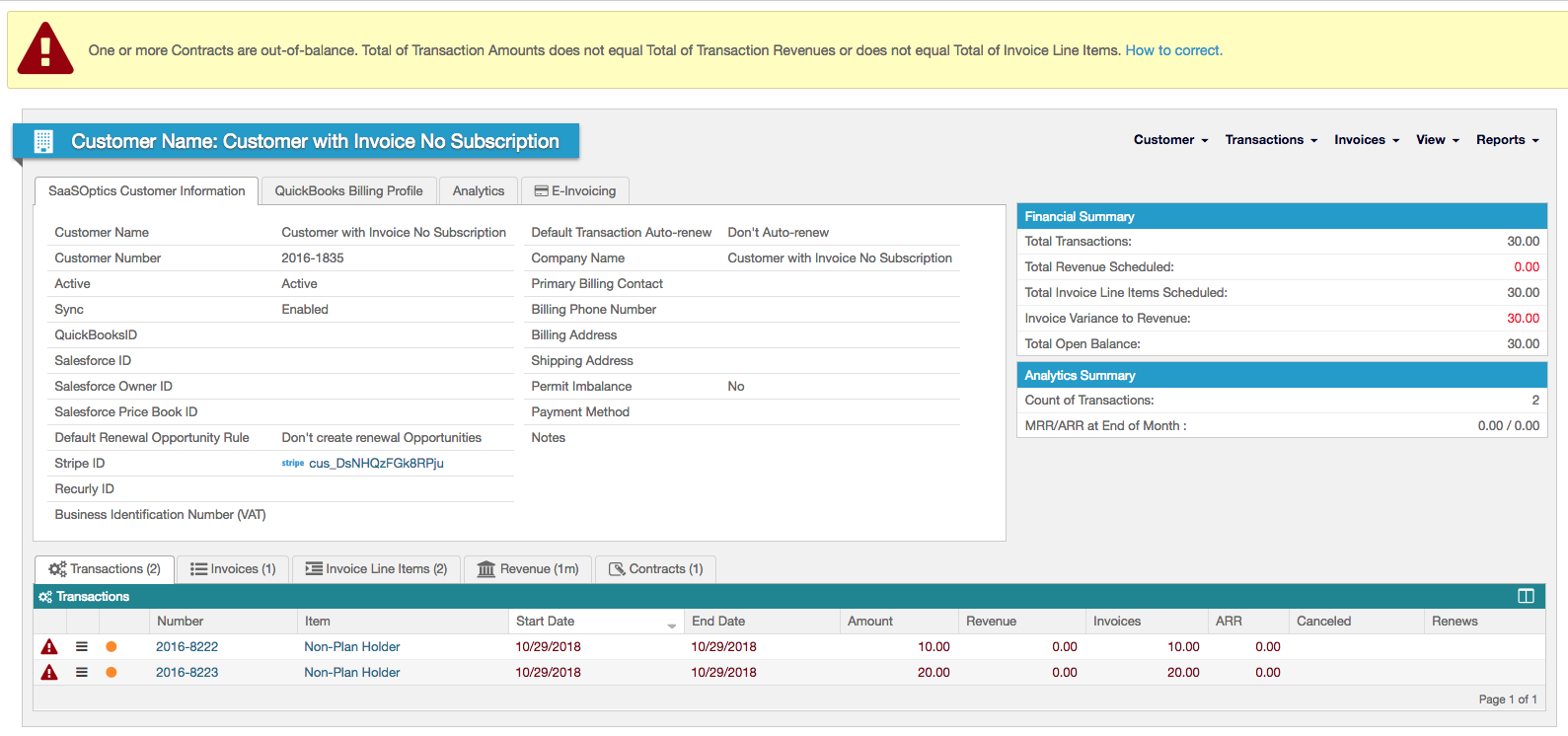
Transactions are generated for each Invoice Line Item using the properties of the Non-Plan Item, again in this case Non-Plan Holder:
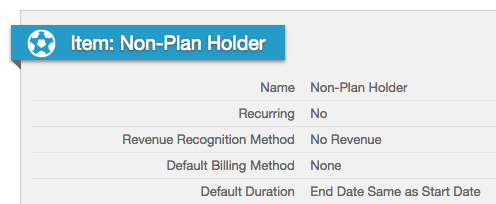
In our example, the properties of the Non-Plan Holder Item are below:
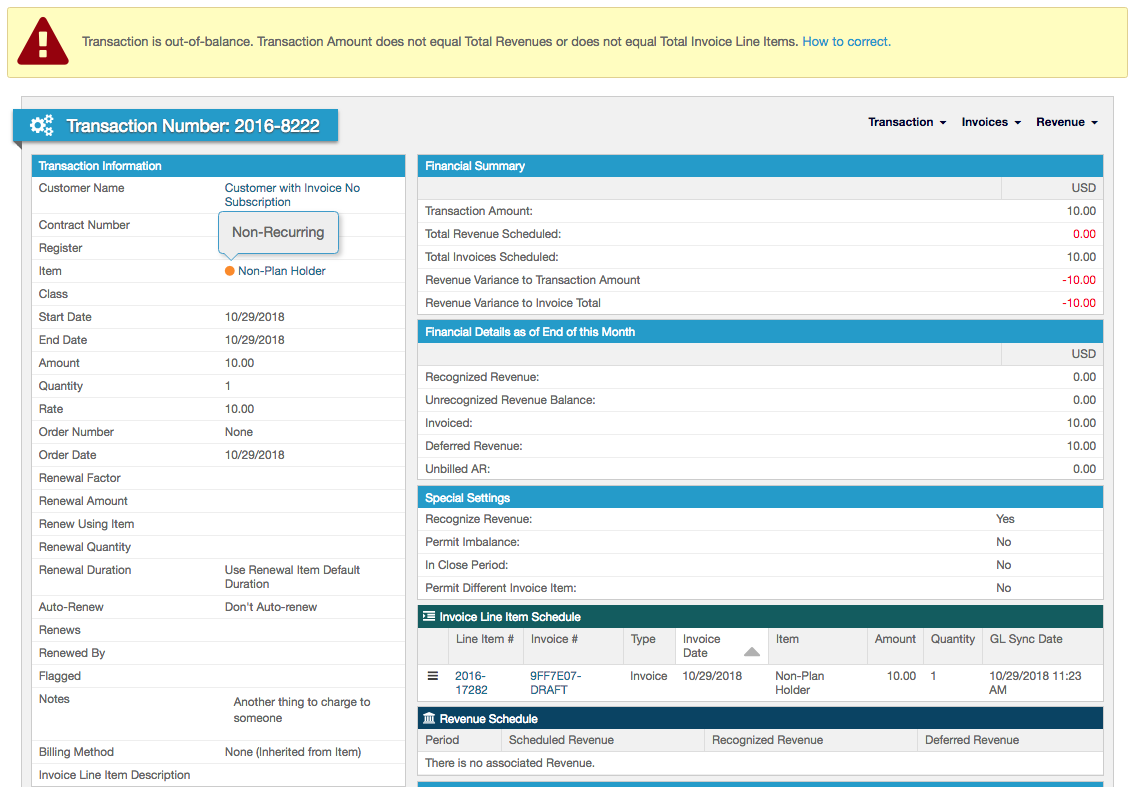
The Transaction view of one of the Items shows it is non-recurring (Recurring setting above), has an end date the same as the start date (default duration setting), and has no revenue generated (revenue recognition method):
Adding a Line Item to an Invoice
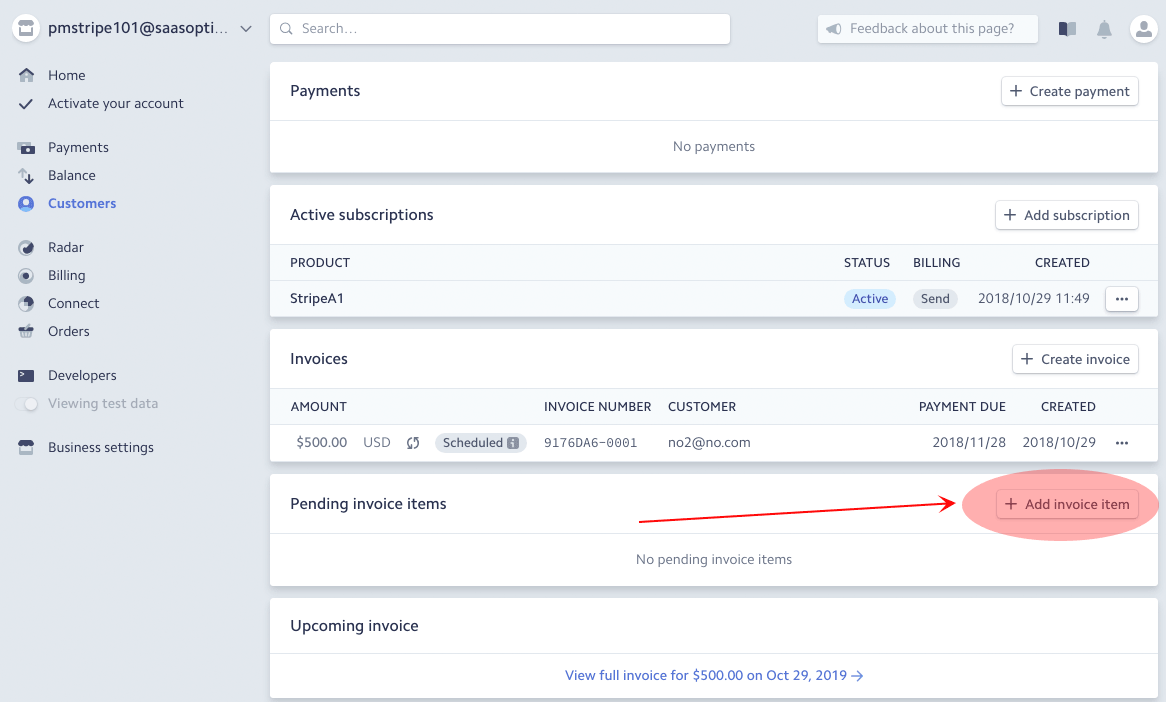
In Stripe, you have the ability to add an Invoice Line Item:
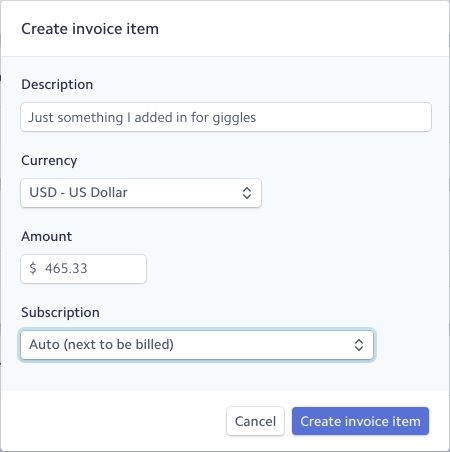
In the screen that appears, there is nowhere to select a Plan, Product, or Item:
The Line Item can be added to the next Invoice that is scheduled to be generated:
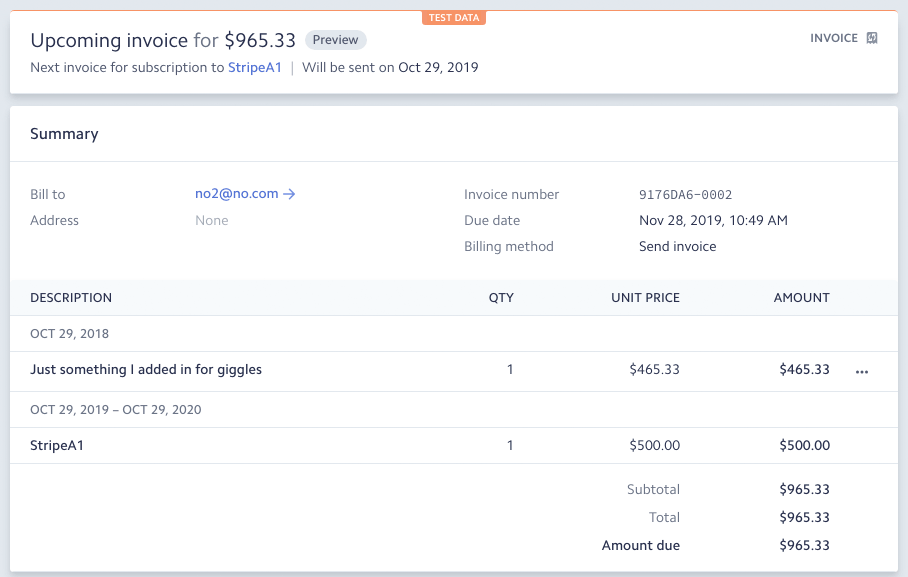
This action is the equivalent of adding an Invoice in Stripe without a Subscription, so no Plan is selected and no Plan dates are created in Stripe. When synced to Maxio Platform, such an Invoice Line Item uses the Non-Plan Item selection. In the example above, the Invoice in Maxio Platform would include two Line Items: one for StripeA1 for $500, and Non-Plan Holder for $465.33.
A Transaction is created for each in Maxio Platform. For the StripeA1 Line Item, the Transaction is created from Subscription data sent to Maxio Platform from Stripe. For the added Invoice Line Item, Maxio Platform generates a Transaction with the Non-Plan Item specification, using that Maxio Platform Item's own properties.
How Stripe Payments map to Maxio Platform
Syncing of Payments is an optional step that must be enabled if you wish to use it.
Payments made against a Stripe Invoice sync to Maxio Platform. A Payment recorded directly in Stripe that is not made against an Invoice does not sync.
Stripe fees associated with a Payment are not stored on the individual Payment record and do not display or report in Maxio Platform. They are captured separately, at the Deposit level, when syncing Deposits to a supported GL.
How Stripe Refunds map to Maxio Platform
Syncing of Refunds is an optional step that must be enabled.
When a Refund is issued in Stripe, Maxio Platform creates an offsetting Invoice, either a Credit Memo or a Refund Receipt if syncing to QuickBooks Online, along with a linked refund Payment record. A Refund issued against a Charge that failed in Stripe is skipped and does not sync.
How Stripe Deposits map to Maxio Platform
Syncing of Deposits is an optional step that must be enabled.
Deposits sync to Maxio Platform. If a Deposit includes both Payments made directly in Stripe (not tied to an Invoice) and Payments made against a Stripe Invoice, the Payments made directly in Stripe won't have a linked Payment record in Maxio Platform. When syncing to QuickBooks, this is what the Unassociated Payments Account setting is for.
If syncing Deposits to QuickBooks, Payments and fees are included in the synced Deposit.

Still need help?
Reach out and our support team will take it from here.