
Understand Stripe 1Way Sync Steps
Applies to: Maxio Core
Last updated on Aug 26, 2026
Use the Stripe Sync Steps page to monitor and configure the one-directional data sync from Stripe to Maxio Platform. This page lets you control which data types (such as Plans, Customers, and Invoices) are synchronized, helping ensure accurate financial reporting, analytics, and revenue recognition.
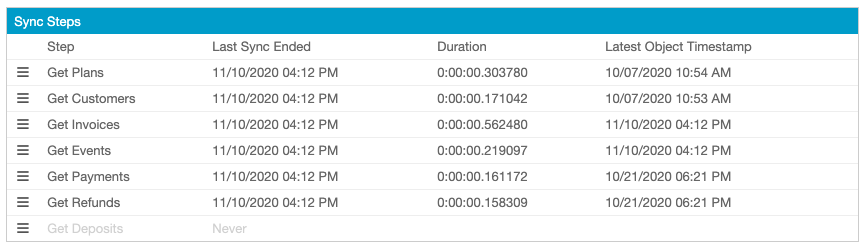
Sync steps
What each Stripe 1Way sync step does
| Sync step | Required | What it does |
|---|---|---|
| Get Plans | Required | Retrieves Plans from Stripe and creates or updates matching Items in Maxio Platform. |
| Get Customers | Required | Retrieves Customers from Stripe and creates or updates matching Customers in Maxio Platform. |
| Get Invoices | Required | Retrieves Invoices from Stripe and creates or updates matching Invoices, Transactions, and Revenue in Maxio Platform. |
| Get Events | Required | Re-checks Invoices that were marked paid in Stripe after the initial sync, so a payment confirmed later still updates the matching Invoice in Maxio Platform. Only runs if Get Invoices is enabled. |
| Get Payments | Optional | Retrieves Payments made against synced Invoices. |
| Get Refunds | Optional | Retrieves Refunds issued against synced Payments. |
| Get Deposits | Optional | Retrieves Deposits (Stripe Payouts) and the Payments included in each one. |
To ensure accurate analytics and revenue recognition, Get Plans, Get Customers, and Get Invoices must be enabled. Get Payments, Get Refunds, and Get Deposits are optional.
Manage sync steps
To modify sync behavior, use the Edit option next to each step.
Enable or disable a sync step
To enable a sync step, check the Enable box next to it.
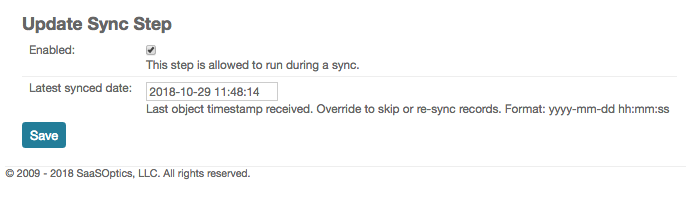
Disabled steps are displayed in gray.
Last Synced Date/Latest Object Timestamp
Format: yyyy-mm-dd hh:mm:ss
Typically, you do not need to edit the Last Synced Date. However, if needed, you can update or clear the Last Synced Date field to re-sync records from a specific point in time. Clearing the field triggers a full re-sync for that step.
All Stripe records synced to Maxio Platform include unique IDs. This prevents duplication. While resetting the sync stamp will not create duplicate records, it may update existing records or recreate deleted ones in Maxio Platform.
Last Sync Ended
This read-only field displays the date and time the sync step last completed.
Duration
This read-only field displays how long the sync step took to complete. Format: hh:mm:ss:ms
Still need help?
Reach out and our support team will take it from here.