
View Consolidated Invoice Links on Individual Invoices
Applies to: Maxio Core
Last updated on Oct 21, 2026
The Consolidated Invoice field on an Invoice shows which consolidated invoice it's included in, with a clickable link that takes you directly there instead of searching manually.
Example: In the Invoice below, the Consolidated Invoice field displays invoice 3387 as a hyperlink. Clicking the link takes you directly to the consolidated invoice.
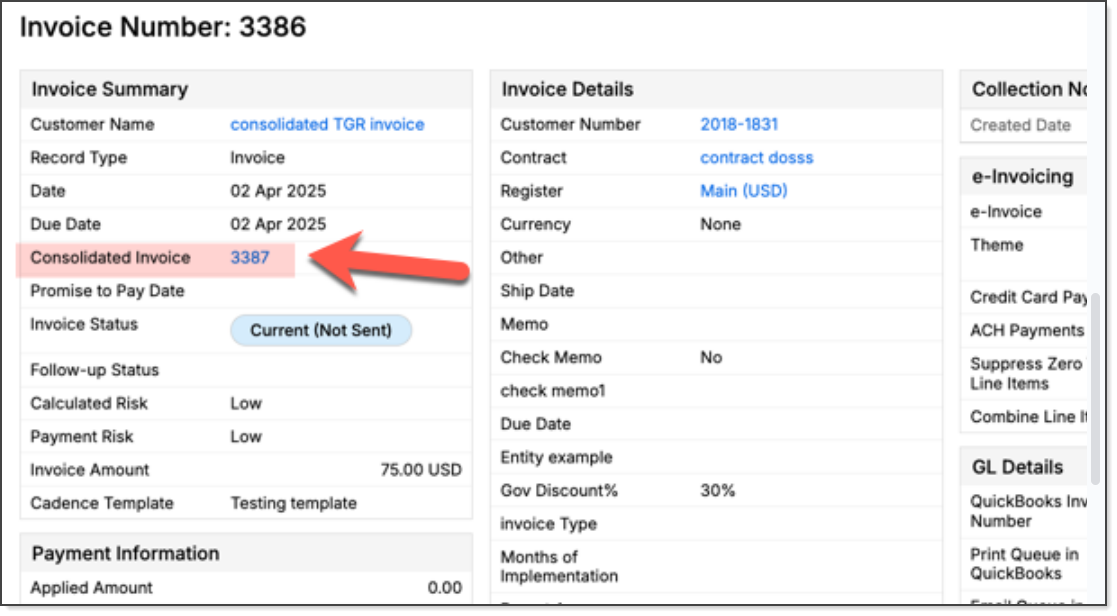
Accessing the Consolidated Invoice
When an individual Invoice is included in a consolidated invoice, its record displays a Consolidated Invoice field that:
-
Shows the consolidated invoice that includes it.
-
Provides a clickable link for direct access to that consolidated invoice.
-
Can be added as a column named Consolidated Invoice Number in the Invoice List and Invoice Line Item List views, for easier sorting, filtering, and export.
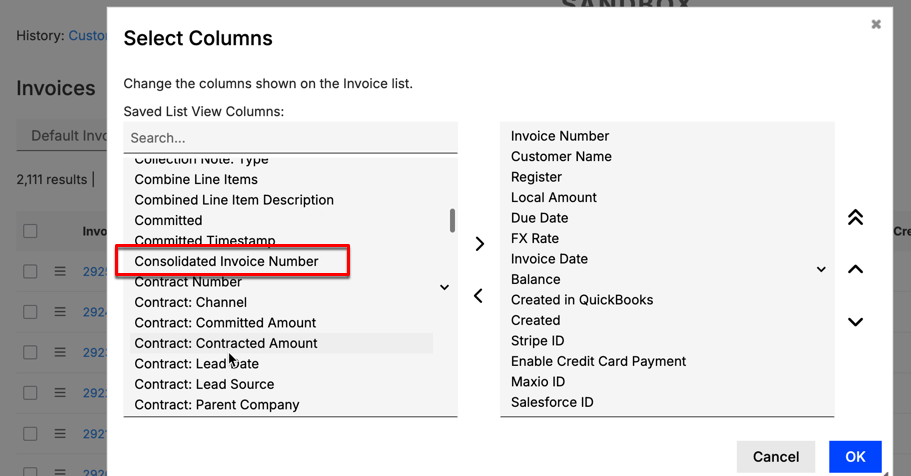
Filtering invoice lists by consolidated invoice
You can filter an invoice list by Consolidated Invoice Number to find the Invoices that were rolled into a consolidated invoice, or to leave them out. The filter is available in the filter bar on these pages:
- Invoices
- Invoices to Email
- Auto Email List, if your account has access to it
The filter appears only when the Build Consolidated Invoice account setting is turned on. The Open Invoices list doesn't offer it.
The filter matches against the number of the consolidated invoice that each Invoice is included in. An Invoice that isn't part of a consolidated invoice, including the consolidated invoice itself, has no value in this field. Use the operator that fits what you want to see:
- Equal to or Contains a consolidated invoice's number: shows only the Invoices that were rolled into that consolidated invoice.
- Is Not Null: shows every Invoice that was rolled into any consolidated invoice.
- Is Null: hides every Invoice that was rolled into a consolidated invoice, leaving standalone Invoices and the consolidated invoices themselves.
Example: Before a bulk send from Invoices to Email, filter Consolidated Invoice Number with Is Null. The list then shows only Invoices that aren't part of a consolidated invoice, so you don't email your customer the individual Invoices alongside the consolidated invoice that replaces them.
Still need help?
Reach out and our support team will take it from here.