
Understand Changing Transaction Dates
Applies to: Maxio Core
Last updated on Aug 28, 2026
Use Change the start or end dates for Advanced Contract Changes when you only need to adjust Transaction start or end dates, such as offering a contract extension or correcting an input error. The feature automatically offsets the original Transaction and creates a new one with revised dates, recalculating revenue and ARR as needed. Closed periods trigger a catch-up entry in the first open period. Not every date change needs an Advanced Contract Change — for which dates you can set directly on a Transaction or its invoice, see How do I customize Transaction or Invoice dates?.
Common use cases:
- You agree to offer the Customer an extension (3 free months) and change the end dates
- You agree to push back the start and end dates of your Transactions
- You accidentally put the wrong start and end date on your Transactions
How it works
Once you select the Transactions you would like to change, you'll be able to select the new dates to use going forward. The original Transaction will be offset 1:1 with a negative ("adjustment") Transaction and the system will create a new Transaction equal to the original Transaction. The new Transaction will use the revised start and end dates entered and all financial metrics will be adjusted and re-calculated using the new dates. If your prior periods are closed, a cumulative catch-up adjustment is recorded in the first open period. The net difference between the original, adjustment, and new Transactions will be billed to your Customer using the revised invoicing schedule.
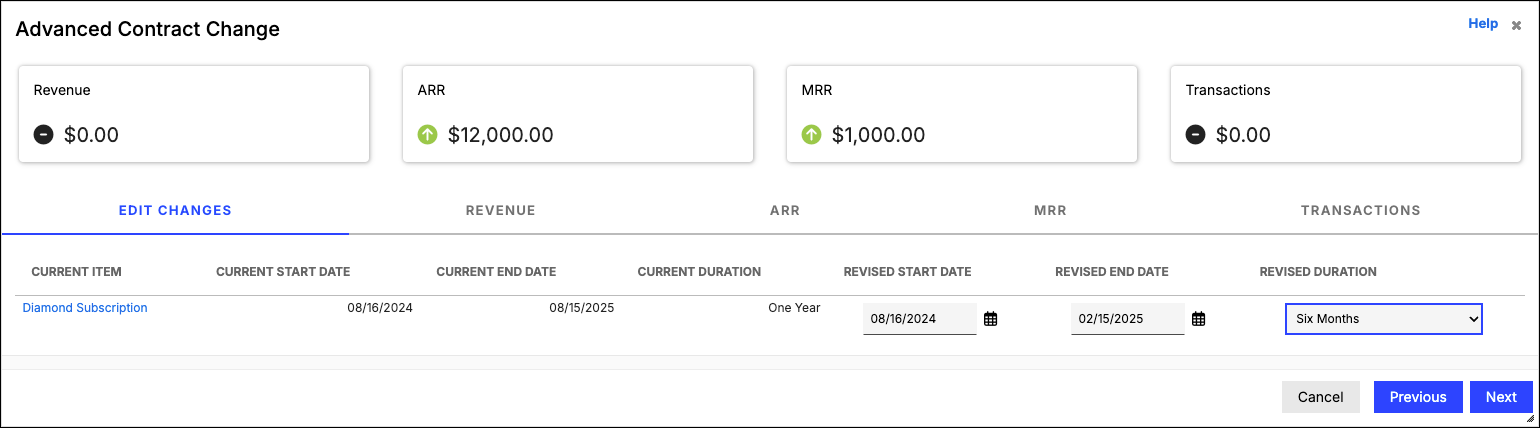
Example:
Providing the Customer a 3 month extension.
| Original Transaction | Revised Transaction | |
|---|---|---|
| Amounts | $12,000 | $12,000 |
| Dates | 7/1/20 to 6/30/21 | 7/1/20 to 9/30/21 |
| Items | Bronze Subscription | same as original |
| Periods Closed | Through 12/31/20 |
Still need help?
Reach out and our support team will take it from here.