
Set Coupon Codes
Applies to: Advanced Billing
Last updated on Aug 29, 2026
Once a coupon has been created, you can add additional coupon codes to make each one unique. These codes behave exactly like the main coupon code, but are generally un-guessable combinations of letters and numbers that you can distribute to customers to make your coupons more secure.
Example: You can have a master coupon of 50OFF. Create a unique subcode for a particular customer by combining the master code with their internal reference ID, resulting in 50OFFMM9280. The subcode can be completely different than the master code; regardless, the subcode value is what you distribute to customers.
To set coupon codes
- Select Manage Codes for the coupon of your choice.
- Select Import Codes.
- Enter the additional codes into the text box, one code per line.
- Select Add codes to coupon.
Advanced Billing confirms which codes were created successfully, and separately lists any codes that were skipped because they were already in use within the Product Family, or invalid.
Delete coupon codes
You can delete a code as soon as it is created.
To delete a coupon code
- On the Manage Codes page, select Delete under the Options column for the code you want to remove.
- Confirm the removal when prompted.
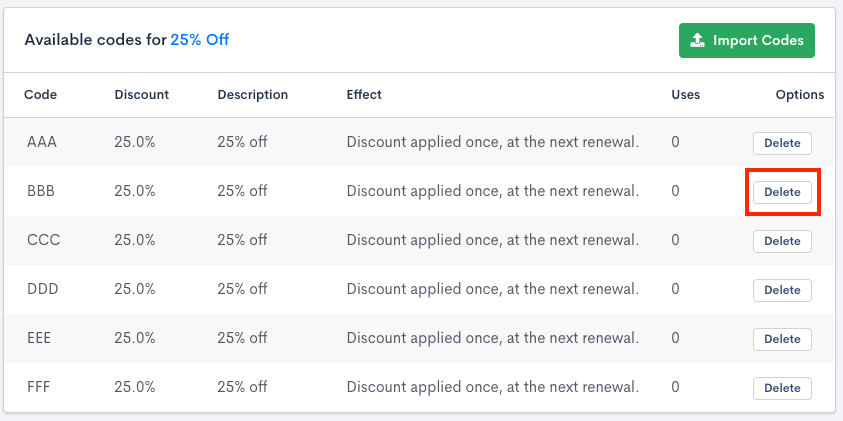
Option to delete current coupon codes
What happens when you delete a coupon code
This immediately removes the code from your account. There is no way to undo this process.
Subscriptions created after the code is deleted cannot apply it. Subscriptions created before the code was deleted still retain the discount applied.
Apply a subcode via the API
When creating an ad-hoc Invoice through the API, you can apply a subcode the same way you'd apply a coupon's main code: pass it in the request's subcode field instead of code. You can't submit both code and subcode for the same coupon on the same request.
Related information
To learn what coupons are and how they work, see Understand Coupons.
Still need help?
Reach out and our support team will take it from here.