
View and Update Subscription Entitlements
Applies to: Advanced Billing
Last updated on Oct 16, 2026
A subscription’s entitlement values are resolved automatically when it’s created, and again whenever its Plan, price point, or Product allocation changes. Use the subscription’s Entitlements tab to confirm exactly what a subscriber has been granted right now, and decide whether to push updated catalog values out to subscriptions that already exist.
View a subscription's entitlements
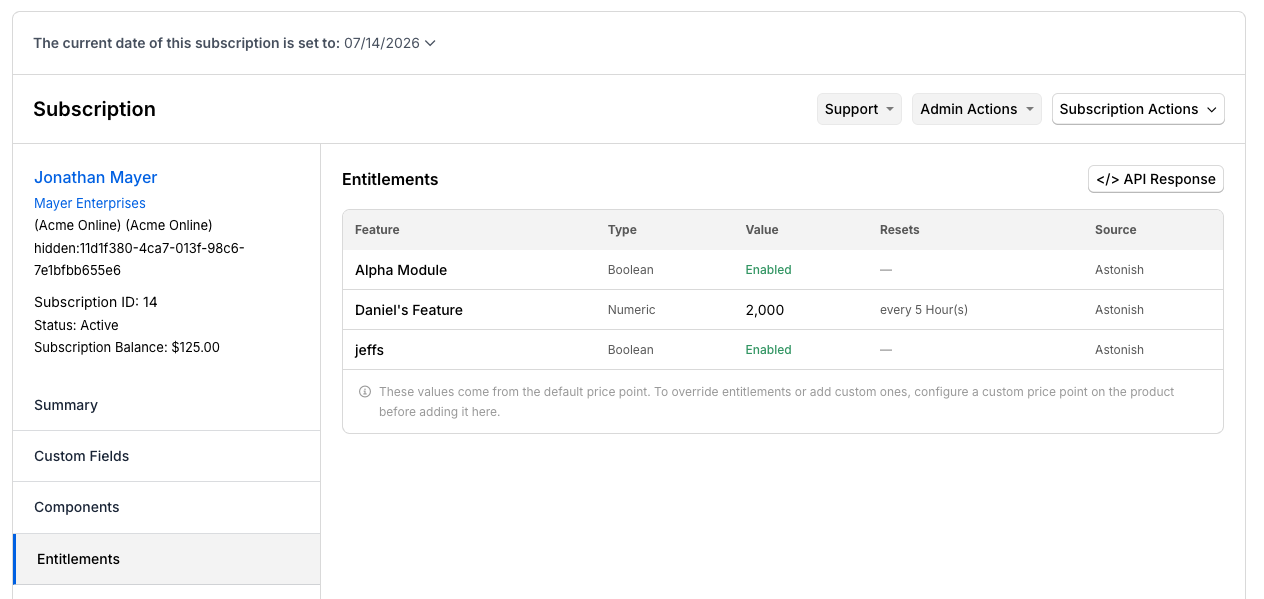
The Entitlements tab shows each feature’s name, type, and resolved value, along with when it resets and which Product(s) it resolves from. For subscriptions with multiple Products, the values shown are the aggregated result across all active Products.
The tab's header shows a count, such as 3 entitlements from 2 sources. It lets you confirm the totals without counting table rows yourself:
- The first number is how many entitlements the subscription has.
- The second number is how many distinct Products and components those entitlements resolve from.
The count appears to the left of the </> API Response button, and only when the subscription has at least one entitlement.
To view entitlements
-
Open the subscription.
-
Click the Entitlements tab.
How entitlements are resolved
When a subscription event occurs (creation, Plan change, Product allocation, renewal), Advanced Billing:
- Reads the current price point for the Plan and each allocated Product.
- Reads the entitlement values configured on each price point.
- Writes a stable snapshot of entitlements onto the subscription.
The snapshot remains unchanged until the next lifecycle event. Editing a feature’s catalog values after a subscription is created does not retroactively change the subscription’s entitlements.
Propagate entitlement changes to existing subscriptions
Editing entitlement override values on a price point that already has subscribers opens an Apply Entitlement Changes dialog when you save, so you decide how the change reaches subscriptions already on that price point.
To propagate changes
-
Edit the entitlement values on the price point and click Update Price Point.
-
In the Apply Entitlement Changes dialog, choose one of the following options:
Option What it does New subscriptions only Creates a new price point carrying the updated entitlement values. The original price point, and every subscription currently on it, stays unchanged permanently, not just until a subscriber's next renewal. Only new subscriptions use the updated values, because they're placed on the new price point. All subscriptions Updates every subscription currently on the price point, including canceled and expired ones, not only active subscriptions. Added or changed entitlement values are applied in the background and can take a while to finish. Removed entitlements are taken off every subscription right away. Important: All subscriptions is selected by default. Select New subscriptions only before you click Apply if you don't want subscriptions already on the price point to change.
-
Click Apply.
New subscriptions only carries over only your entitlement, name, and handle changes to the new price point. If you made another edit in the same save that this option would lose, a warning appears under it:
- On a Plan price point, the warning appears if you also changed the introductory offer setting. Other pricing fields, such as price, interval, and trial settings, can't be changed once a Plan price point has active subscriptions, so neither option saves them and no warning appears.
- On a Product price point, the warning appears if you also changed the pricing scheme or prices.
Choosing New subscriptions only does not schedule the change for existing subscribers at a future date, such as their next renewal. It creates a separate price point that only new subscriptions use going forward. Subscribers who remain on the original price point keep their current entitlements unless you move them to the new one or choose All subscriptions instead.
On a Plan price point, the subscriber count shown beside All subscriptions counts only active subscriptions (shown as, for example, 12 active), even though the update itself reaches every subscription state. On a Product price point, the count includes subscriptions in every state.
Related information
See Understand Entitlements to learn the concepts behind features, feature kinds, and default and overridden entitlement values.
See Configure Entitlements to set up features, attach them to Plans and Products, and configure price point entitlement values.
See Read Subscription Entitlements with the API to retrieve resolved entitlement values for application access control and feature gating.
See Troubleshoot Entitlements to resolve missing, outdated, or unexpected entitlement values.
Still need help?
Reach out and our support team will take it from here.