---
title: Understand Calendar Billing
url: https://docs.maxio.com/billing/subscriptions/configuration/creating-subscriptions/understand-calendar-billing
applies_to: Advanced Billing
updated: 2026-09-21
---
# Understand Calendar Billing
Use Calendar Billing to align Subscription renewals to a specific day of the month, so billing dates stay predictable for your Customers and easier for your accounting team to manage. When enabled, all renewals follow a consistent schedule, reducing date drift and streamlining invoicing.
## How billing dates drift without calendar billing
Without Calendar Billing, signups at the end of the month shift earlier over time. For example, a signup on October 31 renews on November 30, then December 30, January 30, February 28, March 28, and continues on the 28th thereafter.
## When calendar billing is available
Advanced Billing supports Calendar Billing for Subscriptions when the following criteria are met:
- The Plan's billing interval is one month.
- Every allocated Component's Price Point either bills in months or has no defined billing interval. Any number of months works, such as quarterly (every 3 months) or every 4 months, though an interval longer than one month requires multi-frequency billing enabled for your Site. A Price Point that bills in days, including a weekly cadence set as 7 days, isn't allowed.
- The Subscription has no trial period.
- For API users: you must not set `next_billing_at` when creating the Subscription. This field is typically used for importing existing Subscriptions.
### How multi-month components bill
A Component doesn't have to renew every month just because the Plan does. When a Component's Price Point has a multi-month billing interval, its billing periods still snap to the Subscription's Billing Day, but only every Nth month, where N is the Component's own interval. For example, a Component billed every 3 months on a Subscription with a Billing Day of the 1st generates periods that run from the 1st of one month to the 1st of the month 3 months later, rather than renewing every month the way the Plan does.
## Turn on calendar billing
You can turn on Calendar Billing in one of three ways:
- Via a Public Signup Page, use the **Calendar Billing** dropdown to choose a specific billing day instead of the default. See Enable calendar billing for that setting.
- Via the API, specify a calendar billing day using the `snap_day` attribute when creating the Subscription.
- Via the Admin UI, select the calendar billing date when creating a Subscription.
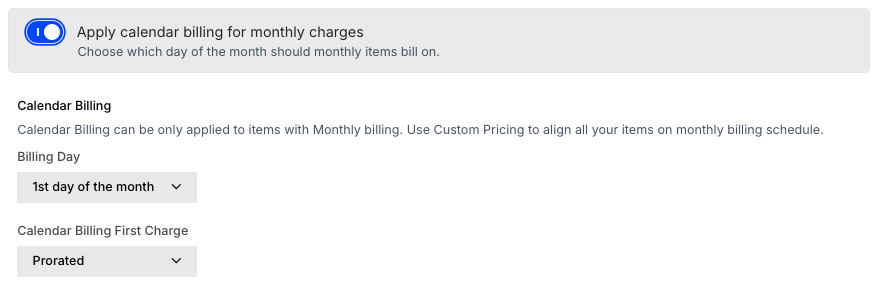
*Billing Day and Calendar Billing First Charge options at Subscription creation*
A valid Billing Day (`snap_day` in the API) is any number from 1 to 28, or the last day of the month (`end` in the API). By default, the Subscription renews at 12:00 PM in your site's time zone on that day.
You can optionally set the default renewal time to 5:00 PM instead of 12:00 PM. See Configure Calendar Billing Settings for how.
## How the term end date aligns to calendar billing
When you turn on **Set Calendar Billing** during Subscription creation, the Term end date automatically recalculates to land on your chosen **Billing Day**, so the Subscription's last billing period doesn't end up split across an unrelated date.
Advanced Billing calculates the new end date by adding the Product's term length to the **Term Start** date, then rolling that date forward to the next occurrence of the Billing Day. For example, a Subscription with a Term Start of January 15, a 6-month term, and a Billing Day of the 1st ends on August 1 instead of July 15.
This recalculation runs whenever you turn on **Set Calendar Billing**, change the **Billing Day**, or change the **Term Start** or Product on the Subscription creation form.
## Choose how calendar billing charges at signup
Subscriptions created with Calendar Billing enabled can be charged in one of three ways at signup:
- **Prorated:** The prorated Plan price is charged immediately.
> This is the universal default, but you can set a site default in Configure Calendar Billing Settings.
- **Immediate:** The full Plan price is charged immediately.
- **Delayed:** The full Plan price is charged with the first scheduled renewal.
### Prorated calendar billing
For prorated charges, the amount depends on the signup date and time relative to the `snap_day`. Signups within 24 hours before the site's renewal time (12:00 PM or 5:00 PM) on the `snap_day` are treated as full period signups. All others are charged a prorated amount until the next `snap_day`.
| `snap_day` | Signup Date | Amount Charged at Signup | `current_period_ends_at` |
| :--- | :--- | :--- | :--- |
| 15 | June 2, 3:00 PM | Prorated amount from 6/2 to 6/15 | June 15, 12:00 PM |
| 15 | June 14, 3:00 PM | Full amount from 6/14 to 7/15 | July 15, 12:00 PM |
| 15 | June 15, 12:01 PM | Prorated amount from 6/15 to 7/15 | July 15, 12:00 PM |
| end | June 2, 3:00 PM | Prorated amount from 6/2 to 6/30 | June 30, 12:00 PM |
| end | June 29, 3:00 PM | Full amount from 6/29 to 7/31 | July 31, 12:00 PM |
| end | June 30, 12:01 PM | Prorated amount from 6/30 to 7/31 | July 31, 12:00 PM |
### Immediate calendar billing
The full amount is charged at signup regardless of the signup date. Signups within 24 hours before renewal time are treated as full period signups.
| `snap_day` | Signup Date | Amount Charged at Signup | `current_period_ends_at` |
| :--- | :--- | :--- | :--- |
| 15 | June 2, 3:00 PM | Full amount | June 15, 12:00 PM |
| 15 | June 14, 3:00 PM | Full amount | July 15, 12:00 PM |
| 15 | June 15, 12:01 PM | Full amount | July 15, 12:00 PM |
| end | June 2, 3:00 PM | Full amount | June 30, 12:00 PM |
| end | June 29, 3:00 PM | Full amount | July 31, 12:00 PM |
| end | June 30, 12:01 PM | Full amount | July 31, 12:00 PM |
### Delayed calendar billing
No charge is applied at signup. The first full charge occurs on the first renewal date as determined by `snap_day`.
| `snap_day` | Signup Date | Amount Charged at Signup | `current_period_ends_at` |
| :--- | :--- | :--- | :--- |
| 15 | June 2, 3:00 PM | Nothing | June 15, 12:00 PM |
| 15 | June 14, 3:00 PM | Nothing | June 15, 12:00 PM |
| 15 | June 15, 12:01 PM | Nothing | July 15, 12:00 PM |
| end | June 2, 3:00 PM | Nothing | June 30, 12:00 PM |
| end | June 29, 3:00 PM | Nothing | June 30, 12:00 PM |
| end | June 30, 12:01 PM | Nothing | July 31, 12:00 PM |
## How daylight saving time affects renewal times
If your time zone observes Daylight Saving Time (DST), renewal times may appear to shift by one hour twice a year as clocks "spring forward" and "fall back." Advanced Billing stores dates in UTC, which doesn't observe DST, so renewals occur at the same UTC time year-round even though the local time appears to change.
To maintain a consistent local renewal time, manually adjust the next billing date and time for each Subscription twice a year when DST changes, including the correct offset at the next renewal.
> **WARNING:** Avoid scheduling billing close to midnight on the first or last day of the month. DST changes can shift the renewal across days, causing duplicate or skipped billing events.
## Change a subscription's calendar billing date
If a Customer signs up via a Public Signup Page with Calendar Billing enabled, you can change the `snap_day` via the Admin UI. See Subscription Summary Overview for the steps.
Modifying the next billing date may result in a prorated charge if it affects the Subscription's alignment to its configured `snap_day` and snap time, specifically:
- The `snap_day` must match both `current_period_ends_at` and `next_assessment_at`.
- The renewal time must match the configured site time (12:00 PM or 5:00 PM).
- No interim billing date can cause a shortened or extended billing period before the next `snap_day`.
## Change a plan on a calendar billing subscription
Changing a Subscription's Plan while on Calendar Billing has a few restrictions:
- You cannot change a Subscription to a Plan with an expiration date. Use an upgrade or downgrade instead. See Upgrade or Downgrade a Subscription for how.
- You can change to a Plan with a trial period, but the trial is ignored unless the Subscription is already in trial.
- Additional restrictions on Prepaid Products may prevent certain Plan changes while on Calendar Billing.