
Configure AvaTax Tax Calculation Data
Applies to: Advanced Billing
Last updated on Aug 26, 2026
AvaTax calculates tax using information from your tax origin address, catalog, and customer records. Use this article to prepare that data before you create a taxed subscription.
Configure taxable Plans and Products
Unless otherwise specified, Plans and Products are not eligible for tax. Edit a Plan or Product and check This Plan is subject to taxes so it's included when AvaTax calculates tax. Also make sure Require Shipping Address at signup? is checked, since AvaTax needs a full address on file to calculate the correct tax rate.
If any settings are configured in Avalara to specify a particular Plan id as taxable, Advanced Billing ignores them. Advanced Billing is the source of truth for which Plans and Products are taxable.
Assign a Tax Type
When editing a taxable Plan or Product, select either Digital Service or Physical Good from the Tax Type dropdown. This information is sent to Avalara to ensure the correct tax rate applies. In the EU specifically, VAT rules can treat digital and physical Plans differently, so getting this assignment right matters more there than in most other jurisdictions. If you have specific questions about how tax applies to your Plan or service, contact your National Administrations office or a tax professional.
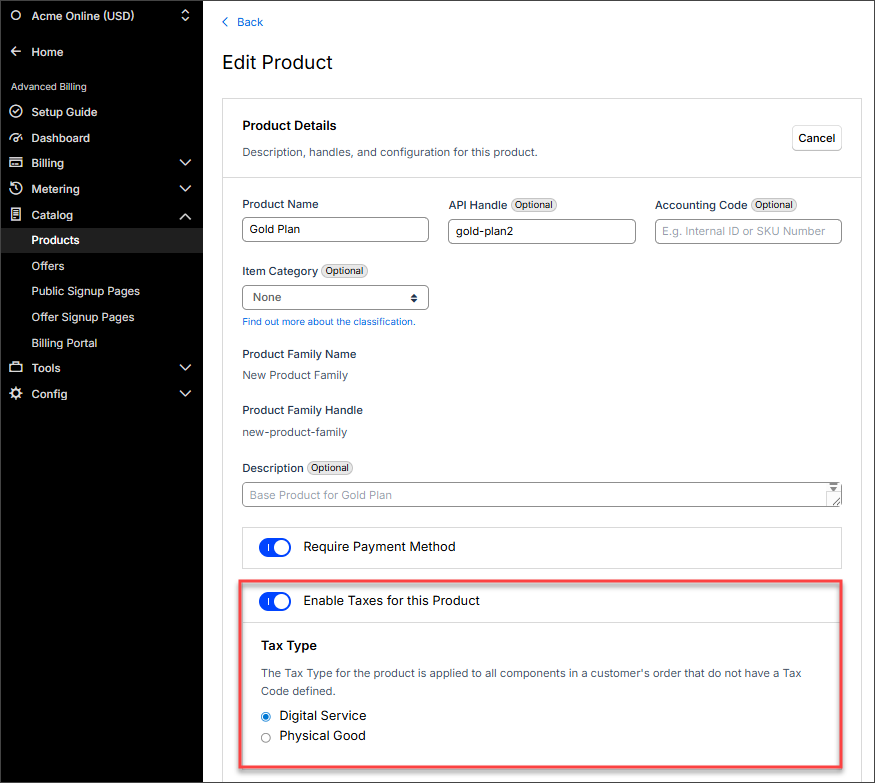
If you're uncertain which Avalara tax code applies to a Product, the View List of Tax Codes link next to the Tax Type field opens Avalara's own tax code search page. See Creating Plans for the full field reference.
Collect complete customer addresses
In order for a Subscription to be considered taxable, it must have a valid shipping or billing address. The address must be complete and correctly formatted so Advanced Billing can determine the tax locale of the charge.
Full address required for taxable Subscriptions
Partial addresses, such as just a country and zip code, aren't acceptable for deriving tax information from Avalara. The result of supplying a partial address is that your subscribers are not charged tax.
A complete address includes the following. The character limits below are Avalara-imposed limits on the data Avalara accepts; Advanced Billing itself does not block you from entering longer values in these fields.
- Address 1 (50 characters maximum)
- Address 2 (optional, use when appropriate)
- City
- State (Required ISO format, see below)
- Country (Required ISO format, see below)
- Postal Code / Zip (11 characters maximum)
Required country format
Advanced Billing requires that you use the ISO standard country codes when designating the subscriber's taxable location.
Countries should be formatted as 2 characters. For more information, see the following Wikipedia article on ISO 3166-1.
Required state format
Advanced Billing requires that you use the ISO standard state codes when designating the subscriber's taxable location.
- US states (2 characters): ISO 3166-2
- States outside the US (2-3 characters): to find the correct state codes outside of the US, go to ISO 3166-1 and click the link in the "ISO 3166-2 codes" column next to the country you want to populate.
Configure taxable jurisdictions
Unlike Custom Taxes or Managed Sales Tax, where taxable countries and states are configured inside Advanced Billing, AvaTax requires your team to configure taxable jurisdictions inside Avalara itself. Go to Settings > Where you collect tax in Avalara to fill this in.
Choosing your taxable jurisdictions is entirely dependent on your company's needs. For any questions, we recommend contacting a tax professional. Avalara's support is available as well for questions on particular tax codes.
Coupons and taxes
When a coupon and a tax both apply to the same subscription, tax is calculated on the total cost of the subscription after the coupon adjustment has been applied, not before.
Still need help?
Reach out and our support team will take it from here.