
Loading article…
Loading article…
Last updated on Aug 26, 2026
Customers and Payments can sync bi-directionally between Maxio Core and Advanced Billing. This means that if you update a Customer or a Payment in one system, it will also update in the other.
Any updates made to Customers in Maxio Core (like address, email, etc.) will be sent to Advanced Billing if the "Send Customer Updates" sync step is enabled. The Customer address information is automatically synced from Advanced Billing to the Maxio Core Customer record in the Get Customers sync step.
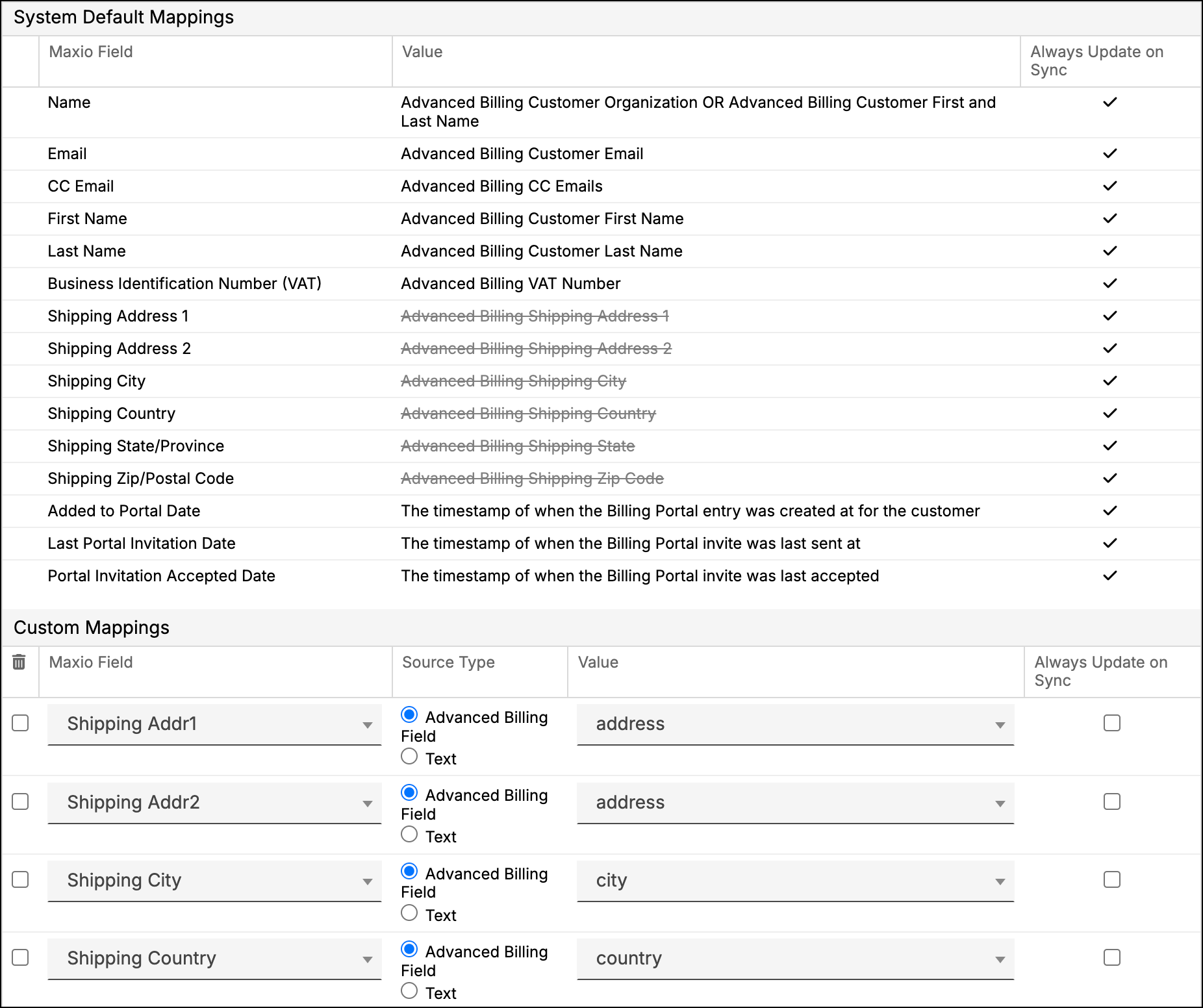
By default, the Advanced Billing Shipping City, Shipping State/Province, and Shipping Country are automatically mapped to (respectively) the City, State/Province, and Country Analytic fields for the Maxio Core Customer. If you override these default mappings with Custom Mappings, the default mappings are then stricken out and not used.
Choose one system where you receive payment because issues related to timing will happen if you process payments across multiple systems within the same timeframe. Verify that the associated invoice data is correct and matches among the various synced systems before posting a payment.
Still need help?
Reach out and our support team will take it from here.