
Design Your New User Signup Flow
Applies to: Advanced Billing
Last updated on Aug 29, 2026
Choosing a signup method and designing what happens after a customer subscribes are the two decisions that shape every other part of your implementation. Work through both here, and you finish with a signup method selected and a diagram of your post-signup workflow.
Part 1: Choose your method Part 2: Post-signup workflow
Summary
- Feature
- All signup methods
- You Need
- An understanding of how customers subscribe to your services, and your post-signup flow (if any).
- Code
- No
- Difficulty
- ◉◎◎◎◎
Choose a signup method
Review the signup methods Advanced Billing offers, confirm the one you have in mind supports the features you need, then get the implementation guide that matches your choice.
1. Choose your signup method and review feature availability
You most likely have an idea of which method you want to use. Before implementing, review the Compare New User Signup Methods help article to confirm the method supports the subscription types and payment methods you need.
2. Get your implementation guide
Find the row that matches the choice you made in step 1.
| If you chose... | and your user... | Your guide is... |
|---|---|---|
| PSP | is not logged in to your website or app when they sign up | PSP Method 1: Website. Get started here |
| is logged in to your website or app, and is redirected to chargifypay.com when they sign up | PSP Method 2: Web App. Get started here | |
| is logged in to your website or app, and stays in your app, on your domain, when they sign up | PSP Method 3: iFrame. Get started here | |
| Maxio.js | is not logged in to your website or app when they sign up | Maxio.js Method 1: Website. Get started here |
| is logged in to your website or app, and stays in your app, on your domain, when they sign up | Maxio.js Method 2: Web App. Get started here | |
| Advanced Billing Admin UI | is Staff | Create Subscriptions Inside Advanced Billing |
| Salesforce | is Staff | Create Signups in Salesforce |
| HubSpot | is Staff | No Quick Start guide. Use the HubSpot documentation instead. |
| Custom | n/a | No Quick Start guide. Use the API documentation instead. |
Design and diagram your post-signup workflow
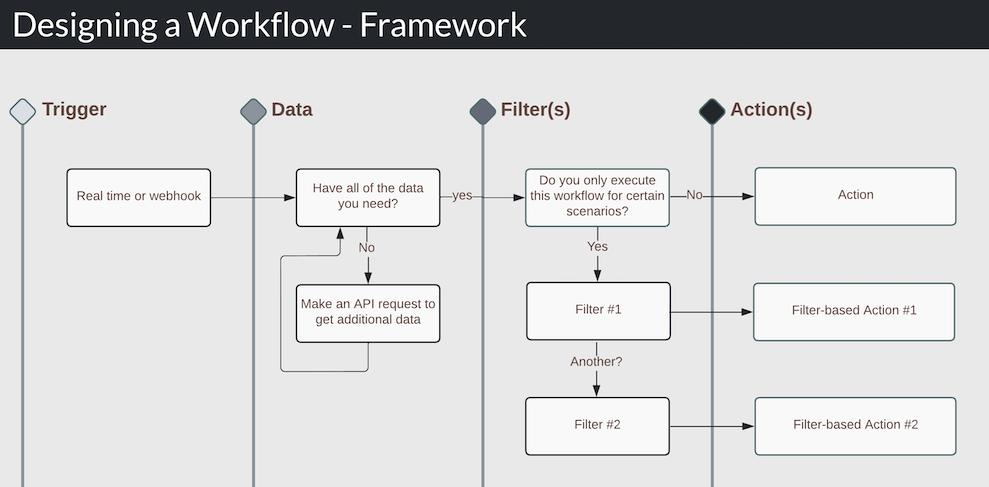
Designing your post-signup workflow is an important step, and typically one of the most difficult. The framework below breaks a workflow into four parts, so you can organize your thinking before you start building.
1. Understand the workflow framework
Workflows can be complex, but this framework helps you simplify. Workflows typically have four parts: Trigger, Data, Filter, and Action.
| Step | Name | Description |
|---|---|---|
| 1 | Trigger | How the workflow begins. Typically an Advanced Billing webhook, or possibly real-time if you use Maxio.js. |
| 2 | Data | The data you need, and where it exists within Advanced Billing. Ask yourself whether you have all the data you need from the trigger step. If yes, continue. If not, make an API request to fetch the rest. |
| 3 | Filter(s) | Add optional filters that match the criteria you care about. Example: if the Customer signs up to the bronze plan, continue the workflow. If the gold plan, stop. |
| 4 | Action | Perform the action you care about. This is either an Advanced Billing action (an API request to Advanced Billing) or a database action (an update to your database). |
Real workflow design is often more complex than this, but the four questions the framework asks are the same every time.
2. Diagram your workflow
Start diagramming your workflow. Depending on your plan and onboarding package, ask your implementation consultant if you have questions about which webhooks or APIs to use.
3. Select an implementation method
Three implementation methods cover any type of workflow.
| Method | Select if... | Example |
|---|---|---|
| No Code | You already know the system that powers the workflow for you, or you hire a developer. | You hire a developer. |
| Low Code | You already know the system that powers the workflow for you, and some small code is required. | Zapier |
Custom Code Most common Developers | You, or your team, are developers who plan to write custom code to build the workflow. | You build an endpoint in your app that accepts Advanced Billing webhooks and executes the workflow. |
4. Start building
For full examples, see the Building Workflows with APIs and Webhooks help article.
FAQs
Can Advanced Billing help me build my workflow?
No. Advanced Billing is a product-focused company, rather than a custom-service-focused one.
Can Advanced Billing help me determine which API endpoints and webhooks to use?
Yes, depending on your Advanced Billing onboarding plan. Ask your implementation consultant.
What if I want to create a subscription in another system?
If you have the development experience, Advanced Billing has the APIs to help. First, confirm the other system has the webhooks you need. If it does, set up an endpoint in your application that listens for that webhook, and use Advanced Billing's create subscription API to create the Subscription in Advanced Billing.
Related information
To compare every signup method against the subscription types and payment methods it supports, see the Compare New User Signup Methods help article.
Still need help?
Reach out and our support team will take it from here.