
Building Workflows with APIs and Webhooks
Applies to: Advanced Billing
Last updated on Aug 27, 2026
Follow two worked workflows for connecting your own application to Advanced Billing with custom code: granting and removing access based on subscription status, and showing or hiding features based on the subscription's plan. Each one shows both the real-time approach, using the API, and the asynchronous approach, using webhooks.
Important: Maxio helps you determine which webhooks and API endpoints to use. Maxio does not build, debug, maintain, or support your workflow, either during implementation or on an ongoing basis.
Manage access based on subscription status
This workflow keeps your application's idea of who may log in aligned with the subscription's status in Advanced Billing, so access is granted at signup and removed when the subscription ends.
Before you start
- Feature
- Webhooks and API
- You Need
- Database, app login, signup process, and application code that restricts access by status. See Set the foundation for details.
- Code
- Yes
- Difficulty
- ◉◉◉◎◎
How to manage access to your app based on subscription status
Most SaaS applications grant access based on a Customer's subscription status. If a subscription's status is active, the user can use your app; if it is canceled, they cannot. The steps below set this up against Advanced Billing.
How it works
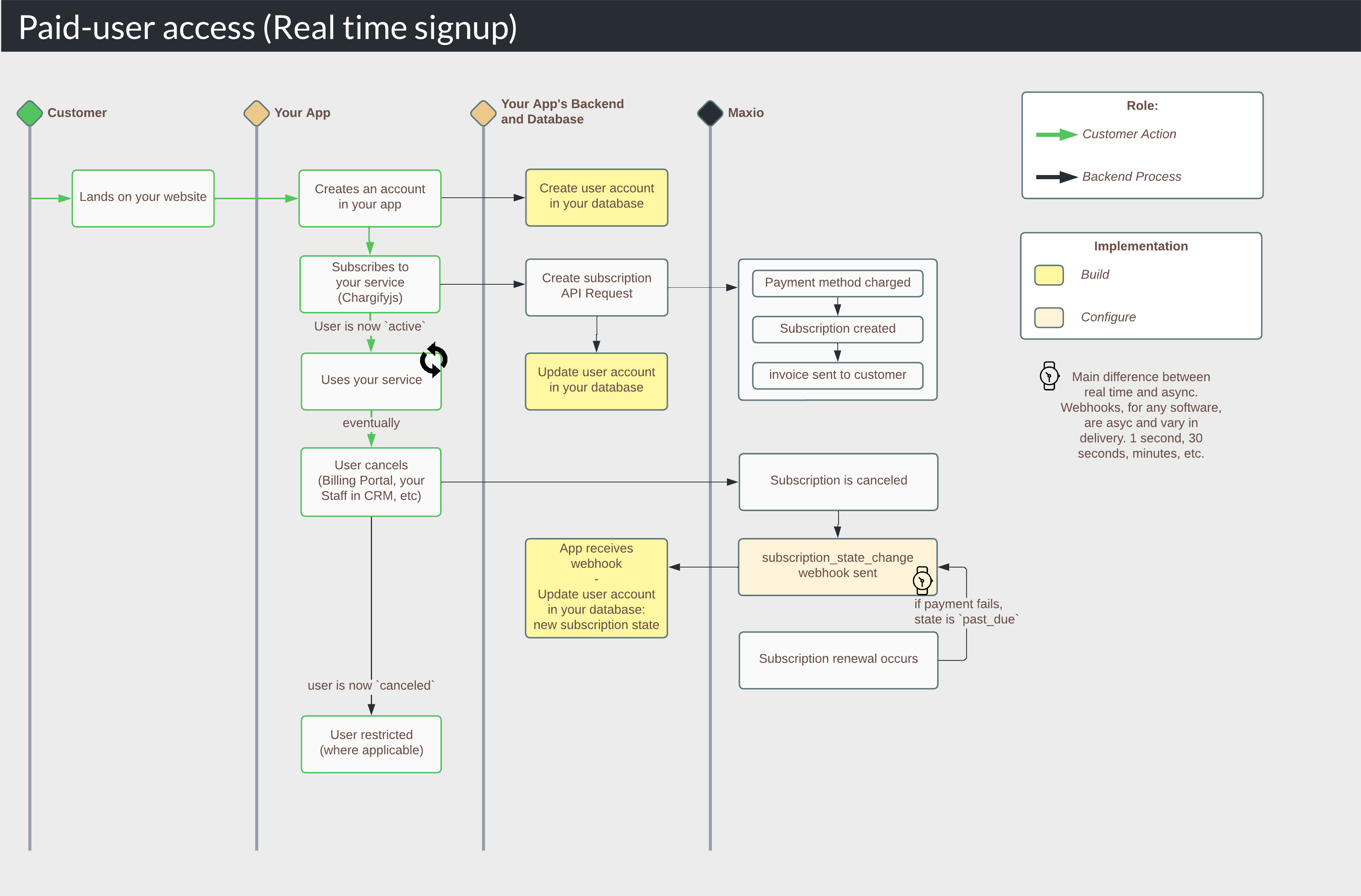
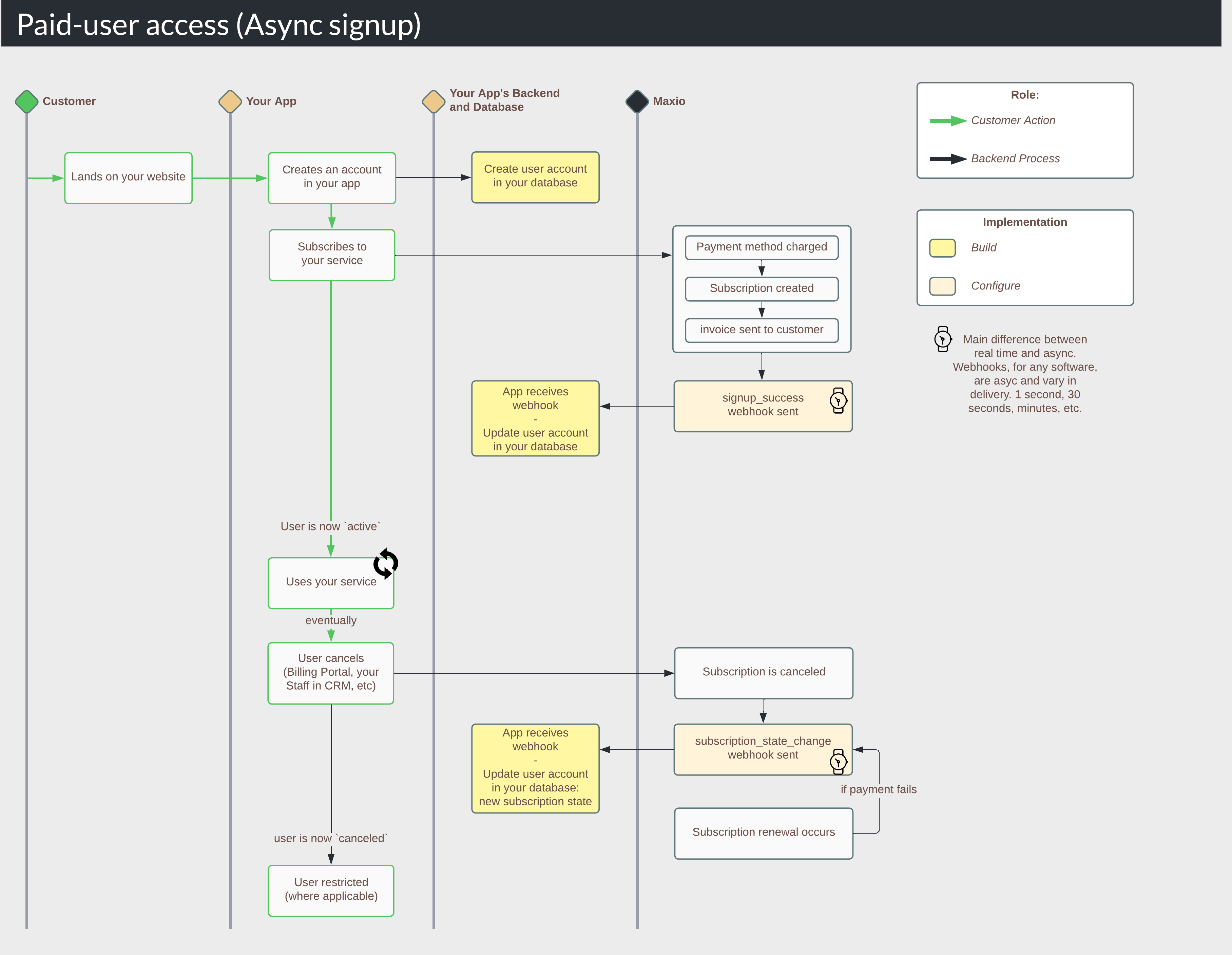
User access can be updated in real time or asynchronously. Real-time signups come through Maxio.js and the API. Asynchronous signups come through Public Signup Pages, Offer Signup Pages, the Advanced Billing admin UI, and your CRM.
Real time (API): the app updates its own database from the API response
Set the foundation
Your application needs these four things in place before you implement anything. You most likely have all or most of them already.
Prerequisites for managing access by subscription status
| You need a... | That meets these prerequisites... |
|---|---|
| Database (Required) |
|
| App login (Required) | A web application that handles new user account creation, such as a standard email and password login that creates a user record in your database. |
| New user signup process (Required) | A new user can sign up and subscribe to your services, creating a subscription in Advanced Billing. If you don't have this yet, start with Design Your New User Signup Flow. |
| Code that shows or restricts access (Required) | Application code that allows or restricts user access. |
Store the subscription status on signup
When a user subscribes, store the Advanced Billing data you need. Do this in real time or asynchronously, depending on how the subscription is created.
Real time (API)
When you create a subscription with the API, you are typically either creating a paid subscription with a Maxio.js token or creating a free trial with no credit card. In both cases, parse the subscription response for state and subscription.id and store them in your database.
This is a subscription API response, filtered to the fields that matter for this workflow:
//Filtered API response when creating a subscription
{
  "subscription": {
    "id": 50652871, //the Advanced Billing-generated subscription ID
    "state": "active", //the subscription status
    ...
    "customer": {
      "reference": "ref_nxzfmNwEakbfWB9XY", //your unique customer reference
      ...
    },
    ...
  }
}
Then update your database:
--Update your database (conceptual example)
UPDATE users
SET subscription_id='50652871', subscription_status='active'
WHERE user_id='ref_nxzfmNwEakbfWB9XY';
Finally, redirect the user to their destination, such as a dashboard or a thank-you page. This flow runs in real time, so the user has access to paid features as soon as they land.
Async (webhooks)
First, configure the signup_success webhook. Go to Config > Settings > Webhooks and enable it.
Next, create a subscription that mirrors your use case. Advanced Billing sends the webhook to your server.
//Filtered webhook body for signup_success
{
  "id":1454785060,
  "event":"signup_success" //the webhook event type
  {
     "id"=>50652871, //the Advanced Billing-generated subscription ID
     "state"=>"active", //the subscription status
     ...
     "customer"=> {
       "reference"=>"ref_nxzfmNwEakbfWB9XY", //your unique customer reference
       ...
      },
   ...
  }
}
Parse the relevant data from the webhook, then update your database:
//Update your database (conceptual example)
//if event is signup_success
if (webhook.event == 'signup_success') {
  UPDATE users
  SET subscription_id='50652871', subscription_status='active'
  WHERE user_id='ref_nxzfmNwEakbfWB9XY';
}
Test this part of your workflow before moving on.
Update the subscription status when it changes
Update the stored status whenever it changes, such as when a user cancels or a subscription goes past due. Even with real-time state changes in place, you still need webhooks to catch changes your users can't initiate, such as a subscription moving to past due after a failed renewal payment.
Real time (API)
Real time applies only when you are building your own billing portal against the Advanced Billing API. For example, a user clicks a cancel button in your application, and you update your database immediately, which removes their access.
Say the user clicks cancel, and your server-side code makes a successful DELETE /subscriptions/{subscription_id}.json request. Advanced Billing returns:
//Filtered API response when canceling a subscription
{
  "subscription": {
    "id": 15254809,
    "state": "canceled",
    "previous_state": "active",
    ...
    "customer": {
      "reference": "ref_nxzfmNwEakbfWB9XY",
      ...
    },
    ...
  }
}
A 200 or 201 status code signals success, so you can update your database:
--Update your database based on your user_id (conceptual example)
UPDATE users
SET subscription_status='canceled' --pass Advanced Billing's value, or your own
WHERE user_id='ref_nxzfmNwEakbfWB9XY';

--Update your database based on subscription_id (conceptual example)
UPDATE users
SET subscription_status='canceled' --pass Advanced Billing's value, or your own
WHERE subscription_id='15254809';
Finally, redirect the user to their destination. This flow runs in real time, so their access is removed as soon as they land.
Async (webhooks)
First, configure the subscription_state_change webhook. Go to Config > Settings > Webhooks and enable it.
Next, create or reuse a subscription that mirrors your use case, and cancel it. Advanced Billing sends the subscription_state_change webhook to your server.
//Filtered webhook body for subscription_state_change
{
  "id":1454785111,
  "event":"subscription_state_change" //the webhook event type
  {
     "id"=>50652871, //the Advanced Billing-generated subscription ID
     "state"=>"canceled", //the subscription status
     "previous_state"=>"active", //the previous subscription status
     ...
     "customer"=> {
       "reference"=>"ref_nxzfmNwEakbfWB9XY", //your unique customer reference
       ...
      },
   ...
  }
}
Parse the relevant data from the webhook, then update your database. Write a separate query for each state transition that matters to you, so you control exactly what reaches your database.
//Update your database based on your user_id (conceptual example)
//if event is subscription_state_change
if (webhook.event == 'subscription_state_change') {
  UPDATE users
  SET subscription_status='canceled' //pass the new state - Advanced Billing's value, or your own
  WHERE user_id='ref_nxzfmNwEakbfWB9XY'; //find the subscription based on the reference value
}

//Update your database based on subscription_id (conceptual example)
if (webhook.event == 'subscription_state_change') {
  UPDATE users
  SET subscription_status='canceled' //pass Advanced Billing's value, or your own
  WHERE subscription_id='50652871';
}

//Reactivation
if (previous_state == 'canceled' && state == 'active') {...}

//Subscription becomes past due
if (previous_state == 'active' && state == 'past_due') {...}

//past_due subscription pays in full
if (previous_state == 'past_due' && state == 'active') {...}

//Subscription pauses
if (previous_state == 'active' && state == 'on_hold') {...}

//Subscription resumes
if (previous_state == 'on_hold' && state == 'active') {...}

//Subscription converts from trialing
if (previous_state == 'trialing' && state == 'active') {...}
Test this part of your workflow before moving on.
Test your application
Work through this checklist once the workflow is implemented:
- When a user subscribes, do they have access?
- When a user cancels, is their access removed?
- Test the other scenarios that apply to you:
- A user pauses and unpauses their subscription.
- A user reactivates their subscription.
- A user's renewal payment fails.
- A user upgrades from a trialing account.
Build feature gating
This workflow keeps your application's idea of what each user may see aligned with the subscription's plan in Advanced Billing, so features appear and disappear as Customers move between plans.
Before you start
- Feature
- Webhooks and API
- You Need
- Database, app login, signup process, and application code that restricts features by plan. See Set the foundation for feature gating for details.
- Code
- Yes
- Difficulty
- ◉◉◉◎◎
How to build feature gating in your app
Most SaaS applications show or restrict features based on a Customer's subscription plan. If a subscription's status is active and its plan is bronze, you show the bronze features; if the plan is gold, you show the gold ones. The steps below set this up against Advanced Billing.
How feature gating works
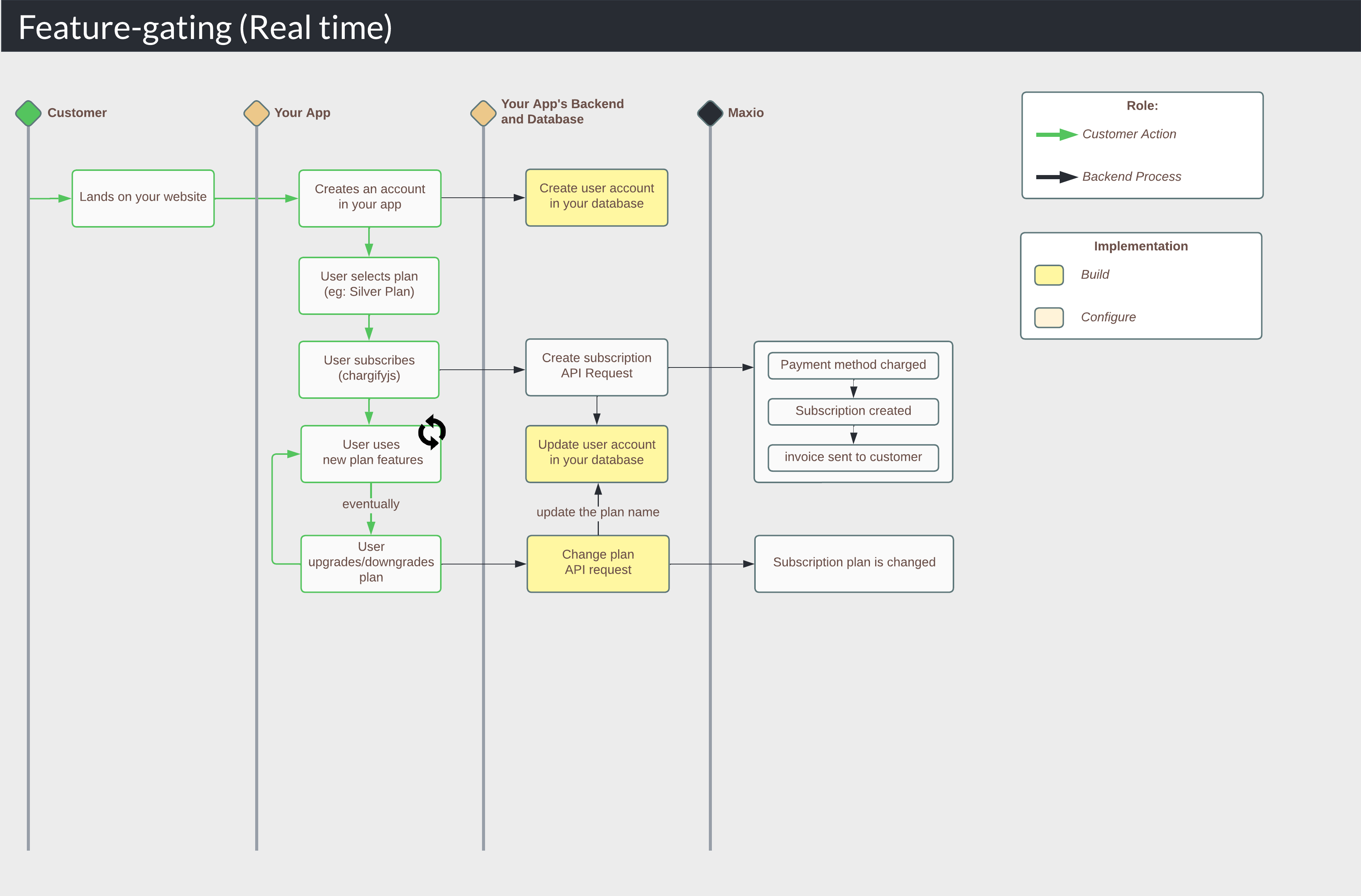
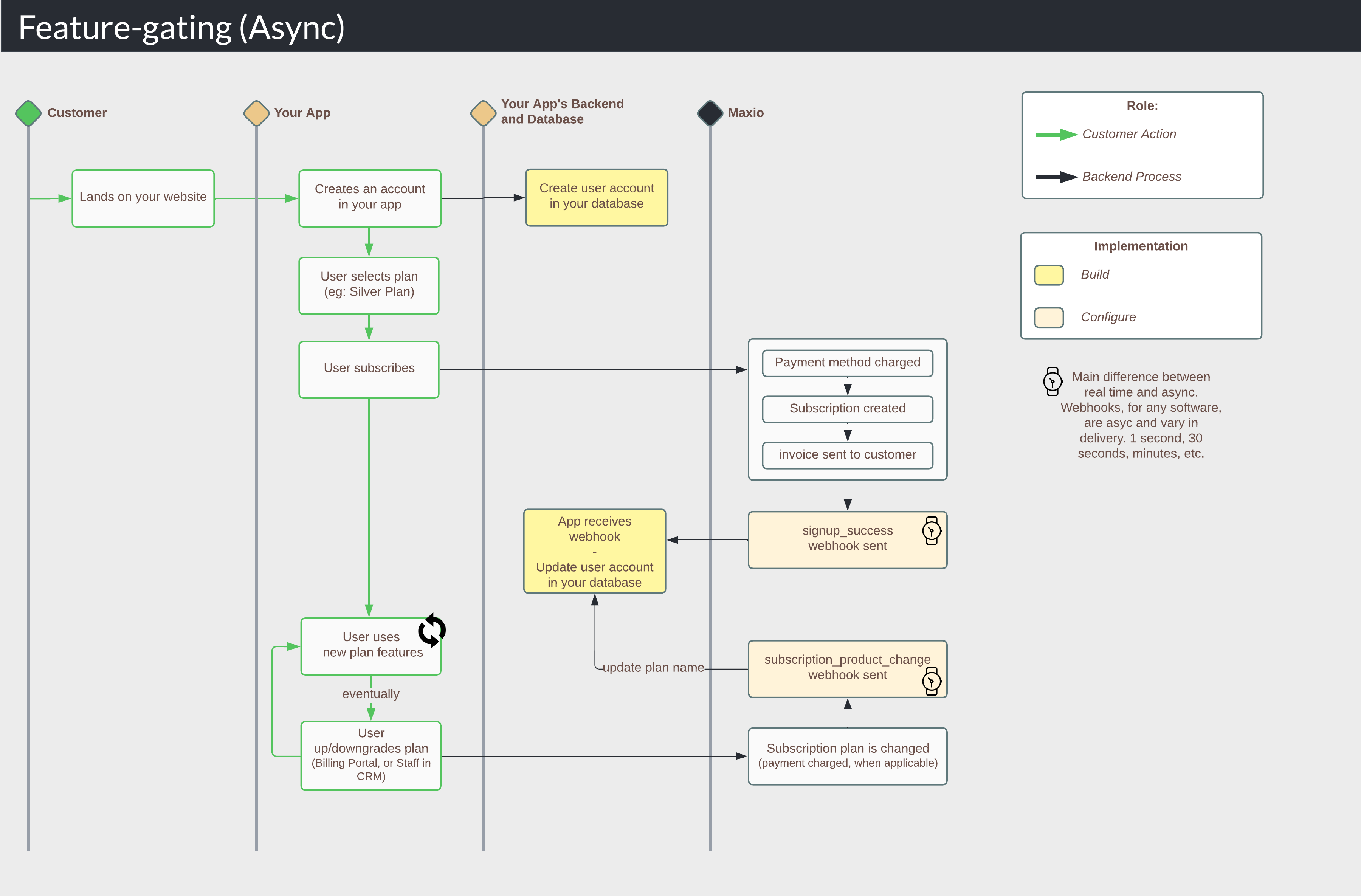
Feature access can be updated in real time or asynchronously. Real-time signups come through Maxio.js and the API, and real-time plan changes come through the Billing Portal and your CRM. Asynchronous signups come through Public Signup Pages, Offer Signup Pages, the Advanced Billing admin UI, and your CRM, and asynchronous plan changes come through the Billing Portal and your CRM.
Real time (API): the app updates the gate from the API response
Set the foundation for feature gating
Your application needs these four things in place before you build. You most likely have all or most of them already.
Prerequisites for feature gating
| You need a... | That meets these prerequisites... |
|---|---|
| Database (Required) |
|
| App login (Required) | A web application that handles new user account creation, such as a standard email and password login that creates a user record in your database. |
| New user signup process (Required) | A new user can sign up and subscribe to your services, creating a subscription in Advanced Billing. If you don't have this yet, start with Design Your New User Signup Flow. |
| Code that shows or restricts features (Required) | Application code that shows or restricts features based on plan type. |
Store the subscription plan on signup
When a user subscribes, store the Advanced Billing data you need. Do this in real time or asynchronously, depending on how the subscription is created.
Real time (API)
When you create a subscription with the API, you are typically either creating a paid subscription with a Maxio.js token or creating a free trial with no credit card. In both cases, parse the subscription response for state, subscription.id, and the plan name in handle, and store them in your database.
This is a subscription API response, filtered to the fields that matter for this workflow:
//Filtered API response when creating a subscription
{
  "subscription": {
    "id": 50652871, //the Advanced Billing-generated subscription ID
    "state": "active", //the subscription status
    ...
    "customer": {
      "reference": "ref_nxzfmNwEakbfWB9XY", //your unique customer reference
      ...
    },
    "product": {
      "handle": "gold_plan", //your plan handle
      ...
    },
    ...
  }
}
Then update your database:
--Update your database (conceptual example)
UPDATE users
SET subscription_id='50652871', subscription_status='active', plan='gold_plan'
WHERE user_id='ref_nxzfmNwEakbfWB9XY';
Finally, redirect the user to their destination, such as a dashboard or a thank-you page. This flow runs in real time, so the user has access to their plan's features as soon as they land.
Async (webhooks)
First, configure the signup_success webhook. Go to Config > Settings > Webhooks and enable it.
Next, create a subscription that mirrors your use case. Advanced Billing sends the webhook to your server.
//Filtered webhook body for signup_success
{
  "id":1454785060,
  "event":"signup_success" //the webhook event type
  {
     "id"=>50652871, //the Advanced Billing-generated subscription ID
     "state"=>"active", //the subscription status
     ...
     "customer"=> {
       "reference"=>"ref_nxzfmNwEakbfWB9XY", //your unique customer reference
       ...
      },
      "product"=> {
       "handle"=>"gold_plan", //your plan handle
       ...
      },
   ...
  }
}
Parse the relevant data from the webhook, then update your database:
//Update your database (conceptual example)
//if event is signup_success
if (webhook.event == 'signup_success') {
  UPDATE users
  SET subscription_id='50652871', subscription_status='active', plan='gold_plan'
  WHERE user_id='ref_nxzfmNwEakbfWB9XY';
}
Test this part of your workflow before moving on.
Update the subscription plan when it changes
Update the stored plan whenever it changes, whether a user upgrades themselves or a staff member changes the plan in the Advanced Billing admin UI or your CRM. Even with real-time plan changes in place, you still need webhooks to catch the changes your staff initiate.
Real time (API)
Real time applies only when you are building your own billing portal against the Advanced Billing API. For example, a user clicks a button to upgrade to the gold plan, and you update your database immediately, unlocking the gold features.
Say the user clicks upgrade, and your server-side code makes a successful POST /subscriptions/{subscription_id}/migrations.json request. Advanced Billing returns:
//Filtered API response when changing a subscription plan
{
  "subscription": {
    "id": 15254809,
    "state": "active",
    ...
    "customer": {
      "reference": "ref_nxzfmNwEakbfWB9XY",
      ...
    },
    "product": {
      "handle": "gold_plan",
      ...
    },
    ...
  }
}
A 200 or 201 status code signals success, so you can update your database:
--Update your database based on your user_id (conceptual example)
UPDATE users
SET plan='gold_plan'
WHERE user_id='ref_nxzfmNwEakbfWB9XY';

--Update your database based on subscription_id (conceptual example)
UPDATE users
SET plan='gold_plan'
WHERE subscription_id='15254809';
Finally, redirect the user to their destination. This flow runs in real time, so their features change as soon as they land.
Async (webhooks)
First, configure the subscription_product_change webhook. Go to Config > Settings > Webhooks and enable it.
Next, create or reuse a subscription that mirrors your use case, and change its plan. Advanced Billing sends the subscription_product_change webhook to your server.
//Filtered webhook body for subscription_product_change
{
  "id":1454785112,
  "event":"subscription_product_change" //the webhook event type
  {
     "id"=>50652871, //the Advanced Billing-generated subscription ID
     "state"=>"active", //the subscription status
     ...
     "customer"=> {
       "reference"=>"ref_nxzfmNwEakbfWB9XY", //your unique customer reference
       ...
      },
      "product"=> {
       "handle"=>"gold_plan", //your plan handle
       ...
      },
   ...
  }
}
Parse the relevant data from the webhook, then update your database.
//Update your database based on your user_id (conceptual example)
//if event is subscription_product_change
if (webhook.event == 'subscription_product_change') {
  UPDATE users
  SET plan='gold_plan'
  WHERE user_id='ref_nxzfmNwEakbfWB9XY';
}

//Update your database based on subscription_id (conceptual example)
if (webhook.event == 'subscription_product_change') {
  UPDATE users
  SET plan='gold_plan'
  WHERE subscription_id='50652871';
}
Test this part of your workflow before moving on.
Test your feature gating
Work through this checklist once the workflow is implemented:
- When a user subscribes to a specific plan, do they have access to that plan's features?
- When a user changes plans, do they gain the new plan's features and lose the old plan's features?
- Does the same hold when your staff change the plan in the Advanced Billing admin UI or your CRM?
Related information
For the API and webhook reference material these workflows are built on, see Core Resources for Building an Integration.
To build the same kinds of workflows without writing code, see Building Integrations and Workflows with iPaaS.
Still need help?
Reach out and our support team will take it from here.