
October 2025 Product Release
Applies to: All Maxio products
Last updated on Sep 19, 2026
Maxio released the following updates and new features during October 2025.
Billing
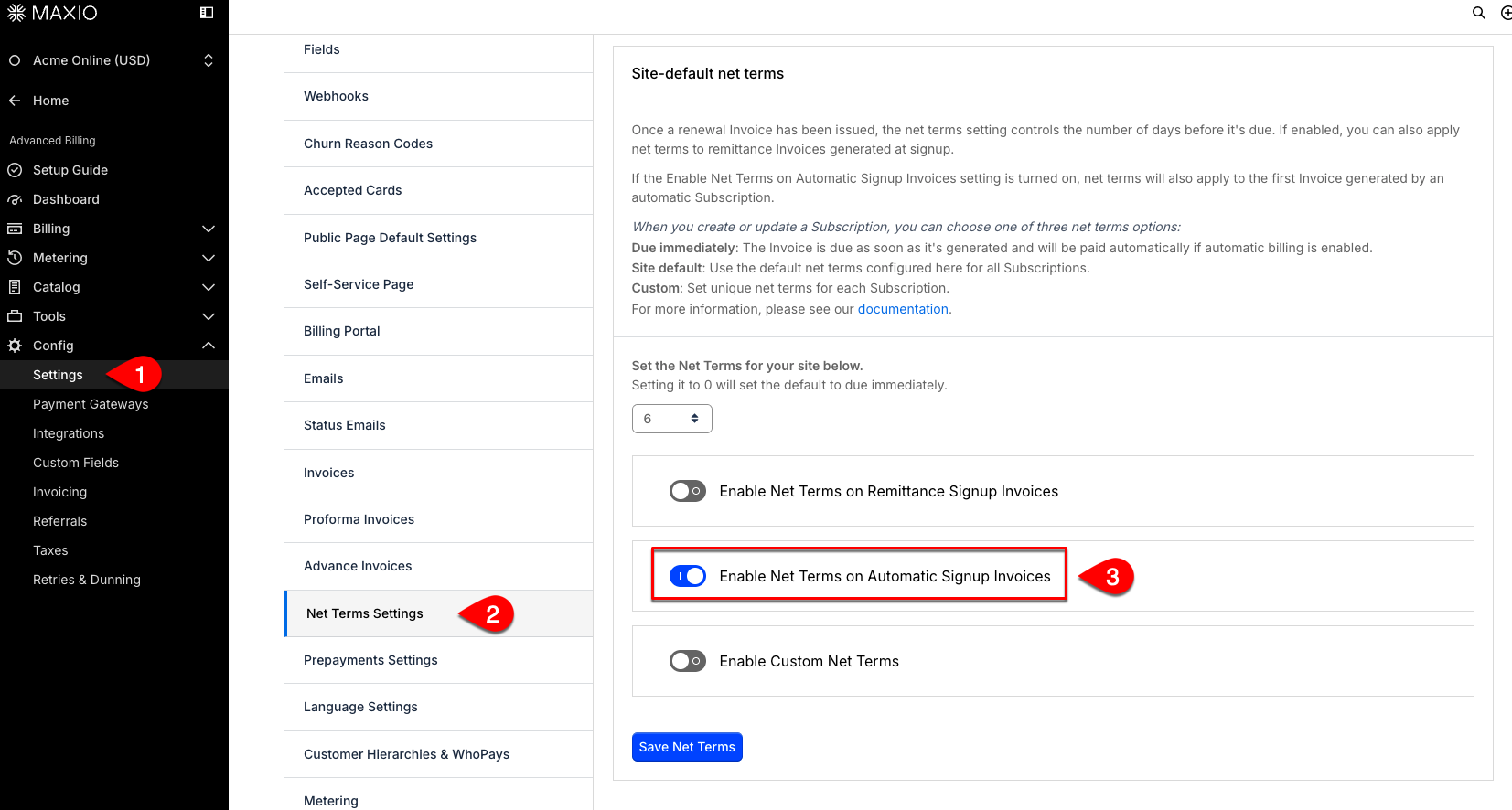
Enable net terms on initial Invoice for automatic Subscriptions General Access
You can now apply net terms (such as Net 15 or Net 30) to the first Invoice of a new automatic Subscription, not just renewals. This update helps enterprise Customers align payments with their procurement processes and avoid upfront payment requirements. (Released: 30 October 2025)
Learn more
- Why it matters:
- This feature removes friction for enterprise Customers by allowing them to pay the initial Invoice according to their standard review and approval workflows, making onboarding faster and smoother.
- Where to find it:
- From Advanced Billing, go to Config > Settings > Net Terms Settings. Toggle the Enable Net Terms on Automatice Signup Invoices to ON and save the setting.
Hide $0 Invoices from Customers in the Billing Portal General Access
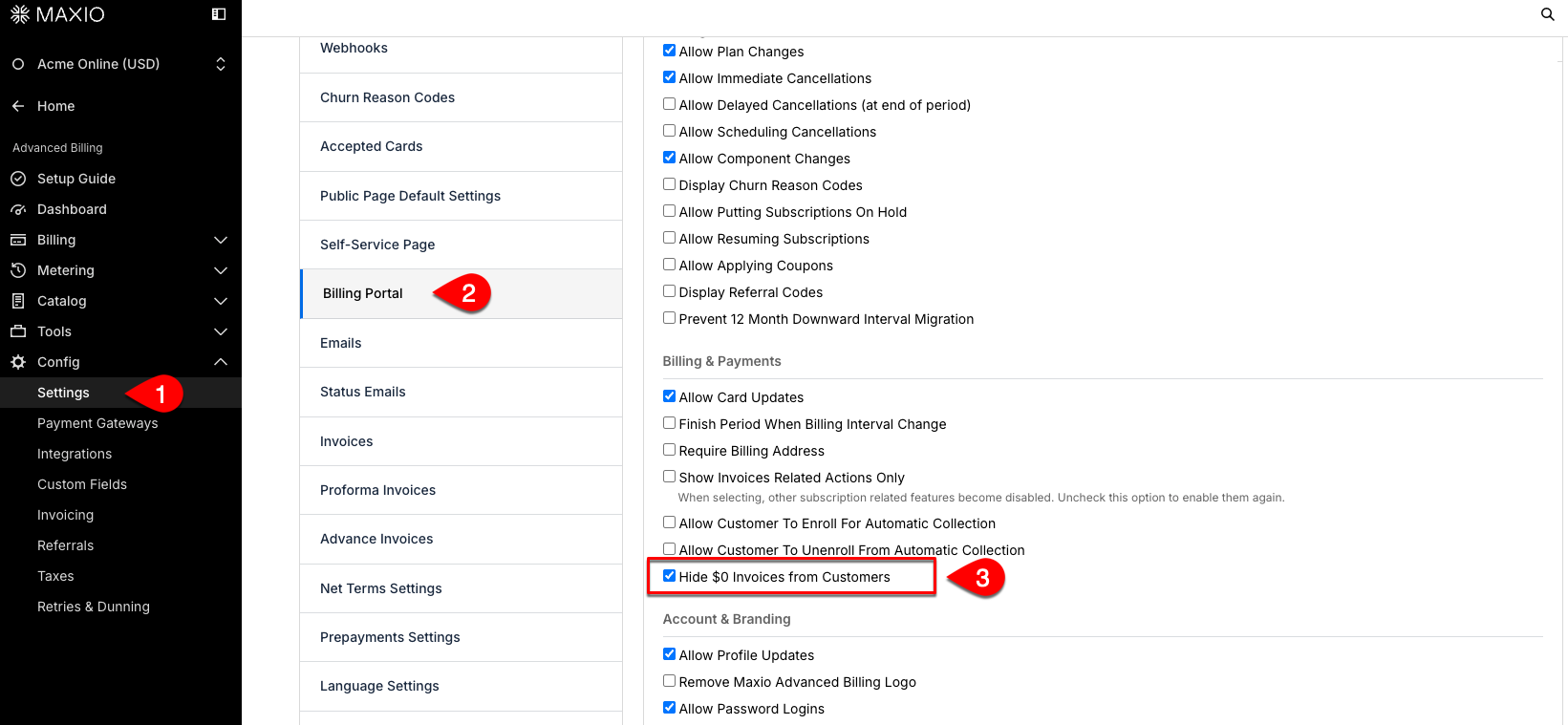
Merchants can now choose to hide $0 invoices from appearing in the customer-facing Billing Portal. This new setting helps ensure that Customers only see Invoices with actual amounts due, making their experience clearer and more focused. (Released: 13 October 2025)
Learn more
- Why it matters:
- This feature reduces clutter in the Billing Portal, making it easier for customers to find and pay relevant Invoices. It also helps Merchants improve customer satisfaction and reduce support requests related to confusing $0 invoice entries.
- Where to find it:
- From Advanced Billing, go to Config > Settings > Billing Portal. Check the Hide $0 Invoices from Customers box and save the setting.
Accounting
Automatically generate POB revenue with new Revenue Books automation General Access
You can now enable an automation for revenue books to generate Performance Obligation Revenue (POB) for new or updated transactions. This setting allows the system to automatically detect and process contracts that need POB revenue, running every 5 minutes for timely updates. (Released: 23 October 2025)
Learn more
- Why it matters:
- This automation reduces manual work and ensures revenue schedules are always up-to-date, improving data accuracy and operational efficiency for accounting teams.
- Where to find it:
- Go to Revenue Books settings, select Edit or create a revenue book, and look for the POB Automated Revenue Generation field to enable or configure the automation.
Adjust FX rounding for multiple Transactions at once General Access
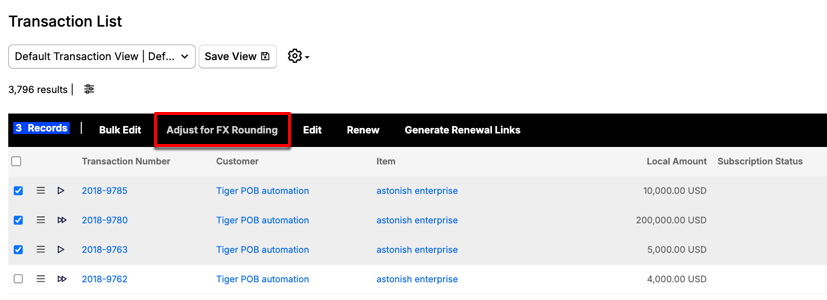
You can now adjust for FX rounding differences on multiple Transactions at once, instead of handling them individually. This new bulk action helps ensure that Transaction and Invoice totals match more easily when currency rounding issues occur. (Released: 28 October 2025)
Learn more
- Why it matters:
- This update saves time and reduces manual effort by allowing you to fix FX rounding discrepancies across many Transactions in one step, improving accuracy and efficiency in your accounting process.
- Where to find it:
- Go to the Transactions home or list page, select two or more Transactions, then choose the Adjust for FX Rounding option from the Bulk Actions menu bar.
Show Parent Customer Number in Customer List view General Access
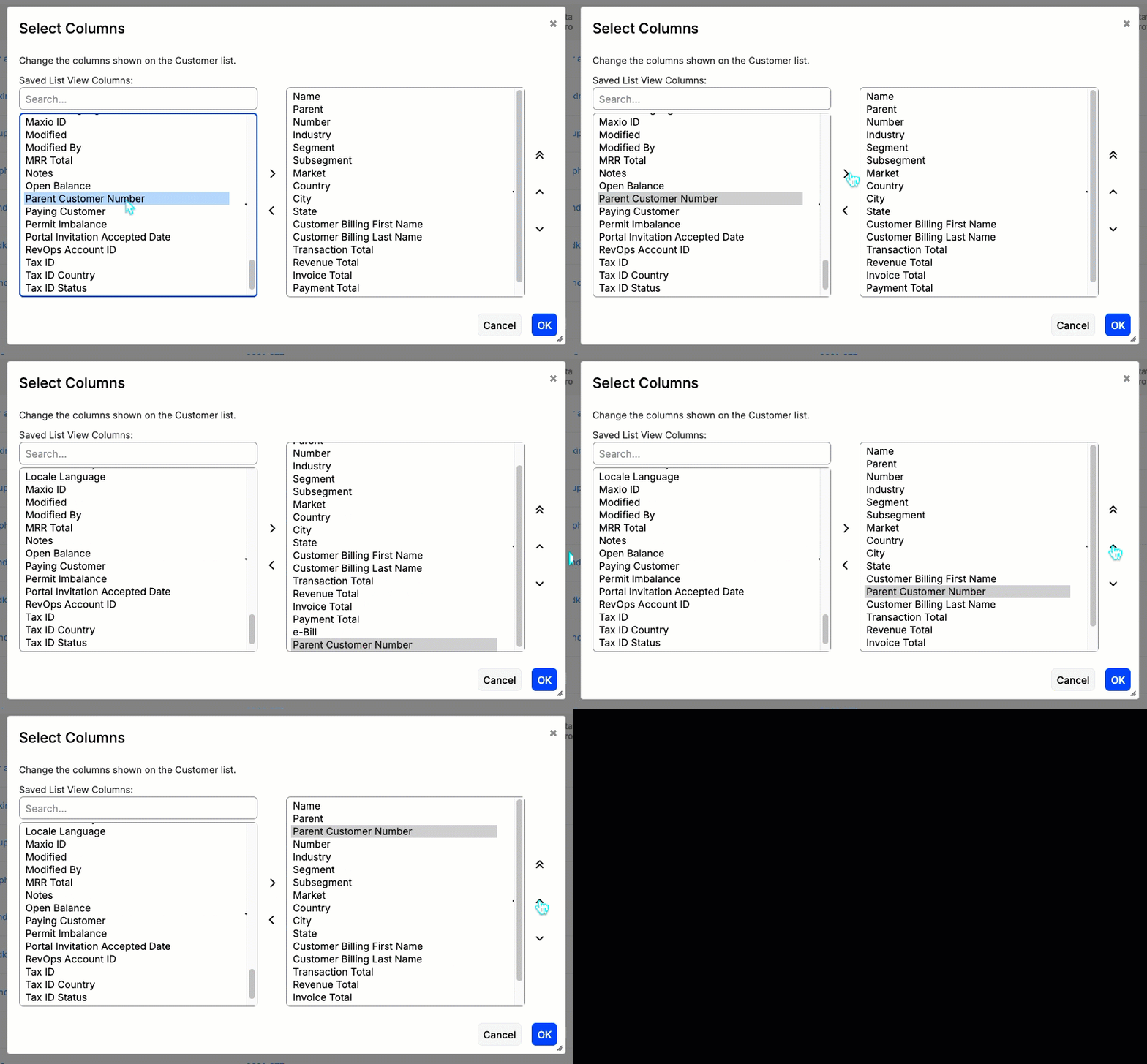
You can now add the parent customer number as a column in the Customer List view, displayed next to the parent name. This makes it easier to identify and reconcile account hierarchies directly in the Maxio UI. Both the standard and plain list templates support this new column. (Released: 23 October 2025)
Learn more
- Why it matters:
- This update helps finance and customer success teams quickly analyze customer relationships and hierarchies without needing to export data, saving time and reducing errors.
- Where to find it:
- Go to Customers, then select Customer List. Click the Columns action and, from the list of columns, add Parent Customer Number and place it next to the Parent column.
Delete register records using the Import tool General Access
Admins and Support roles can now delete register records directly through the Import tool. This update streamlines the process of managing register data, making it easier to remove outdated or incorrect entries in bulk. (Released: 28 October 2025)
Learn more
- Why it matters:
- This enhancement saves time and reduces manual effort by allowing Admins and Support to efficiently manage and clean up register records, improving data accuracy and operational efficiency.
- Where to find it:
- From Maxio Admin, under Import, select Delete, and follow the prompts to delete register records. Related article: Run an Import
Payments
Grouped fees now match transactions in deposits General Access
Deposit syncs now display grouped fees and transactions together, providing a consistent view across Maxio Core and Maxio Payments. This improves accuracy for deposits and minimizes manual corrections. (Released: 9 October 2025)
Learn more
- Why it matters:
- This reduces sync issues and time spent manually adjusting deposits in systems like NetSuite, ensuring a smoother reconciliation process for Merchants.
- Where to find it:
- From Maxio Payments, go to the Deposits view**.**
Email alert for deleted payment profile General Access
Merchants now receive an email notification when a payment profile is automatically deleted due to chargebacks, ACH rejects, or hard declines. This ensures timely action can be taken to collect payment through a new method. (Released: 9 October 2025)
Learn more
- Why it matters:
- Merchants are alerted immediately when a customer’s payment method is deactivated due to fraud or failed payments, allowing them to follow up quickly and reduce collection delays.
- Where to find it:
- Email notifications are sent automatically and are also logged in the Maxio Payments log files in Maxio Platform.
Chase gateway updated with latest DigiCert certificate General Access
Maxio updated the Chase/Orbital payment gateway to support the latest DigiCert security certificate. This ensures continued secure processing of transactions through the gateway. (Released: 6 October 2025)
Learn more
- Why it matters:
- This update ensures your payment processing remains secure and compliant with Chase’s latest security requirements.
- Where to find it:
- Applies automatically when using the Chase/Orbital gateway for payment processing.
Customer name added to payment failure notifications General Access
Payment failure email notifications now include the Customer name in both the subject line and as a bullet point in the message. This update helps Merchants quickly identify which Customer’s payment failed, making it easier to manage follow-ups and resolve issues. (Released: 30 October 2025)
Learn more
- Why it matters:
- This improvement allows Merchants to immediately recognize the affected Customer when a payment fails, reducing confusion and saving time when addressing payment issues.
- Where to find it:
- Payment failure notifications are sent via email. Look for the Customer name in the subject line and in the bulleted details within the email.
Developer Experience
Apply Coupon subcodes to ad-hoc Invoices via API General Access
You can now use Coupon subcodes when creating ad-hoc Invoices through the API. This update allows automated workflows to apply discounts to both Catalog-based and ad-hoc Invoices in a consistent way. (Released: 28 October 2025)
Learn more
- Why it matters:
- This enhancement streamlines discount automation for enterprise Customers, eliminates manual workarounds, and ensures consistent discount logic across all Invoice types.
- Where to find it:
- Use the API endpoint for creating ad-hoc Invoices. Include a valid Coupon subcode in your request payload.
Still need help?
Reach out and our support team will take it from here.