
December 2025 Product Release
Applies to: All Maxio modules
Last updated on Aug 30, 2026
Maxio released the following updates and new features during December 2025.
Billing
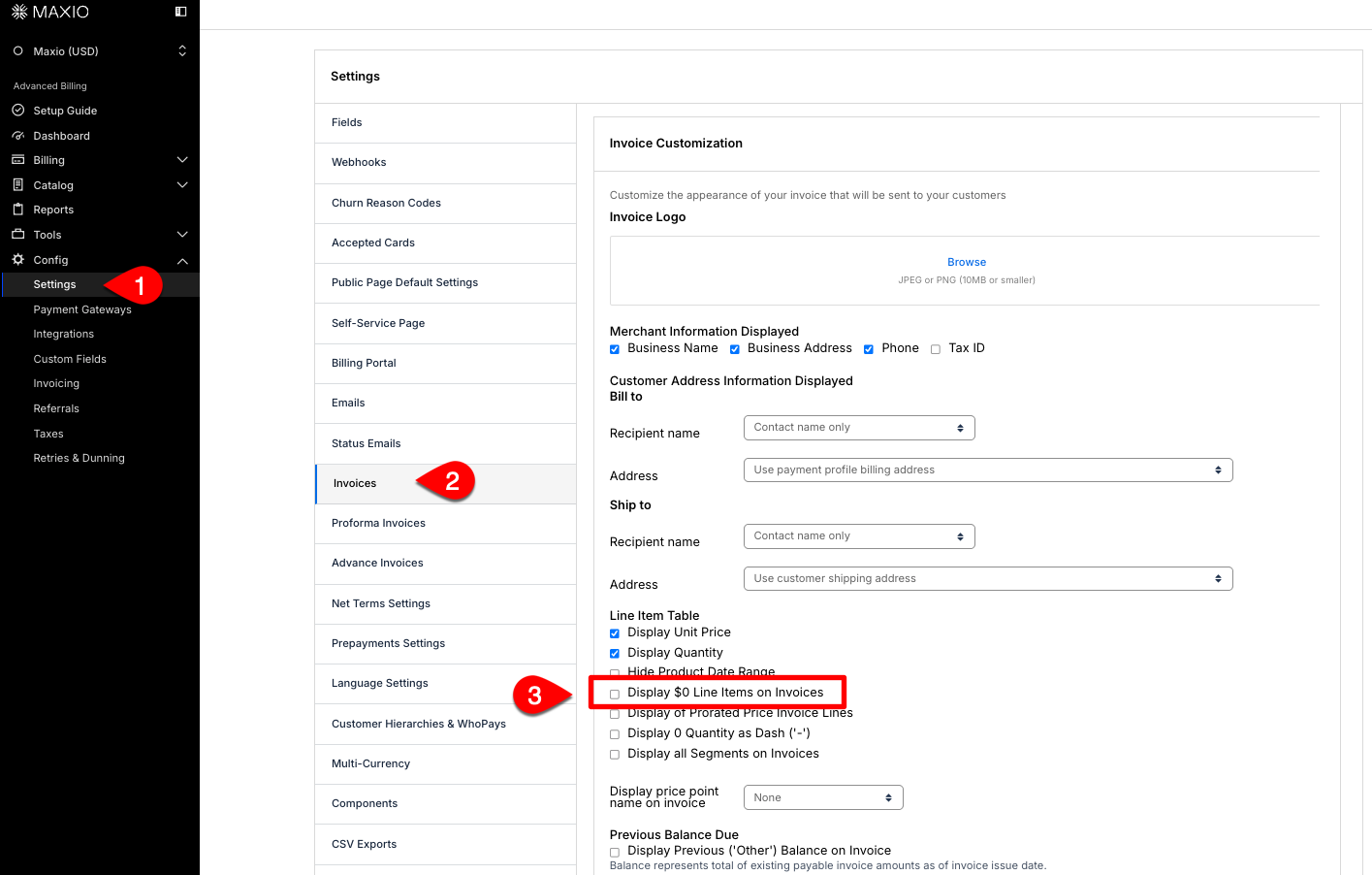
Hide $0 Product and Component line items on Invoices General Access
You can now hide $0 for both Product and Component line items on Invoices using the existing setting to hide $0 Invoice Line Items. This enhancement ensures that all $0 subtotal line items are excluded from Invoices. (Released: 10 December 2025)
Learn more
- Why it matters:
- This update helps keep Invoices clear and focused by removing unnecessary $0 line items, making it easier for Customers and Merchants to review charges.
This behavior differs from standard Public Signup Pages.
Learn more
- Where to find it:
- From Advanced Billing, go to Config > Settings > Invoices. Under Invoice Customization and uncheck the Display $0 Line Items on Invoices box.
Export Subscription Group data General Access
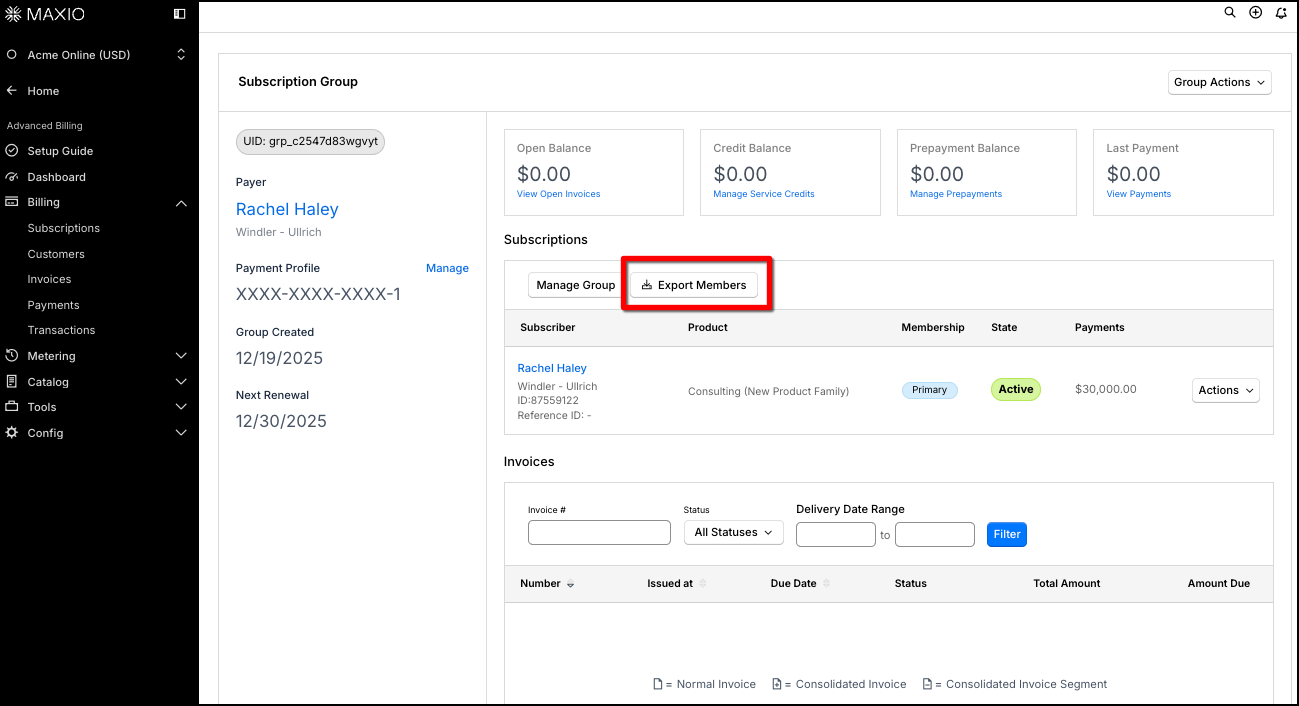
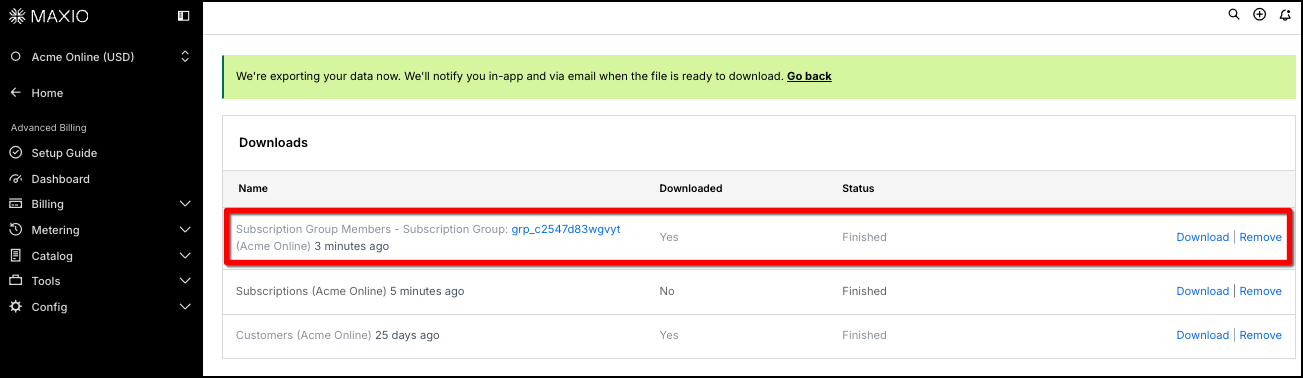
You can now export all Subscription Group data directly from the Group Subscription view. This feature allows you to download group member details and related metadata in a CSV file, making it easier to analyze or share Subscription information outside of Maxio. (Released: 19 December 2025)
Learn more
- Why it matters:
- This update helps you quickly access and share detailed Subscription group data for audits, financial analysis, or support purposes, saving time and reducing manual work.
- Where to find it:
- In Advanced Billing, view a Subscription and select the View Subscription Group action. Click the new Export Members button.
Payments
Foreign exchange rate now visible on cross-border Transactions General Access
Merchants can now view the applied foreign exchange (FX) rate on cross-border Transactions directly from the Transaction view, Transaction list, and deposit view embedded grid. This makes it easier to track and compare FX rates over time. (Released: 15 December 2025)
Learn more
- Why it matters:
- This update gives merchants greater transparency into the FX rates used for cross-border Transactions, supporting better financial analysis and reconciliation.
- Where to find it:
- Go to Transactions and select a cross-border Transaction to see the FX rate below the Amount. The FX rate also appears as a column in the Transaction list and in the embedded grid on the Deposit view page.
Enable EUR settlement and SEPA Direct Debit for merchants in Ireland, France, and Germany
Maxio Payments now supports Merchants domiciled in Ireland, France, and Germany, settling in EUR with SEPA available as a direct debit payment method. These Merchants can still accept payments from Customers paying in a wide range of other presentment currencies. (Released: 4 December 2025)
Learn more
- Why it matters:
- This extends Maxio Payments to new European Merchant countries and a new direct debit network, so Merchants can settle in their local currency while still accepting international Customers in the currency they expect to pay in.
- Where to find it:
- This applies automatically when a Merchant account is configured for Ireland, France, or Germany during onboarding. Contact your Maxio representative to enable it for an existing Merchant account in one of these countries.
Selling
Easily add fixed values to Salesforce sales orders General Access
You can now enter constant or fixed (static) values directly in Maxio’s Sales Order mapping UI, instead of creating extra fields in Salesforce. This streamlines the integration process and reduces clutter in your Salesforce schema. (Released: 11 December 2025)
Learn more
- Why it matters:
- This update saves time for Salesforce administrators and implementation specialists by allowing fixed values to be mapped directly in Maxio. It reduces the need for unnecessary Salesforce fields, making configuration simpler and ongoing maintenance easier.
- Where to find it:
- In Maxio, go to Integrations > Salesforce > Settings > Sales Order Mapping.
View billing intervals for each Subscription Product or Component in Salesforce General Access
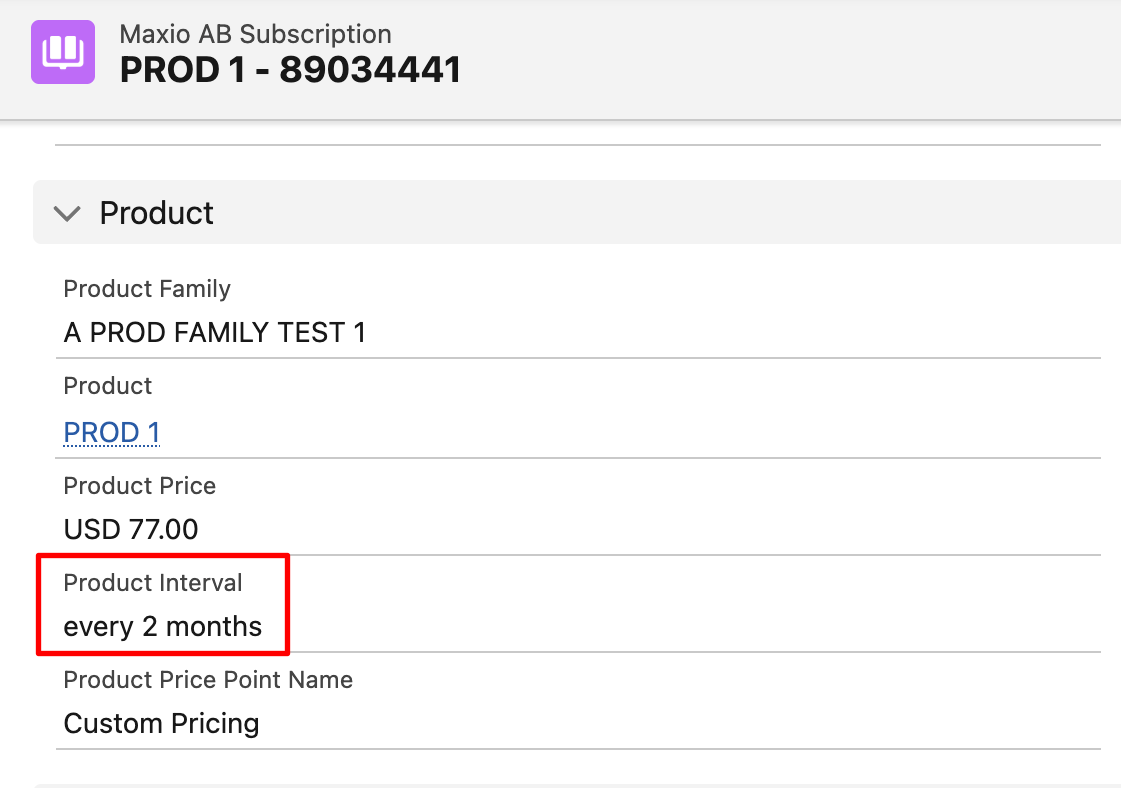
You can now view a clear summary of billing intervals for each Subscription directly in Salesforce. New fields have been added to the Subscription object, making it easier to reference billing intervals for products and quantity-based or metered components. (Released: 8 December 2025)
Learn more
- Why it matters:
- This update makes it easy to see how often a Customer is billed for a Subscription, providing full visibility into both Product and Component billing intervals directly in Salesforce.
- Where to find it:
-
-
For the Product interval:
From Salesforce, go to the Maxio AB Subscriptions object. The Product Interval field is located within the Product group.
-
For the Component interval:
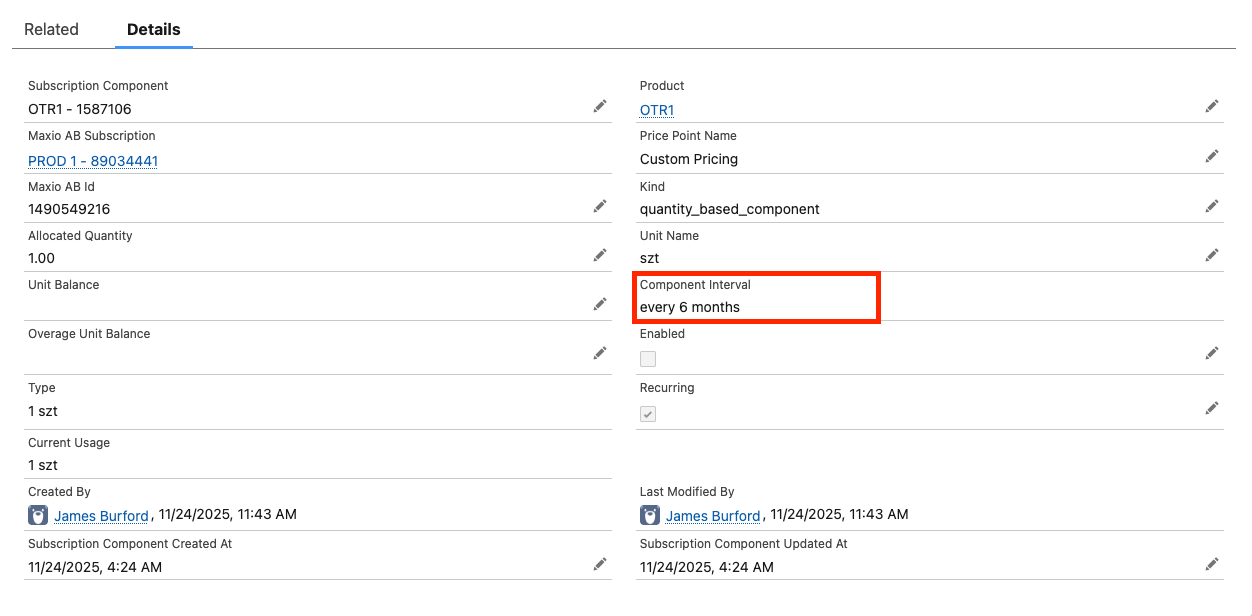
-
Edit a Subscription's term directly in Salesforce General Access
Salesforce users can now edit a Subscription's term directly from the Maxio Subscription UI in Salesforce. This includes updating the expiration date or setting the Subscription as evergreen, streamlining workflows and aligning the experience with Maxio Advanced Billing UI. (Released: 8 December 2025)
Learn more
- Why it matters:
- This feature allows you to efficiently manage Subscription terms within Salesforce, eliminating the need to switch to Maxio. It improves productivity and ensures a consistent user experience across platforms.
- Where to find it:
- In Salesforce, go to the Maxio Subscription record. The new Edit Term button appears directly beneath the Resume button for active Subscriptions on sites with Multi-Frequency enabled.
Maxio integration with Rillet BETA
Maxio now integrates with Rillet ERP, allowing you to use Rillet as your general ledger system. This integration streamlines the flow of financial data between Maxio and Rillet, supporting a seamless accounting process. (Released: 2 December 2025)
Learn more
- Why it matters:
- This integration helps you manage your financial records more efficiently by connecting Maxio with Rillet ERP. It reduces manual data entry and ensures your accounting information stays accurate and up to date.
- Where to find it:
- Once the integration is enabled, refer to the following help articles for details:
Offer Signup Pages block signups for archived Products General Access
Offer Signup Pages now correctly prevent signups for archived Products and their price points, matching the behavior of Public Signup Pages (see Create and Manage Offer Signup Pages). Previously, Subscriptions could still be created for archived Products through Offer Signup Pages, which contradicted documentation and caused Merchant confusion. (Released: 18 December 2025)
Learn more
- Why it matters:
- This fix ensures that Merchants cannot unintentionally create Subscriptions for archived Products, providing consistency across signup experiences and reducing support escalations from unintended signups.
- Where to find it:
- From Advanced Billing, go to Catalog > Offers > Offer Signup Pages. As described in Understand Public Signup Pages, attempting to access a public page for an archived Product returns a Page not found.
Developer Experience
Access renewal factors via a new public API endpoint
You can now retrieve your Site's Renewal Factor values through a new, read-only public API endpoint, so external systems can pull them without a user checking the Renewal Factor drop-down in a Transaction. (Released: 19 December 2025)
Learn more
- Why it matters:
- This makes Renewal Factor data available to integrations and external tools without manual lookup, streamlining automated reporting and reconciliation workflows.
- Where to find it:
- Use
GET /api/v3/renewal_factorsto list every Renewal Factor defined for your Site. Related article: Access Renewal Factors via the API
Still need help?
Reach out and our support team will take it from here.