
Understand the Projection Report
Applies to: Maxio Core
Last updated on Sep 13, 2026
The Projection Report is a special Report with unique behavior relative to other Reports: it generates virtual future projection Transactions from your actual Transactions, so you can project future revenue and cash flow before it happens.
Key capabilities
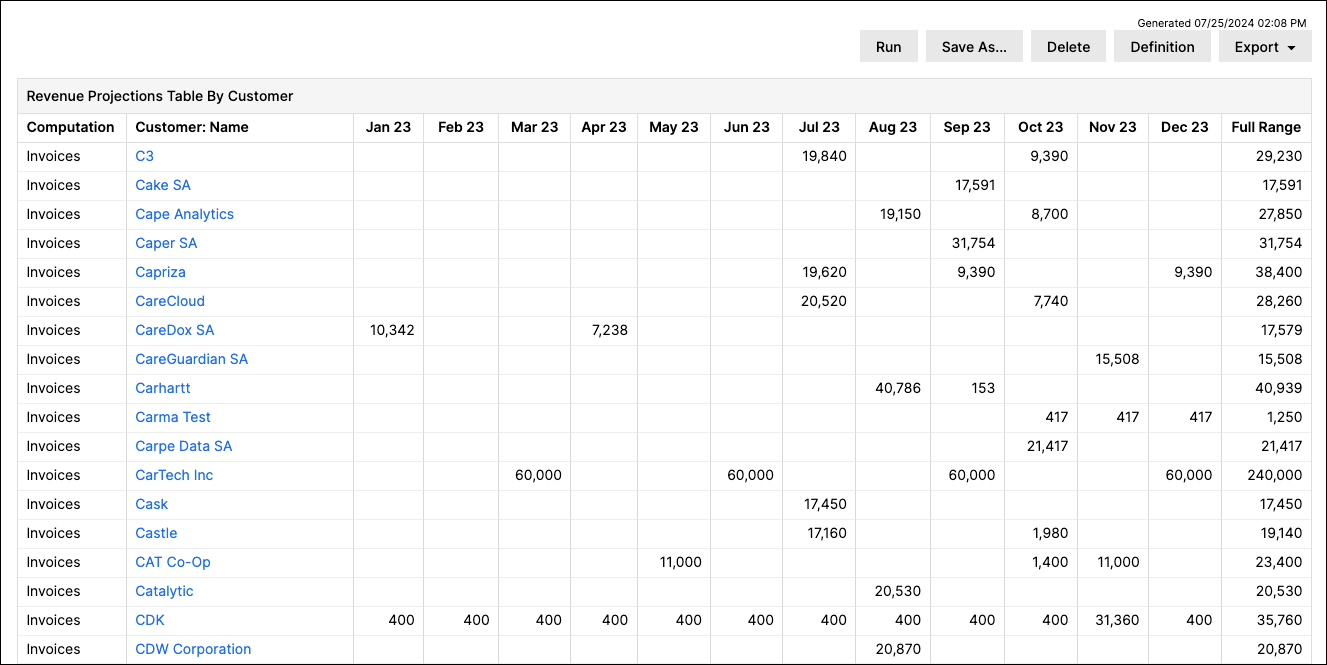
When you create and run a Projection Report, the system creates a set of virtual future projection Transactions to use in computations. How many projection Transactions are created and what information they contain is based on the actual Transaction from which they are derived and the Report settings you select, such as Item Group and filters.
A unique set of virtual projection Transactions is created and stored for each saved Report and is not visible in the Contract or Transaction Registers, nor included in Finance Reports or other Analytics Reports. For each Transaction, virtual Revenue Schedules and virtual Invoice Line Items are created, enabling you to project future revenues and future cash flow. These virtual records are not available for viewing in the application and are never included in Finance Reports. Virtual Transactions are created only for Transactions that have a Recurring Item, meet the Report criteria, and have neither been renewed nor canceled.
The results of a Projection Report include both this projected virtual data and actual Transaction data. Actual scheduled Invoices and Revenues for real Transactions are included in the Report results if they meet the Report criteria.
Important: The Report projects the selected Transaction Field value per your Report settings, and also displays any actual Transaction amount that starts within the Report's period.
Example: It's October 1, 2016, and you create a Projection Report with a Start Month/Year of January 2016. You have a Transaction with a start date of 6/1/2015 and an end date of 5/31/2016, with monthly invoicing. The Report includes revenues and invoices for that Transaction in the January, February, March, April, and May results.
Customer responsibilities
A Projection Report does not automatically refresh its projections. To keep them current, edit and save the Report again whenever the underlying Transaction, Revenue, or Invoice data changes. To update the Report, open its Definition screen, click Edit, and save your changes.
Limitations
A saved Projection Report is not real-time. Other than the Projection Report, every other Maxio Platform Report runs in real time, retrieving fresh data from the database each time you run it. A Projection Report is first saved when you define and run it, and after that does not run in real time unless you edit it.
Important: Projection Transactions are generated only when the Report is saved or edited, not every time you run it. If Transaction, Revenue, or Invoice data changes after you last saved or edited the Report, its projections may no longer be complete or accurate.
For example, a Projection Report created on May 1 includes projection Transactions as of May 1, based on your Report settings. Running that saved Report on October 1 uses the same projections created on May 1.
Related information
For the full set of configuration options, see Build Projections for Revenue and Invoices.
For what the report is built to answer — probability ladders, uplift factors, expired-contract treatment, and the three compute lenses — see What You Can Do with the Projection Report.
Still need help?
Reach out and our support team will take it from here.