
Understand Awaiting Signup
Applies to: Advanced Billing
Last updated on Aug 28, 2026
Use Awaiting Signup to onboard new Customers, coordinate Subscription start dates with Contracts, or align billing with your implementation timeline, without delaying when the Subscription itself gets created. The Subscription exists immediately, but Maxio treats its first successful billing as the official signup event.
What is awaiting signup?
Awaiting Signup lets you create a Subscription now and bill it on a specified future date. This initial billing date is treated as the signup event and calculates any trial or setup fees defined on the Plan.
Subscription creation and Subscription signup are considered two separate events. Each event has its own success and failure records for tracking and reporting.
Because the first billing date is treated as a signup, it behaves similarly to an immediate signup:
- Maxio ignores automatic net terms to prompt immediate payment.
- Maxio respects remittance net terms only if the site setting is enabled.
- You can apply prepayments and credits on the Subscription or group to the signup Invoice.
- You can generate a proforma Invoice to preview signup charges.
- You can generate an advance Invoice to capture charges before the signup date.
Subscriptions created with a delayed signup have the Awaiting Signup state. These Subscriptions are not considered paying and do not influence MRR. If necessary, you can extend the waiting period by updating the billing date on the Subscription.
When the delayed signup processes successfully, the Subscription either becomes active or enters a trial, depending on Plan settings. Maxio logs a signup success event in the Subscription's activity.
If the signup payment fails, the Subscription either:
- Is immediately canceled, logs a failure event, skips dunning, and has its Invoice canceled.
- Enters a past due state and begins dunning if the Plan's dunning strategy has Awaiting Signup Payment Failure enabled.
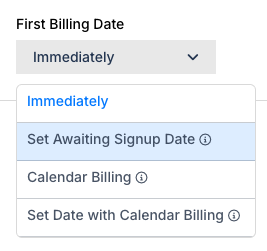
You choose Awaiting Signup from the First Billing Date field when creating a Subscription.
Where awaiting signup isn't available
Delayed signups are not available on legacy statement-based sites. Subscriptions with a delayed signup cannot be placed on hold.
Prepaid Products: Prepaid Subscriptions using the pre-funded account balance collection method are not supported with delayed signup. See Understand Prepaid Subscriptions for that collection method. For details on using Prepaid Products (allocation-based) with a delayed-signup Subscription, see Add Prepaid Products before the activation date below.
Configure the signup processing time
You can specify the date and time of signup for each Subscription. To configure a default processing time for all delayed signups, go to Config > Settings > Subscription Creation Settings and open the Delayed Signup section. The default time is 5 am.
Daylight saving time changes can shift processing across calendar days, so you can't set the default signup time to midnight. However, you can select midnight for an individual Subscription.
Choose how calendar billing charges the first signup
The Calendar Billing First Charge setting controls how the first charge is calculated when a Subscription has a delayed signup. Choose Prorated to charge a prorated amount, Immediate to charge the full amount right away, or Delayed to defer the full charge to the first renewal instead of collecting it at signup. If the First Billing Date aligns with the Calendar Billing day, the time automatically aligns with the Calendar Billing time.

For example, if a Subscription has a snap date of the 1st and signup is scheduled for the 5th of the next month:
- The Plan is charged at full cost on the 5th.
- The billing date snaps to the 1st of the following month.
Change product quantities or usage before signup
You can adjust Product quantities or usage before signup to ensure accurate billing. These changes do not generate prorated charges or Invoices.
Products may be configured during Subscription creation or at any time before signup. Metered usage added at Subscription creation is not reset until the delayed signup processes.
Add prepaid products before the activation date
On Invoice-centric billing sites, you can add Prepaid Products to a delayed-signup Subscription at creation or at any time before the activation date. No charges are made and no Invoices are generated at the time of setup. On the scheduled activation date, the system generates a single signup Invoice covering both the base Subscription cost and the prepaid allocation.
A few things to note:
- Maxio captures payment at activation using the saved payment method.
- The prepaid balance becomes available for usage recording only once the Subscription activates.
- Expiration windows for the prepaid allocation begin on the activation date, not the sale date.
- You can adjust the allocation quantity upward during the waiting period before activation.
Change a subscription's plan before signup
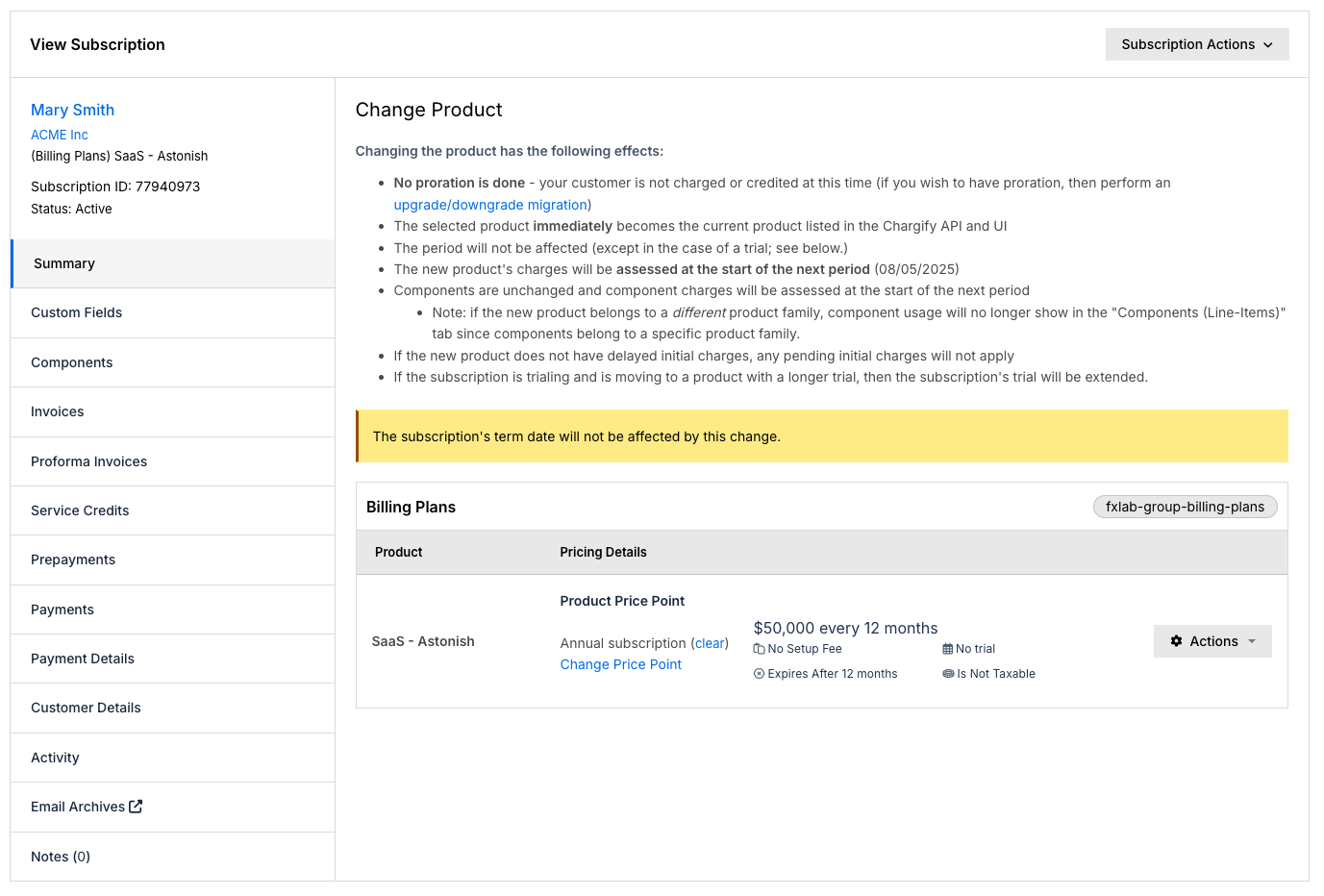
You can change the Plan associated with the Subscription using the immediate or scheduled Change Plan functionality.
Because the billing period has not officially started, upgrade and downgrade migrations are not available before signup. See Upgrade or Downgrade a Subscription for how migrations work once signup has processed.
Reactivate a canceled awaiting signup subscription
If a delayed signup Subscription is canceled before processing, you can reactivate it by resuming the billing period. The Subscription returns to the Awaiting Signup state as long as time remains in the billing period.
Once the signup has processed, whether successfully or unsuccessfully, the Subscription cannot return to the Awaiting Signup state. A new Subscription must be created instead.
Subscription Groups are an exception: reactivating an entire group places all Subscriptions in an active state.
Awaiting signup in subscription groups
Subscriptions with delayed signups can be grouped with the following rules:
- If the primary Subscription is Awaiting Signup, all group members must also be Awaiting Signup. Align billing dates whenever possible.
- If the primary Subscription is active, individual group members may remain in the Awaiting Signup state. Configure the Accrue charges until the group renewal option to control when the member pays.
Group consolidation options at signup behave as follows:
- Align the billing date with the billing date of the group copies the primary billing date. If the primary is Awaiting Signup, the member is automatically created in the Awaiting Signup state.
- Prorate billing for the current period is ignored because it applies only when dates are aligned and no proration remains at signup.
- Accrue charges until the group renewal determines whether a consolidated Invoice is issued immediately or waits for the primary renewal.
We recommend combining Align the billing date and Accrue charges when you want multiple Subscriptions to sign up on the same date and generate a single consolidated Invoice.
Delayed signup compared to a next_billing_at import
Advanced Billing allows you to create an imported Subscription using the next_billing_at attribute. This workflow assumes the Subscription previously existed in another system and is being migrated into Maxio.
In contrast, a delayed signup represents a new Subscription that has not yet officially begun billing. API overrides supported for next_billing_at, such as importing as canceled, setting a previous billing date, or importing MRR, are not available for delayed signups.
Related information
For the full explanation of Prorated, Immediate, and Delayed first-charge behavior, see Understand Calendar Billing.
To configure the site-wide default first-charge behavior, see Configure Calendar Billing Settings.
For the full set of billing-consolidation rules referenced under Subscription Groups, see Choose invoice consolidation options.
Still need help?
Reach out and our support team will take it from here.