
Set Up Stripe with Plaid
Applies to: Maxio Core
Last updated on Sep 19, 2026
Stripe + Plaid is the Stripe for Payments integration with Plaid authorization added, so ACH payments are verified instantly instead of through micro-deposits. You need a Stripe account, but not a Plaid account of your own.
Before you start
Maxio Support switches Plaid on, and there is no setting for it on the Payment Providers screen. Contact support@maxio.com to enable Plaid authorizations, including if you already use Stripe for Payments, then complete the steps below. Once Plaid is enabled, the provider appears as Stripe + Plaid in place of Stripe.
Connect Maxio to Stripe
Once Support has enabled Plaid, the connection steps are the same as for Stripe on its own.
To connect Maxio to your Stripe account
-
Click e-Bill Payment Provider Settings in the Invoicing section of the Admin screen.
-
On the Payment Providers screen, click Connect to Stripe on the Stripe + Plaid card.

-
On the Stripe screen that appears, click Sign In to connect an existing Stripe account, or fill in the fields in the lower half of the screen to create a new one. If your Stripe login covers more than one account, select the account you want to use for this integration.
-
Click Configure and complete the settings. They are identical to the ones for Stripe on its own, so see Set Up Stripe for Payments for what each one does.
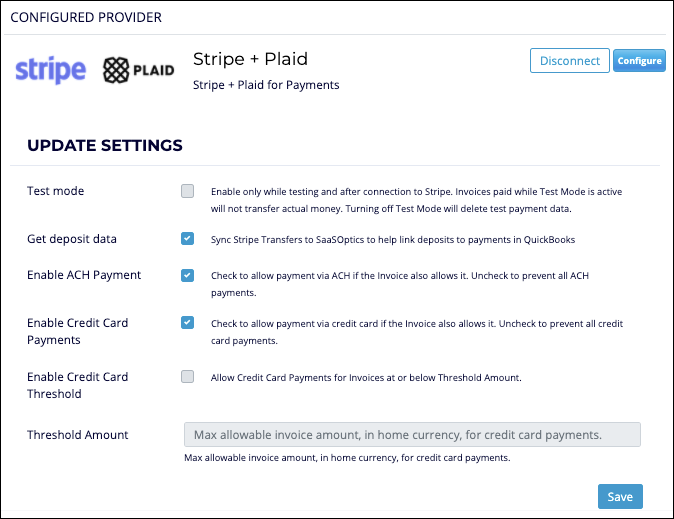
The Stripe + Plaid settings panel -
Click Save.
Once connected, Connect to Stripe is replaced by Disconnect.
Finish setup and test
The remaining work is the same for Stripe with or without Plaid, so it is documented once.
To align the e-Bill Settings screen with your Stripe setup, see Match your e-Bill settings.
To try a payment end to end before going live, see Test Stripe. Ask Support for a sandbox account rather than connecting a production one.
Still need help?
Reach out and our support team will take it from here.