
January 2026 Product Release
Applies to: All Maxio modules
Last updated on Aug 30, 2026
Maxio released the following updates and new features during January 2026.
Selling
Direct Anrok integration now available Beta
The Anrok integration with Maxio allows you to connect your systems to Anrok quickly and easily, without the need for extra software or complex setup. This update improves performance, reliability, and makes it easier to scale your operations. (Released: 17 January 2026)
Learn more
- Why it matters:
- This feature introduces a native integration with Anrok to automate tax calculations and compliance directly within Maxio. It also provides real-time tax reporting capabilities, helping businesses stay compliant with various tax regulations and reducing the risk of errors.
- Where to find it:
- Go to Taxes > Anrok in the Maxio UI. Related articles:
Billing
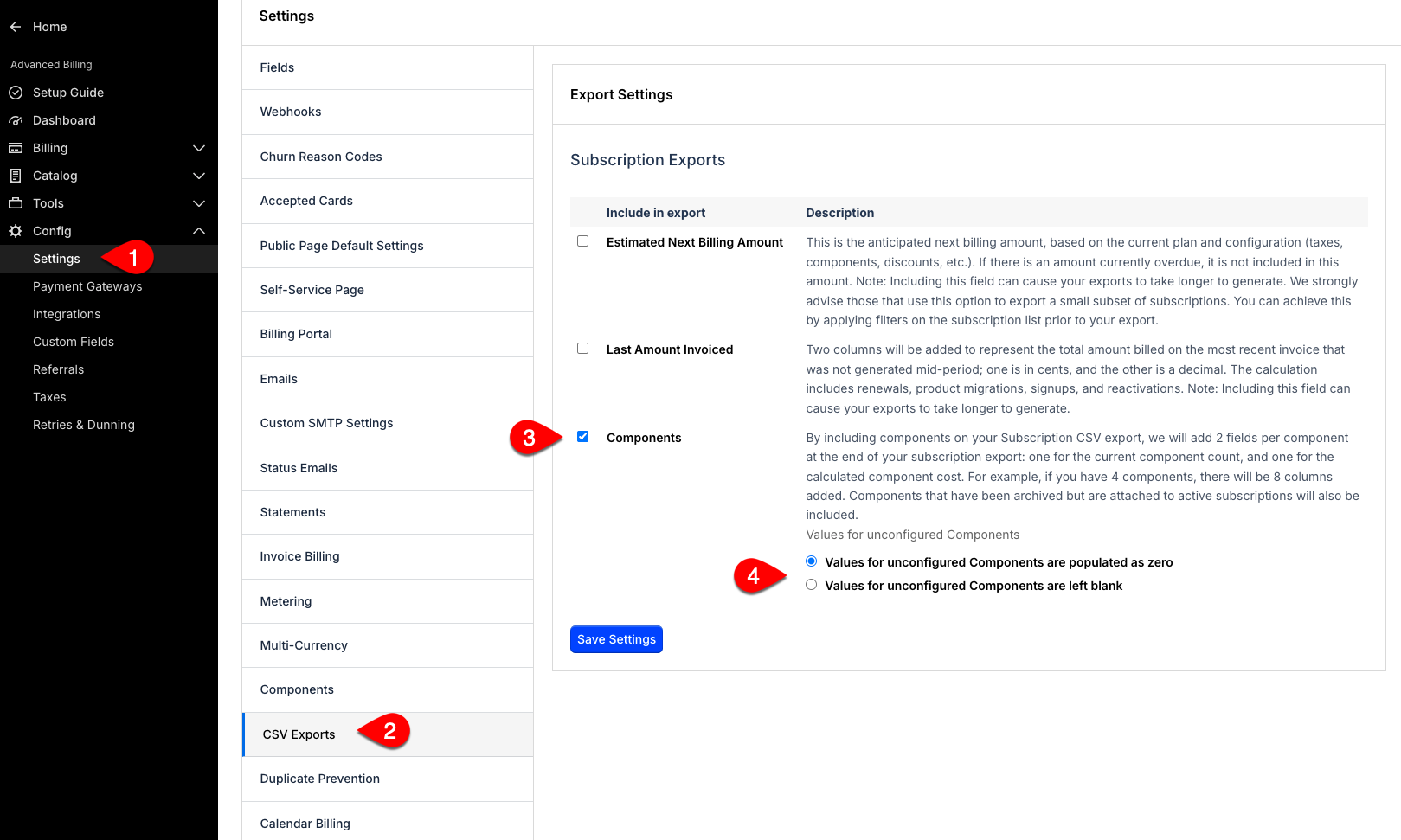
Choose how unconfigured Components appear in Subscription exports General Access
You can now decide whether unconfigured Component values in Subscription CSV exports appear as 0 (zero) or are left blank. This new setting helps you distinguish between components that are set to zero and those that are not configured at all, improving downstream reporting and data clarity. (Released: 13 January 2026)
Learn more
- Why it matters:
- This update gives you more control over your exported Subscription data, making it easier to accurately interpret missing versus zero values for components. This distinction is important for reporting and analytics, especially when tracking usage or configuration status.
- Where to find it:
- From Advanced Billing, go to Config > Settings > CSV Exports, then configure the Components option when exporting Subscription data. If your site uses the Allow Product List Subscriptions feature, look for Products instead of Components.
Billing Portal setting to hide subscription sign-up date
Maxio Admins can now control whether the Subscription sign-up date is shown in the Billing Portal and related external locations. The Hide Subscription Signup Date setting hides the created and activated dates for Subscriptions, giving you more control over sensitive metadata. (Released: 15 January 2026)
Learn more
- Why it matters:
- This update helps you protect customer privacy and tailor the information shown to end users by hiding subscription start dates when needed.
- Where to find it:
- Go to Config > Settings > Billing Portal and check the Hide Subscription Signup Date option under Subscription management.
Accounting
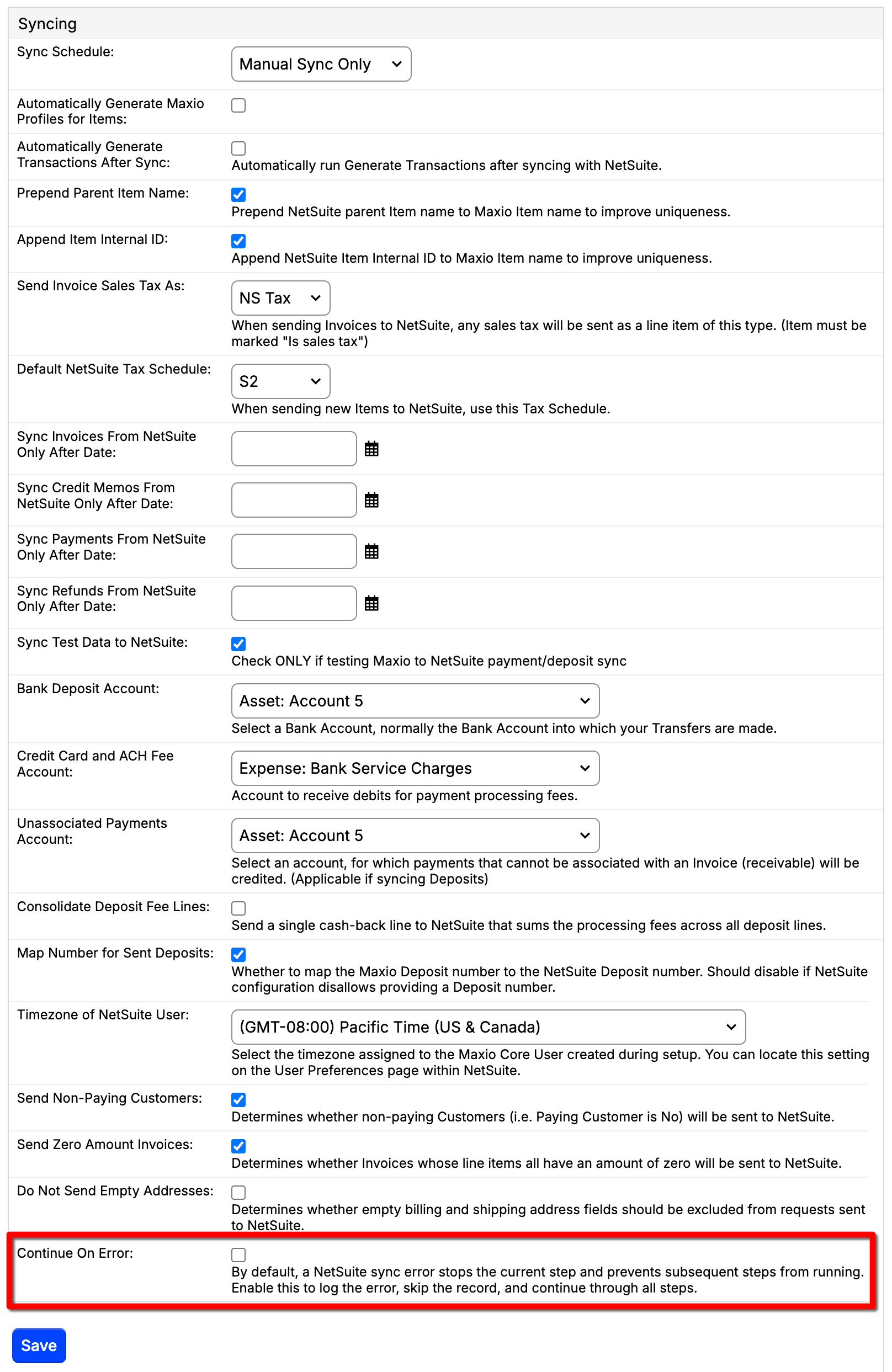
Option to continue on error for NetSuite sync General Access
You can now enable a Continue on Error option for NetSuite syncs, allowing the process to continue even if individual records fail. This helps ensure daily syncs for large customers are not interrupted by minor, recoverable issues. (Released: 7 January 2026)
Learn more
- Why it matters:
- This feature increases operational efficiency by reducing manual intervention and minimizing disruptions caused by minor errors during NetSuite synchronization.
- Where to find it:
- From Maxio Admin and under Integrations, click NetSuite. Click the Update Settings action and scroll down to the Continue on Error option.
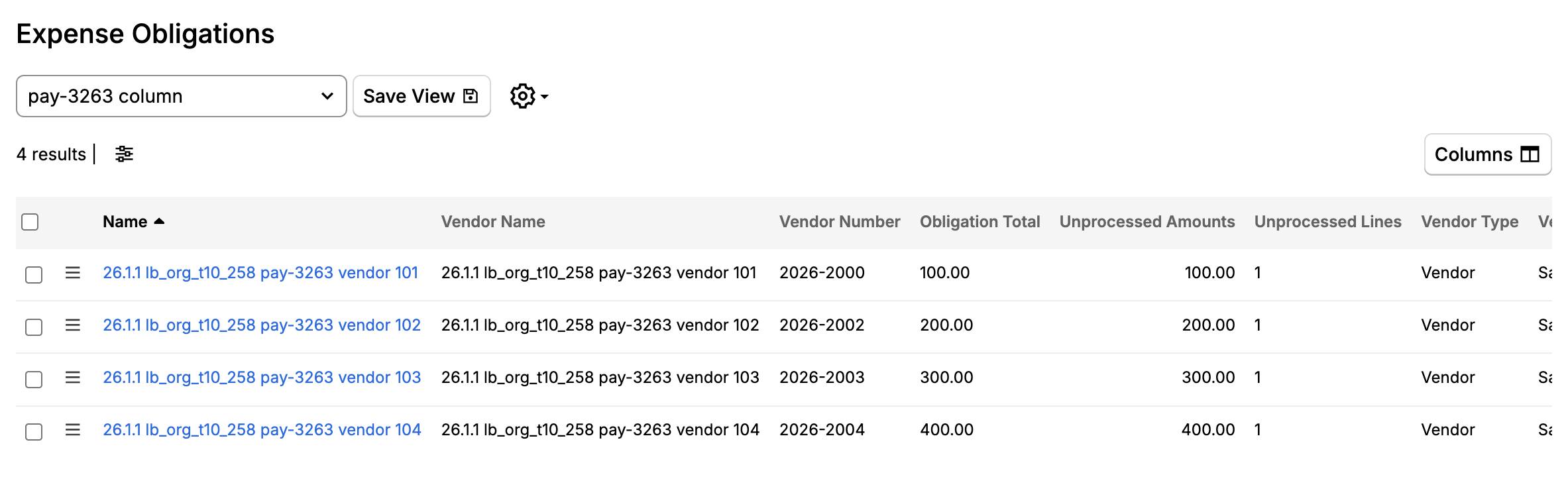
Save custom list views for Expense Obligations General Access
You can now save and reuse your preferred configurations for the Expense Obligations list view, including filters, sorting, and column visibility. This enhancement streamlines your workflow and ensures a consistent experience every time you access the list. (Released: 29 January 2026)
Learn more
- Why it matters:
- This feature saves you time by letting you quickly apply your favorite list settings, making it easier to work efficiently and maintain consistency across sessions.
- Where to find it:
- From Maxio, go to Expenses > Expense Obligations. Select your preferred view from the drop-down or Create and Save a List View and then click Save View.
Insights
Enhanced Cohort Report with sortable columns General Access
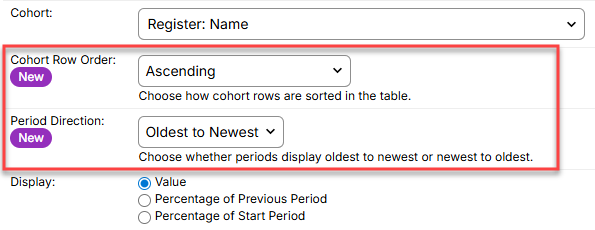
You can now control how cohorts are displayed and sorted in the MRR Cohort Report, including sorting by metrics and changing the display direction of time periods. These new options make it easier to analyze trends without affecting how metrics are calculated. (Released: 27 January 2026)
Learn more
- Why it matters:
- This update gives you more flexibility to customize cohort data views, making it easier to focus on the most relevant trends and insights for your business needs.
- Where to find it:
- Go to Reports and create or edit an MRR Cohort Report. From the Cohort Report Builder, scroll down and select:
- A Cohort Row Order to sort in ascending or descending order;
- The Period Direction to display periods forward (oldest to newest) or backward in time.
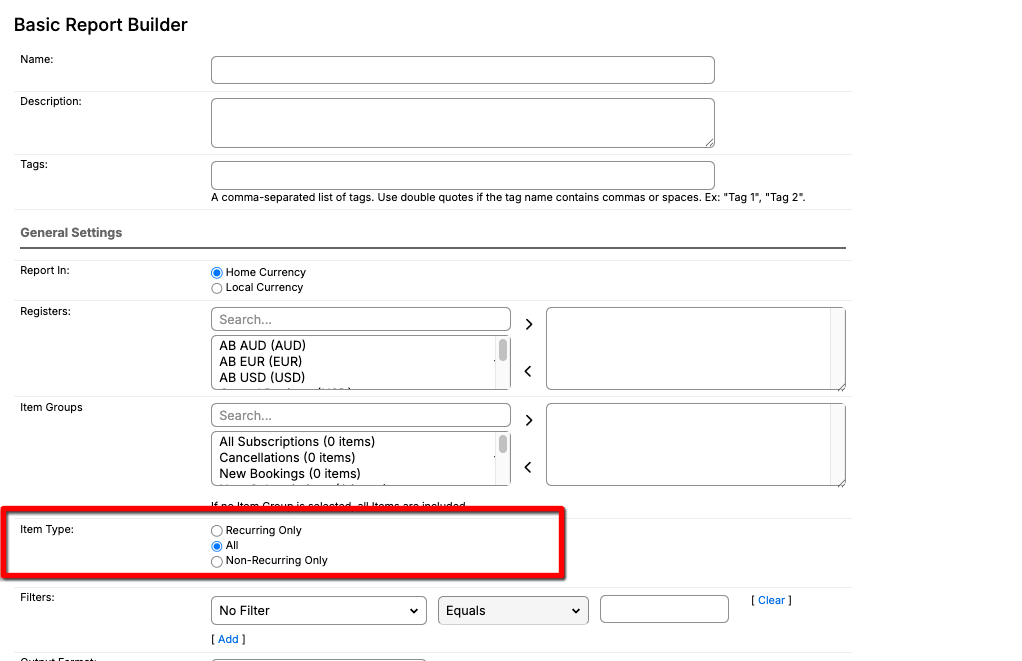
Add recurring and non-recurring filter to Basic Report General Access
You can now filter the Basic Report by item type, choosing between recurring, non-recurring, or all items. This new selector makes it easier to segment your data and matches the options available in the Cohort Report. The default selection is set to all, so your existing reports continue to work as before. (Released: 8 January 2026)
Learn more
- Why it matters:
- This update gives you more control over how you view and analyze your data, making it easier to focus on recurring or one-time transactions. It also ensures a consistent experience across different reporting tools.
- Where to find it:
- Go to Reports > Add Report > Basic Report. In the report form, under General Settings, look for the Item Type option.
Developer Experience
Attach files to Invoices automatically using the API General Access
You can now attach files or provide file URLs when sending Invoices using the Advanced Billing API. This update allows developers to automate invoice delivery workflows by including attachments programmatically, eliminating the need for manual uploads in the UI. (Released: 21 January 2026)
Learn more
- Why it matters:
- This feature streamlines high-volume invoice delivery by allowing attachments to be added directly through the API, saving time and reducing manual effort for Customers who need to send usage summaries or custom documents with their Invoices.
- Where to find it:
- From the Maxio Developer Portal, go to the API Endpoints. Use the POST /invoices/:uid/deliveries endpoint in the API. Refer to the updated API documentation for details on the attachments[ ] and attachment_urls[ ] parameters.
Issue Draft Invoices through the public API General Access
Developers can now issue draft Adhoc Invoices using the public Maxio API endpoint, enabling full automation of invoice approval workflows without relying on the UI. This update extends the existing endpoint to support draft invoices, making it easier for merchants to integrate external approval flows. (Released: 19 January 2026)
Learn more
- Why it matters:
- This enhancement allows merchants and developers to automate the process of issuing draft invoices, streamlining approval workflows and reducing manual intervention. It supports more flexible and efficient integrations with external systems.
- Where to find it:
- From the Maxio Developer Portal, go to the API Endpoints. Use the POST /invoices/:invoice_id/issue endpoint in the Maxio public API.
Improved Multifrequency Subscription preview General Access
The Multifrequency Subscription preview now supports both numeric IDs and string handles for component and price point identifiers. This update ensures that preview manifests are generated correctly and consistently, regardless of the identifier type used. Developers and integrators can now use either form without concern for errors or inconsistencies. (Released: 29 January 2026)
Learn more
- Why it matters:
- This enhancement increases flexibility and reliability for developers, allowing seamless integration and accurate previews when using either numeric IDs or handles. It also ensures consistent behavior across different subscription preview paths, reducing the risk of integration errors.
- Where to find it:
- From the Maxio Developer Portal, go to the API Endpoints.
Still need help?
Reach out and our support team will take it from here.