
Get Started with the Advanced Subscription Momentum Report
Applies to: Maxio Core
Last updated on Oct 16, 2026
The Advanced Subscription Momentum Report helps SaaS finance and product teams analyze subscription dynamics, including renewal growth, churn velocity, cohort momentum, and revenue transition. Take a moment to understand the report's logic before running it so you get accurate analytics.
How the report interprets your data
With a configurable structure of logical sections, the report delivers unbiased, mathematically valid insights into subscription performance without relying on class labels. The underlying methods and approaches have been vetted and benchmarked by the marketplace, and by numerous domain experts including consultants and mathematicians. These methods may not always match your preferred way of measuring and analyzing, especially when your objective differs from the report's goal of delivering the purest, most unbiased, mathematically valid subscription-performance analysis.
The report interprets data rather than relying on explicit categorization: it examines Transactions in the context of each other rather than using Transaction fields such as "Class" to determine which calculation or category a Transaction falls into. The Class settings (New, Renewal, etc.) are NOT used in this report.
Creating an Advanced Subscription Momentum Report
The Advanced Subscription Momentum Report is highly configurable and covers a broad range of metrics and analytics. The system provides two primary ways to configure the report, so you can make the process as simple or as detailed as you'd like. You can either use the Fast Start with One-Click Reports feature, which uses a pre-set template of configurations, or you can use the report builder to set up the report manually.
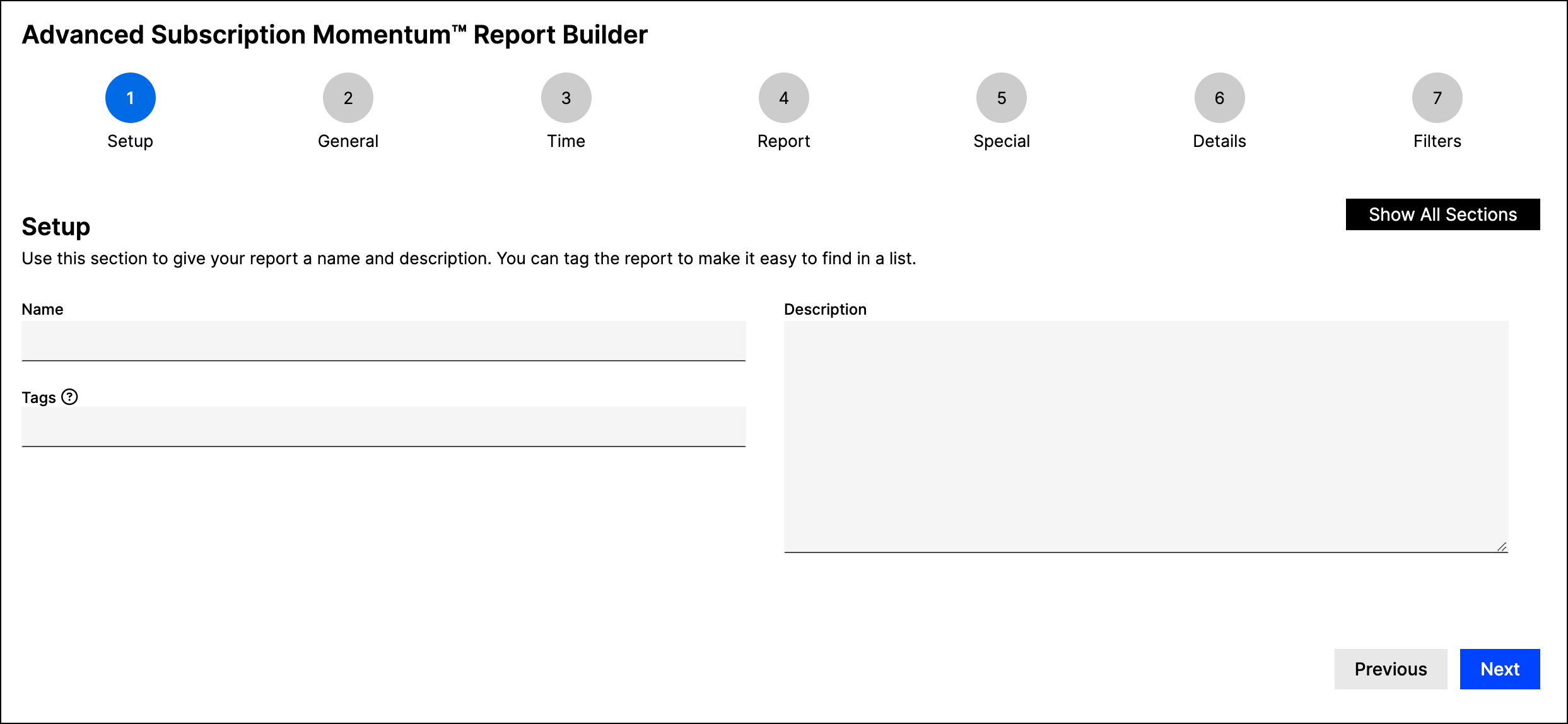
If you opt to set up the report manually, the system walks you through each section of the report step-by-step using the report-builder wizard. If you prefer to view all sections at once, select Show All Sections in the report-builder wizard.
For detailed configuration steps, see Configuring the Advanced Subscription Momentum Report.
Viewing an Advanced Subscription Momentum Report
After you save and run the report you configured, the results appear. The report consists of sections that vary depending on how you set it up. The default view is a floating bar chart; however, you can also filter and group sections and include additional graphs and charts to visualize the data.
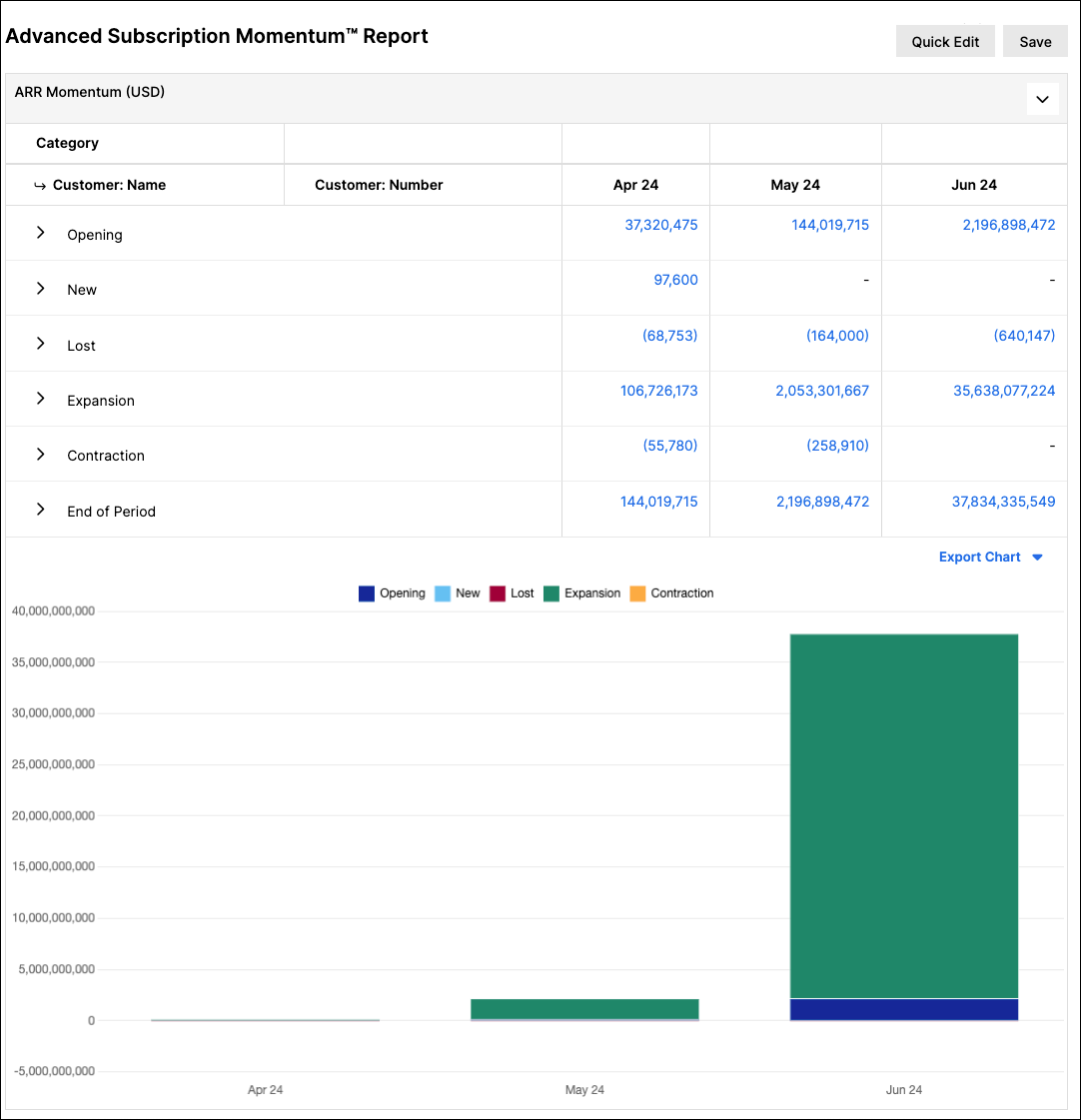
One of the most helpful features of the report is its expandable rows. To view more granular information for a specific row, click the expand icon next to it. The expanded view displays the Customers that contribute to each momentum category for each period.
You can use the Edit or Quick Edit options in the upper-right corner to adjust the report settings. You can also export the report data to another format (for example, a spreadsheet).
For an in-depth explanation of the report's sections and calculations, see Understanding the Advanced Subscription Momentum Report.
Running the report for one contract or customer
You can run the report for a single Contract or Customer straight from its page, without setting it up in the report builder. This is useful when you're reconciling one account and want to see how its Transactions roll into Momentum.
The report covers the record's recurring Transactions, monthly, from the earliest order or start date through the latest end date. It opens in a new browser tab as an unsaved report.
To run the report for a Contract or Customer:
- Open the Contract or Customer.
- In the Reports menu, select Advanced Subscription Momentum™.
The menu option appears only when the Advanced Subscription Momentum™ Report setting is turned on for your account. It is unavailable when the record has no recurring Transactions, and you need permission to run reports to see the Reports menu. On a Contract page, the Reports menu also requires the Financial Performance Summary Report or the Advanced Revenue Summary Report to be enabled for your account.
Re-running the report after you edit transactions
When you change a Transaction on that Contract or Customer, you can refresh the results in the same tab instead of launching the report from the record again.
To re-run the report:
- On the report results page, click Re-run Report in the upper-right corner.
The report runs again for the same Contract or Customer with the same settings, using your current Transaction data. A Generating Report message appears while it runs.
Re-run Report keeps the report's original date range. If your edit moves activity outside that range, for example by extending a Transaction's end date past the report's last month, that activity doesn't appear. To include it, run the report again from the Contract or Customer page.
Re-run Report appears only on unsaved Momentum reports, such as the ones you run from a Contract or Customer. A saved report shows Run instead.
Related information
For the most common conditions that affect the accuracy of your Momentum Report results, see Troubleshoot Unexpected Advanced Subscription Momentum Report Results.
Once you're comfortable with the basics, see What You Can Do with the Advanced Subscription Momentum Report for real use cases behind FX Gain/Loss, CLV, retention, and backlog metrics.
Still need help?
Reach out and our support team will take it from here.