
Activate Cadences
Applies to: Maxio Core
Last updated on Aug 24, 2026
Turn on Cadences in Collections and Dunning settings so Maxio can automatically send payment reminder emails based on your cadence templates. Once enabled, you can choose a default cadence and control which days of the week the system sends cadence emails.
This feature is a part of the Cadences functionality. Cadences is a feature of Maxio Platform's Collections functionality that generates and sends emails to customers to remind them to pay their outstanding invoices.
To activate cadences
-
From the Admin menu, under Invoicing, click Collections & Dunning.
-
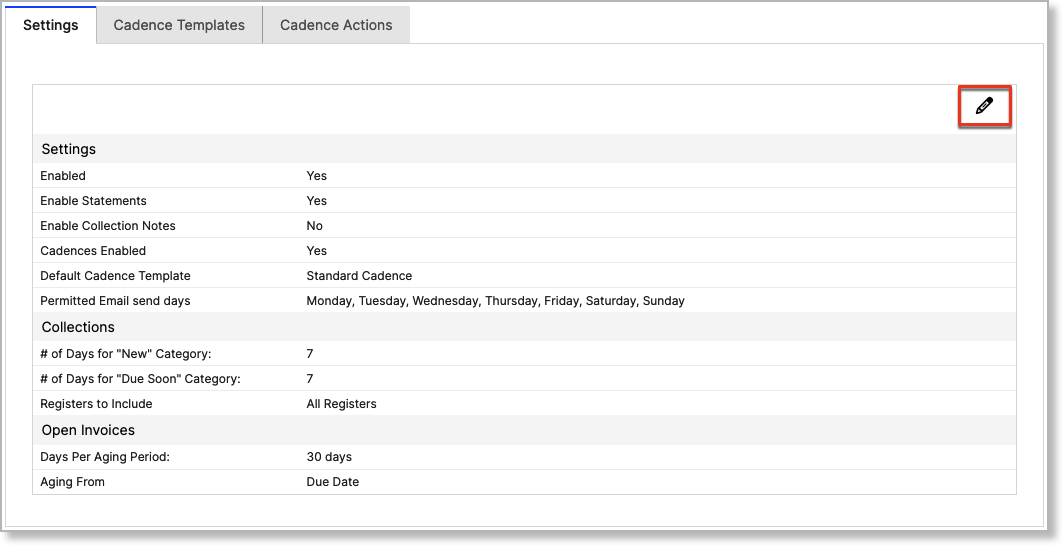
Click the Update Settings button in the top-right corner.
-
Click the Enable Cadences checkbox at the top of the screen.
Note you can also select a default cadence template and the days of the week the system should send cadence emails.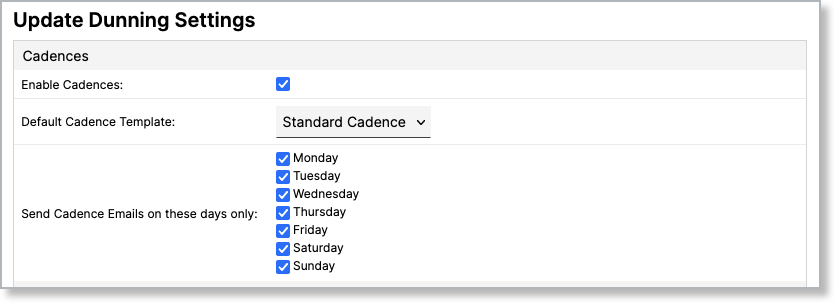
-
Click Save at the bottom of the screen. The Cadence Template tab should now appear next to the Collections and Dunning settings.
Related information
You can learn more about Cadences by checking out this help article: Cadences Overview.
Still need help?
Reach out and our support team will take it from here.