
Cadences Overview
Applies to: Maxio Core
Last updated on Aug 24, 2026
Cadences automate your collection emails so you can streamline dunning, reduce manual follow-up, and ensure customers receive timely reminders for outstanding invoices. With Cadences, you build custom message schedules that send e-Bills automatically or manually after a set number of days have passed. You also control the email messaging with each cadence step and at what point to include the customer's escalation contact.
Getting Started with Cadences
Complete the following in order to use Cadences:
- Activate the feature in your account
- Create cadence templates
- Assign cadences to invoices, transactions, and customers
You should also take some time to decide how you would like to use this feature before completing these steps. How many reminders do you want to send and how many days should the system wait in-between emails? When should the emails be sent to the customer's escalation contact? Should the cadence run automatically or manually? Remember that you can create multiple cadence templates to segment your customer base and customize your messaging to suit their needs.
Using Cadences
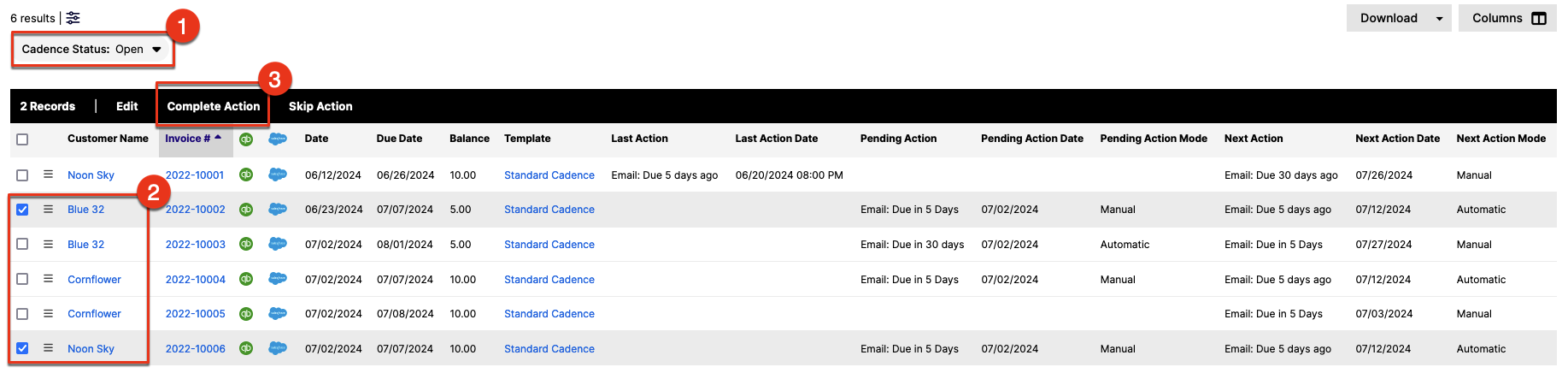
The Cadences screen (Accounts Receivable > Cadences) provides a dashboard for tracking and managing your collection cadences. You can also manually execute the steps in bulk for any cadences not set to run automatically. See Use Cadences to Manage Collection Emails for more information. Simply select the open cadence(s) by checking the box next to it and then clicking Complete Action.
Still need help?
Reach out and our support team will take it from here.