
Delete Subscriptions
Applies to: Advanced Billing
Last updated on Aug 29, 2026
Permanently delete a Subscription and its transaction data from your Site. Because deletion can't be undone, reserve it for reversing data-entry mistakes. If you want to end a Customer's Subscription while keeping its revenue and history, cancel it instead.
Eligibility for deletion
If your Site is connected to Maxio Core, a Subscription is eligible for deletion only if all of the following are true:
- Every associated Maxio Core Transaction has a start date after the configured Transaction Lock Date.
- Every associated Invoice and Credit Memo has an issue date after the configured Close Lock Date.
- None of the associated Invoices or Credit Memos have synced to a General Ledger.
If a Subscription doesn't meet these criteria, Advanced Billing blocks the deletion and shows a Maxio Core Subscription Error message explaining why.
Delete a Subscription
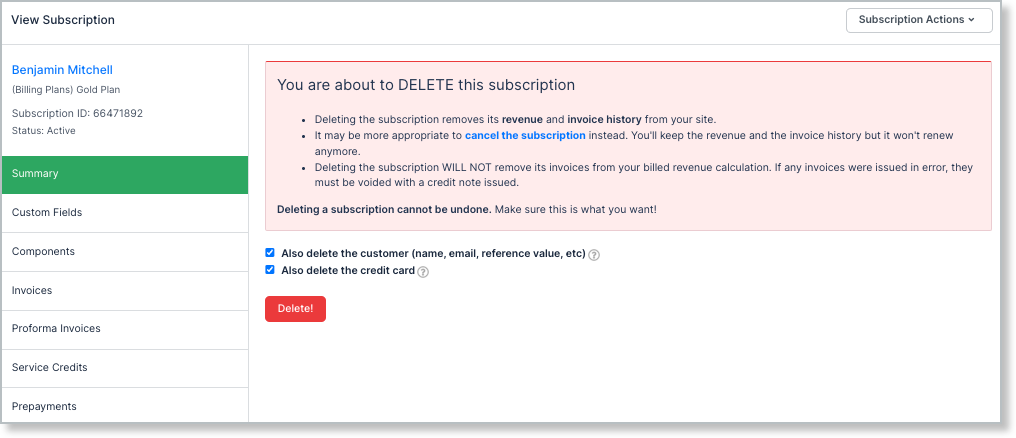
Deleting a Subscription can also delete its Customer and credit card, if they're not used elsewhere.
WARNING: Deleting a Subscription is permanent and can't be undone. Only account administrators can delete a Subscription, and deletion is blocked if the Subscription has any pending payments. The Delete... option isn't available for a Subscription Group's primary Subscription.
To delete a Subscription
-
From the Subscription Actions dropdown, select Delete....
-
Select which additional records to delete.
Option Description Also delete the customer (name, email, reference value, etc.) If you plan to use this Customer for new Subscriptions, leave this unchecked. A Customer can have multiple Subscriptions, so the Customer is deleted only if you select this option and the Customer has no other active Subscriptions. Also delete the credit card If you plan to reuse this credit card for another Subscription, leave this unchecked. A credit card can be linked to multiple Subscriptions, so it's deleted only if it isn't linked to any others. -
Click Delete.
Related information
For more on lock dates, see Manage Closing and Transaction Lock Dates.
For the full list of Subscription actions, see Subscription Actions Overview.
Still need help?
Reach out and our support team will take it from here.