
Update Subscription Payment Method
Applies to: Advanced Billing
Last updated on Sep 28, 2026
A Subscription's payment method is the card or bank account Advanced Billing charges at each renewal. When it expires, fails, or the Customer wants to pay with something else, Update Payment Method is the action that changes it.
Update the payment method yourself
You can edit, add, or delete a Subscription's payment method directly.
To update a Subscription's payment method
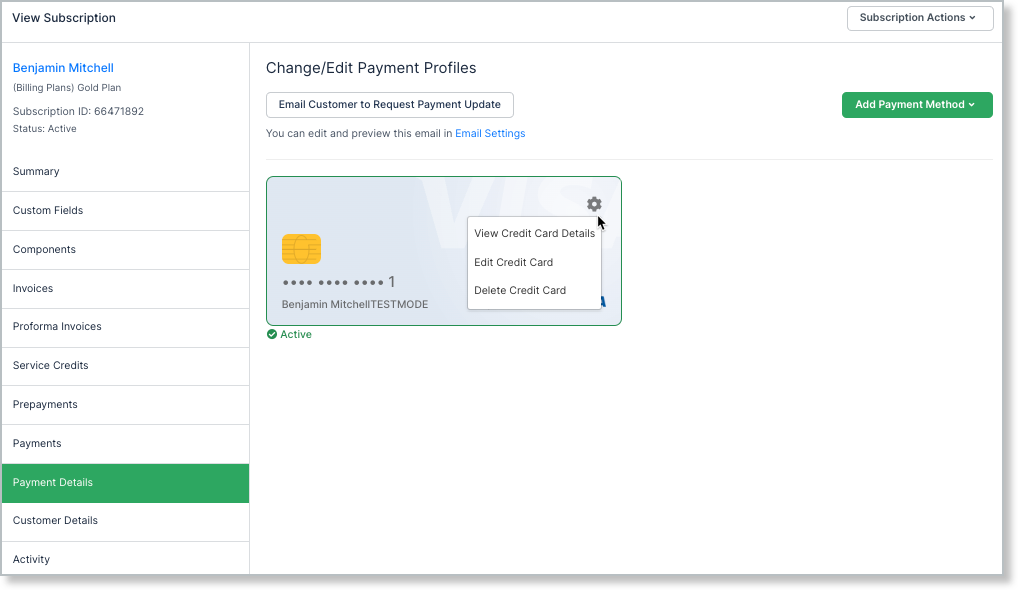
- From the Subscription, select Update Payment Method from the Subscription Actions.
- On the Payment Details tab, edit the existing payment method, add a new one, or delete one.
Switch a subscription to automatic collection
Advanced Billing only charges the payment method assigned to the Subscription itself. For a Subscription in a Group, it charges the payment method assigned to the Group, and uses the Subscription's own only if the Group has none. A payment method saved on the Customer's record isn't charged unless it's assigned this way, even when you can see it on the Customer.
To switch a Subscription to automatic collection
- From the Subscription Summary, on the Payment Method line item, select Change.
- On the Edit Payment Method page, select Automatic Payment.
- Select Save, or, if a warning appears, assign a payment method from the warning instead.
If the Subscription has no payment method assigned, a warning appears as soon as you select Automatic Payment: "Automatic renewals will fail because no payment method is assigned to this subscription." The warning doesn't stop you from saving, so you can still switch now and add a card afterward. Until a payment method is assigned, any renewal that needs to charge the Subscription fails.
What else the warning shows depends on what the Customer has on file:
- If the Customer has one enabled payment method, the warning shows an Assign button that names it.
- If the Customer has more than one, the warning shows a dropdown listing them, with the Customer's default payment method selected, next to an Assign payment method button.
- If the Subscription has open Remittance invoices, the warning also says that those invoices stay on Remittance and won't be collected automatically.
Selecting either Assign button assigns the payment method and switches the Subscription to Automatic in one step, then reloads the Edit Payment Method page. Assigning doesn't attempt to collect a payment.
For a Subscription Group, the warning appears only on the Group's Primary Subscription, never on a Group member. Collection for the whole Group runs through the Primary Subscription, so a member's own payment method is never charged. The warning lists the payment methods of the Group's Customer, which can be a different Customer from the Primary Subscription's, and assigning one attaches it to the Group rather than to the Primary Subscription. See Understand Subscription Groups for how a Group's Customer and payment method relate to its members.
Selecting Manual/Remittance Payment again hides the warning.
Ask the Customer to update it
From the same Payment Details tab, select Email Customer to Request Payment Update to send the Customer a link to their self-service page, where they can update their own payment method. This is usually the better route for a card that's simply expired: the Customer enters the new details themselves, so you never handle their card data.
See Configure Email Settings for more on this and other Advanced Billing-generated emails.
Why the update matters for dunning
A Subscription in dunning leaves it in one of two ways: a payment succeeds, or the dunning strategy runs out of steps and takes its final action, which, depending on how the strategy is configured, can leave the Subscription Unpaid or Canceled without any payment being made.
Updating to a working payment method is what lets a retry succeed before that final action is reached, so it's normally the first thing to check when a Subscriber is past due.
Related information
Please be aware that this article covers one of the many actions available for managing your subscriptions.
For the full list of Subscription actions, see Subscription Actions Overview.
Still need help?
Reach out and our support team will take it from here.