
Subscription Actions Overview
Applies to: Advanced Billing
Last updated on Aug 27, 2026
Once you've created a Subscription, you can perform many actions on it. There are two places to reach these actions, and they don't offer exactly the same list.
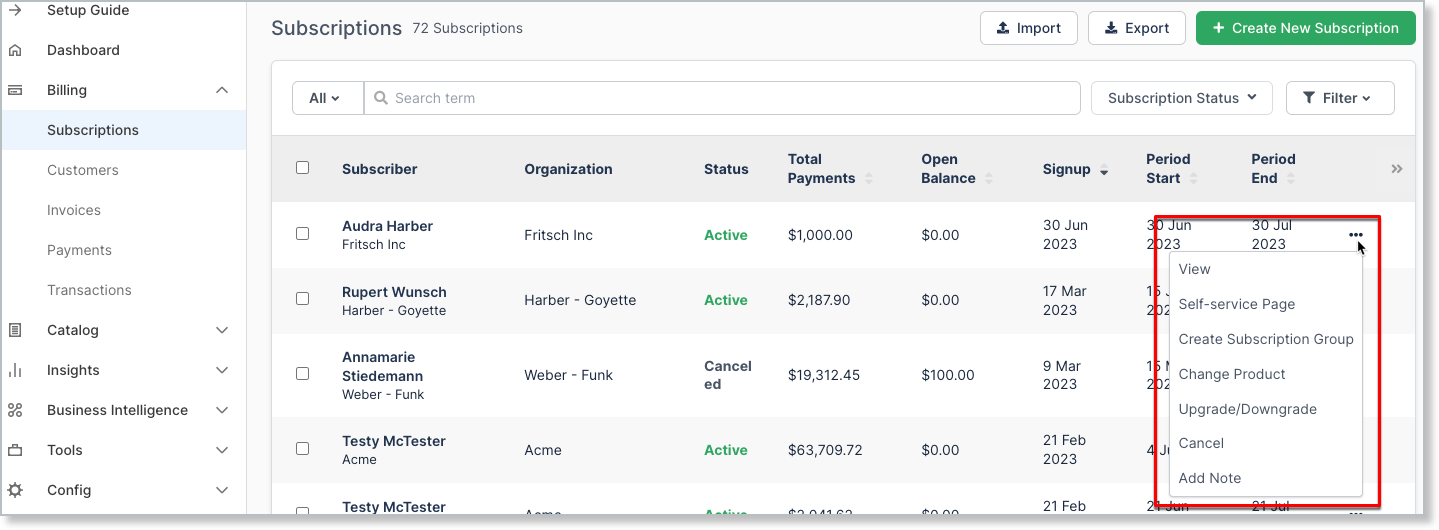
From the Subscriptions list, select the More icon ("...") at the end of a Subscriber's row for a smaller, quick-access menu.
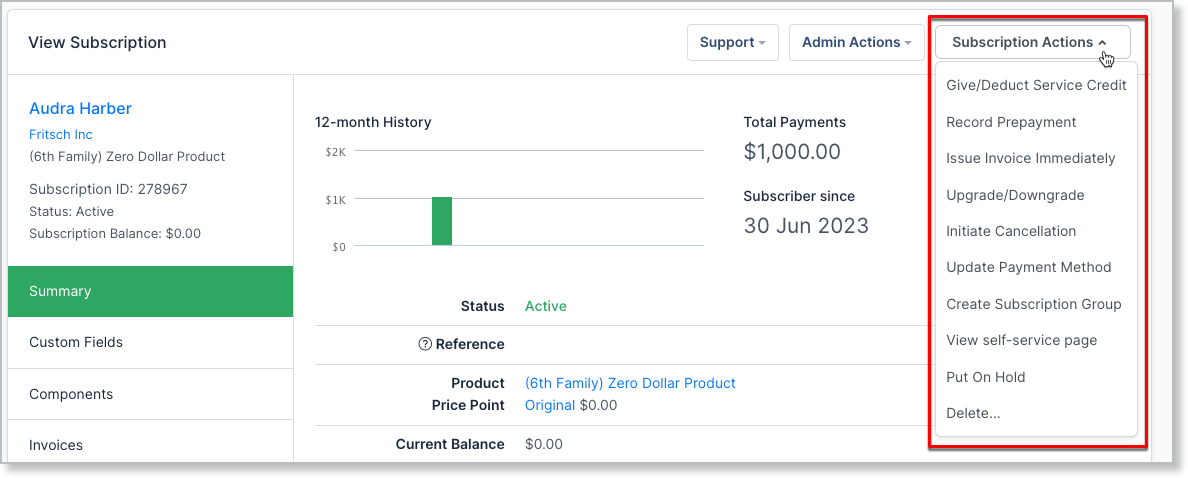
Open the Subscription itself and select Subscription Actions for the full menu, described in the table below.
Available actions
Depending on the state of your Subscription, the Subscription Actions menu displays different options.
| Action | Description |
|---|---|
| Activate | Activates a Subscription that's awaiting signup. |
| Add Charge | Adds a one-time charge to the Subscription. Available only if your Site doesn't use invoice-centric billing. |
| Adjust Balance | Adjusts the Subscription's balance directly. Available only if your Site doesn't use invoice-centric billing. |
| Process Refund | Issues a refund against the Subscription. Available only if your Site doesn't use invoice-centric billing. |
| Record External Payment | Records a payment collected outside Advanced Billing. Available only if your Site doesn't use invoice-centric billing. |
| Record External Refund | Records a refund issued outside Advanced Billing. Available only if your Site doesn't use invoice-centric billing. |
| Give/Deduct Service Credit | Issues or removes a Service Credit for the Subscription. Giving or deducting a Service Credit doesn't apply to one specific Invoice; it applies to the entire Subscription. |
| Record Prepayment | Records an actual payment in advance, to go toward future Invoices. |
| Issue Invoice Immediately | Opens a Proforma preview of the Invoice you're about to generate. Verify the information is correct, then click Confirm Invoice to issue it. |
| Upgrade/Downgrade | Moves a Subscriber to a new Plan using basic proration rules. |
| Initiate Cancellation | Choose to cancel immediately, at the end of the current billing period, or on a specific date. |
| Update Payment Method | Directs you to the Payment Details tab, where you can edit, add, or delete the payment method on file. |
| Create Subscription Group | Makes this Subscription the primary member of a new Subscription Group. Member Subscriptions are billed on one consolidated Invoice, issued on the primary Subscription's renewal date. |
| View Subscription Group | Available if the Subscription is already part of a Subscription Group; opens that group's summary. |
| View self-service page | Navigates the current tab to the Subscriber's own secure self-service page, where you can update their payment method on their behalf. |
| Put a Subscription on Hold | If the Subscription is Active, moves it to the On Hold state. While On Hold, it doesn't go through the renewal process, and nothing is charged to the Customer. |
| Resume | Available for a Subscription that's On Hold; brings it back to Active. |
| Reactivate Subscription | Available for a Canceled Subscription; brings it back to Active. |
| Cancel Dunning | Takes the Subscription out of dunning, moving it from Past Due to Active. |
| Delete... | Permanently deletes the Subscription and its associated data. Advanced Billing recommends canceling instead, unless you're reversing a data-entry mistake. |
Still need help?
Reach out and our support team will take it from here.