
Create and Use Sandbox Sites
Applies to: Advanced Billing
Last updated on Sep 19, 2026
A sandbox is a cloned site in test mode, holding real copies of your products but using test payment data. Keeping one on hand means you can try a new product or a change to a workflow without touching the site your customers are on.
What a sandbox is for
Sandboxes matter most if you run a single live site, since there's otherwise nowhere safe to experiment. Common reasons to clone a site:
- Advanced Billing requires that you test your pricing model before enabling live mode on your site. As your product offering evolves, you'll want to clone your existing live or test site to keep testing changes. These cloned sites are what we call sandboxes.
- Cloning simplifies moving from a test phase to production. Once a development site's products, product families, taxes, and other configuration are correctly set up and tested, you don't have to redo that work to set up a production site: clone the dev site instead.
- You have a set of products that belong to one brand, and you want to sell to another market under a different brand. Clone the site and change only what you need.
- You have a set of products that you want to sell in another currency. Clone the whole site, then change the currency.
Site cloning speeds up site creation and reduces errors when migrating. It also lets you keep your existing test site for future testing and debugging.
Example: You've already gone live with your first Advanced Billing Site, and now you're expanding into Canada and need a new site that uses CAD as its currency. Clone your existing site to create a sandbox, update the pricing, product descriptions, and emails to reflect the CAD currency, and test your subscriptions in the sandbox CAD site before taking it live. From there, you can clone the CAD site again to test new workflows with test credit cards.
A short, nonexhaustive list of what you can accomplish with sandbox sites:
- Experience Public Signup Pages through your subscriber's eyes.
- Preview and revise all emails generated for signup, cancellation, and transactions.
- Understand the basics of subscription management.
If you're integrating with our API, a sandbox also gives your developers a dedicated environment to test the connection to your application.
Sandbox gateway
Sandbox sites connect initially to the Advanced Billing Test Gateway. The test gateway simulates transactions, so you can vet your pricing model without live credit card data.
Advanced Billing recommends keeping at least 1 live Site and 1 fully functional sandbox environment set up in your account, so you always have somewhere to test workflows and experiment with fake credit card data.
Clone a site
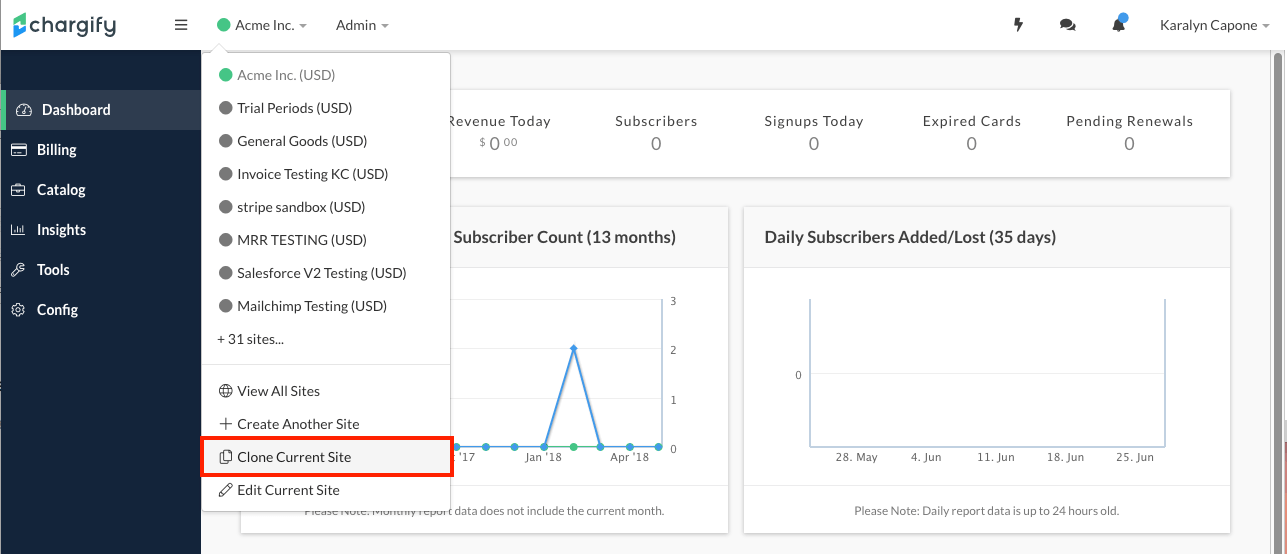
To clone a Site, navigate to the top menu and select the site picker. From the site picker, select Clone Current Site.
Advanced Billing then asks which aspects of the current site to clone, and for the new site's subdomain and name.
Cloning does not copy subscriptions, Public Signup Pages, transactions, or existing revenue analytics.
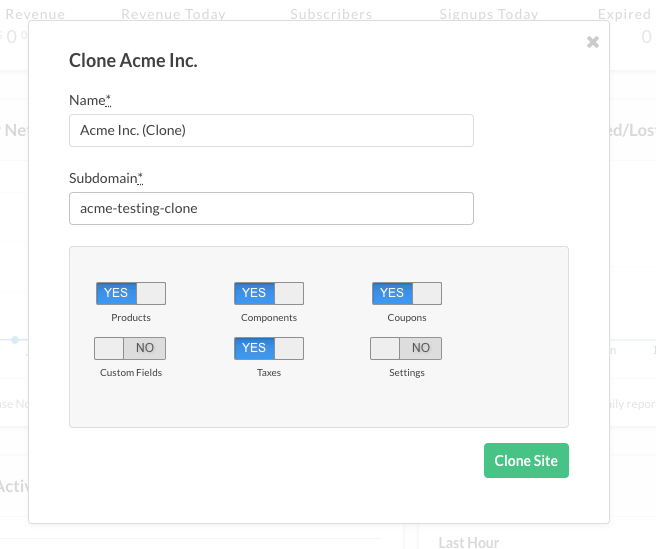
Toggle each of the following aspects on or off to decide whether it's cloned:
- Products
- Components
- Coupons
- Custom Fields
- Taxes
- Settings
- Gateways: duplicates all of your site's gateways and supported payment methods. This toggle is only available when Settings is also selected.
Offers, Offer Signup Pages, and Public Signup Pages don't carry over to the cloned site.
Once you confirm your options, a notification appears in the original site confirming that cloning has begun.
After a moment, revisit the site picker at the top of the page and locate your new site. If you have many sites in Advanced Billing, you may need to select View All Sites to locate your new site.
Related information
To understand how a test Site differs from a Sandbox, see Understand Test Sites.
For the wider picture of how Sites fit together in Advanced Billing, see Understand Advanced Billing Sites.
To work through a Site before it takes real payments, see Test Your Site Before Going Live.
Still need help?
Reach out and our support team will take it from here.