
Configure Child Invoice Numbering and Segment Suffix Enumeration
Applies to: Advanced Billing
Last updated on Sep 19, 2026
Set up Invoice numbering and segment suffix enumeration so every child Invoice is uniquely identified and easy to trace back to its parent. These settings support consolidated invoicing and keep the relationship between a parent Invoice and its child segments clear.
Invoice numbers
Maxio generates Invoice numbers automatically, based on the configuration in the Invoice Number section of your invoicing settings. To set the first or next number your site uses, see Invoice start number.
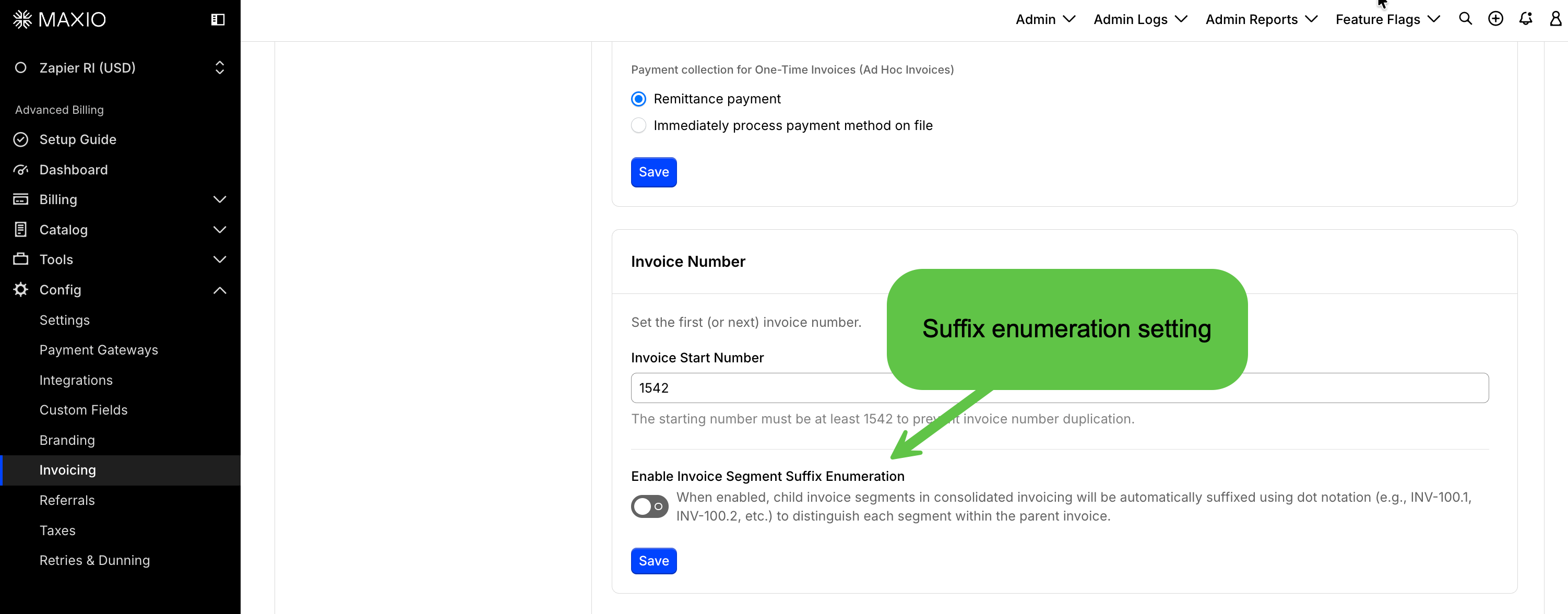
The Invoice Number card holds both the Invoice Start Number field and the segment suffix enumeration toggle described below.
Invoice segment suffix enumeration
Maxio appends a numeric suffix to each child Invoice segment so every segment carries a unique Invoice number in consolidated billing. This makes the relationship between a parent Invoice and its child segments visible at a glance.
How Invoice segment suffix enumeration works
When the setting is enabled, Maxio adds a suffix in dot notation to each child segment associated with a parent Invoice:
- Parent Invoices - Keep the base Invoice number, such as INV-100.
- Child segments - Receive sequential suffixes, such as INV-100.1 and INV-100.2.
- Reset behavior - Numbering starts again for each new parent Invoice.
- Where it appears - The Maxio interface, generated PDFs, and the underlying records.
Suffixes are never reused. The suffix counts every child segment that has ever been consolidated into that parent, so voiding and detaching a segment does not release its number. If you void the segment numbered INV-100.1, the next segment added to that parent becomes INV-100.3, not INV-100.1 again.
The setting applies only to newly generated child Invoices. Invoices that already have numbers keep them.
Numbering with segment suffix enumeration enabled
| Invoice type | Numbering example |
|---|---|
| Parent Invoice | INV-500 |
| First child segment | INV-500.1 |
| Second child segment | INV-500.2 |
Configure Invoice segment suffix enumeration
The toggle for this setting appears only on sites that have WhoPays enabled, since child Invoice segments exist only in consolidated invoicing. WhoPays itself requires invoice-centric billing, and enabling it also enables Customer Hierarchies. You can find it under Settings > Customer Hierarchies & WhoPays.
WARNING: If your site has pending consolidated Invoices, changing this setting before those Invoices are issued can produce inconsistent Invoice numbering. Issue the pending Invoices manually first to keep the numbering sequence orderly.
To enable Invoice segment suffix enumeration
- Go to Config > Invoicing.
- Find the Invoice Number card.
- Turn on Enable Invoice Segment Suffix Enumeration.
- Confirm the change when Maxio prompts you. Maxio asks you to confirm every time this setting changes, and warns you again if pending consolidated Invoices exist.
- Click Save.
New consolidated Invoices now use suffix notation for their child segments.
Related information
For the site-level Invoice numbering settings this builds on, see the Manage Invoices Settings help article.
Still need help?
Reach out and our support team will take it from here.