
Core Resources for Building an Integration
Applies to: Advanced Billing
Last updated on Sep 19, 2026
Every custom integration with Advanced Billing is built from three sets of resources: the API you call, the webhooks you receive, and, if you would rather not write code, an iPaaS that wires the two together for you. This page collects the reference material for all three, so you can pick an approach and go straight to what it needs.
Work through Design Your Integrations first if you have not already settled on an approach.
API
Use the API when you are writing your own code and need to read or change Advanced Billing data directly.
Before you start
- Feature
- API
- You Need
-
- Completed Design Your Integrations
- Developer(s) experienced with integrating systems, data modification, and APIs.
- Code
- Yes
- Difficulty
- ◉◉◉◎◎
API core resources
If you are coding your own integration, you already understand your project's needs. These resources are the ones that help most.
Core API reference material
| Resource | Description |
|---|---|
| Full API documentation | Every API endpoint, with examples. |
| Manage Advanced Billing API Keys | Create and manage the API key your integration authenticates with. |
| Authentication example | The API uses Basic Authentication. Pass your API key as the username and any single character, x or X, as the password. |
| API guidelines | Tips and best practices for working with the API. |
| Rate limits | Error handling and rate-limiting behavior. |
Test authentication
Run this request to confirm your credentials work before you build anything on top of them. Replace SUBDOMAIN with your Site's subdomain and APIKEY with your API key.
curl https://SUBDOMAIN.chargify.com/subscriptions.json \
-X GET \
-u APIKEY:x \
-H 'Content-Type: application/json'
A 200 response listing your subscriptions confirms the key is valid.
API code generator
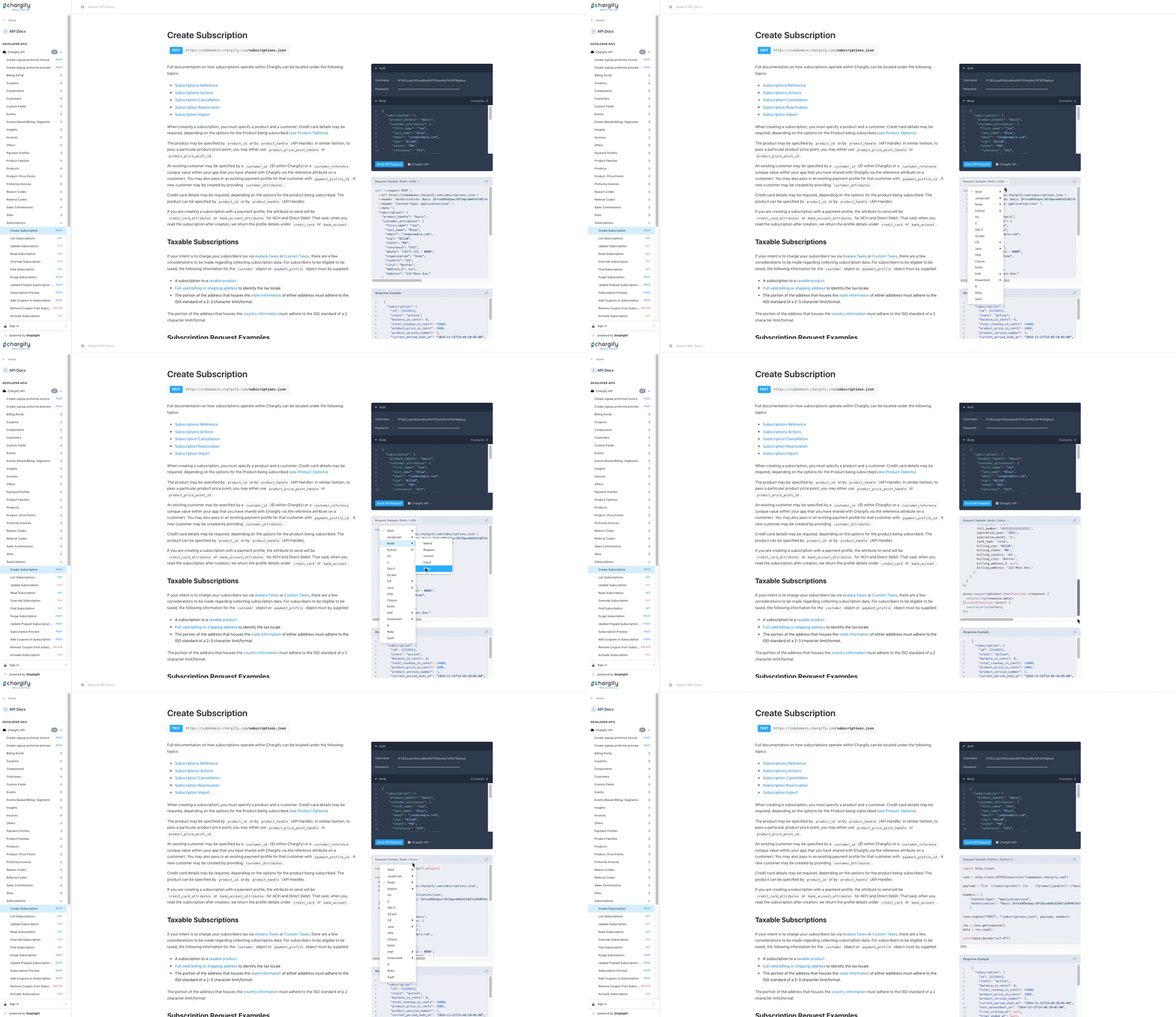
The API documentation generates ready-to-paste request code in a wide range of languages and frameworks. See How to get started.
Languages and frameworks the code generator supports
| Language | Frameworks |
|---|---|
| Shell |
|
| JavaScript |
|
| Node |
|
| Python |
|
| C# |
|
| Java |
|
| PHP |
|
| PowerShell |
|
| Go | |
| C | |
| Obj-C | |
| OCaml | |
| HTTP | |
| Clojure | |
| Kotlin | |
| R | |
| Ruby | |
| Swift |
To use it, open an endpoint in the API documentation and select a language or framework from the panel on the right. Selecting Node with the Axios framework on the Create Subscription endpoint, for example, produces a complete working request.
Webhooks
Use webhooks when you need Advanced Billing to notify your system that something happened, rather than polling for it.
Before you start
- Feature
- Understand Webhooks in Advanced Billing
- You Need
-
- Completed Design Your Integrations
- Developer(s) experienced with webhooks
- Code
- Yes
- Difficulty
- ◉◉◉◎◎
Webhook core resources
Core webhook reference material
| Resource | Description |
|---|---|
| Review Webhook Events | Every event type you can subscribe to. View and configure them at Config > Settings > Webhooks. |
| Understand Webhooks in Advanced Billing | A full overview of Advanced Billing webhooks. |
| Webhook signature | Verify that an incoming webhook genuinely came from Advanced Billing. |
| Review Webhook Payload Examples | Full example payloads for each event type. |
| Webhooks Panel | Inspect what was sent, spot errors, and resend. |
| JSON webhooks | Advanced Billing sends form-encoded webhook bodies by default. Contact Maxio Support to enable JSON webhook payloads for your Site. |
Webhook endpoint requirements
Your endpoints have to meet these constraints before Advanced Billing sends to them.
- HTTP endpoints work only while your Site is in test mode. Switch to HTTPS before you move the Site to live mode.
- If you specify a port number, only ports 80 and 443 are supported.
- A Site can have at most five multicast webhook endpoints.
Testing tips
Use these to develop faster.
Send a test webhook without creating real data
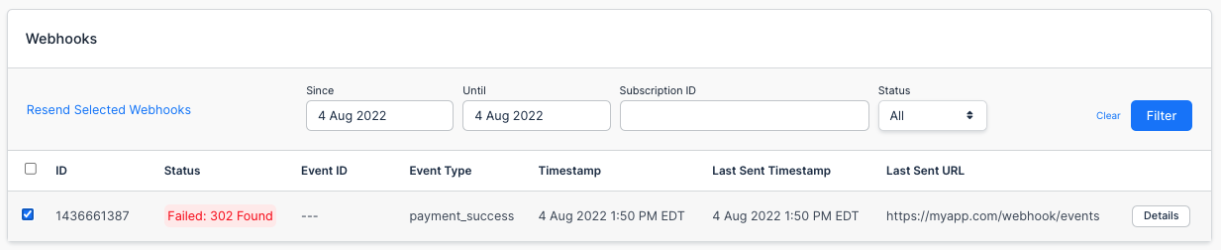
Advanced Billing has a dedicated testing page that fires a webhook at your endpoint on demand, so you don't have to manufacture a real subscription to see one arrive. Go to Tools > Webhook Testing, send the test, and review the outcome in the Webhooks Panel.
Replay webhooks instead of simulating events repeatedly
Simulating the same event over and over is the most tedious part of webhook development. Instead, trigger the event you care about once, then replay it as many times as you need. You can replay both failed and successful webhooks. Go to Tools > Webhooks Panel, select the webhook, and click Resend Selected Webhooks.
Replay webhooks in production, not just in testing
This helps in production as much as in development. In billing systems without replay, a failed webhook is simply lost, which is a problem when that webhook is what unlocks a paying user's features in your app. Rather than editing a database record by hand to repair it, replay the webhook. Webhooks stay available for replay for up to 90 days.
Review webhook workflow examples
For conceptual examples that show the coding workflow end to end, see Building Workflows with APIs and Webhooks.
iPaaS
Use an iPaaS when you need an integration but don't have developers to build one. An iPaaS connects Advanced Billing's webhooks and API to other systems through a visual builder rather than code.
Important: Maxio does not build, debug, maintain, or support anything you or a developer builds with an iPaaS. Depending on your plan, Maxio can help you determine which Advanced Billing webhooks and API endpoints to use.
Before you start
- Feature
- Advanced Billing's APIs and webhooks, plus a third-party iPaaS (Integration Platform as a Service)
- You Need
-
- Completed Design Your Integrations
- Person(s) with technical experience building (but not coding) integrations, handling data modification, and knowledge of APIs and webhooks.
- An iPaaS software
- Code
- No-code to low-code
- Difficulty
- ◉◎◎◎◎
Build an integration with iPaaS
Follow these four steps to go from a rough idea to a scoped, buildable integration.
List your trigger-action statements
At its simplest, an integration is a collection of triggers and actions. Write out every piece of functionality your integration needs as a trigger-action statement, using the patterns below as a guide.
The basic pattern
When trigger in system, action in system
Examples
- When a subscription is canceled in Advanced Billing, update the deal record in HubSpot.
- When an invoice is created in Advanced Billing, create an invoice in NetSuite.
- When a Customer changes from the bronze to the silver plan in Advanced Billing, update the subscription's component price point in Advanced Billing.
Adding conditionals
Add a condition when you only want the action to run in certain cases.
When trigger in system, conditional, action in system
Examples with conditionals
- When a subscription is canceled in Advanced Billing, if the subscription has the churn reason code TRIAL-CANCEL, update the deal record in HubSpot.
- When an invoice is created in Advanced Billing, if the invoice type is
signup, create an invoice in NetSuite. - When a Customer changes from the bronze to the silver plan in Advanced Billing, if the Customer subscribes to the user-licenses component, update the subscription's component price point in Advanced Billing.
Adding multiple actions
Chain actions when one trigger needs to do several things.
When trigger in system, conditional, action 1 in system, action 2 in system
Examples with multiple actions
- When a subscription is canceled in Advanced Billing, if the subscription has the churn reason code TRIAL-CANCEL, update the deal record in HubSpot, then update the company record in HubSpot.
- When an invoice is created in Advanced Billing, if the invoice type is
signup, create an invoice in NetSuite, then mark the invoice paid in NetSuite. - When a Customer changes from the bronze to the silver plan in Advanced Billing, if the Customer subscribes to the user-licenses component, read the Customer signup date in Advanced Billing, and if that date was in January, update the subscription's component price point in Advanced Billing.
Choose an iPaaS
With your list of needs in hand, work out whether a given iPaaS actually supports them. Other companies have built third-party integrations with Zapier and Cyclr, so the comparison below covers both, along with what to expect from an iPaaS you already use.
Important: The pricing and connector counts below come from each vendor and change without notice. Treat them as a starting point and confirm current figures with the vendor.
Comparison of iPaaS options
| Zapier | Cyclr | Other iPaaS | |
|---|---|---|---|
| Reason to use | Small integrations at affordable cost. | Any size integration; medium to large businesses; flexibility. | Your business already uses one and it supports your integration needs. |
| Best for | Small one-way From integrations | One-way From, one-way To, and two-way integrations | One-way From |
| Pricing | From $29.99/mo. See Zapier pricing. | From $899/mo. See Cyclr pricing. | Ranges from $500/mo to $6,000/mo on average |
| Advanced Billing triggers | Always use Advanced Billing webhooks | Always use Advanced Billing webhooks | Always use Advanced Billing webhooks |
| Advanced Billing read actions | 7 | 40+ | Typically not many |
| Advanced Billing create/update actions | 5 | 40+ | Typically not many |
| Supports conditionals | Yes | Yes | Typically yes |
| Supports multiple steps | Yes | Yes | Typically yes |
| Other systems | 4,000+ | 350 | Varies |
| Cron jobs | Not documented | Yes | Typically yes |
Whichever you choose, the integration is your responsibility. Maxio does not help build, debug, maintain, or support it.
Scope the integration
Next, confirm the iPaaS supports the specific triggers and actions you listed in step 1.
How to scope each data flow, by platform
| Platform | Data flow | Scope trigger | Scope actions |
|---|---|---|---|
| Zapier | Advanced Billing to another system | Use Zapier Webhooks. All Advanced Billing webhooks are supported. |
|
| Advanced Billing to Advanced Billing | Use Zapier Webhooks. All Advanced Billing webhooks are supported. | Same as above. If your final action is an Advanced Billing API request, use Zapier Code. | |
| Another system to Advanced Billing | See the Zapier scope actions steps above. | Same as above. | |
| Cyclr | Advanced Billing to another system | Use Cyclr Webhooks. All Advanced Billing webhooks are supported. |
|
| Advanced Billing to Advanced Billing | Use Cyclr Webhooks. All Advanced Billing webhooks are supported. | Same as above. | |
| Another system to Advanced Billing | See the Cyclr scope actions steps above. | Same as above. | |
| Other | Any direction | Typically webhooks. Check the iPaaS documentation. | Check the iPaaS documentation. |
Finalize the design
After working through the three steps above, you have a clear picture of how to proceed. For worked Zapier and Cyclr examples to build against, see Building Integrations and Workflows with iPaaS.
Still need help?
Reach out and our support team will take it from here.