
Set Up and Collect Direct Debit Payments with GoCardless
Applies to: Advanced Billing
Last updated on Sep 19, 2026
GoCardless is payment platform that allows Advanced Billing merchants to easily collect Direct Debit payments. Your subscriber may easily add existing banking information to seamlessly pay for products and services.
Requirements
Geographic requirements
In order to use GoCardless, a merchant must be located within one of the following countries:
| Country | Country | Country |
|---|---|---|
| Åland Islands | Ireland | Réunion |
| Australia | Italy | San Marino |
| Austria | Latvia | Slovakia |
| Belgium | Lithuania | Slovenia |
| Canada | Luxembourg | Spain |
| Cyprus | Malta | Saint Barthélemy |
| Denmark | Martinique | Saint Martin |
| France | Mayotte | Saint Pierre and Miquelon |
| French Guiana | Monaco | Sweden |
| Germany | Netherlands | United Kingdom |
| Greece | New Zealand | United States |
| Guadeloupe | Portugal |
Billing address
When using GoCardless, a complete billing address must be supplied with each payment method for a subscription. A complete payment method must include the following items:
- Street address
- Street address line 2 (optional)
- City
- State
- 2 digit country code
- Postal / zip code
Even if the product does not require an address, the GoCardless gateway requires the address to be entered on the payment form.
Supported currencies
GoCardless is supported for the following currencies:
- AUD
- CAD
- DKK
- EUR
- GBP
- NZD
- SEK
- USD
Limitations
GoCardless has the following limitations:
- GoCardless only supports Direct Debit. That said, with multi-gateway enabled, another gateway can be configured to accept credit cards and other payment methods
- We allow merchants using Relationship Invoicing to use GoCardless
- GoCardless may not be used with Advanced Billing sites that use the legacy invoices / statements functionality.
- In order to process refunds, GoCardless must approve your merchant account beforehand.
- Bank accounts may not be created from within the admin UI, including when manually creating a subscription.
- This is because the customer must view and confirm the details of their mandate, which is not possible if another individual is entering the information for them.
- When creating a subscription manually, a workaround is to sign the customer up on a free trial or with a future billing date so they can enter their bank account information after signup.
- Advanced Billing currently does not support the GoCardless automatic retrying of failed payments feature.
- Partial payments are not supported. Only a payment for the full amount of the invoice may be applied.
- If a payment was pending and then failed, the payment profile can't be reused for that subscription, to avoid double charges. The Use existing payment profile option isn't available if this happens.
GoCardless setup
To begin using GoCardless in your Advanced Billing site, select Connect with GoCardless in your settings for your site. Setting up the connection between Advanced Billing and GoCardless is easy and secure thanks to GoCardless’s OAuth feature. All that’s required is that you enter your email address and password; we handle the rest.
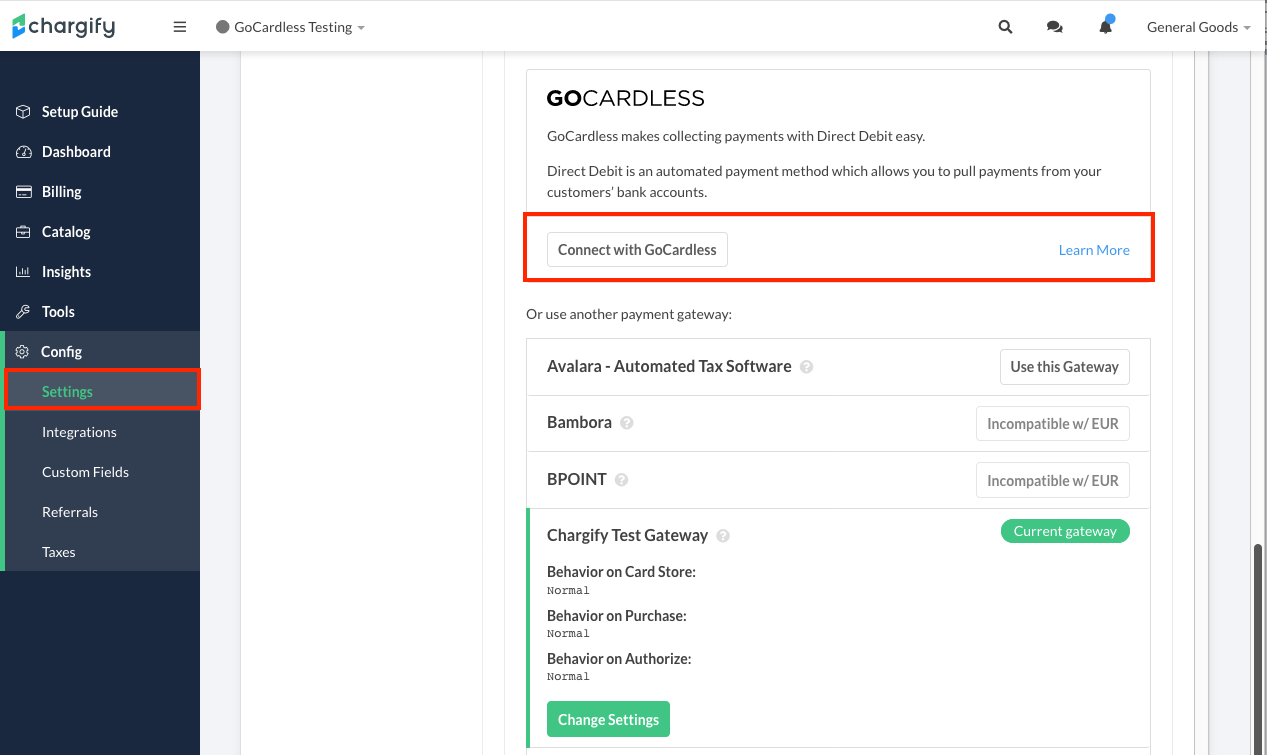
Enable GoCardless in your site
From here, you’re securely redirected to GoCardless, where you either sign in to an existing account or create a new one.
Once you’re signed in, select Connect account to authorize the connection:
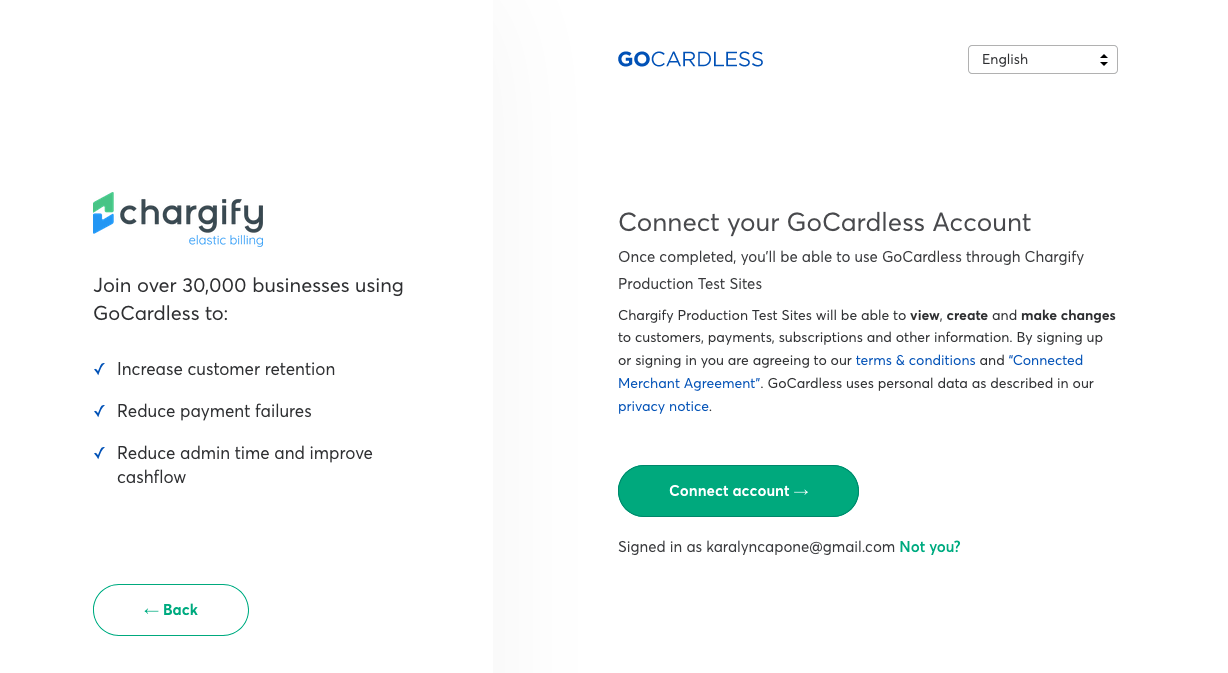
Authorize the connection between GoCardless and Advanced Billing
You may connect a GoCardless account to multiple Advanced Billing sites within the same Advanced Billing account.
Before accepting live payments, refer to the GoCardless developer guide for test bank account numbers.
Specific workflows
Now that your Advanced Billing site is connected to GoCardless, it’s time to start accepting subscriptions that contain Direct Debit information as a payment method. Creating a new subscription with GoCardless follows this path:
- Create a subscription to a product in Advanced Billing
- Provide contact information, including full billing address
- Include IBAN / banking information as the payment method
- Confirm the mandate for the current subscription
- View on-screen receipt for subscription or be redirected to a thank you page
When entering a billing address, the billing country must match the country code for the IBAN number. For example, if you provide a French IBAN number, FR1420041010050500013M02606, the country code for the billing address must be France. Mixing country codes for IBAN numbers and billing addresses is not supported.
In order to understand how GoCardless works with Advanced Billing, it’s important as the merchant that you’re aware how mandates work. A mandate is required in order for a payment method to be deemed valid by the rules that govern Direct Debit.
Mandates explained
Once a subscriber has successfully entered their banking information, GoCardless issues a mandate to authorize funds transfer. This applies to banking information that is entered via a Public Signup Page or Self-Service Page.
To be transparent, a mandate is an authorization from your subscriber that grants permission to process current and future payments. For more information on mandates, see the mandate guide from GoCardless.
Public Signup Page flow
Using GoCardless to accept payments via Public Signup Pages is extremely straightforward. Your subscriber completes the following steps when they purchase a product:
- Customer-based information
- Complete bank information, include IBAN
- Complete billing address
Once a subscriber selects Place My Order, they are asked to confirm the Direct Debit mandate. The subscriber must agree to the mandate in order to complete the purchase.
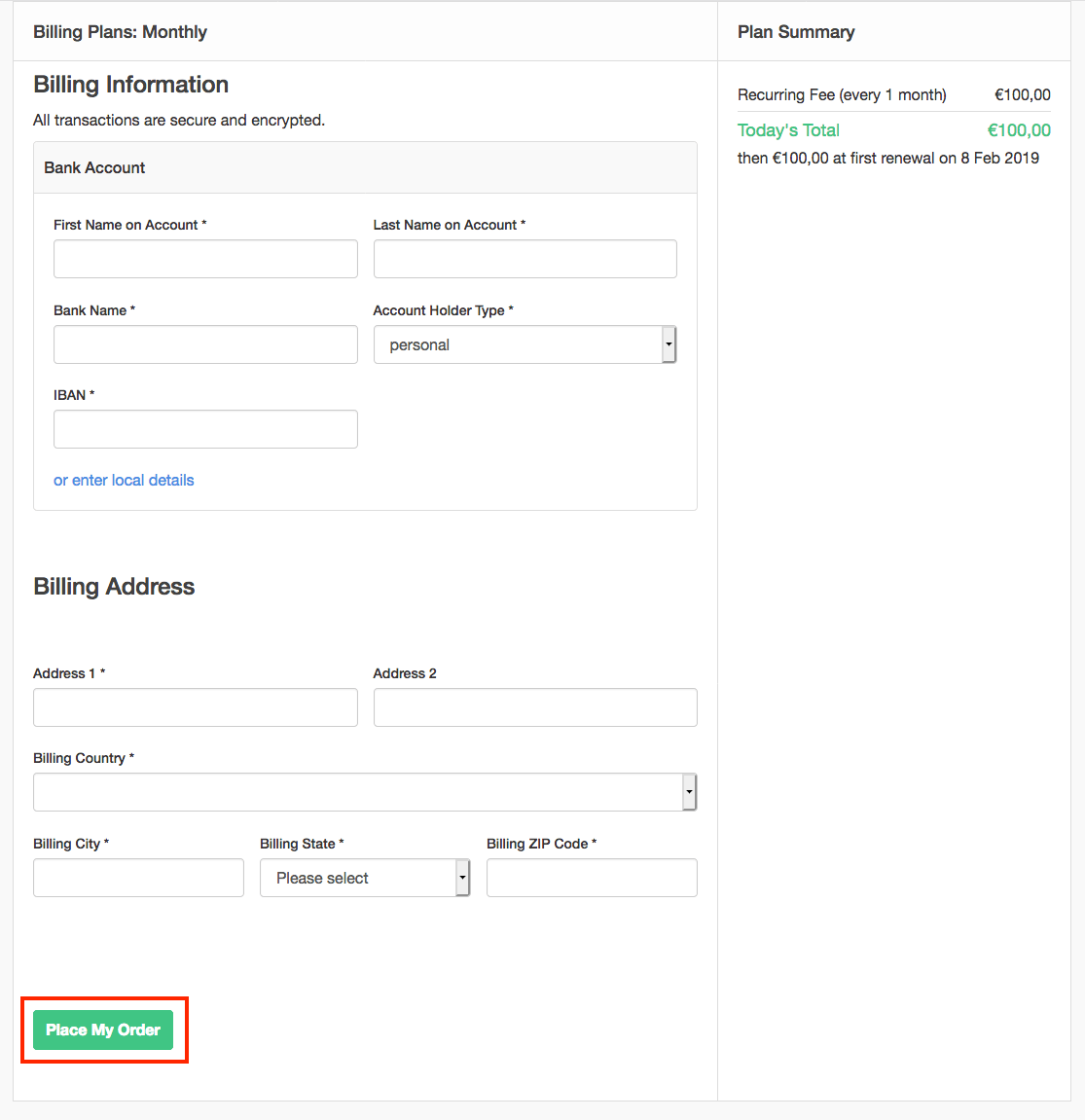
Confirm purchase within Public Signup Page
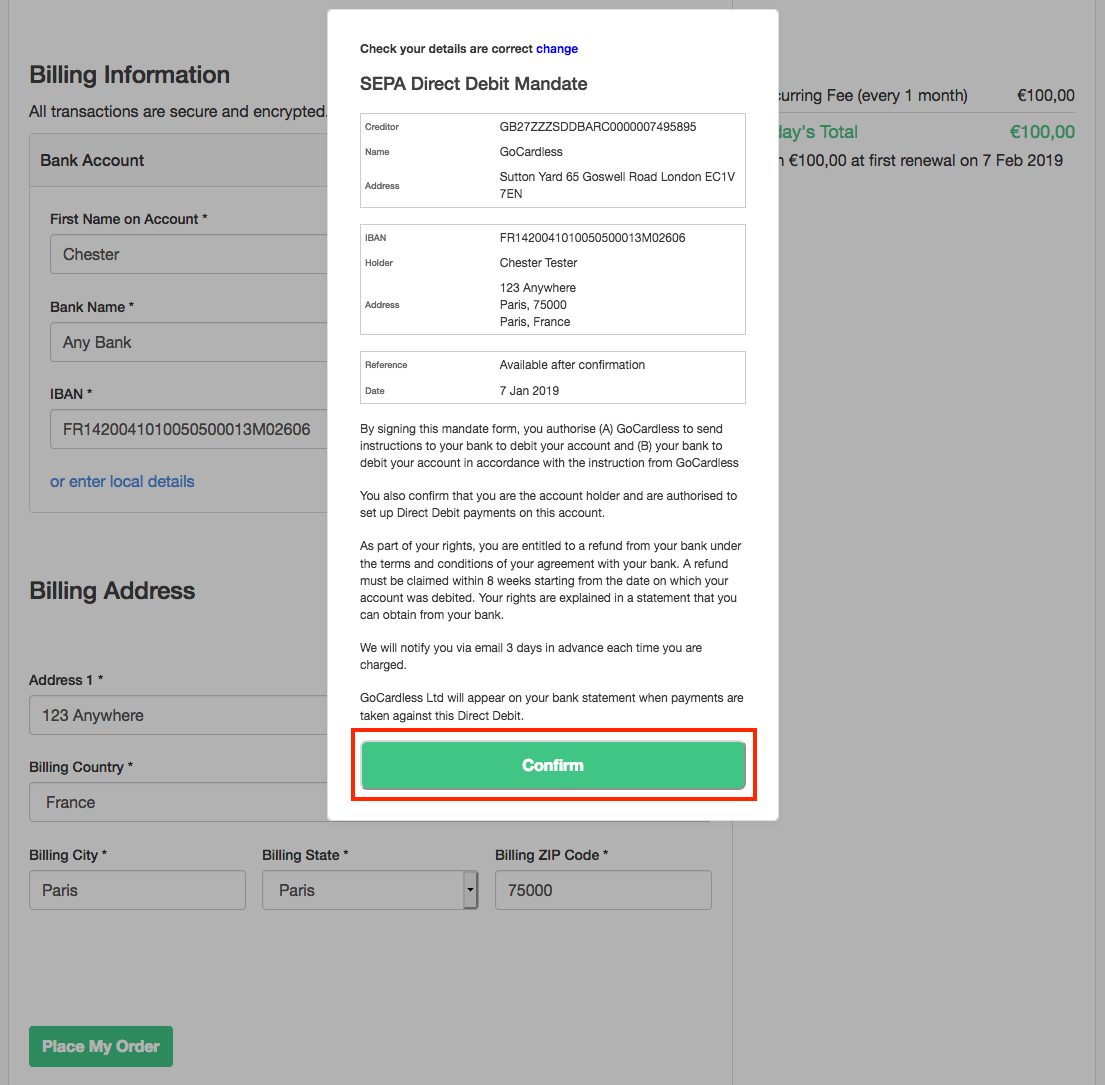
Agree to Direct Debit mandate
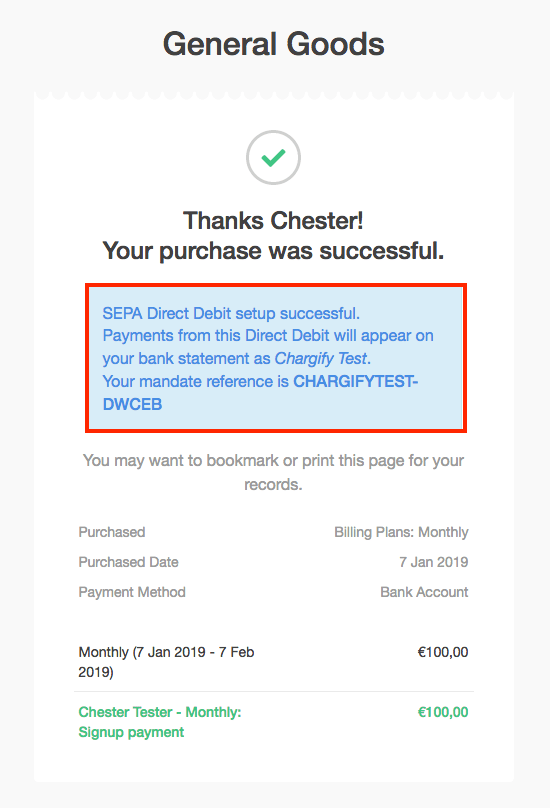
Receipt page confirming Direct Debit mandate agreement
From here, all recurring payments are processed via the payment method provided at signup. Subscribers can update their payment method via a Self-Service Page.
Self-Service Page flow
Occasionally, a subscriber needs to update their payment method. They can do this easily using a Self-Service Page. If you’re unfamiliar with how Self-Service Pages work, we recommend reviewing an overview on how these pages function.
When an existing subscriber visits a Self-Service Page, they can enter a new bank account.
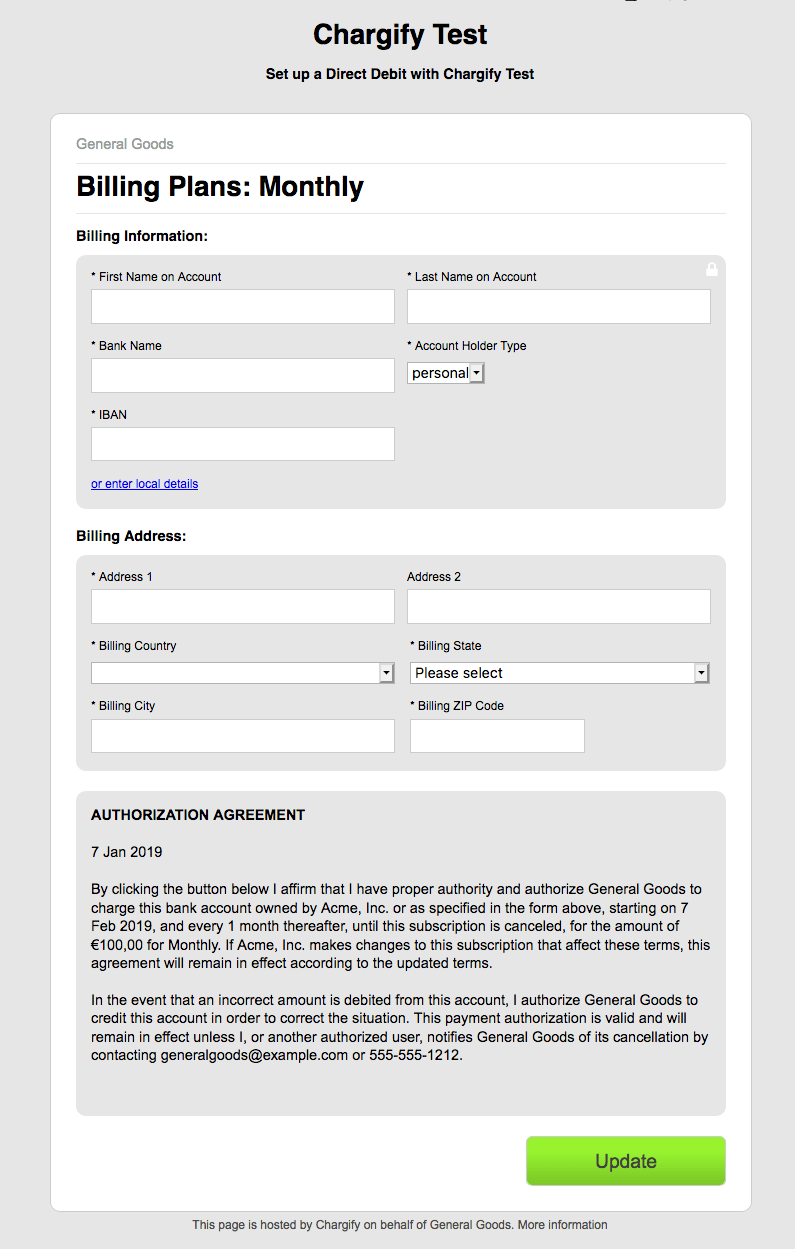
Example Self-Service Page
Once they enter valid information, they confirm the mandate for the new payment method associated with the subscription.
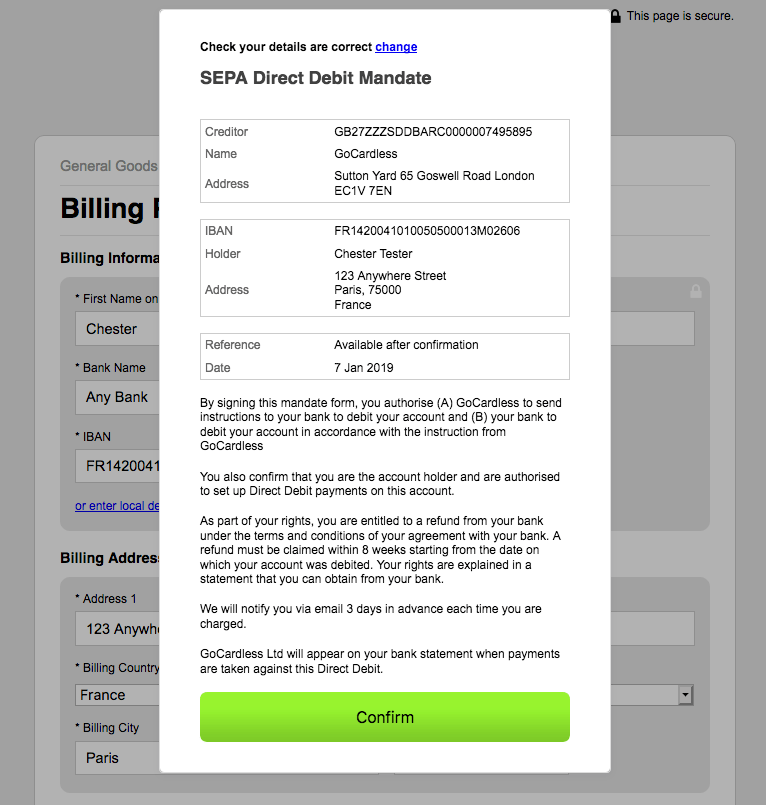
Confirm mandate for new payment method
For the Multi Gateway feature, the customer can change their Payment Profile to a different payment method if one is set. The only restriction to that is when a Direct Debit payment is still pending. Until it is resolved, the customer can only change their Payment Profile to another Direct Debit Account.
Refunds
Refunds can be processed after GoCardless is connected to the Advanced Billing Site. However, this requires reconnecting the integration. To reconnect, go to the GoCardless gateway settings and select Reconnect Gateway.

Once your GoCardless account can process refunds, payments that have been in the confirmed state for at least 2 days (48 hours) before a refund can be initiated.
To learn more about how to process refunds for your subscriptions, see Refund an Invoice.
Customer import
When connecting to your GoCardless account, it’s possible to import customers and payment profiles from GoCardless into Advanced Billing. The import functionality appears as a pop-up as long as there are customers within GoCardless that aren’t inside Advanced Billing; this pop-up can be triggered when first connecting to GoCardless as well as reconnecting.
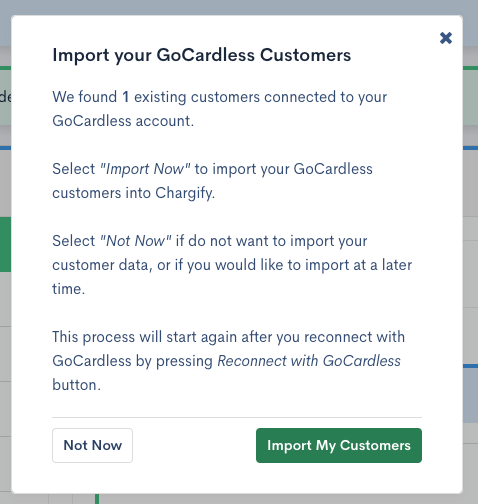
This process only imports customers and bank accounts. Once those are pushed into Advanced Billing, to charge these customers, subscriptions must be created in Advanced Billing for them. Ensure that any subscriptions in GoCardless are canceled prior to re-creating them in Advanced Billing.
Webhooks
There are three new webhooks in Advanced Billing that are related to payments status change:
direct_debit_payment_pending- this webhook is sent when payment was created and submitted in GoCardless (payment is waiting for being processes)direct_debit_payment_paid_out- this webhook is sent when payment was successfully processed in GoCardlessdirect_debit_payment_rejected- this webhook is sent when payment was rejected in GoCardless (e.g. insufficient funds on the customer account)
For more information about webhooks see our Webhooks Reference
Still need help?
Reach out and our support team will take it from here.