
Show Tax Breakdowns by Region
Applies to: Advanced Billing
Last updated on Oct 9, 2026
Show tax breakdown messages on Invoices billed in a currency other than the relevant tax authority’s own currency, for EU VAT, UK VAT, and New Zealand GST.
Go to Config > Settings > Invoices and scroll down to the Invoice Customization section.
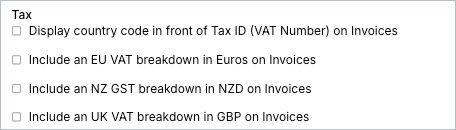
Additional tax settings
These settings also affect how tax information appears on Invoices.
- Display Country Code in Front of Tax ID (VAT Number)
Shows the Customer’s country code before the Tax ID (VAT Number) on the Invoice. - Display Tax Line Item (previously named Display VAT Line Item)
Adds a Rate, Amount, and Gross Amount column to each Invoice line item that's subject to tax, on Invoices, Credit Notes, and Debit Notes. On Invoices billed in Australian or New Zealand dollars, the columns apply to any tax on the document and are labeled GST Rate and GST Amount. On Invoices billed in other currencies, the columns apply only to EU VAT or UK VAT, whether the tax is calculated by a custom EU VAT tax or by the Avalara integration. They are labeled VAT Rate and VAT Amount. - Display Taxable Amount
Shows the taxable amount the tax was calculated from, on the Invoice.
EU VAT breakdown
When this setting is enabled, Invoices that are subject to VAT and billed in a non-Euro currency include a message like the one shown below.

GST NZD breakdown
When this setting is enabled, Invoices that are subject to GST and billed in a currency other than NZD include a message similar to the one shown below.

UK VAT breakdown
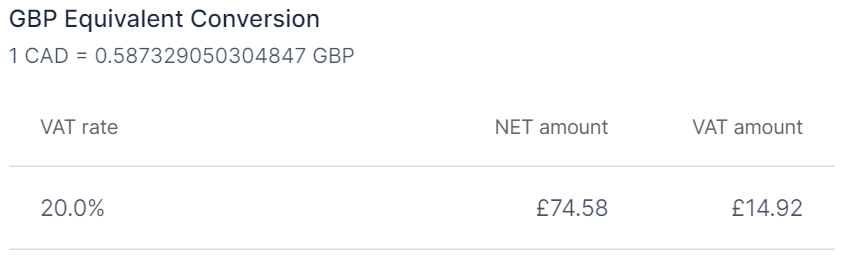
When this setting is enabled, Invoices that are subject to UK VAT and billed in a currency other than GBP display a message like the one below.
Still need help?
Reach out and our support team will take it from here.