
Configure Taxwire Tax Calculation Data
Applies to: Advanced Billing
Last updated on Sep 28, 2026
Taxwire calculates tax using information from your Maxio site, product catalog, customer records, and Taxwire account. Use this article to prepare the data Taxwire needs before you create taxable subscriptions or invoices.
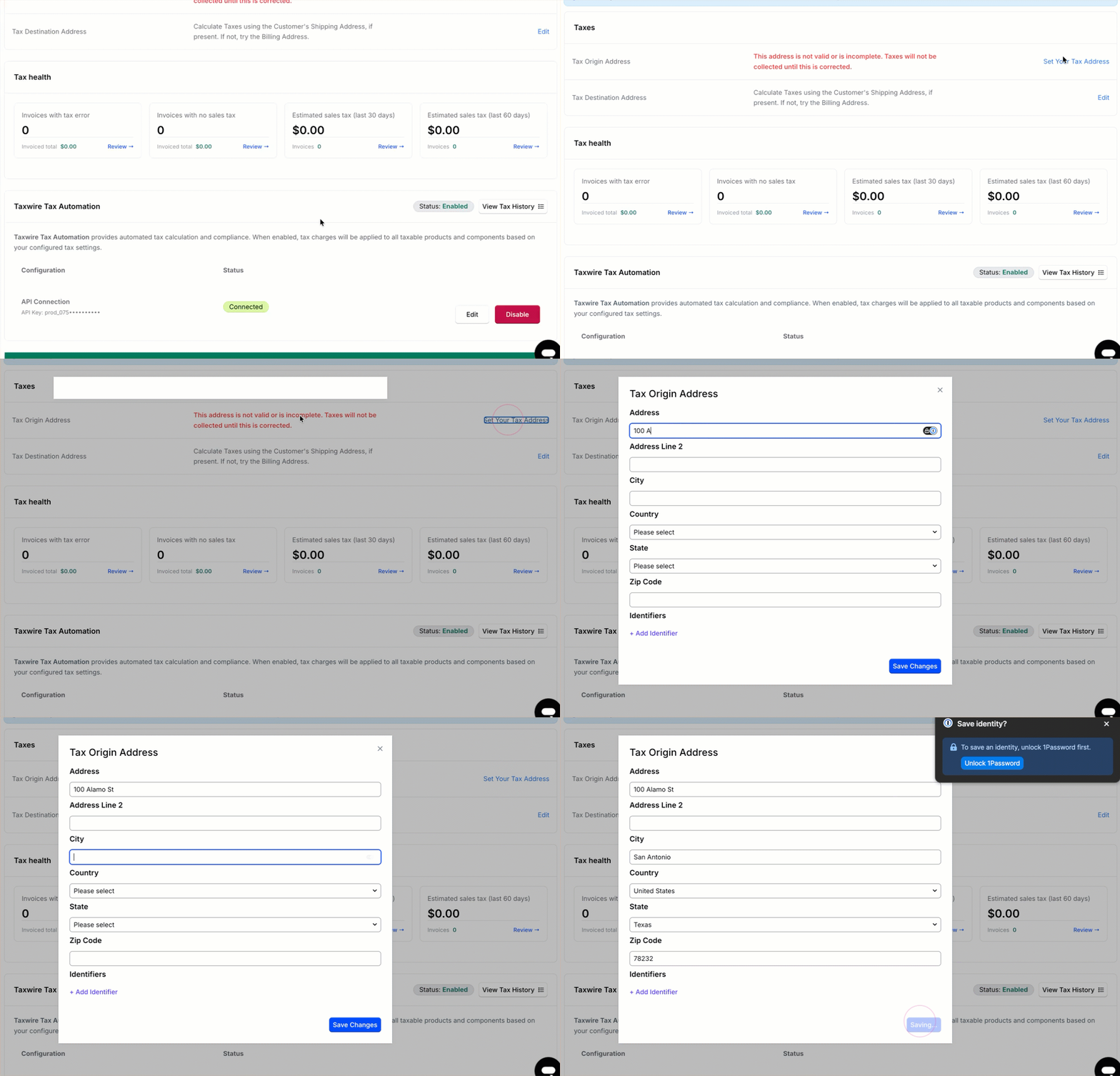
Configure the tax origin address
Your tax origin address represents where your business operates from. Taxwire uses the origin address to determine sourcing rules for each transaction.
Set the tax origin address in your site's tax settings. Without a valid origin address, Maxio doesn't call Taxwire and no tax is calculated.
Configure taxable products and components
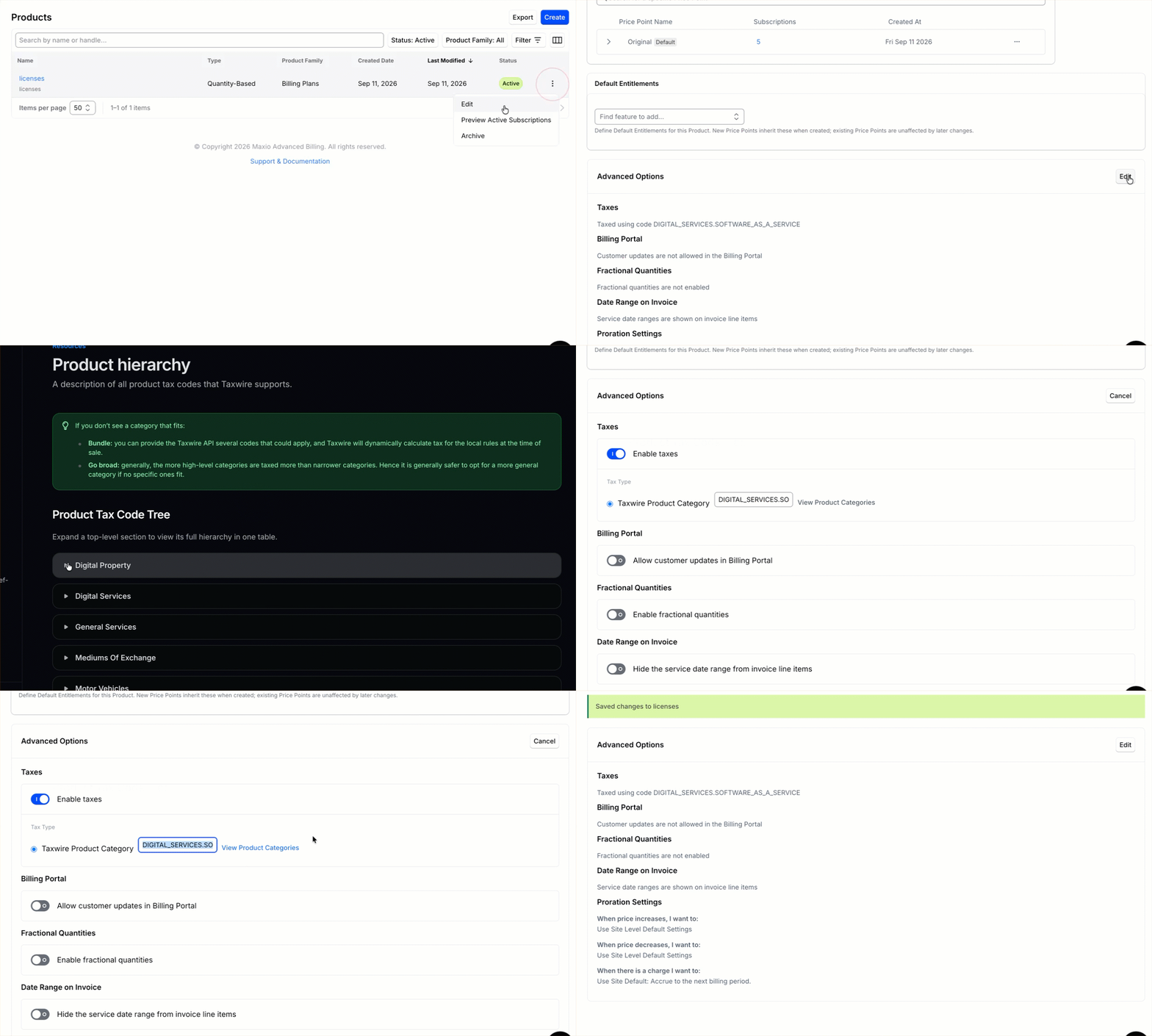
Define products and plans in Maxio as usual. Turn on Enable taxes in a product's or component's Advanced Options when sales tax should apply.
If a Taxwire product category is present on a taxable product or component, Maxio sends it as the product tax code for the line item. If none is set, Maxio sends the general services category.
Assign product tax codes
Product tax codes map Maxio products and components to the correct taxability category in Taxwire, such as SaaS, digital goods, or professional services. Taxwire uses the code to determine whether and at what rate the line item is taxable in each jurisdiction.
| If the product is... | Then... |
|---|---|
| Fully taxable everywhere you sell | A product tax code is optional, but recommended for cleaner reporting. |
| Partially taxable and varies by state | A Taxwire product tax code is required to apply the correct rate. |
| Exempt from tax | A Taxwire product tax code is required to apply the exemption correctly. |
Enter the code directly on the product or component's Taxwire Product Category field in Maxio. Taxwire publishes the valid category values in its own product categories reference; Maxio sends whatever value is set on each invoice line.
Taxwire tax codes can be up to 255 characters.
Collect customer address details
Customer shipping and billing addresses are captured in Maxio. Your site's tax address option determines which address Maxio sends to Taxwire.
- For shipping-based tax settings, collect a complete shipping address.
- For billing-based tax settings, collect complete billing address details on the payment profile or signup form.
- For mixed address settings, keep both shipping and billing addresses complete.
Address fallback behavior
For mixed address options, Maxio picks which address to send before it ever calls Taxwire, based on which address type has data on file for the customer. If the first-priority address is missing, Maxio automatically falls back to the other address type. This selection isn't a retry after Taxwire rejects a request. It happens before Taxwire is called at all.
- Shipping then billing: Maxio uses the shipping address when it has data, and falls back to the billing address otherwise.
- Billing then shipping: Maxio uses the billing address when it has data, and falls back to the shipping address otherwise.
- Use Shipping Address only: Maxio uses customer shipping address.
- Use Billing Address only: Maxio uses payment billing address.
For best results, keep customer shipping and billing addresses complete and standardized.
Apply customer exemptions
Tax exemption is typically used for resellers, government agencies, non-profits, or other entities that qualify under jurisdictional rules. Exemption status is managed in Taxwire and respected on Maxio invoices. On each calculation, Maxio sends the Maxio customer ID to Taxwire so Taxwire can match the buyer to its own customer record and apply that customer's stored exemptions.
When configuring an exempt customer in Taxwire:
- Set the exemption category on the customer record, such as wholesale, government, or non-profit.
- Confirm the customer record in Taxwire uses the Maxio customer ID so Taxwire can match the transaction to the exempt customer.
Stored Taxwire exemptions don't apply to a signup preview for a brand-new customer, because the customer doesn't have a Maxio customer ID yet.
Taxwire can override an applied exemption in certain scenarios, such as when a customer is exempt in one region but subject to tax in another. This is expected behavior and is determined by Taxwire at the time of calculation.
If a customer is marked Tax Exempt in Maxio, Maxio skips tax calculation for that customer entirely and doesn't call Taxwire.
Still need help?
Reach out and our support team will take it from here.