
Unable to Commit Sales Tax: AvaTax Took Too Long to Respond
Applies to: Maxio Core
Last updated on Aug 28, 2026
When a QuickBooks sync tries to commit an invoice's sales tax to AvaTax and the request does not come back in time, Maxio Core logs the following sync issue and does not sync that invoice:
Unable to commit sales tax: AvaTax took too long to respond.
This error means the connection between Maxio and AvaTax's servers timed out before AvaTax returned a response, not that anything is wrong with the invoice itself.
Why the AvaTax commit request times out
If your AvaTax integration's Commit Mode is set to Automatic, Maxio Core commits each invoice's sales tax to AvaTax as part of the QuickBooks sync, before that invoice is sent on to QuickBooks. This commit request has to complete within a short window, so it fails whenever AvaTax does not respond in time.
Two situations typically cause that: the servers at Avalara are busy or temporarily down, or the invoice being committed has an extremely large number of line items, which gives AvaTax more tax calculations to run before it can respond.
Retry the sync or commit sales tax manually first
If Avalara's servers are currently busy or down, wait a few minutes and then run the sync again. Sales tax should commit successfully once the servers are back up.
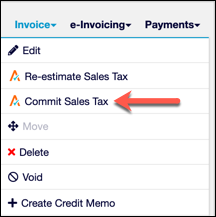
If the error keeps happening on a specific invoice with a large number of line items, commit that invoice's sales tax on its own first, outside of the sync, so AvaTax has as much time as it needs to finish the calculation.
To manually commit sales tax before syncing
-
Navigate to the invoice in Maxio Core.
-
Hover over Invoice and click Commit Sales Tax.
-
Re-sync with QuickBooks.
Contact support@maxio.com if neither of these options resolves the sync issue.
Related information
For more on how and when sales tax is sent to Avalara, including how to set your Commit Mode, see Commit Sales Tax to AvaTax.
Still need help?
Reach out and our support team will take it from here.