
Configure the Contract Details Report
Applies to: Maxio Core
Last updated on Sep 19, 2026
The Contract Details Report shows detailed Contract- and Item-level revenue, invoicing, and deferred revenue waterfall information for audit purposes. Use it to view revenue schedules, invoice schedules, or the declining deferred revenue schedule for your Contracts.
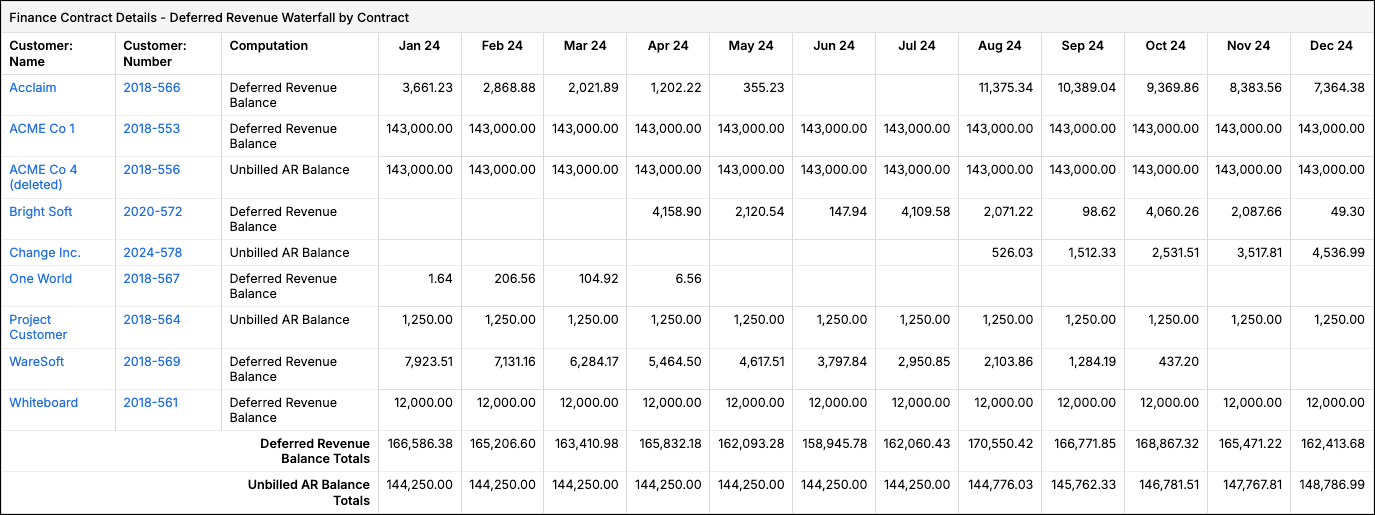
This report generates information for use in the compilation of financial reports. The Contract Details Report uses Transaction Revenue Schedules and Invoices associated with Transactions or directly with Contracts to generate information.
Important: This report doesn't use the Transaction Amount in any computations.
This report produces a maximum of 500,000 cells. If your report definition includes too much data, select a smaller date range or reduce the number of Accounts/Items selected.
Configure options
Go to Reports > Add Report > Finance Reports > Contract Details to open the report builder. This report includes the following configuration options.
| Option | Description |
|---|---|
| Currency Presentation | Choose Home Currency or Local Currency. Only appears if multicurrency is enabled in your account. |
| Registers | Select one or more Registers. If none are selected, all are included. |
| Filter on Accounts or Items | You can run the report by Accounts or by Items. You can select specific Accounts or Items, but not both. In either case, if you select no Items or no Accounts, then all Items are included. For important caveats when selecting Items or Accounts, see Items, Accounts, and Filters in Finance Reports. |
| Date Range | Select fixed Custom Dates or from one of the date range options. |
| Periodicity | Select Monthly, Quarterly, or Yearly. |
| Calculate By | Select one or more fields to group calculations by, such as Customer: Name, Customer: Number, Contract: Number, Item: Name, or Item: Account. Defaults to Customer: Name and Contract: Number. Important: This setting significantly affects how Deferred Revenue and Unbilled AR are calculated when a Customer has more than one Contract. If you use Contracts for GAAP revenue recognition, always include Contract: Number in your selection; removing it can produce calculations that aren't GAAP compliant. For more detail, see Calculating by "Customer Contract" or by "Customer". |
| Operation | Select one:
|
| Filters | Select one or more filters and appropriate matching criteria to filter in or out relevant Transactions and or Invoice Line Items. For important caveats when using Revenue and Invoice Filters, see Impact of Filters on Deferred Revenue and Unbilled AR. |
Report results
A summary Totals row is always displayed. When Revenue or Invoices is the selected Operation and the report covers more than one period, a summary Total column is also displayed. When Deferred Revenue / Unbilled AR Balance is the selected Operation, separate Deferred Revenue Balance and Unbilled AR Balance columns are displayed instead.
The Calculate By fields Customer: Name, Customer: Number, Contract: Number, and Item: Name are drill-down hyperlinks in all variations of the report. Drill down by Item: Account isn't available.
When Operation is set to Revenue or Invoices, and your Calculate By selection includes Contract: Number or Customer: Number (and doesn't include Item: Name or Transaction: Number), the period value is a drill-down hyperlink. The drill-down isn't available when Operation is set to Deferred Revenue / Unbilled AR Balance, or when Item: Name or Transaction: Number is included in Calculate By.
When using the Revenue operation, each cell can be clicked to drill down to the Transaction-level detail revenue contribution for that period. When using the Invoices operation, each cell can be clicked to drill down to the Invoice Line Item-level detail for that period.
Related information
If you want Contract- and Item-level totals without the period-by-period waterfall detail this report provides, see Configure the Contract Summary Report.
Still need help?
Reach out and our support team will take it from here.