
Configure the Payment Summary Report
Applies to: Maxio Core
Last updated on Aug 26, 2026
Use the Payment Summary Report to see a rundown of Invoice amounts, Accounts Receivable, and Payments received for a specified span of time. This report also provides the journal entries detailing the A/R credits and cash debits you should make in your general ledger (GL) if you're using one that isn't connected to Maxio Platform through an integration.
Configure options
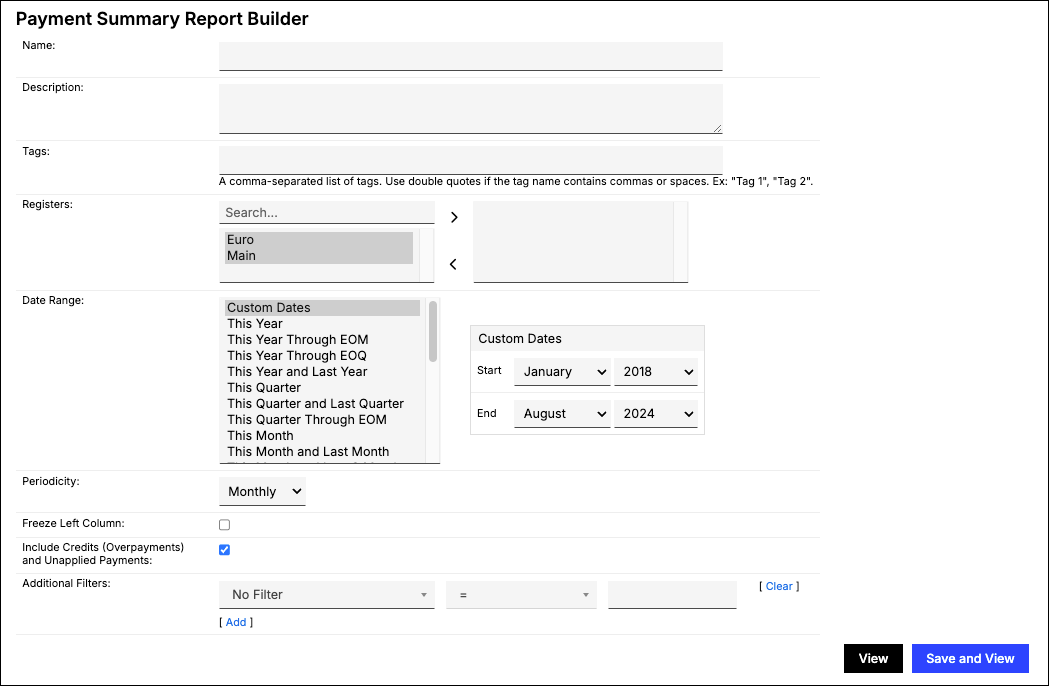
Go to Reports > Add Report > Finance Reports > Payment Summary to open the report builder. Make a selection for each option below, then click View to preview the report or Save and View to save it and run it.
| Option | Description |
|---|---|
| Registers | Select which Registers to include in the report. If none are selected, all are included. |
| Date Range | Define the span of time the report should cover. |
| Periodicity | Choose Monthly, Quarterly, or Yearly to determine how the report summarizes the payment data. |
| Include Credits (Overpayments) and Unapplied Payments | Enabled by default. Controls whether Credit Memo and unapplied-Payment activity is included in the report's results. |
| Currency Presentation / Reporting Currency | Only appears if your account has realized FX gain reporting enabled. Choose Home Currency, Single Local Currency, or FX Restated Reporting; Reporting Currency is required when you select FX Restated Reporting. |
| Freeze Left Column | Keeps the leftmost column visible while you scroll the report table. |
| Filters | Select one or more filters and appropriate matching criteria to filter in or out relevant Contracts or Customers. |
Report results
The report displays the following summary information based on the configurations you selected, so you can balance your chart of accounts using the provided debits and credits. Be sure to save the report if you want to review it again in the future.
| Result | Description |
|---|---|
| Invoices for Period | The aggregate of all Line Items, Sales Tax, and Shipping on Invoices with an Invoice Date within the period. You can click this section to view a breakdown of all the Invoices within the selected Date Range. |
| Accounts Receivable | The open Invoice and Credit Memo balance as of the end of the period: cumulative Invoices and Credit Memos through the period end, minus cumulative Payments through the period end. This is a running balance, not a period-only subtraction. |
| Payments for Period | The total amount of Payments received within each period. Refunds are netted in as negative amounts. Pending and Failed Payments aren't included. You can click this section to view a full list of the individual Payments received within the selected Date Range. |
| Credit Memos | Only shown when Include Credits is enabled. The total of unapplied Payments received within the period. You can click this section to view a breakdown of the related Credit Memos. |
| Dr Cash Account | The amount to debit the cash account in your general ledger. Equal to Payments for Period. |
| Cr Accounts Receivable | The amount to credit the A/R account in your general ledger. Equal to Dr Cash Account, unless your account has realized FX gain reporting enabled and isn't reporting in Home Currency, in which case this is a currency-remeasured figure instead. |
| Realized FX Gain/Loss, Unrealized FX Gain/Loss, Dr/Cr CTA, Dr/Cr Unrealized FX Gain/Loss | Only shown when your account has multicurrency and realized FX gain reporting enabled. |
Still need help?
Reach out and our support team will take it from here.