
Configure the Contract Summary Report
Applies to: Maxio Core
Last updated on Oct 16, 2026
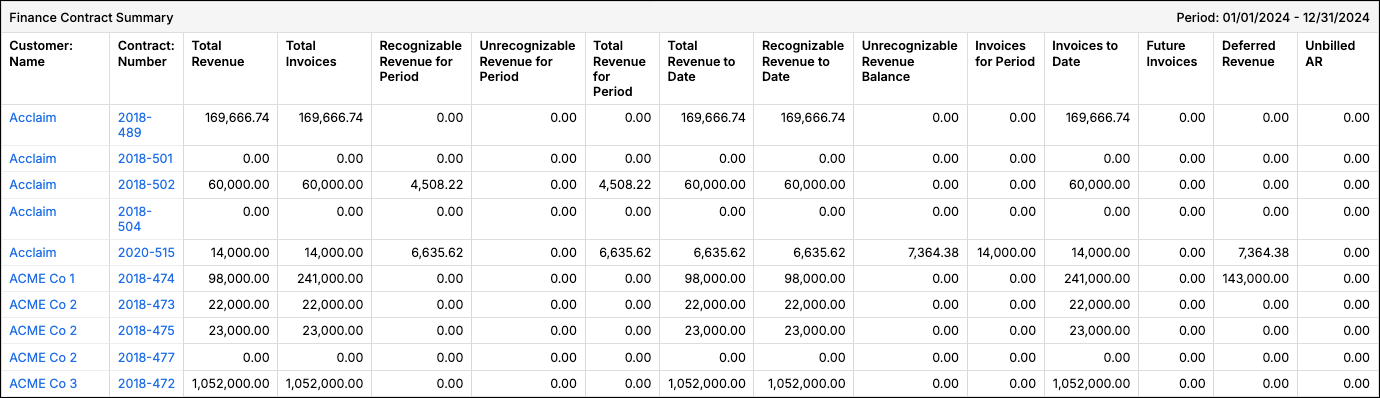
Use the Contract Summary Report to see Contract-level revenue, invoicing, and Deferred Revenue totals for compiling financial reports. It's based on Transaction Revenue Schedules and Invoices, whether they're linked to Transactions or directly to Contracts.
Important: This report doesn't use the Transaction Amount in any computations.
Configure options
Go to Reports > Add Report > Finance Reports > Contract Summary to open the report builder. This report includes the following configuration options.
![Contract Summary Report Builder with the Revenue Book drop-down set to [Contract Main Book], between the Columns and Calculate By options](/content-images/insights/finance-reports/configure-the-contract-summary-report/contract-summary-report-builder-revenue-book.png)
| Option | Description |
|---|---|
| Revenue Book | Select the Revenue Book to source the report's revenue from. Use the Main Revenue Book set on each Contract ([Contract Main Book]), the default, or select a specific Revenue Book. Only revenue is scoped to the selected book — Invoices and Transactions in the report always include all of them, regardless of this selection. Only appears if advanced revenue recognition is enabled for your account. |
| Currency Presentation | Choose Home Currency, Single Local Currency, or FX Restated Reporting. Only appears if multicurrency is enabled in your account. |
| Registers | Select one or more Registers. If none are selected, all are included. |
| Filter on Accounts or Items | You can run the report by Accounts or by Items. You can select specific Accounts or Items, but not both. In either case, if you select no Items or no Accounts, then all Items are included. For important caveats when selecting Items or Accounts, see Items, Accounts, and Filters in Finance Reports. |
| Columns | Select one or more result columns to show on the report, such as Total Revenue, Deferred Revenue, Short Term DR, Long Term DR, or Unbilled AR. If you select none, all are included. The columns are described in Report results below. |
| Calculate By | Select Customer Contract or Customer. Important: This setting significantly affects how Deferred Revenue and Unbilled AR are calculated when a Customer has more than one Contract. If you use Contracts for GAAP revenue recognition, always select Customer Contract. The Customer option can produce calculations that aren't GAAP compliant. For more detail, see Calculating by "Customer Contract" or by "Customer". |
| Date Range | Select fixed Custom Dates or from one of the date range options. |
| Detail Columns | Select additional columns to include in the report output, such as contact and billing information or Contract details. The available choices vary depending on which integrations are enabled for your account. |
| Revenue and Invoice Filters | Select one or more filters and appropriate matching criteria to filter in or out relevant Transactions and or Invoice Line Items. For important caveats when using Revenue and Invoice Filters, see Impact of Filters on Deferred Revenue and Unbilled AR. |
Report results
The report includes the following information for each Customer Contract. If a Contract has no matching values for the columns you've selected, it's omitted from the report.
| Result | Description |
|---|---|
| Total Transactions | The count of all Transactions for the Contract, regardless of date. |
| Total Revenue | The sum of all revenue for the Contract, regardless of date (including future revenue). |
| Recognizable Revenue for Period | The recognizable revenue for the defined period. Excludes Transactions with the Recognize field set to No. |
| Unrecognizable Revenue for Period | The sum of revenue in this period for Transactions with the Recognize field set to No. |
| Total Revenue for Period | The sum of Recognizable Revenue for Period and Unrecognizable Revenue for Period. |
| Total Revenue to Date | The sum of revenue from the very first revenue entry in your account through this period. This is a life-to-date (end of period) running total and includes revenue from Transactions where Recognize is set to No. |
| Recognizable Revenue to Date | The sum of recognizable revenue from the very first revenue entry in your account. This is a life-to-date (end of period) running total and excludes revenue from Transactions where Recognize is set to No. |
| Unrecognizable Revenue Balance | The balance of unrecognizable revenue as of the end of this period. This includes future revenue, as well as revenue for Transactions where Recognize is set to No, regardless of the dates. |
| Total Invoices | The sum of all Invoices for the Contract, regardless of date. |
| Invoices for Period | The sum of all Invoices for the defined period. |
| Invoices to Date | The sum of all Invoices from the very first Invoice for the Customer Contract. This is a life-to-date (end of period) running total. |
| Future Invoices | The sum of Invoices dated after the report's end date. |
| Deferred Revenue | The sum of Deferred Revenue from Contracts with a positive Deferred Revenue balance. |
| Short Term DR / Long Term DR | Short Term DR is the portion of Deferred Revenue that can be recognized within 12 months of the report's end date. Long Term DR is the remaining portion. See also: Long-Term and Short-Term Deferred Revenue. |
| Unbilled AR | The sum of Unbilled AR from Contracts with a positive Unbilled AR balance. |
Related information
If you want period-by-period waterfall detail instead of this report's Contract-level summary, see Configure the Contract Details Report.
Still need help?
Reach out and our support team will take it from here.