
Understand Ad-Hoc Invoices
Applies to: Advanced Billing
Last updated on Aug 28, 2026
An ad-hoc Invoice bills a Customer outside a Subscription's regular billing cycle, for a one-time charge, service, or custom line item.
What are ad-hoc invoices?
This flexible tool lets you create Invoices using Catalog items or custom amounts, for miscellaneous billing needs a regular Subscription cycle doesn't cover.
Ad-hoc invoices are different from Sign-up or Renewal invoices, which are automatically generated and are dependent on the related subscription. You can create an ad-hoc Invoice even if the related subscription is canceled or on hold, as long as the customer record is still available and invoicing is enabled on your site.
Close date restrictions
Your site may enforce a Close Date to prevent invoicing in closed accounting periods. If a Close Date is set:
- You cannot create an ad-hoc invoice dated on or before the Close Date.
- Dates on or before the Close Date are unavailable in the date picker.
Example: If the Close Date is set to March 31, you cannot create an ad-hoc Invoice dated March 31 or earlier. The date picker only allows April 1 or later.
Close Date is configured at Settings > Subscription Creation. If your site has a Close Date enabled, Advanced Billing may display informational messages explaining why certain invoice dates are unavailable, including what the Close Date means and why a specific date can't be selected.
Best practices
Keep these practices in mind when working with Close Dates:
- After closing an accounting period, update the Close Date so users cannot accidentally issue invoices in a closed period.
- Before issuing an invoice, confirm the invoice date is selectable and not restricted by the Close Date.
- If multiple teams create invoices, coordinate Close Date updates with accounting or finance administrators.
How taxes work on ad-hoc invoices
If taxes are enabled and supported by your site's configuration, Advanced Billing automatically selects a Tax Type. You can, however, edit the Tax Type for the line item. Some tax setups (such as Avalara) allow you to choose Other and enter a Tax Code.
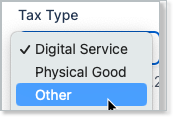
Tax Codes are only available for use with Avalara taxes, not Custom Taxes.
If your site is configured to calculate taxes automatically, tax amounts are calculated when you add the line item. Additionally, changing the shipping or billing address after marking a line item as taxable results in recalculating the tax amounts.
Keep in mind that tax calculation depends on shipping or billing addresses, and on which of your Products are taxable; see Configure Taxable Products and Items. Tax calculation may require a complete billing or shipping address, depending on your tax provider and configuration. Without an address, Advanced Billing may not be able to determine the correct tax jurisdiction. Make sure the customer's address includes all required fields, such as country, state, and postal code, so the correct tax region can be determined. Also consider whether the Customer is tax exempt. In this case, the tax cannot be added to the ad-hoc Invoice until you update the Customer record.
In some cases, Advanced Billing may display a notice if the customer is tax exempt or located in a non-taxable region:


How taxes are calculated depends on how the site is configured to collect taxes:
- If Custom Taxes are enabled for the site, confirm that the invoice's shipping/billing address overlaps with the geographic regions defined in your tax rules, including any EU VAT distinctions. See Configure Custom Taxes.
- If Advanced Billing Managed Sales Tax is enabled on the site, confirm that the invoice's shipping/billing address overlaps with the taxable regions you defined, and check your Avalara VAT Tax configuration. See Set Up Managed Sales Tax and Configure AvaTax Tax Calculation Data.
- If your Avalara account is connected on the site, Advanced Billing uses that connection to ask Avalara for tax amounts. See Connect your Avalara account.
Related information
To create an ad-hoc Invoice, see Create an Ad-Hoc Invoice.
Still need help?
Reach out and our support team will take it from here.