
Invalid Reference Id: Account Assigned to This Transaction Has Been Deleted
Applies to: Maxio Core
Last updated on Aug 24, 2026
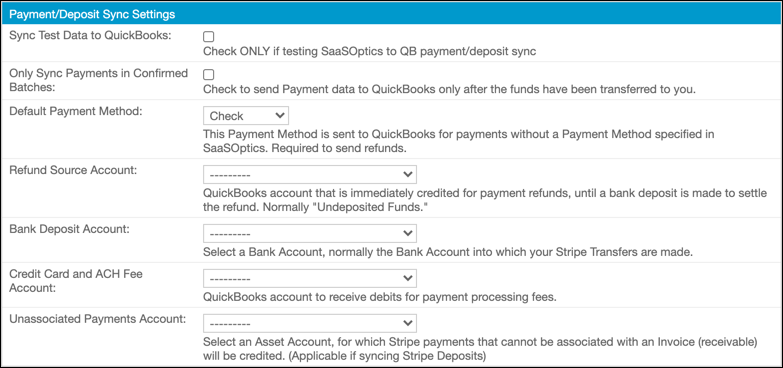
This sync error appears when an account the QuickBooks integration references, whether it's an account selected in your QuickBooks integration settings or the GL account assigned to an Item, has been deleted in QuickBooks Online. When Maxio sends a transaction that points to that account's reference ID, QuickBooks Online rejects it because the account no longer exists.
Replace the deleted account
Open your QuickBooks integration settings and select a different, active account in place of the one that was deleted. Example: if the deleted account was set as the Refund Source Account, choose another account from that dropdown instead.
Coordinate account changes to prevent recurrence
Anyone who manages your QuickBooks chart of accounts should confirm an account isn't referenced by the Maxio integration, either in your QuickBooks integration settings or on an Item's GL account, before deleting it in QuickBooks.
Related information
For the settings that control which QuickBooks account each transaction type syncs to, see Configure QuickBooks Integration Settings.
Still need help?
Reach out and our support team will take it from here.