
QuickBooks Online: App Already Purchased Error
Applies to: Maxio Core
Last updated on Oct 9, 2026
QuickBooks Online can return an app_already_purchased error when you try to sync or reconnect after a long stretch with no activity between Maxio and QuickBooks Online. The full message reads:
Error Code: app_already_purchased
Message: The application has already been subscribed to by another user for this company.
Please contact "username" to make changes to this subscription.
Why QuickBooks Online returns this error
This error comes from QuickBooks Online's own connection management, not from Maxio. It appears on the older, subscription-style connection to QuickBooks Online, where the integration showed up as a purchased app in the account's Apps list rather than as a direct OAuth connection. On that connection type, Intuit disables the subscription after an extended period without a sync, and the next sync or reconnect attempt returns this error instead of completing.
How long QuickBooks Online waits before disabling an inactive subscription is Intuit's own connection-management behavior. Maxio's codebase has no visibility into that internal timer, so this is third-party behavior and can't be confirmed or denied here.
If your account connects to QuickBooks Online through Maxio's current QuickBooks integration (the Connect to QuickBooks flow under Admin > Integrations > QuickBooks), the connection uses OAuth instead of an app subscription. Intuit documents that OAuth refresh token as valid for 100 days, and Maxio refreshes it automatically before it expires, so the connection should not lapse from inactivity on its own. If you're on that connection type and still run into sync or reconnect trouble, disconnect and reconnect from within Maxio rather than from QuickBooks Online's Apps tab. For those steps, see Setup QuickBooks Online.
Remove the stale app from QuickBooks Online
If you land on the Apps list described above, remove the old subscription before reconnecting.
Sign in to QuickBooks Online as the user who originally connected the two systems, open the Apps tab, then select My Apps. Find the entry named RevenueBooks, an earlier product name still used on this connection screen, and select Disconnect.
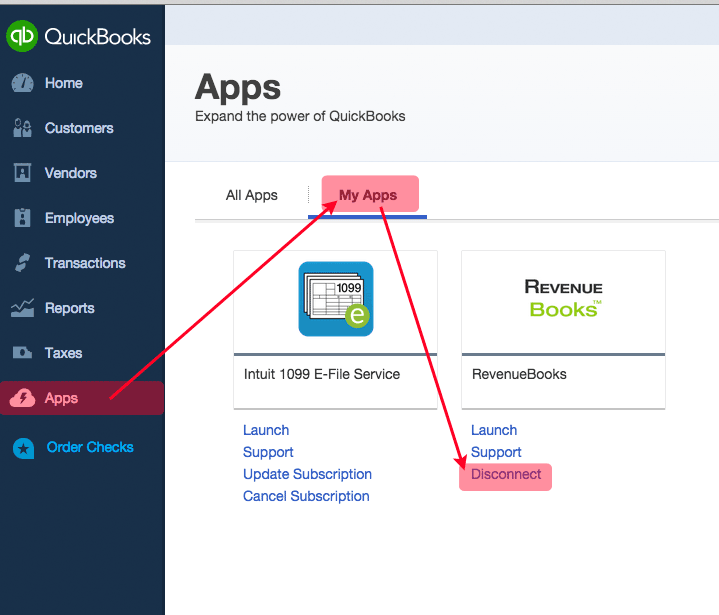
Disconnecting from this screen can itself return the same error:
Oops! An error has occurred.
Please close this window and try again.

Error Code: app_already_purchased
Message: The application has already been subscribed to by another user for this company.
Please contact <name@example.com> to make changes to this subscription.
Ask Maxio Support to clear the connection
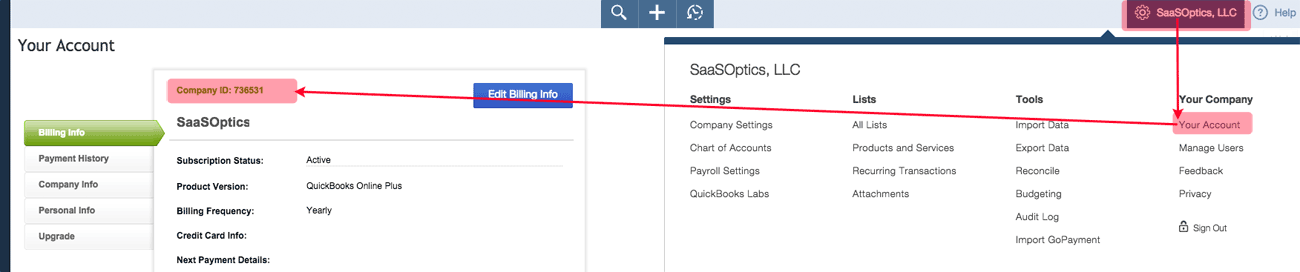
If you cannot clear the subscription from QuickBooks Online, or you still cannot connect after removing it, see Before You Connect to QuickBooks Online, or contact support@maxio.com and ask Support to disconnect your QuickBooks CompanyID (also called the RealmID) from your Maxio account. Support needs that ID to locate the stale connection.
Find the CompanyID in QuickBooks Online under Your Account, in the top-right company menu.
Related information
For the steps to connect, disconnect, and reconnect Maxio's current QuickBooks Online integration, see Setup QuickBooks Online.
Still need help?
Reach out and our support team will take it from here.