
Set Up Billing Methods
Applies to: Maxio Core
Last updated on Aug 26, 2026
Billing Methods in Maxio Core determine how and when Invoices are created for Transactions. This article explains the available billing schedules (monthly, quarterly, annually, or one-time) and how to select the right method to match your invoicing cadence, revenue recognition policy, and integration needs.
While the Billing Method is used during Transaction creation, a default Billing Method is a required field for all Items in Maxio Core. When a Transaction is created and an Item is selected, the Item's default Billing Method will be inherited and used by the Transaction to generate the Invoice schedule and create Invoice Line Items unless an alternative Billing Method is selected.
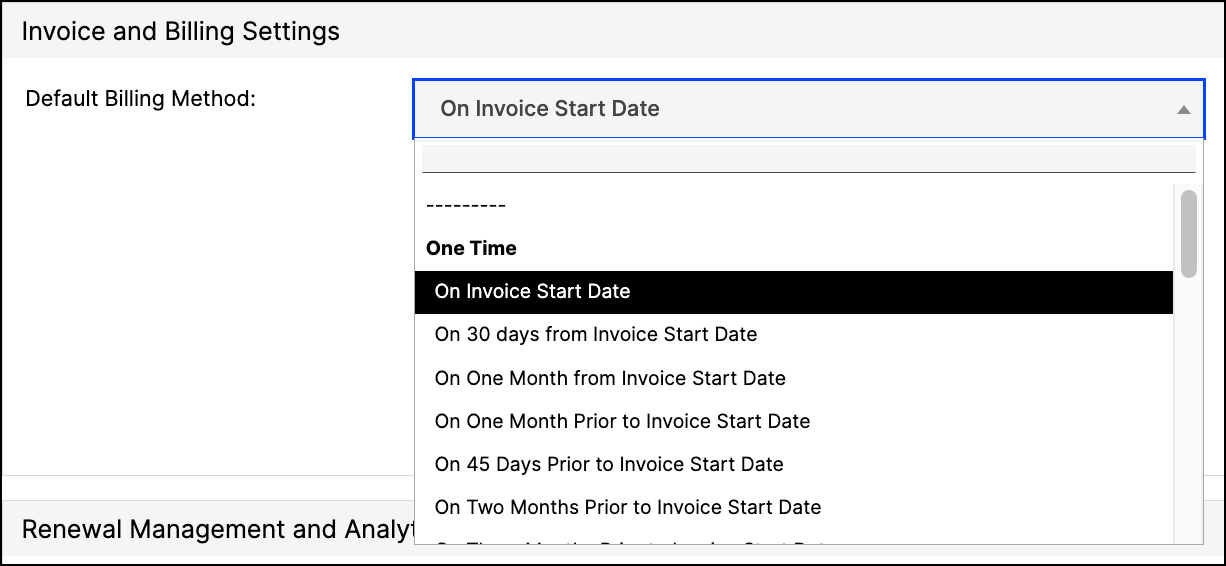
Billing methods available
One Time
- On Invoice Start Date - creates a single invoice line item for the entire amount of the Transaction.
- On 30 days from Invoice Start Date - creates a single invoice line item for the entire amount of the Transaction 30 days in arrears from the Invoice Start Date.
- On One Month from Invoice Start Date - creates a single invoice line item for the entire amount of the Transaction one month in arrears from the Invoice Start Date.
- On One Month Prior to Invoice Start Date - creates a single invoice line item for the entire amount of the Transaction one month prior to the Invoice Start Date.
- On 45 Days Prior to Invoice Start Date - creates a single invoice line item for the entire amount of the Transaction 45 days prior to the Invoice Start Date.
- On Two Months Prior to Invoice Start Date - creates a single invoice line item for the entire amount of the Transaction two months prior to the Invoice Start Date.
- On Three Months Prior to Invoice Start Date - creates a single invoice line item for the entire amount of the Transaction three months prior to the Invoice Start Date.
Annually
- Annually: From Invoice Start Date - creates an invoice line item for each twelve-month period between the Invoice Start and End Dates. Use this for multi-year agreements that bill annually.
- Annually: Starting One Month Prior to Invoice Start Date - creates an invoice line item every year between the Invoice Start and End Dates, but one month in advance.
- Annually: Starting Two Months Prior to Invoice Start Date - creates a single invoice line item for the entire amount of the Transaction two months earlier than the start date.
Quarterly
- Quarterly: From Invoice Start Date - creates an invoice line item for each three-month period between the Invoice Start and End Dates.
- Quarterly: Arrears from Invoice Start Date - creates an invoice line item for each three-month period between the Invoice Start and End Dates with the first invoice line item being a quarter from the Invoice Start Date.
- Quarterly: Starting One Month Prior to Invoice Start Date - creates an invoice line item quarterly between the Invoice Start and End Dates, but one month in advance.
Monthly
- Monthly from Invoice Start Date - creates a monthly invoice line item for each month between the Invoice Start and End Dates.
- Monthly in Arrears from Invoice Start Date - creates an invoice line item for each month between the Invoice Start and End Dates, but 30 days in arrears.
- Monthly starting One Month Prior to Invoice Start Date - creates an invoice line item for each month between the Invoice Start and End Dates, but one month in advance.
Special
- None - No invoice is created.
- Semiannually from Invoice Start Date - creates an invoice line item for each six-month period between the Invoice Start and End Dates.
- Semiannually starting One Month Prior to Invoice Start Date - creates an invoice line item every six months between the Invoice Start and End Dates, but one month in advance.
- All on Transaction Order Date - creates a single invoice line item for the entire amount of the Transaction using the Transaction Order Date field.
- All on 30 days from Transaction Order Date - creates a single invoice line item for the entire amount of the Transaction 30 days in arrears from the Transaction Order Date field.
- 50% on the Start Date - creates a single invoice line item for 1/2 of the Transaction amount. The transaction will be out of balance if you use this method.
- 50% on the Start Date + 50% 2 Months after the start date - creates an invoice line item for 1/2 of the Transaction amount on the start date and another invoice for 1/2 two months after the start date.
Salesforce integration
If you are mapping to this field in your Salesforce integration, your mapped value in Salesforce must match the exact phrase below:
- On Invoice Start Date
- On 30 days from Invoice Start Date
- On One Month from Invoice Start Date
- On One Month Prior to Invoice Start Date
- On 45 Days Prior to Invoice Start Date
- On Two Months Prior to Invoice Start Date
- On Three Months Prior to Invoice Start Date
- Annually: From Invoice Start Date
- Annually: Starting One Month Prior to Invoice Start Date
- Annually: Starting Two Months Prior to Invoice Start Date
- Quarterly: From Invoice Start Date
- Quarterly: Arrears from Invoice Start Date
- Quarterly: Starting One Month Prior to Invoice Start Date
- Monthly from Invoice Start Date
- Monthly in Arrears from Invoice Start Date
- Monthly starting One Month Prior to Invoice Start Date
- None
- Semiannually from Invoice Start Date
- Semiannually starting One Month Prior to Invoice Start Date
- All on Transaction Order Date
- All on 30 days from Transaction Order Date
- 50% on the Start Date
- 50% on the Start Date + 50% 2 Months after the start date
Still need help?
Reach out and our support team will take it from here.