
Invoice AR Account Currency Mismatch
Applies to: Maxio Core
Last updated on Aug 28, 2026
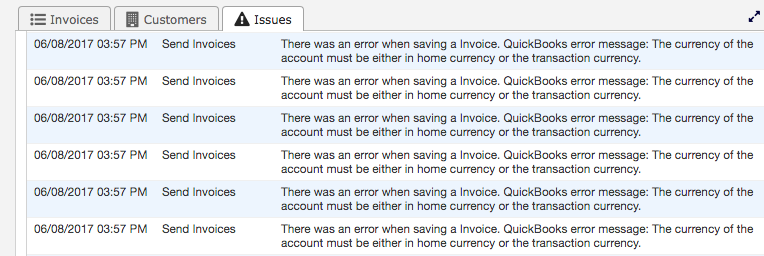
Sending an Invoice from Maxio to QuickBooks Desktop can fail with either of two wrapper messages that share the same underlying QuickBooks error. Example: There is an invalid reference to QuickBooks AR Account "80000030-1356101331" in the Invoice. QuickBooks error message: The currency of the account must be either in home currency or the transaction currency. The same problem can also surface as a generic save failure: There was an error when saving a Invoice. QuickBooks error message: The currency of the account must be either in home currency or the transaction currency. Both messages point to the same cause: the Invoice references an AR Account whose currency doesn't match its Customer's currency.
Maxio's Send Invoices Issues list shows every affected Invoice with this same error text, since the underlying cause repeats until it's fixed.
Why an AR account currency mismatch happens
An Invoice for a Customer must use an AR Account in the same currency as that Customer. Maxio enforces this when you edit an Invoice's AR Account field: the dropdown only lists AR Accounts whose currency matches the currency set on the Customer's QuickBooks Billing Profile. This mismatch can still happen if the Customer's currency wasn't set on the QuickBooks Billing Profile at the time the AR Account was chosen, or if the Customer's currency was set or changed after the Invoice's AR Account was already selected. When the Customer's currency isn't known, Maxio doesn't filter the AR Account list, so an AR Account in a different currency can end up on the Invoice.
QuickBooks Desktop itself rejects the sync because it doesn't allow an Invoice to post to an AR Account that is in neither the company's home currency nor the transaction's own currency. That rejection behavior belongs to QuickBooks Desktop and can't be verified from the Maxio codebase, but Maxio's own currency-matching requirement for the AR Account field is enforced in code.
Select an AR account that matches the Customer's currency
Fix the mismatch by reassigning the Invoice to an AR Account in the Customer's currency, then resyncing it.
To fix the AR account on the Invoice
- Open the failed Invoice from the Invoices to Send sync step or from the Customer's record.
- In the AR Account field, select the account whose currency matches the Customer's currency. Maxio limits this list to accounts in the Customer's currency, so choose from what's offered.
- Select Save.
- From the QuickBooks menu, resync the Invoices to Send sync step.
Confirm the Customer's currency before choosing an AR account
Check the Customer's currency on the QuickBooks Billing Profile before you assign or change an Invoice's AR Account. Once that currency is set, Maxio limits the AR Account field to matching accounts, so this error won't recur for that Customer.
Related information
For how Maxio and QuickBooks handle Customer currencies and Register mismatches under multi-currency, see Sync QuickBooks Multi-currency.
Still need help?
Reach out and our support team will take it from here.