
Viewing Payments
Applies to: Advanced Billing
Last updated on Aug 26, 2026
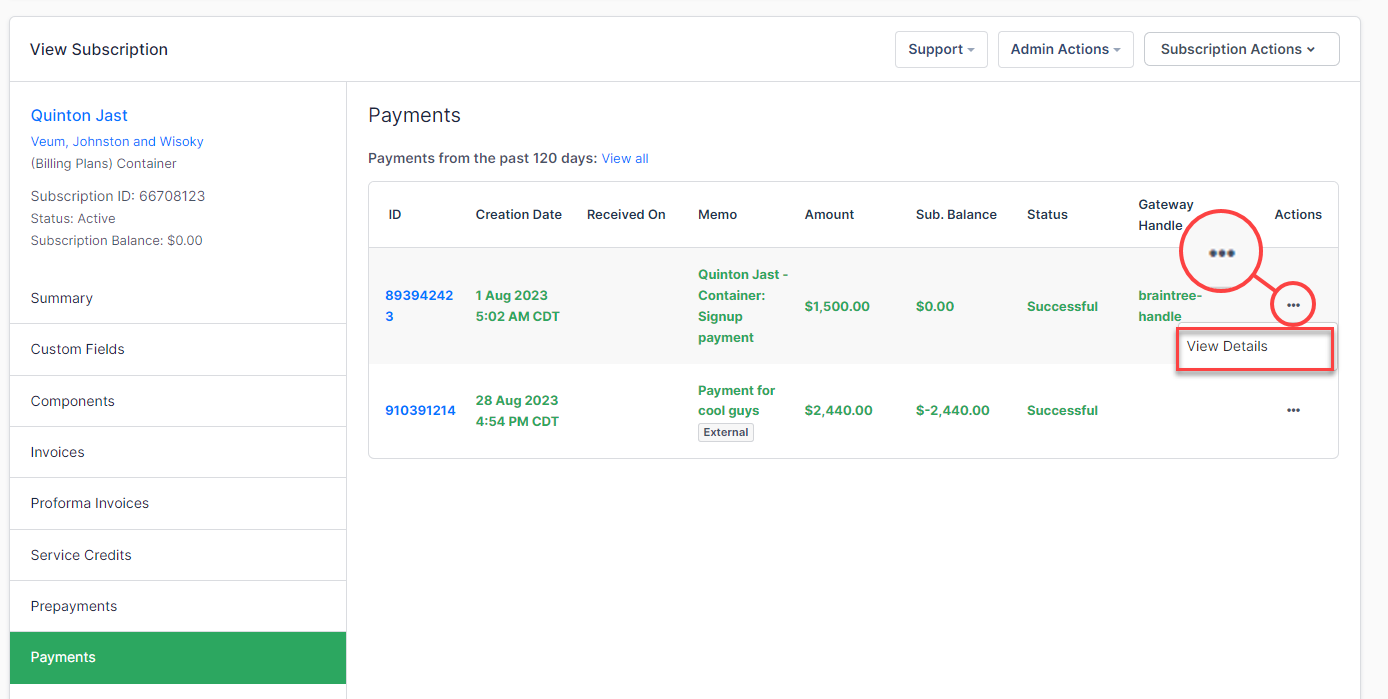
The Payments tab allows the viewing of previous payments on a particular subscription. This view will provide the following:
- Payment ID
- Creation Date
- Received Date
- Memo
- Amount
- Subscription Balance
- Status of Payment
- Gateway Handle
To see more detail about a payment, open the menu next to it and select View Details.
Please be aware that this article is related to Advanced Billing's Subscription Summary function. The subscription summary is the place to perform all tasks necessary to manage customers’ purchases through Advanced Billing.
You can learn more about the Subscription Summary by checking out this help article: Subscription Summary Overview.
Viewing payments
From the Payments tab of the Subscription Summary, you can select an individual payment to view expanded transaction details.
Basic information
| Field | Description |
|---|---|
| Subscription | Links to the associated subscription ID. |
| Customer | The name of the customer associated with the payment. |
| Organization | The organization is tied to the customer record. |
| Date | The timestamp indicates when the payment was created. |
| Amount | The total value of the transaction. |
| Memo | A brief description or note describing the purpose of the payment (e.g., plan renewal, manual charge). |
Gateway information
This section includes metadata returned by the payment gateway.
| Field | Description |
|---|---|
| Transaction Type | The kind of gateway interaction the payment represents. |
| Gateway Environment | Whether the transaction was processed against the live or test gateway. |
| Gateway Transaction ID | The unique ID returned by the gateway, used to reference the transaction in the gateway’s own dashboard. |
| Gateway Response Code | A numeric or alphanumeric code indicating the result of the transaction. Interpretation varies by gateway. |
| Gateway Response Message | A short message from the gateway describing the result (e.g., "Approved", "Insufficient funds"). |
| Gateway Response Description | Additional descriptive text from the gateway, if available. |
| Customer Translation | The gateway's response translated for the customer. Shows N/A when the gateway returned no customer-facing message. |
| Merchant Translation | The gateway's response translated for you as the merchant. Shows N/A when the gateway returned no merchant-facing message. |
Raw request
The Raw Request details the payload sent from Advanced Billing to the payment gateway. This is useful for debugging and understanding what data was transmitted at the time the transaction was initiated.
Raw response
The Raw Response captures the data returned by the gateway in response to the raw request. This is especially useful when reviewing why a transaction failed or whether additional fraud checks passed.
Still need help?
Reach out and our support team will take it from here.